-
It is mostly this error, sometimes after 1 minute sometimes 4 minutes or 5 minutes. The error is unsolvable, different versions pulled, no change at all. It ran perfectly for multiple months, just today this weird error, not going away. 2025-12-09 21:25:19,284 DEBG fd 11 closed, stopped monitoring <POutputDispatcher at 23011121730320 for <Subprocess at 23011121333456 with name watchdog-script in state RUNNING> (stdout)> 2025-12-09 21:25:19,284 DEBG fd 15 closed, stopped monitoring <POutputDispatcher at 23011121337296 for <Subprocess at 23011121333456 with name watchdog-script in state RUNNING> (stderr)> 2025-12-09 21:25:19,284 WARN exited: watchdog-script (terminated by SIGKILL; not expected) 2025-12-09 21:25:19,285 DEBG received SIGCHLD indicating a child quitNever had this in the 5+ years I'm running unRAID with binhex-qbittorrentvpn. EDIT: Nuked the whole container. Installed the docker again, and copied back the BT_backup folder. Now it's all working again. Phew! 😂
-
When my docker with this image starts, no problems. But after 1 minute and 30 seconds (exactly) I get this message in my log and the container isn't running anymore. Never had this error before, dunno what to do to resolve this error. Hereby a part of the log with the error: 2025-12-09 16:26:48,737 DEBG 'watchdog-script' stdout output: [debug] Checking we can resolve name 'www.google.com' to address... 2025-12-09 16:26:48,750 DEBG 'watchdog-script' stdout output: [debug] DNS operational, we can resolve name 'www.google.com' to address '142.250.179.196' 2025-12-09 16:26:48,750 DEBG 'watchdog-script' stdout output: [debug] Waiting for iptables chain policies to be in place... 2025-12-09 16:26:48,757 DEBG 'watchdog-script' stdout output: [debug] iptables chain policies are in place 2025-12-09 16:26:48,761 DEBG 'watchdog-script' stdout output: [debug] VPN incoming port is 47948 [debug] qBittorrent incoming port is 47948 [debug] VPN IP is 10.2.0.2 [debug] qBittorrent IP is 10.2.0.2 2025-12-09 16:27:16,986 DEBG 'start-script' stdout output: [debug] ProtonVPN assigned incoming port is '47948' 2025-12-09 16:27:18,310 DEBG fd 11 closed, stopped monitoring <POutputDispatcher at 23058020539792 for <Subprocess at 23058020538352 with name watchdog-script in state RUNNING> (stdout)> 2025-12-09 16:27:18,310 DEBG fd 15 closed, stopped monitoring <POutputDispatcher at 23058020538592 for <Subprocess at 23058020538352 with name watchdog-script in state RUNNING> (stderr)> 2025-12-09 16:27:18,310 WARN exited: watchdog-script (terminated by SIGKILL; not expected) 2025-12-09 16:27:18,310 DEBG received SIGCHLD indicating a child quit 2025-12-09 16:28:02,061 DEBG 'start-script' stdout output: [debug] ProtonVPN assigned incoming port is '47948' 2025-12-09 16:28:47,143 DEBG 'start-script' stdout output: [debug] ProtonVPN assigned incoming port is '47948'I hope someone can help me out with this error. I'm running unRAID 7.1.4 with ghcr.io/binhex/arch-qbittorrentvpn:5.0.3-1-01 as container. Kind Regards, LoudRex
-
I'm struggling with uploading all my Firefox bookmarks. Currently I've exported it to HTML, but due to all the bookmarks, the HTML file is more than 50 Megabytes. How do I upload this to my unRAID's Linkwarden container? I use the latest version of this container, and it isn't forwarded to the internet. So I am accessing it via 192.168. I've already set NEXT_PUBLIC_MAX_FILE_SIZE to 1000, but that didn't help... Thanks in advance!
-
That's indeed what I want to know. How do I get those custom networks to set to an individual 192.168. address. Because I cannot set 2 containers to the same IP address, already tried that... And that didn't work. Thanks for your reply. Kind Regards, Rick.
-
Thanks for replying @Vr2Io. My containers are already installed. And I have set the settings from a group set like this. But I don't know how to get the Subnet right... As you can see in the screenshot below. This is how the first group's containers network config looks:

-
Hi all, I am trying to setup some docker containers. But the ports of some of them are already in use. I want to group some of them on their own LAN address, because then those ports aren't in use on that specific LAN address. I wanted to use some addresses in the higher part of the 1-254 range of my LAN network. So I thought about making some custom docker networks. But I am a noob about docker custom networks. I managed to make some custom networks, but they don't give me the IP address I wanted to use. Just some vague 172.18.xxx addresses... Also while setting some dockers to the same LAN address gives me errors I don't understand. I have searched multiple days now how to solve this all, but nothing is bringing me to the solution. Can you guys help me? Sorry for another question, I would like to be better with unRAID, but I still don't manage everything... Thanks in advance, Rick
-
Well, I would like to give you the link, but I no longer have the link, as it was an advice and or guide generated by the Bing (.com) AI... I didn't know, at that moment, if it was a good or bad option, as I never heard from LuckyBackup at all. But if you really want to have the URL, I can still try some things to find out the exact one. I just know that it will take me a long, long time to retrieve that exact URL... Please let me know, if you still need something 😁 Thanks again! -- Rick
-
Hi @ich777, Nextcloud is also a pain in the ass for me on unRAID, so I would like to avoid Nextcloud at all. Furthermore I found the luckybackup method while searching on the internet. But that seems a no-go too. Kind Regards, Rick
-
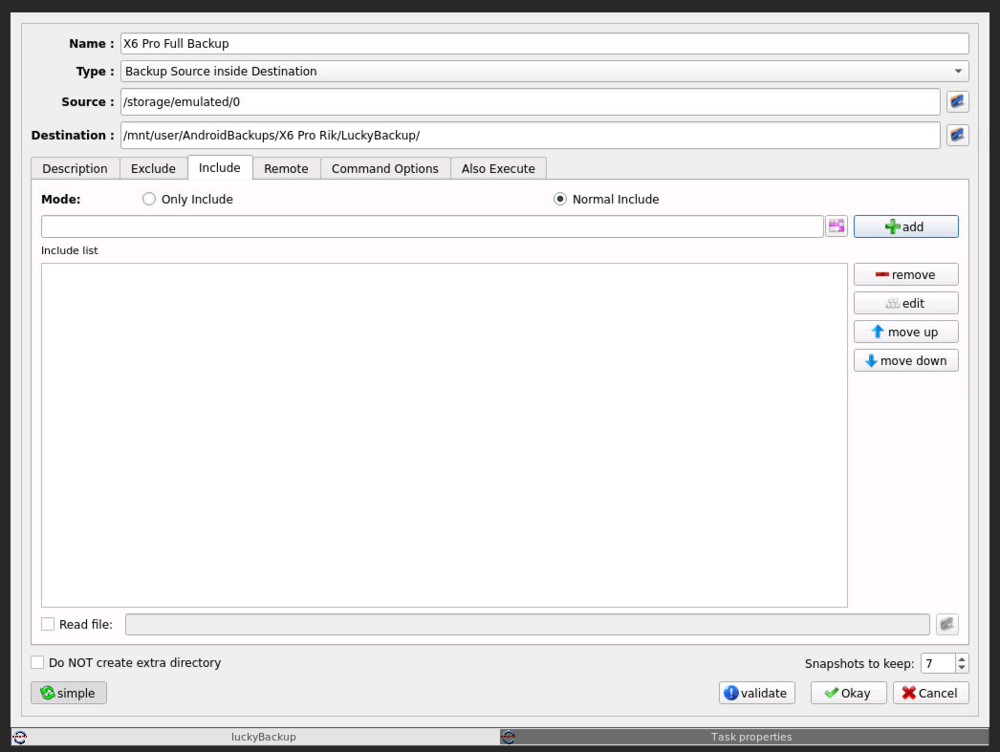
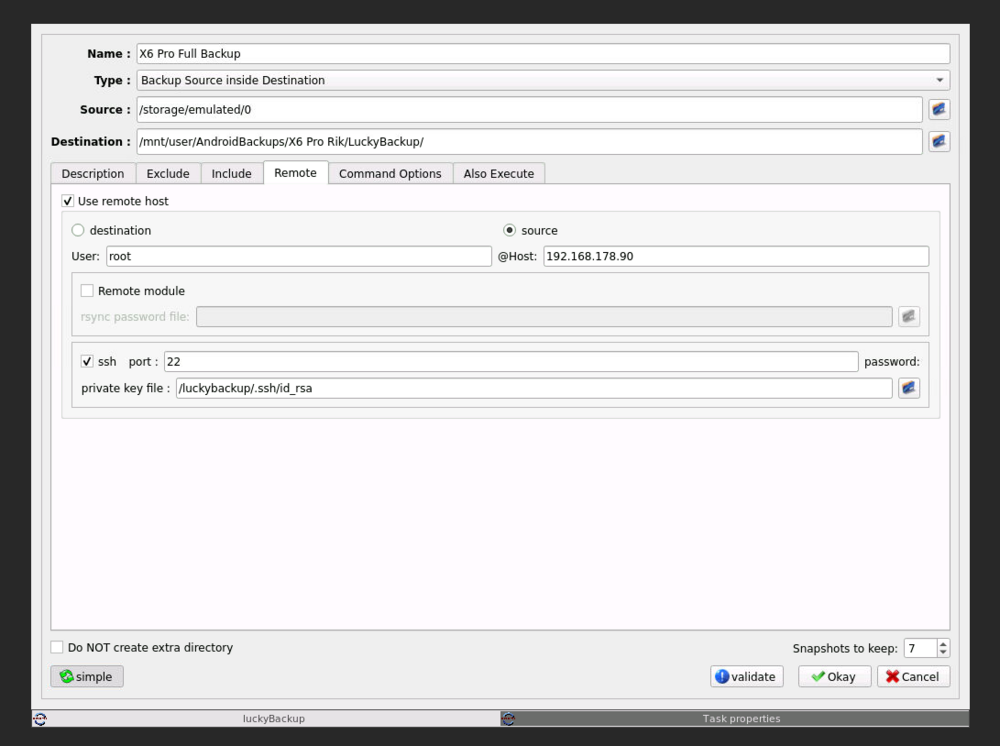
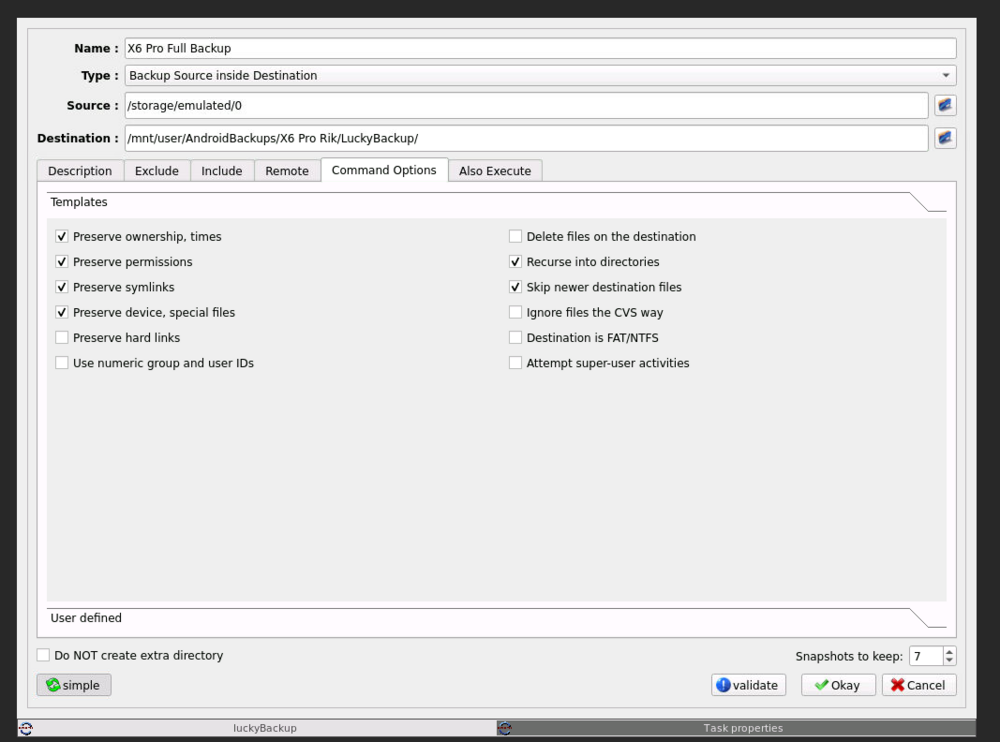
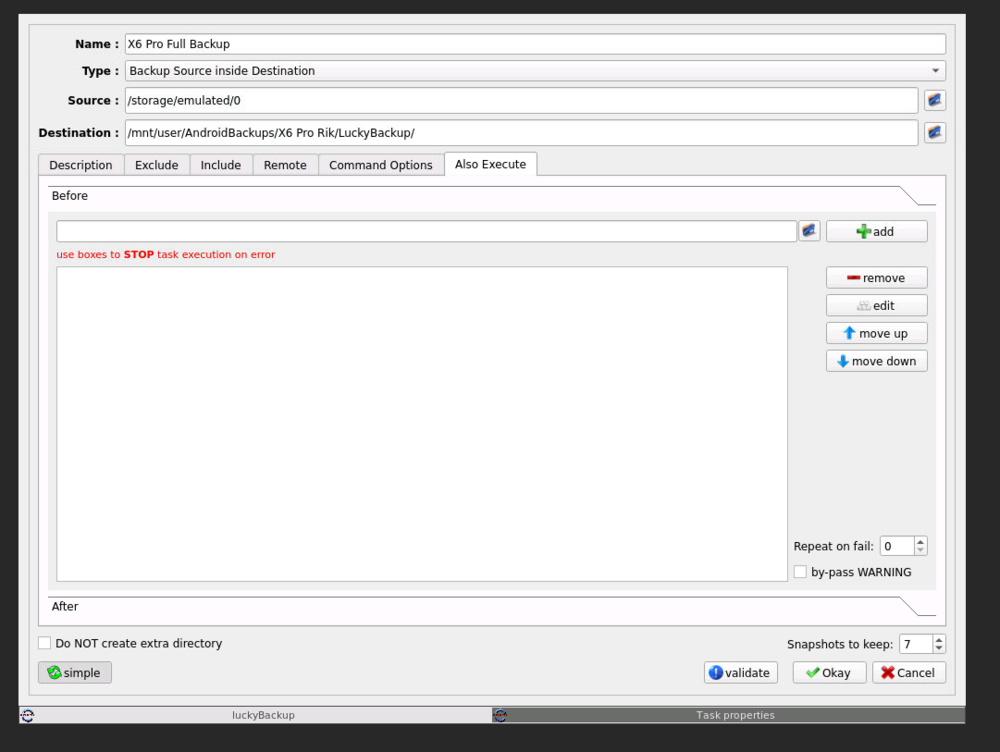
The only thing I want is to backup my whole /storage/emulated/0/, as that contains all my files, on my Non-Rooted phone. Syncthing was too difficult to setup, I tried it but it gave me all kinds of errors when I wanted to backup /storage/emulated/0/. Also FolderSync won't backup all the folders under /storage/emulated/0/, so I also stopped with that. Now I thought maybe LuckyBackup is an easy way to backup /storage/emulated/0/, but that option seems off the table now... Sorry for being a bit unclear at times, but I don't write fluent English...
-
There are definitely ways to backup /storage/emulated/0/. Even while my phone isn't rooted... I've found multiple examples for that cause, only none of them are currently working for me right now. That is why I thought that maybe LuckyBackup was a method to do that... I understand now, that you cannot help me any further. I'm sorry about that, I really hoped that you could help me out. But still thanks for responding, I appreciate that a lot. Greetz, Rick!
-
Well I thought it was a good idea, cause nothing else is working right now. I already tried SyncThing, FolderSync and more, but nothing will backup my whole system from /system/emulated/0/ to a folder on unRAID. So I was searching on more options to backup my Android system to unRAID, and then I saw that option... But now you say it isn't a "good idea".... So now the LuckyBackup option is off the list too.... I don't want to go too much off-topic, but what can you help me with to solve this problem I have. You can always message me via DM here on the Forum, if you want to help me with this matter. Hope you can help me out. Kind Regards, Rick.
-
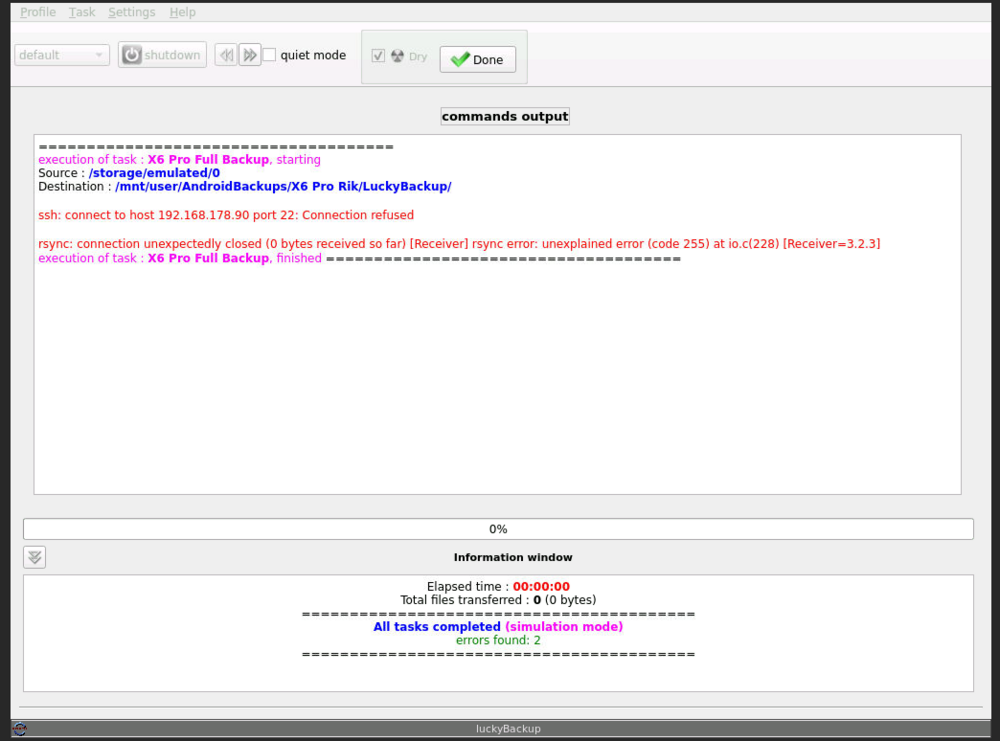
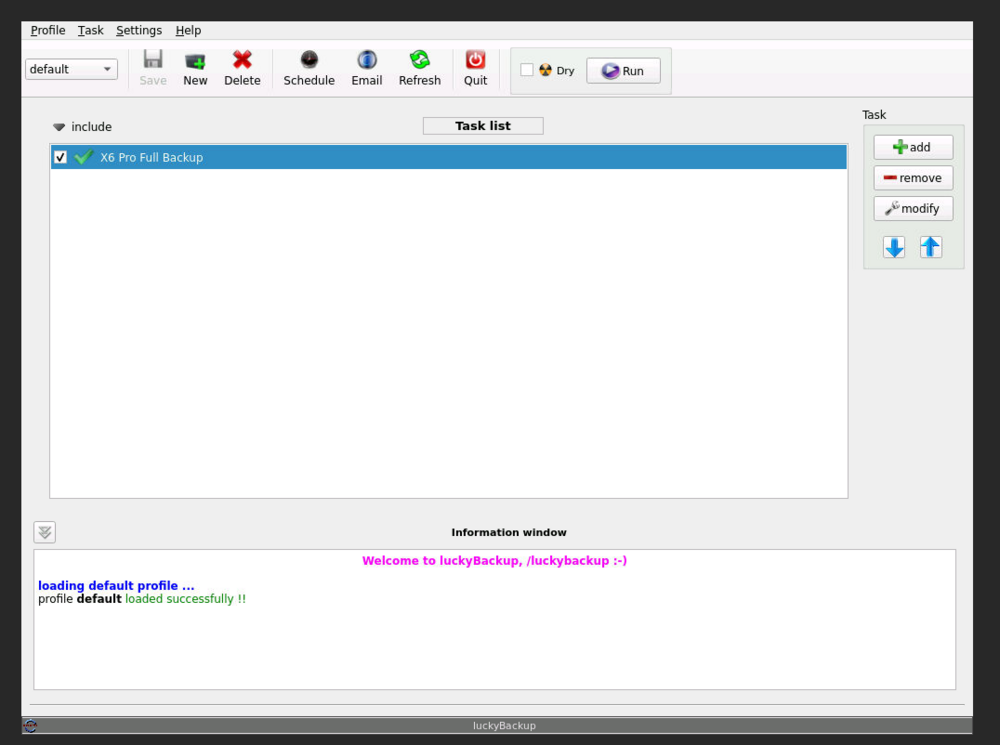
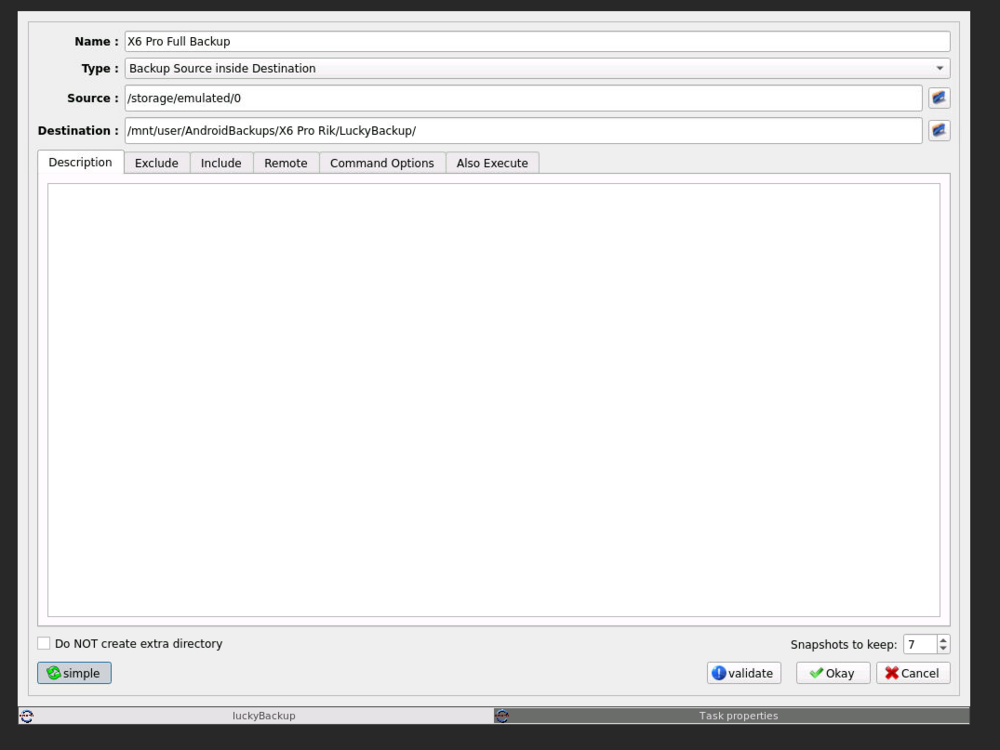
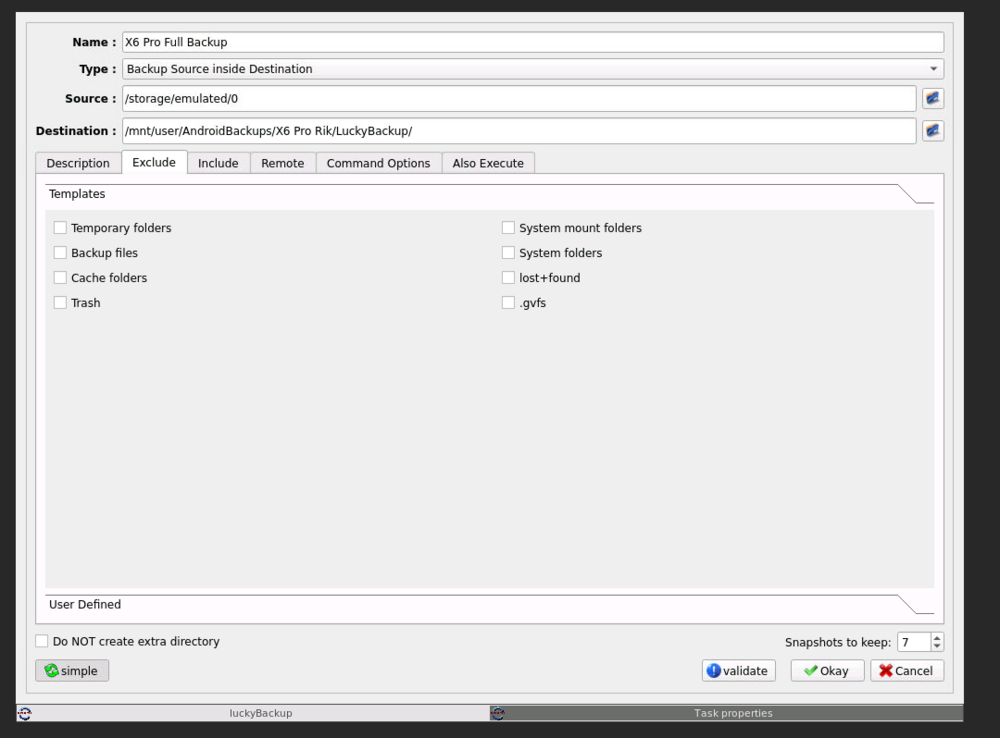
Hi everyone, I am experiencing some issues. It has to do with LuckyBackup on unRAID and my Android phone. According to what I've read online, LuckyBackup is excellent for backing up my Android phone. But I can't make it work on my own. Using the docker, ich777/luckybackup, I run LuckyBackup on unRAID. And I want to backup my Poco X6 Pro 5G, without root. I have already generated a SSL key for my mobile device. Nevertheless, when I run LuckyBackup to do the backup, I keep getting numerous issues. To help you understand this post better, I'll include several screenshots of my LuckyBackup setup at this moment. I won't bother you with all the things I've done so far, but nothing has worked. Could someone please assist me with this problem? Thanks in advance, Rick!
-
I'm sorry for posting twice, but I don't understand why nobody has responded to my topic, except for @tjb_altf4. I don't know if double posting is allowed on this forum, but from my experience on other forums, it's usually not appreciated or even allowed. I asked about this before on Reddit, and they said to try it here. So, I did, but I still don't have all the answers. Is anyone else able to help me with these questions?
-
Thanks for helping me out with the CPU pinning. So that setting seems right. I didn't mean my docker page was slow, but the webUI pages of my containers are slow... Also that's why I added the screenshots, so that you'll can see which containers are running now. Maybe it was all a bit confusing as to what exactly it was about. My docker page was indeed slow, but so were the other unRAID pages. That was easily fixed, by restarting Nginx via Putty. At this time, I'm not running the poste.io container anymore. So that gives 20 containers that are running 24/7/365.
-
Hi all, I have since 2023 a Tower NAS running unRAID 6.12.10. The specs of this NAS are as following: CPU w/iGPU = AMD Ryzen 7 5700G Mobo = Gigabyte B550 AORUS ELITE V2 Dedicated GPU = MSI GeForce GTX 1050 Ti 4G OC Case = Cooler Master Force 500 RAM = 1x G.Skill Aegis F4-2666C19D-16GIS (DDR4 16GB) & 1x G.Skill Value F4-2666C19D-64GNT (DDR4 64GB) PSU = Corsair CX550 Cache (zfs pool) = 1x Samsung 870 QVO 1TB & Samsung 870 QVO 4TB Array (xfs)= 3x WDC 3TB & 1x WDC 4TB & 3x WDC 8TB & 4x Toshiba 18TB But now I am running 21 docker containers for 24 hours a day, 7 days a week and 365 days a year. And since I'm using that amount of docker containers, a lot of the webUI's of the docker containers are reacting slow. First the webUI of unRAID itself was also slow and not reacting, so I've restarted Nginx, and that solved the slow webUI of unRAID, but still most of the webUI's of the dockers are so slow... I must mention that while using the dockers webUI's, I use Google Chrome (Version 129.0.6668.60 (Official Build) (64-bit)) and PIA as VPN, with "Allow LAN traffic" enabled. I also heard about the CPU pinning for docker. But the ones that told me about it, said they don't have the knowledge how to set it, to get the maximum CPU power for the containers. What I did was I left 4 threads for the system and the other 12 threads assigned to all the docker containers. Below you'll find the screenshots, to clarify things. The loads of the server, measured with htop, at this time are all above 30, and most of the time stay in the 30's or even higher. And at the moment I'm not actively using the server or the containers. All that now is running on my PC is the unRAID webUI, some docker webUI's that I have open as always to check some of the dockers progress'. I don't know if those load averages are very high or normal, but they look to me as if it is significantly higher than a normal load. So now the questions: What can I do to make the webUI of the docker containers less laggy, or to response in a quicker way? I think that a fairly "good" and fairly recent CPU is installed. Can I resolve above problem with an upgrade of the CPU that has about the same or less TDP? As far as I know, this is one of the better AM4 socket CPU's, so upgrading would at least cost me a new motherboard and CPU... Or is upgrading my CPU overkill, and a unnecessary spending of money? I know that my physical RAM configuration isn't ideal, but does it also slow the system down, in comparison with only the 64 GB RAM installed? I am saving some money right now, for a 2nd set of RAM (G.Skill Value F4-2666C19D-64GNT (DDR4 64GB)), but I cannot afford that right now. Also I don't think I need more than the 80 GB at the moment, but currently the system is using 87% of the available RAM, mostly due to the ZFS pool, which is sucking up RAM like a old vacuum cleaner. I deliberately created a cache pool with ZFS (ZFS Raid0 2 devices to be precise). This is because I was crashing every week with my single cache disk, then with BTRFS and XFS... Unfortunately, I was still using a PCI-e card with Marvell controller to increase the number of sata ports (to be precise, the Supermicro AOC-SAS2LP-MV8). A month or two ago, I was advised on here to replace that card, which I of course did immediately, and then at least the cache problems were solved. That was after I already had a cache ZFS pool in use. Here the screenshots of my CPU pinning: And here the screenshots of my docker containers: Thanks for reading my never-ending story and sorry for this terribly long post, but I think I've told everything clearly that way..... I hope you'll have some tips and advice for me!

View in the app
A better way to browse. Learn more.