bubiman
Members
-
Joined
-
Last visited
Everything posted by bubiman
-
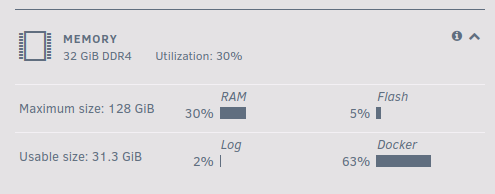
I found the docker that is causing the problem: but right now I don´t know why this problem occurs. There seems to be pleanty RAM available

-
Is there anyway to see wich container causes the problem? Yesterday I got the same error again "Out Of Memory errors detected on your server". The docker tab suggest, that there is no max memory allocation set: Every docker seems to have the whole 32gb available

-
Thanks for your answer. I will reboot the server and monitor if this is happening again
-
... and I forgot to include the diagnostics
-
Hi, I have to admit, I am not checking my unraid server on a daily basis. Today I saw a red error from the "FIX COMMON PROBLEMS" Plugins: Out Of Memory errors detected on your server I have not noticed any malfunction from the server and do not know what to do except the recommended reboot of the server from this post: Should I check or do somthing else before rebooting?
-
Thanks for your answer ... it is working without special characters
-
Hi, I am having problems mounting an encrypted USB drive. I activated the destructive mode, deleted all partitions, formated the drive with xfs-encrypted ... that all went well: Jan 5 20:07:00 Tower unassigned.devices: Removing partition '1' from disk '/dev/sdb'. Jan 5 20:07:55 Tower unassigned.devices: Format device '/dev/sdb'. Jan 5 20:07:55 Tower unassigned.devices: Device '/dev/sdb' block size: 5860533168. Jan 5 20:07:55 Tower unassigned.devices: Clearing partition table of disk '/dev/sdb'. Jan 5 20:07:55 Tower unassigned.devices: Clear partition result: 1+0 records in 1+0 records out 2097152 bytes (2.1 MB, 2.0 MiB) copied, 0.013233 s, 158 MB/s Jan 5 20:07:57 Tower unassigned.devices: Reloading disk '/dev/sdb' partition table. Jan 5 20:07:57 Tower unassigned.devices: Reload partition table result: /dev/sdb: re-reading partition table Jan 5 20:07:57 Tower unassigned.devices: Creating Unraid compatible gpt partition on disk '/dev/sdb'. Jan 5 20:08:00 Tower kernel: sdb: sdb1 Jan 5 20:08:00 Tower unassigned.devices: Create gpt partition table result: Creating new GPT entries in memory. The operation has completed successfully. Jan 5 20:08:02 Tower unassigned.devices: Reloading disk '/dev/sdb' partition table. Jan 5 20:08:02 Tower kernel: sdb: sdb1 Jan 5 20:08:02 Tower unassigned.devices: Reload partition table result: /dev/sdb: re-reading partition table Jan 5 20:08:02 Tower unassigned.devices: Formatting disk '/dev/sdb' with 'xfs-encrypted' filesystem. Jan 5 20:08:11 Tower unassigned.devices: Format drive command: /sbin/mkfs.xfs -f '/dev/mapper/format_sdb' 2>&1 Jan 5 20:08:26 Tower unassigned.devices: Format disk '/dev/sdb' with 'xfs-encrypted' filesystem: meta-data=/dev/mapper/format_sdb isize=512 agcount=4, agsize=183140635 blks = sectsz=4096 attr=2, projid32bit=1 = crc=1 finobt=1, sparse=1, rmapbt=0 = reflink=1 bigtime=1 inobtcount=1 data = bsize=4096 blocks=732562537, imaxpct=5 = sunit=0 swidth=0 blks naming =version 2 bsize=4096 ascii-ci=0, ftype=1 log =internal log bsize=4096 blocks=357696, version=2 = sectsz=4096 sunit=1 blks, lazy-count=1 realtime =none extsz=4096 blocks=0, rtextents=0 Jan 5 20:08:29 Tower unassigned.devices: Reloading disk '/dev/sdb' partition table. After that I set the password for the drive in the UNASSIGNED DEVICES settings: Jan 5 20:09:03 Tower ool www[25856]: /usr/local/emhttp/plugins/unassigned.devices/scripts/rc.settings 'set_pass' and hit the mount button on the main tab and it is not working: Jan 5 20:27:22 Tower unassigned.devices: Adding partition 'UnraidBackup1'... Jan 5 20:27:22 Tower unassigned.devices: Mounting partition 'UnraidBackup1' at mountpoint '/mnt/disks/UnraidBackup1'... Jan 5 20:27:22 Tower unassigned.devices: Using disk password to open the 'crypto_LUKS' device. Jan 5 20:27:25 Tower unassigned.devices: luksOpen result: No key available with this passphrase. Jan 5 20:27:25 Tower unassigned.devices: Partition 'IB-1122- U3' cannot be mounted. Does anyone have an idea what I am doing worng? Thanks for your help
-
Thanks for your help. I have read that but it seems that the information was not processed by my brain 🙄
-
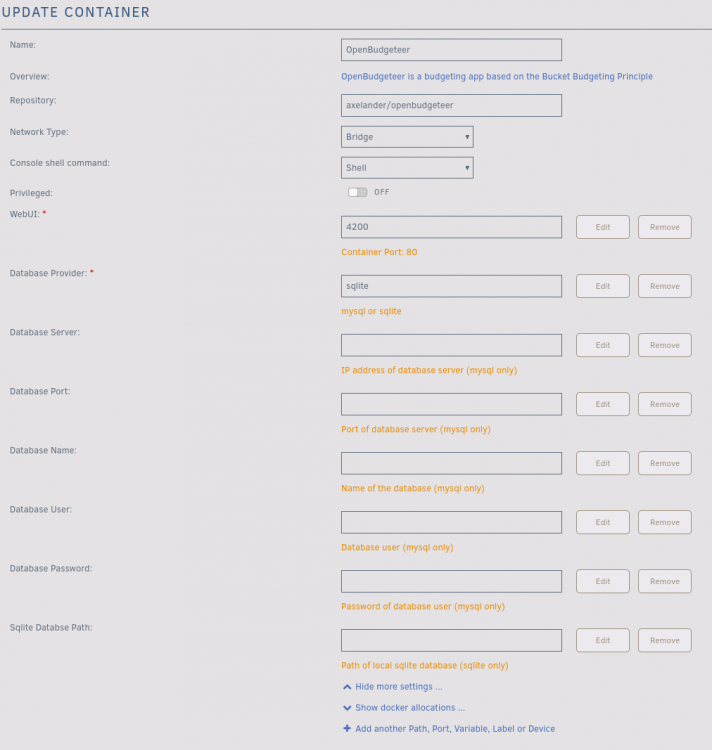
The only thing I changed was the "Database Provider" value:
-
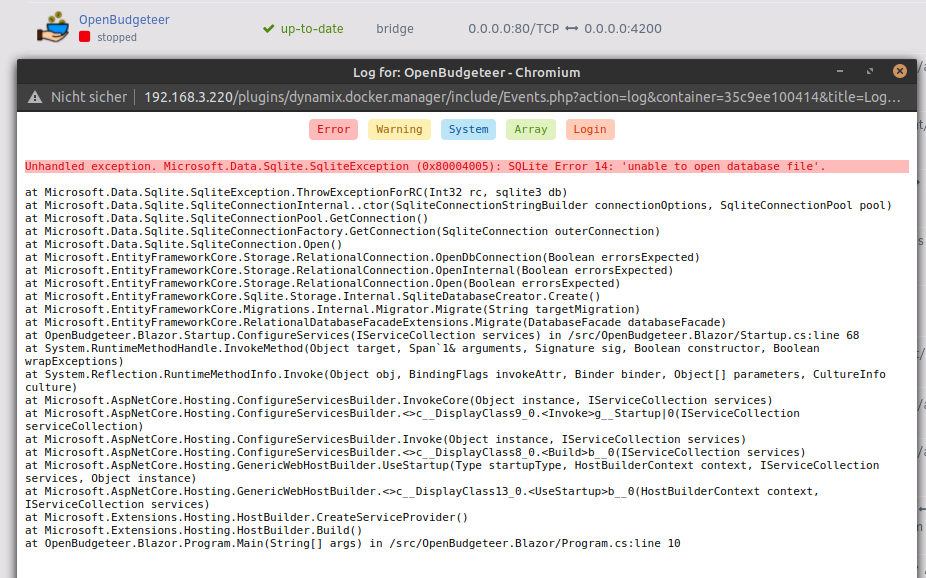
Hello, when starting the docker it stops with the following error: I have not tried to use my maria DB but does anyone know what I could try to fix this problem with sqlite? Thanks for your help