





presence06
Members
-
Joined
-
Last visited
Everything posted by presence06
-
I uninstalled the docker, removed the appdata folder. reinstalled documentserver, added the JWT that's in my seahub_settings.py. restarted Seafile and now I have OnlyOffice working. Thank you,
-
Just adding.. I read about copying certs from my swag container and renaming them and putting them into the onlyoffice/data/certs folder.. started working in seafile. apparently I missed that step?
-
2025/05/12 21:17:55 [error] 12469#12469: *16 open() "/var/www/onlyoffice/documentserver/web-apps/apps/api/documents/api.js'" failed (2: No such file or directory), client: 172.19.0.1, server: , request: "GET /web-apps/apps/api/documents/api.js' HTTP/1.1", host
-
OKay..corrected a few things in the Seahub settings file.. I now get "Connection refused" when trying to open a document.
-
both containers are on my proxy-net network. I tried your swag config, same thing. It's like it wants to open but doesn't.
-
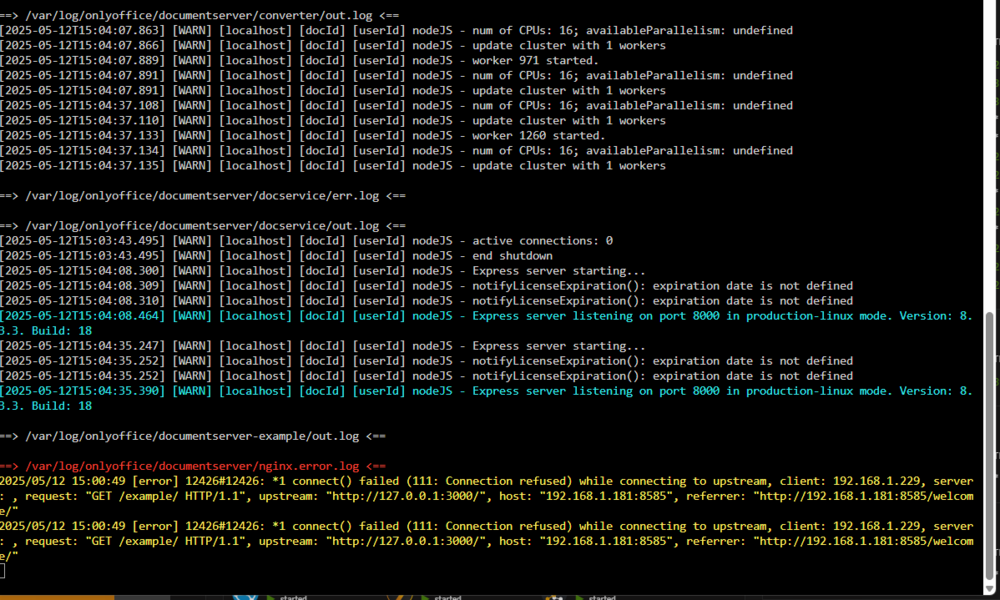
I keep getting this when starting OnlyOffice, I can hit office.mydomain.com just fine and I get the "Server installed". when I try to open a document I just get a white screen, no errors in Seafile or OnlyOffice. Wondering if it's not my proxy config maybe? I am using Swag. server { listen 443 ssl; listen [::]:443 ssl; server_name office.*; include /config/nginx/ssl.conf; client_max_body_size 0; location / { include /config/nginx/proxy.conf; resolver 127.0.0.11 valid=30s; set $upstream_app OnlyOfficeDocumentServer; set $upstream_port 2443; set $upstream_proto https; proxy_pass $upstream_proto://$upstream_app:$upstream_port; proxy_max_temp_file_size 2048m; } } My proxy config, I've tried serverIP, docker name, port for HTTP 8585 and I've tried HTTPS port 2443. Same result.
-
I am trying to set up OnlyOffice integration into Seafile. I can't hit office.mydomain.com just fine.. when I open a document I can't do anything, I just get a blank screen.
-
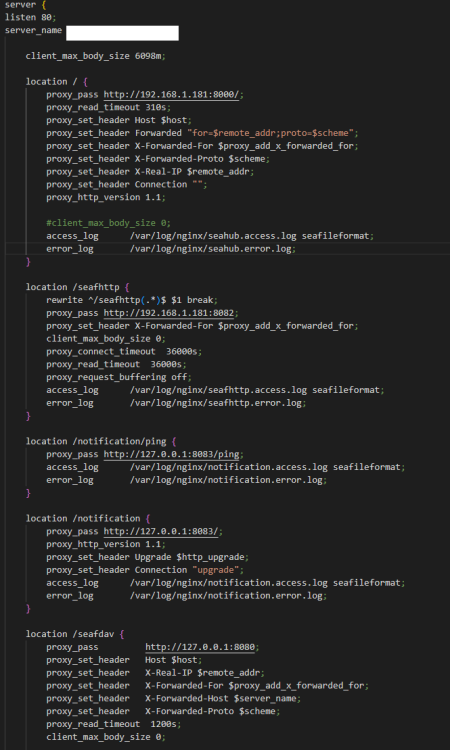
I'm at my wits end getting this to work. I can locally access Seafile-Official docker, I can see all files I've uploaded, if I log in locally via the ip I can download files and upload. I would like to use it remotely via Reverse Proxy (SWAG). Externally I can access and log in, see files. However, when I go to download I get "Sorry, but the requested page could not be found.". If I try to upload anything a single file or folder, network error. Playing around with settings and I just can't get it to upload or download externally. EDIT: playing around more, I can download some folders from the webUI, single files no, it shows me the "Sorry" message. When I can download a file it says "Cannot be downloaded securely", if I choose keep it will download the folder.

-
I'm having a hell of time with this.. the container is up and running. I can get to the login page but nothing I enter works. In the logs I have a bunch of this: today at 6:38:25 PM2022-08-16 18:38:25.192 CDT [587] ERROR: relation "api_user" does not exist at character 746 today at 6:38:25 PM2022-08-16 18:38:25.192 CDT [587] STATEMENT: SELECT "api_user"."id", "api_user"."password", "api_user"."last_login", "api_user"."is_superuser", "api_user"."username", "api_user"."first_name", "api_user"."last_name", "api_user"."email", "api_user"."is_staff", "api_user"."is_active", "api_user"."date_joined", "api_user"."scan_directory", "api_user"."confidence", "api_user"."confidence_person", "api_user"."image_scale", "api_user"."semantic_search_topk", "api_user"."avatar", "api_user"."transcode_videos", "api_user"."nextcloud_server_address", "api_user"."nextcloud_username", "api_user"."nextcloud_app_password", "api_user"."nextcloud_scan_directory", "api_user"."favorite_min_rating", "api_user"."save_metadata_to_disk", "api_user"."datetime_rules", "api_user"."default_timezone" FROM "api_user" today at 6:38:27 PM2022-08-16 18:38:27.005 CDT [683] ERROR: relation "api_user" does not exist at character 746 today at 6:38:27 PM2022-08-16 18:38:27.005 CDT [683] STATEMENT: SELECT "api_user"."id", "api_user"."password", "api_user"."last_login", "api_user"."is_superuser", "api_user"."username", "api_user"."first_name", "api_user"."last_name", "api_user"."email", "api_user"."is_staff", "api_user"."is_active", "api_user"."date_joined", "api_user"."scan_directory", "api_user"."confidence", "api_user"."confidence_person", "api_user"."image_scale", "api_user"."semantic_search_topk", "api_user"."avatar", "api_user"."transcode_videos", "api_user"."nextcloud_server_address", "api_user"."nextcloud_username", "api_user"."nextcloud_app_password", "api_user"."nextcloud_scan_directory", "api_user"."favorite_min_rating", "api_user"."save_metadata_to_disk", "api_user"."datetime_rules", "api_user"."default_timezone" FROM "api_user" today at 6:38:27 PM2022-08-16 18:38:27.285 CDT [685] ERROR: relation "constance_config" does not exist at character 91 today at 6:38:27 PM2022-08-16 18:38:27.285 CDT [685] STATEMENT: SELECT "constance_config"."id", "constance_config"."key", "constance_config"."value" FROM "constance_config" WHERE "constance_config"."key" = 'ALLOW_UPLOAD' LIMIT 21 today at 6:38:27 PM2022-08-16 18:38:27.285 CDT [685] ERROR: relation "constance_config" does not exist at character 91 today at 6:38:27 PM2022-08-16 18:38:27.285 CDT [685] STATEMENT: SELECT "constance_config"."id", "constance_config"."key", "constance_config"."value" FROM "constance_config" WHERE "constance_config"."key" = 'ALLOW_UPLOAD' LIMIT 21 today at 6:38:31 PM2022-08-16 18:38:31.026 CDT [863] ERROR: relation "api_user" does not exist at character 746 today at 6:38:31 PM2022-08-16 18:38:31.026 CDT [863] STATEMENT: SELECT "api_user"."id", "api_user"."password", "api_user"."last_login", "api_user"."is_superuser", "api_user"."username", "api_user"."first_name", "api_user"."last_name", "api_user"."email", "api_user"."is_staff", "api_user"."is_active", "api_user"."date_joined", "api_user"."scan_directory", "api_user"."confidence", "api_user"."confidence_person", "api_user"."image_scale", "api_user"."semantic_search_topk", "api_user"."avatar", "api_user"."transcode_videos", "api_user"."nextcloud_server_address", "api_user"."nextcloud_username", "api_user"."nextcloud_app_password", "api_user"."nextcloud_scan_directory", "api_user"."favorite_min_rating", "api_user"."save_metadata_to_disk", "api_user"."datetime_rules", "api_user"."default_timezone" FROM "api_user" today at 6:38:31 PM2022-08-16 18:38:31.348 CDT [909] ERROR: relation "api_user" does not exist at character 746 today at 6:38:31 PM2022-08-16 18:38:31.348 CDT [909] STATEMENT: SELECT "api_user"."id", "api_user"."password", "api_user"."last_login", "api_user"."is_superuser", "api_user"."username", "api_user"."first_name", "api_user"."last_name", "api_user"."email", "api_user"."is_staff", "api_user"."is_active", "api_user"."date_joined", "api_user"."scan_directory", "api_user"."confidence", "api_user"."confidence_person", "api_user"."image_scale", "api_user"."semantic_search_topk", "api_user"."avatar", "api_user"."transcode_videos", "api_user"."nextcloud_server_address", "api_user"."nextcloud_username", "api_user"."nextcloud_app_password", "api_user"."nextcloud_scan_directory", "api_user"."favorite_min_rating", "api_user"."save_metadata_to_disk", "api_user"."datetime_rules", "api_user"."default_timezone" FROM "api_user" today at 6:41:59 PM2022-08-16 18:41:59.175 CDT [944] ERROR: relation "constance_config" does not exist at character 91 today at 6:41:59 PM2022-08-16 18:41:59.175 CDT [944] STATEMENT: SELECT "constance_config"."id", "constance_config"."key", "constance_config"."value" FROM "constance_config" WHERE "constance_config"."key" IN ('ALLOW_REGISTRATION', 'ALLOW_UPLOAD', 'SKIP_PATTERNS', 'HEAVYWEIGHT_PROCESS', 'MAP_API_KEY', 'IMAGE_DIRS') today at 6:41:59 PM2022-08-16 18:41:59.176 CDT [944] ERROR: relation "constance_config" does not exist at character 91 today at 6:41:59 PM2022-08-16 18:41:59.176 CDT [944] STATEMENT: SELECT "constance_config"."id", "constance_config"."key", "constance_config"."value" FROM "constance_config" WHERE "constance_config"."key" = 'ALLOW_UPLOAD' LIMIT 21 today at 6:41:59 PM2022-08-16 18:41:59.176 CDT [944] ERROR: relation "constance_config" does not exist at character 91 today at 6:41:59 PM2022-08-16 18:41:59.176 CDT [944] STATEMENT: SELECT "constance_config"."id", "constance_config"."key", "constance_config"."value" FROM "constance_config" WHERE "constance_config"."key" = 'ALLOW_UPLOAD' LIMIT 21 today at 6:41:59 PM2022-08-16 18:41:59.186 CDT [944] ERROR: relation "api_user" does not exist at character 746 today at 6:41:59 PM2022-08-16 18:41:59.186 CDT [944] STATEMENT: SELECT "api_user"."id", "api_user"."password", "api_user"."last_login", "api_user"."is_superuser", "api_user"."username", "api_user"."first_name", "api_user"."last_name", "api_user"."email", "api_user"."is_staff", "api_user"."is_active", "api_user"."date_joined", "api_user"."scan_directory", "api_user"."confidence", "api_user"."confidence_person", "api_user"."image_scale", "api_user"."semantic_search_topk", "api_user"."avatar", "api_user"."transcode_videos", "api_user"."nextcloud_server_address", "api_user"."nextcloud_username", "api_user"."nextcloud_app_password", "api_user"."nextcloud_scan_directory", "api_user"."favorite_min_rating", "api_user"."save_metadata_to_disk", "api_user"."datetime_rules", "api_user"."default_timezone" FROM "api_user" WHERE "api_user"."username" = 'docker' LIMIT 21 today at 6:47:22 PM2022-08-16 18:47:22.751 CDT [971] ERROR: relation "constance_config" does not exist at character 91 today at 6:47:22 PM2022-08-16 18:47:22.751 CDT [971] STATEMENT: SELECT "constance_config"."id", "constance_config"."key", "constance_config"."value" FROM "constance_config" WHERE "constance_config"."key" = 'ALLOW_UPLOAD' LIMIT 21 today at 6:47:22 PM2022-08-16 18:47:22.752 CDT [971] ERROR: relation "constance_config" does not exist at character 91 today at 6:47:22 PM2022-08-16 18:47:22.752 CDT [971] STATEMENT: SELECT "constance_config"."id", "constance_config"."key", "constance_config"."value" FROM "constance_config" WHERE "constance_config"."key" = 'ALLOW_UPLOAD' LIMIT 21 today at 6:47:22 PM2022-08-16 18:47:22.762 CDT [971] ERROR: relation "api_user" does not exist at character 746 today at 6:47:22 PM2022-08-16 18:47:22.762 CDT [971] STATEMENT: SELECT "api_user"."id", "api_user"."password", "api_user"."last_login", "api_user"."is_superuser", "api_user"."username", "api_user"."first_name", "api_user"."last_name", "api_user"."email", "api_user"."is_staff", "api_user"."is_active", "api_user"."date_joined", "api_user"."scan_directory", "api_user"."confidence", "api_user"."confidence_person", "api_user"."image_scale", "api_user"."semantic_search_topk", "api_user"."avatar", "api_user"."transcode_videos", "api_user"."nextcloud_server_address", "api_user"."nextcloud_username", "api_user"."nextcloud_app_password", "api_user"."nextcloud_scan_directory", "api_user"."favorite_min_rating", "api_user"."save_metadata_to_disk", "api_user"."datetime_rules", "api_user"."default_timezone" FROM "api_user" WHERE "api_user"."username" = 'docker' LIMIT 21
-
No I haven't.. I had it facing the internet but have since just been using it locally now anyways. I cannot get the config to not show.
-
looking at logs for Collabora lately, I see a lot of these: [ websrv_poll ] WRN convert-to: Requesting address is denied: and then it has my Public IP.. collabora works fine and so does Nextcloud. Is this anything to be concerned about or is it normal? Collabora is latest/code with domain variable removed and Aliasgroup1 added. NC is on 23. Also, if I try to go to the collabora webui, I get error 400.. I'm using SWAG.
-
This doesn't seem to work anymore? I set it to true, go to my search page, the config is still there. I've blown away the container and appdata folder, reinstalled and set it to true, same thing. EDIT- Tried setting to 1 instead.. still shows the config option.
-
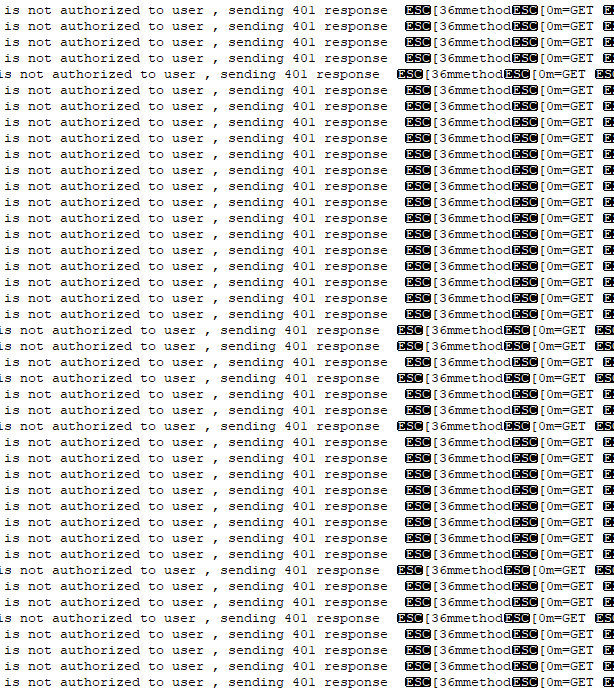
I have Authelia setup and working..or seems to be for a few apps.. I'm seeing in the logs though a lot of "user not authorized" with the same IP (From work) after I've already logged in. also in the docker logs I'm getting an error with "Bad connection" multiple a day... just wondering if that's something I should be concerned about, using Redis.
-
I'm interested in checking in on my setup... I have unraid 6.8.3 running with Syncthing docker. I have /sync set as my photos, this syncs from my phone camera. I also then created a /sync2 that points to another folder to sync to my phone as well. I also setup /sync3 for syncing my wife's phone photos... all seems to work.. I have the server side setup to ignore delete and I only have it sync when connected to home wifi. Is this the correct setup? I've been watching some Lawrence systems videos and it sounds like the best practice for adding more folders/devices is for the "remote" device to reach out to the Server, is that also correct? if I want to sync more folders, do I keep adding /sync locations with the path I want to sync? The only issue I've had..not really an issue I guess.. my /sync2, which is on my phone, if I delete from my phone, the server reports back that it's synced up. My webUI on my phone Syncthing shows it's out of sync with X amount of files.. this shows for /sync2 and /sync.. supposed to ignore that or is there a config I have that's missed/messed up that it keeps showing out of sync?
-
I'm going through your guide @SpaceInvaderOne , I got the mongodb working, I think... but when I try and start the Rocketchat it just doesn't start.. in the log: disregard, I'm dumb... had a special character in the password that it didn't like...
-
odd issue I have with my BW.. it's not a big deal but slightly annoying.. I had the previous BW installed and the icon showed. After some time the icon went away. Then I updated the rs version and still can't get the icon to show. I've set the icon address.. unraid isn't going through any pihole..
-
sounds like you might have a mishap with your LE and it pointing to your nextcloud container. Double check LE configs and make sure it's pointed to the right port.
-
Mine did the same thing on Friday..was working fine until the afternoon when I updated MariaDB.. then it all went to shit.. MariaDB Logs were constantly updating with - "MYSQL safe logging" over and over.. Nextcloud wasn't working either, couldn't even pull up the docker link. I ended up just making a backup of my nextcloud share, deleting it, removing MariaDB and NC and everything in Appdata and started fresh. But I agree, it was something with the MariaDB.. my db that I had made, didn't even exist anymore where it should have been.
-
I ran into this issue when I had mapped my Mouse and KB to the VM, removed them and for some reason it was trying to start the VM with them.. Had to reconnect them, start the VM, then remove them from the template.
-
That's funny... I checked and it was already set to public... but I double checked, saved, removed the container, redownloaded it and now it's working.. WTF lol.
-
Trying to setup Nextcloud - unraid 6.6.7. I have MariaDB running and configured (via SpaceInvaderOne's vid), no errors in that log, but when I fire up NC I get this: I have removed the container, restarted server and tried it again.. still the same thing. I have App data set to Public.. and the share for nextcloud set to public as well.. any ideas?
-
I ended up getting it to work... I had to have the Bitwarden docker on BRIDGE, and I tweaked the config file.. Works externally to use my ddns domain and internally via IP.
-
I'm trying to setup Let's Encrypt along side Bitwarden... I have it to the point where I can go to my DDNS.Net domain/address and I get the Let's Encrypt "Welcome page". I have my router setup.. I think.. it's an ASUS - external Port 443, internal port 1443 Tower IP.. and External Port 80, Internal 180 Tower IP.. I have tweaked the bitwarden.subdomain.conf file and I can't get it to through to the Bitwarden. Any ideas? I did setup the Proxynet network (followed spaceinvaders video).





