mhlnstdt25
Members
-
Joined
-
Last visited
-
No that is not the error, i added after the server crashing and the log suggested to add -debug to get more information. I will add a log without -debug from 6.8 gmod_2.log
-
It worked in unraid 6.7 I added the following parameter for TTT. I removed the webapikey and collection_id. Also a collection with a lot of mods. -secure +gamemode terrortown +maxplayers 16 +map gm_construct -authkey {steam_web_api_key} +host_workshop_collection {collection_id} -debug I rolled back to 6.7. If you need more info i can (re-)upgrade to 6.8 gmod.log
-
Running in Unraid 6.8.0_rc.3 i get the following error message when using the gmod server with -debug: Using default binary: ./srcds_linux Enabling debug mode /serverdata/serverfiles/srcds_run: 182: ulimit: error setting limit (Operation not permitted) /serverdata/serverfiles/srcds_run: 1: /serverdata/serverfiles/srcds_run: gdb: not found WARNING: Please install gdb first. goto http://www.gnu.org/software/gdb/ Server will auto-restart if there is a crash. ---Server ready--- The server doesn't start
-
Access Control is only a warning, you can ignore that. Maybe try mongo-express to check if your mongodb is running Also the rocket chat startup does take a few minutes. When u see something like this, the rocketchat instance should be reachable. [32m➔[39m [32mSystem ➔ startup[39m [32m➔[39m [32m+---------------------------------------------+[39m [32m➔[39m [32m| SERVER RUNNING |[39m [32m➔[39m [32m+---------------------------------------------+[39m [32m➔[39m [32m| |[39m [32m➔[39m [32m| Rocket.Chat Version: 1.2.1 |[39m [32m➔[39m [32m| NodeJS Version: 8.11.4 - x64 |[39m [32m➔[39m [32m| MongoDB Version: 4.0.10 |[39m [32m➔[39m [32m| MongoDB Engine: wiredTiger |[39m [32m➔[39m [32m| Platform: linux |[39m [32m➔[39m [32m| Process Port: 3000 |[39m [32m➔[39m [32m| Site URL: http://10.0.0.4:3000 |[39m [32m➔[39m [32m| ReplicaSet OpLog: Enabled |[39m [32m➔[39m [32m| Commit Hash: 7475d7628a |[39m [32m➔[39m [32m| Commit Branch: HEAD |[39m [32m➔[39m [32m| |[39m [32m➔[39m [32m+---------------------------------------------+[39m
-
what is the error message in you are getting ?
-
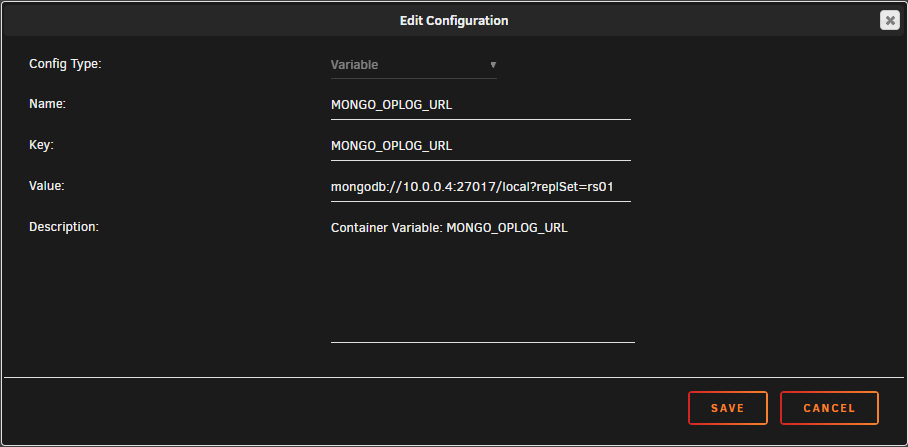
I got it! Create folder mongodb in /mnt/user/appdata/ add mongod.conf in that folder: # mongod.conf # for documentation of all options, see: # http://docs.mongodb.org/manual/reference/configuration-options/ # Where and how to store data. storage: dbPath: /data/db journal: enabled: true # engine: # mmapv1: # wiredTiger: # network interfaces net: port: 27017 bindIp: 127.0.0.1 # how the process runs processManagement: timeZoneInfo: /usr/share/zoneinfo #security: #operationProfiling: replication: replSetName: "rs01" #sharding: ## Enterprise-Only Options: #auditLog: #snmp: Install MongoDB via communityapps. With added postargument "-f /data/db/mongod.conf" watch the log of mongodb if it start correctly. Install rocket.chat from communityapp Set Mono DB to your mongoDB, in my case it is "mongodb://10.0.0.4:27017/rocketchat" Set RocketChat URL to yor ip, in my case: "http://10.0.0.4:3000" Add another variable (plus icon) Start RocketChat watch the log and after a few minutes it should start up and you can connect.