






alicecantsleep
Members
-
Joined
-
I only have it configured for plex. I use Firefox. I use a domain and have had this plugin configured and working that way but with the aforementioned poster bug. I toggled secure connections and selected a secure connection to my server it had discovered instead of using my custom url. That got the posters working fine. Hope this helps if anyone else runs into this! I did send my logs to the maintainer to assist with bug hunting.
-
Loving the latest release! I am having an issue where it does not show artwork however. Happy to troubleshoot it, just not sure where to start. To clarify, the plugin fully works, just the artwork is a blank rectangle. Unraid 7.2.4 Plugin 2026.08.24
-
I'm getting an error. I have my downloads directory set but also a second folder piped in for my playlists as I put channels and playlists in different places. But now when I attempt to add a playlist to the playlist folder it tells me 'Path /playlists is not under any allowed download directory'. Am I no longer able to save different items to different locations? I tried remapping them but then all my channels disappeared so I didn't want to start entirely over again. Also, where does quick download save the files? I downloaded them and I cannot find them on my server, it only offers me to download it to my local pc which is not what I need this for. Downloading a file to my server to download to my pc to upload to my server is inane but I cannot find where the downloaded files are cached on the server so I can just move them.
-
Seems to have broken my docker with the following error in logs: sqlalchemy.exc.OperationalError: (sqlite3.OperationalError) no such table: download_logs [SQL: DELETE FROM download_logs WHERE video_id IN (SELECT id FROM videos WHERE channel_id NOT IN (SELECT id FROM channels))] (Background on this error at: https://sqlalche.me/e/20/e3q8) Database initialization failed
-
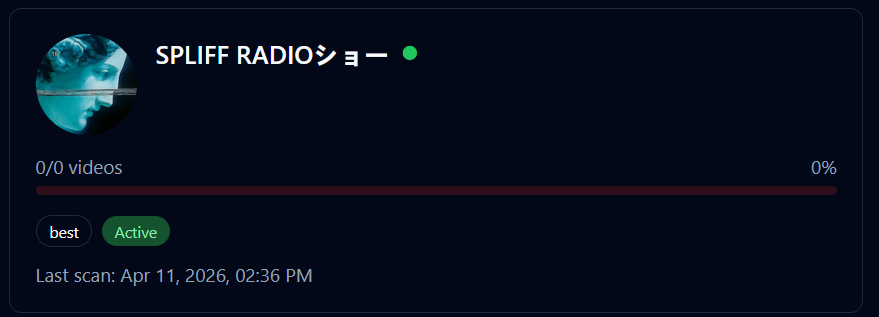
v1.7.14 Oh gosh, duh, the playlist needs to be public. That one's on me! Not sure why this channel is refusing to show the 7 videos it's indexed. I've tried both scan types, as well as removing and re-adding the channel. It's a stubborn one! I notice when I run force re-scan it says 'Cleared 0 old records, found 0 videos on rescan' so maybe it's not clearing the database properly. stuckchannellogs.txt
-
I seem to have a channel stuck with the re-add sync bug. The re-added channel bug itself is definitely fixed as I've tested with 3 channels and 2 work fine. So I think I just have the one stuck in my system somehow. Any troubleshooting suggestions?
-
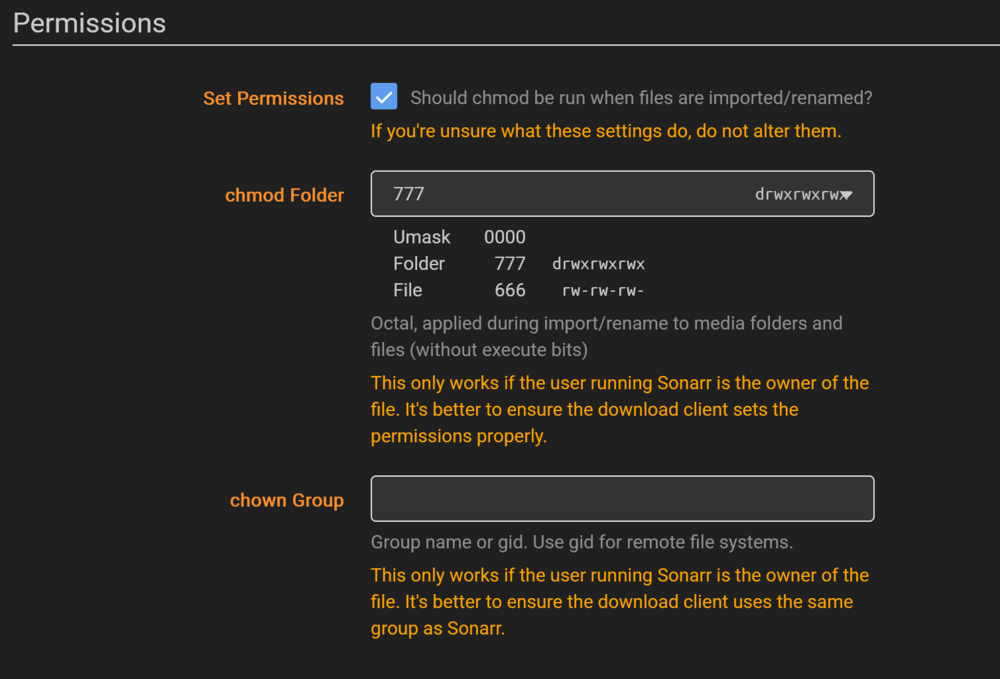
Loving these updates! This is WELL on the way to being the best YT tool on Unraid! A few bugs to report - would you like these here or as issues in your github for tracking? I can do either/both. ======================== ======================== Re-added channels fail to sync: When a channel is deleted, then re-added, it fails to sync with an 'internal server error'. Docker logline: INFO: 192.168.1.159:54180 - "GET /api/v1/settings/ HTTP/1.1" 500 Internal Server Error Tested with multiple channels with identical behavior. ======================== The github reported settings bug seems to be affecting me as well. I will run the commands listed in that issue and respond there in case that OP doesn't. ======================== In regards to deleting channels, could the delete button once clicked then offer to delete the channel in the app and leave the files, or to wipe the entire folder and files as well? ======================== Lastly, I'm running into an old perms issue I used to face with the arr stack apps where I don't have perms to modify downloaded files. With the arr apps there's a perms step that can be set (see attached) that would perfectly resolve this issue. My thought is it would sit nicely next to the file name setting, maybe making that 'file management' settings instead. Not to be presumptuous. I have to say, I'm wildly impressed with your development turn around time! That's 4 pushes in a single day addressing nearly every major issue! All that minecraft modding paid off!
-
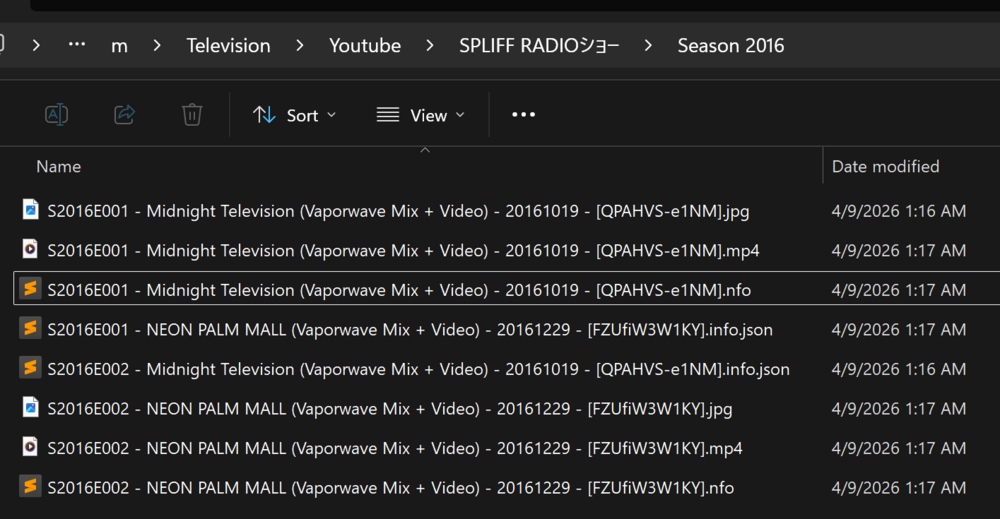
Testing V1.7.0 I'm an unemployed IT professional so I have time to test 😁 ==================================================== Channel Icons - Confirmed Working Properly Auto Download Toggle - CWP Episode Deletion in WebUI with file cleanup - CWP Season Posters - still testing Cookie Invalidation Loop - still testing Playlist Support - allows me to enter a playlist url and it pulls the name of the playlist, but does not index any of the videos within. Episode Renamer - seems to work but I'm having an issue with plex not recognizing the nfo files afterwards. Something is strange there. When I analyze a simple 2 episode season that it renamed I found the attached screenshot. It seems there are .info.json files with the old names left behind. I'm not sure if this is causing plex to have problems matching the nfo files after the rename though as the nfo files themselves are properly renamed. I'm still testing. Update ideas: Channel percentages should be 100% if episodes are skipped but the rest is complete. Filesize limit to cull shorts posted on wide video, trailers, and teasers. (I've noticed channels posting shorts on main and these are always measured in MB so I generally already delete ones that are less than 1gb for most of my monitored channels. While I was intending to just write a script real quick to do this, I also thought it might be useful for others who use this docker.)
-
HOLY SMOKES! YAAAASSSS! I figured you'd get a few of them but not my whole list! This is amazing work! Thank you! I will for sure put it through it's paces! I'm so blown away! Best container maintainer/dev ever!
-
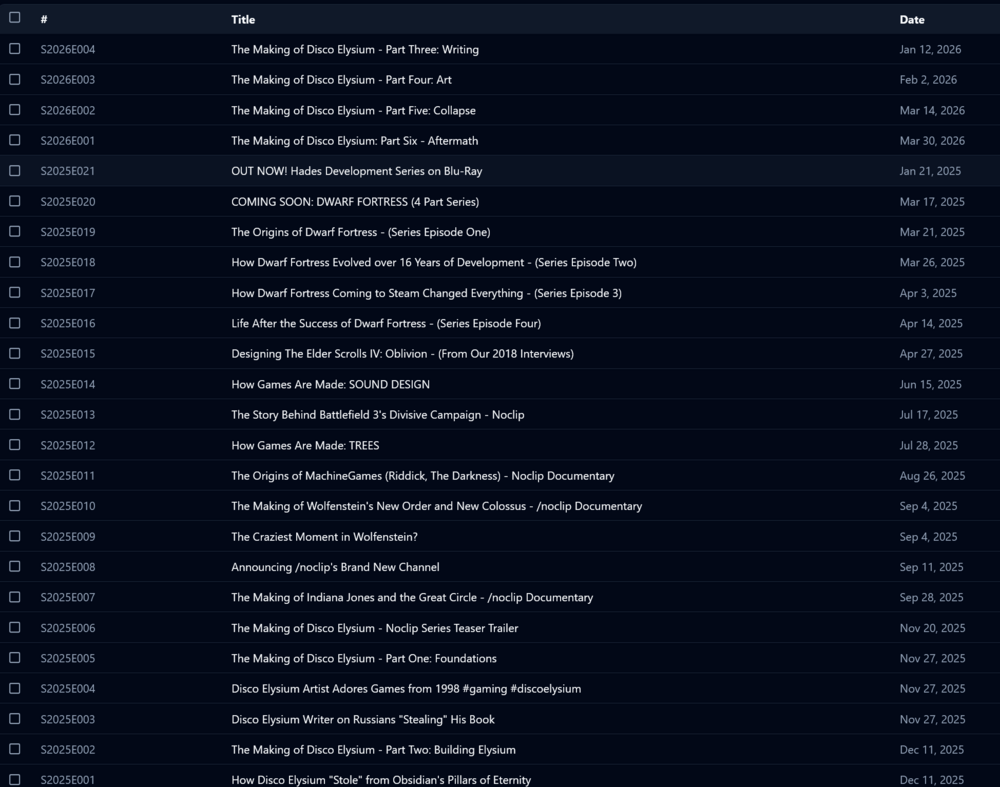
Loving this so far! This is fitting nearly all of my YT download needs from channel backup to individual file downloads. And it's so much better than the implementation and scripting I was working on! Thanks for all your hard work! A few feature requests/suggestions/ideas: ADD Playlist support Ability to unmonitor all episodes prior to adding/scanning channel Automated show poster generation using channel logo? Automated season poster generation based on name/year? Ability to delete individual episodes from webui - deleting video, nfo, and image when done FIX Ability to skip episodes that are already in download queue - mine force download anyway and I have to delete them through my file manager Channel logo not loading in webgui - the banners are loading (shown when you click on a channel) Episode ordering/numbering - I've had a strange issue on one of my channels where the numbering is just .... weird. See attached. When a video fails to download it immediately invalidates the cookies, even if they were uploaded only moments ago leading to a looping error of uploading cookies, attempting download, fails, invalidates cookies, repeat.
-
Excellent! Up and running! Can't wait to dig in! Feature Request: Playlist support
-
Database creation step during initial run fails: sqlalchemy.exc.OperationalError: (sqlite3.OperationalError) no such table: channels [SQL: ALTER TABLE channels ADD COLUMN platform VARCHAR(32) DEFAULT 'youtube' NOT NULL] (Background on this error at: https://sqlalche.me/e/20/e3q8) Database initialization failed Clearing DB and rebuilding does not resolve issue. Fresh install using CA template. CA template is setup by default to create 2 appdata folders (appdata/channelhoarder/cookies and appdata/ChannelHoarder/db-files). Only changes to my install are to join the appdata folders under appdata/channelhoarder/ I'm very interested in running this docker! I appreciate your support!
-
Thank you!
-
Suddenly seeing 'Unable to communicate with GitHub.com' even tho I can install community apps and ping github. The only thing I notice is most icons for CA apps are not loading. Maybe a backend github url is down? How does it verify it's connection to github? I had made zero config changes to my server or network when this appeared so I think it's not on my side but need a way to verify. I've rebooted, restarted docker service, disabled VPN, and turned off host access to custom networks but no luck on resolving the error messages.
-
Am I the only one that this just does not work for? I finally updated to 7 today to integrate TS via the SI1 vid and I'm getting stuck at basic steps. Since this isn't a docker I'm having a hard time figuring out what to do. Per the video I should be able to, on an Unraid 7 system, install TS plugin, register, authenticate my device, then navigate to the TS assigned IP and see the unraid webgui. This does not function whatsoever. Further, the only way to manage routes is apparently on the server via the TS plugin menu. However, I'm not able to enter any routes in the plugin at all as it only says 'Add devices to your tailnet without installing TS . Learn more →'. In the SI1 video, he clicks the viewing button then 'sign in to confirm identity', only mine doesn't have a sign in button, just 'Cannot access this device’s Tailscale IP. Make sure you are connected to your tailnet, and that your policy file allows access. Learn more →'. I can see my server and my other devices in my tailnet so it's for sure authenticated. I mean all I've done is add my server to my tailnet and nothing else as per the video and I can't keep going as I can't even configure the basics yet. What am I missing here?




