Strubdog
Members
-
Joined
-
Last visited
-
How would I do this in unraid?
-
There doesn't seem to be forum thread for this application. I posted on the Github. Was hoping someone in the Unraid Forum might have an idea. On further inspection of the github, it might be a bug.
-
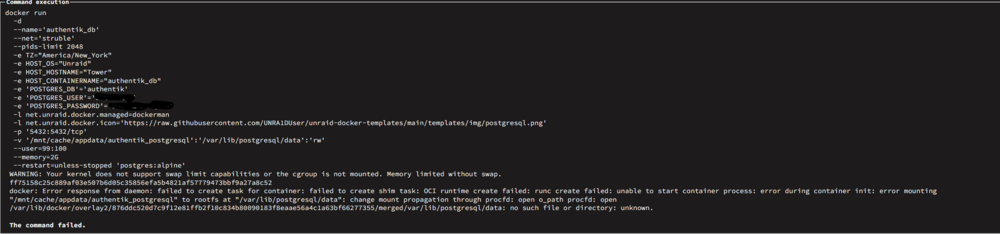
I am trying to install PostgreSQL_Alpine (I'm following the Ibracorp video on Authentik install). I get the following error message when it tries to install. Diagnostic is also attached tower-diagnostics-20251101-0730.zip
-
How does this handle Capcha authenication? In the local windows version, a browser window will pop up for Capcha. Thank You
-
Is it possible to set Qbittorent to move completed torrent that have a "state" of Done. I set my torrents to stop seeding once they hit a ratio of 1.0. I'd like to set qbittorent to move the files once they are done seeding.
-
Nevermind, I figued it out. Thanks for the help.
-
Is there a good forum thread that explains this process? Thank You
-
I want to expand my cache pool from 500GB to 1.5 TB. I recently bought a Samsung 980 Pro NVME drive. I have installed the drive and I only show 500GB of available space. Not sure what I'm doing wrong, I was expecting to have more than 500GB of available. Any suggestions would be appreciated. Thank You

-
Thank You for checking this for me.
-
I just added an older m.2 SSD drive from my main pc. This is the drive: WD Blue 1TB PC SSD - SATA 6 Gb/s M.2 2280 Solid State Drive - WDS100T1BOB - 00AS40. It's not ready in my bios either for some reason. Not if the diagnostic will tell you anything. tower-diagnostics-20240309-1927.zip
-
I was able to get this fixed. I guess there is a bug in the current version of qbittorrent. I reverted back to a previous version, logged in, changed the password. I then reverted to the most current version and am able to login without issue.
-
Hello, I'm having trouble logging in to the WebUI. I am using PIA and using OpenVPN. Once I got everything setup (I was following Ibracorp Youtube video) I ran into this issue. I have tried doing the login in Firefox & Edge/Chrome, still can't login. I then went and uninstalled the application and reinstalled, but kept everything default. I also turned off the vpn portion. Just to see if I can get into the UI. I have the same issue. Any assistance would be appreciated.
-
Okay, I'll change it back to auto after by current Data Rebuild completes.
-
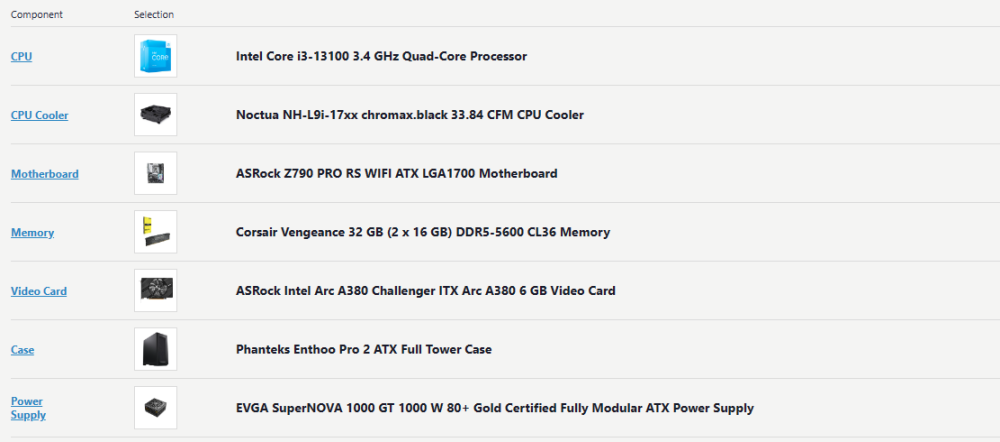
I knew I wanted change the XMP settings for the memory. I also checked on virtualization, which seems like it is turned on by default on my motherboard. I'm using an intel i3-13100 & the motherboard is an ASRock Z790 PRO RS WIFI ATX LGA1700 Motherboard.
-
So I'm in the process of doing a new unraid build. Here is the hardware I have purchased: Now when I do my first boot, which settings in the BIOS should I be changing? I know I will adjust XMP settings for the Ram and turn on IOMMU settings. Are there any other settings that it generally recommended to change or turn on in the BIOS? Thanks