





Virtual
Members
-
Joined
-
Last visited
Everything posted by Virtual
-
How did you get unraid on a hetzner server ?
-
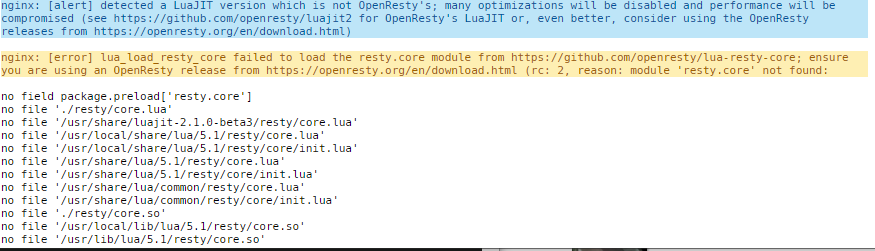
It works but i get this in the log, whats wrong ?
-
How do I copy the file from /user/*** to /bin/ Im not the shapest hammer in the fridge when it come to terminal commands ---- EDIT ---- Found the solution cp ../mergerfs* /bin
-
sorry to ask again... I have some errors.. write UDP: Operation not permitted (code=1) 2019-03-23 16:34:47,499 DEBG 'start-script' stdout output: -P INPUT DROP -P FORWARD ACCEPT -P OUTPUT DROP -A INPUT -i tun0 -j ACCEPT -A INPUT -s 172.17.0.0/16 -d 172.17.0.0/16 -j ACCEPT -A INPUT -i eth0 -p udp -m udp --sport 121 -j ACCEPT -A INPUT -s 192.168.1.0/24 -d 172.17.0.0/16 -i eth0 -p tcp -j ACCEPT -A INPUT -p icmp -m icmp --icmp-type 0 -j ACCEPT -A INPUT -i lo -j ACCEPT -A OUTPUT -o tun0 -j ACCEPT -A OUTPUT -s 172.17.0.0/16 -d 172.17.0.0/16 -j ACCEPT -A OUTPUT -o eth0 -p udp -m udp --dport 121 -j ACCEPT -A OUTPUT -s 172.17.0.0/16 -d 192.168.1.0/24 -o eth0 -p tcp -j ACCEPT -A OUTPUT -p icmp -m icmp --icmp-type 8 -j ACCEPT -A OUTPUT -o lo -j ACCEPT 2019-03-23 16:34:47,500 DEBG 'start-script' stdout output: -------------------- 2019-03-23 16:34:47,501 DEBG 'start-script' stdout output: [info] Starting OpenVPN... 2019-03-23 16:34:47,534 DEBG 'start-script' stdout output: Sat Mar 23 16:34:47 2019 WARNING: file 'credentials.conf' is group or others accessible Sat Mar 23 16:34:47 2019 OpenVPN 2.4.6 x86_64-pc-linux-gnu [SSL (OpenSSL)] [LZO] [LZ4] [EPOLL] [PKCS11] [MH/PKTINFO] [AEAD] built on Apr 24 2018 Sat Mar 23 16:34:47 2019 library versions: OpenSSL 1.1.1a 20 Nov 2018, LZO 2.10 2019-03-23 16:34:47,535 DEBG 'start-script' stdout output: [info] OpenVPN started 2019-03-23 16:34:47,536 DEBG 'start-script' stdout output: Sat Mar 23 16:34:47 2019 TCP/UDP: Preserving recently used remote address: [AF_INET]146.0.32.121:1194 Sat Mar 23 16:34:47 2019 UDP link local: (not bound) Sat Mar 23 16:34:47 2019 UDP link remote: [AF_INET]146.0.32.121:1194 2019-03-23 16:34:47,536 DEBG 'start-script' stdout output: Sat Mar 23 16:34:47 2019 write UDP: Operation not permitted (code=1) 2019-03-23 16:34:49,965 DEBG 'start-script' stdout output: Sat Mar 23 16:34:49 2019 write UDP: Operation not permitted (code=1) 2019-03-23 16:34:53,607 DEBG 'start-script' stdout output: Sat Mar 23 16:34:53 2019 write UDP: Operation not permitted (code=1) 2019-03-23 16:35:01,402 DEBG 'start-script' stdout output: Sat Mar 23 16:35:01 2019 write UDP: Operation not permitted (code=1) 2019-03-23 16:35:17,675 DEBG 'start-script' stdout output: Sat Mar 23 16:35:17 2019 [UNDEF] Inactivity timeout (--ping-exit), exiting 2019-03-23 16:35:17,675 DEBG 'start-script' stdout output: Sat Mar 23 16:35:17 2019 SIGTERM[soft,ping-exit] received, process exiting
-
Thanks, didn´t expect that you could tell me my services providers port number
-
My opvn file lookes like this + code in the remote line there should pe a port number. What port number? my outgoing, the dockers port number, the portnumber of my provider ? Thanks for the great work of making the dockers. Im running alot of yours. remote lu.vpnunlimitedapp.com client dev tun reneg-sec 0 persist-tun persist-key ping 5 ping-exit 30 nobind comp-lzo no remote-random remote-cert-tls server auth-nocache route-metric 1 <ca> -----BEGIN CERTIFICATE-----
-
I am getting a error that VPN_PORT not found.. anyone that can help me

