





richardamz
Members
-
Joined
-
Last visited
-
Gotcha. I've removed some drives and got the array to start again. Will most likely not mess with this until I figure out the controller issue. Any recommendations on a controller that would be compatible with the Dell r510? Also thinking about starting over with a brand new build. Any links or recommendations would be greatly appreciated!
-
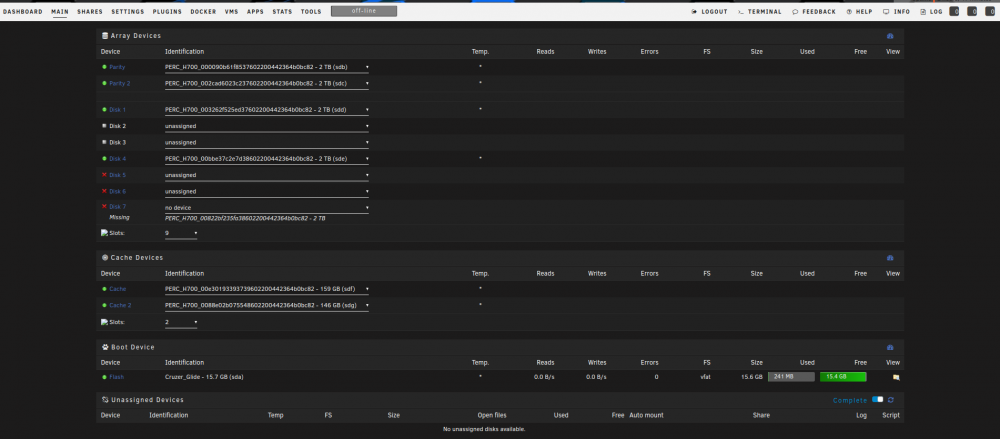
Here is some more details. I'm running Unraid on a Dell r510. Comes with PERC H700 (which I know is frowned upon. However, this was for my initial test run). I set each drive up to RAID 0 so that each drive could be seen individually by Unraid. In total, I have 9 2TB drives and a couple of SSDs for the cache. It has been running fine for about 11 months. Recently, one of the disks started throwing some errors. I figured I'd just swap out that disk for another. I stopped the array, removed the drive, and restarted the drive. This is when I got the first "device missing" message. However, I was still able to start the array. I decided to dig a little deeper today and see if there was something else going on. I got into the BIOS, and a couple of the drives were reported "offline". I removed one, and put a spare that I had in the same slot, and the BIOS showed the drive in a "ready" state. I concluded that the "offline" drives have completely failed. I figured I was still fine, since my cache, parity and 2 array drives were still operational (as seen in the screenshot). So I'm a little perplexed as to why the array wouldn't start. Hopefully, that cleared it up a bit...
-
I had the same amount of drives before I rebooted. I don't believe I've made any new additions. I've attached the screenshots.

-
Apologies. First time posting on here. I've attached the diagnostics zip.
-
I'm not quite sure what happened. I do not have the ability to start my array. This has never happened before. I wonder if there is something I've done. I've attached the diagnostics. Any help is greatly appreciated. tower-diagnostics-20190323-1505.zip

