DiscDuck
Members
-
Joined
-
Last visited
-
You can try to default the bios and enable the functions you need step by step (like vt-d). 6.9.2 does not like "too fast" for some reason. At least that is what I have found. Previous version never shown that. Good luck.
-
Hi honestly, having more than one cache pool drive is not a 1 in a million exotic server case but very common place since the release of unraid 6.9.x many moons ago. If you find the time to look into this, simply add another cache pool drive (doesn't even need to be an ssd) to your server and you have all the information you could possibly need. If you don't have the time or the drive to bring unbalance up-to-date, that is of course totally up to you. You will still get my appreciation for the great tool that has helped me moving many many bytes.
-
Hi did the week or two allow you to look into the missing pool drives? With 6.10 release around the corner it would be nice if unbalance would support 6.9.x. Again, if we can help pinging Limetech, looking for api's and such, let us know. Thanks
-
DiscDuck changed their profile photo
-
Hi Just wondering if you had any luck. It seems more and more users enjoy the multiple cache pools function. If we can help pinging Limetech, looking for api's and such, let us know. Thanks
-
I would love to find out, how the choices for the gui icons came about? What made you choose a paw for boot devices? A snow flake for array operations? More about this and the early decisions.
-
Thanks for the update. Will there be a version that supports more than one cache pool drive? Mine still seem to only show one.
-
Just had a movie not wanting to play on an iPad. Error not enough space to convert. Upped the ramsdisk from 4 to 6 GB and everything worked fine. Maybe this will help the next person running into this.
-
The problem is not, that the phrase is wrong or not applied. It fails randomly on drives, every time the array starts. Without touching the kexfile. Only happens with 6.9.0.
-
Normally pulled of an ftp server so that the array can start automatically. But took that out here for testing. Makes no difference to do it via the GUI.
-
After testing 6.9.0 on two other unraid servers for a couple of days, without any problems, I updated the next unraid server, my storage server from 6.9.0-rc2 to 6.9.0. Now I see drives with a red lock icon, claiming "WRONG ENCRYPTION KEY". But every time I try to start the array, it is a different set of drives. Even managed to get the array started with all drives unlocked once. The two other unraid servers also have their drives encrypted, the same way, the same key. No problems there. Example array start:
-
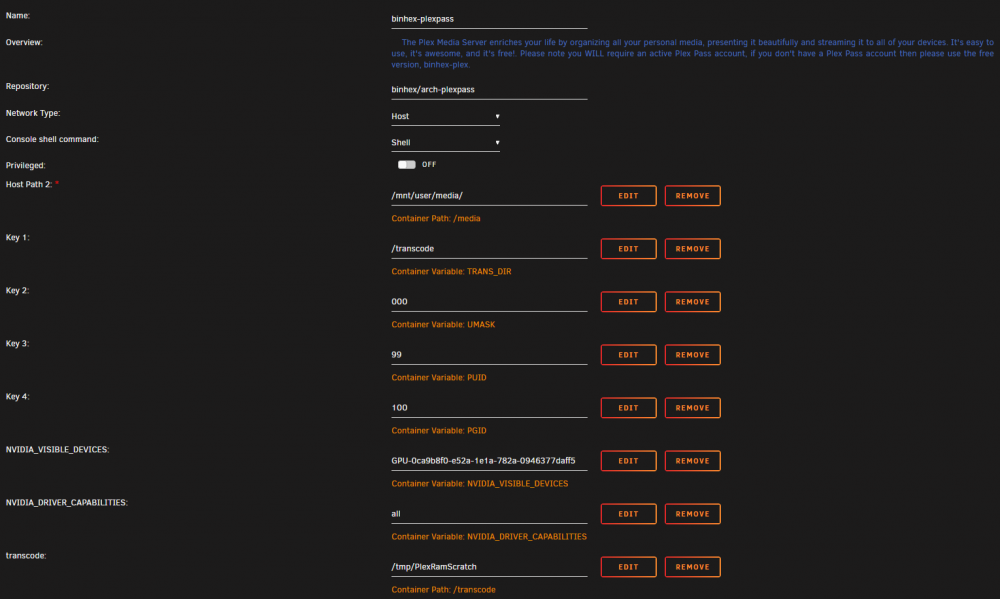
The screenshot has the destination down as /transcoding, is that a typo in the text with ?
-
@bilinz I'm using: #!/bin/bash mkdir /tmp/PlexRamScratch chmod -R 777 /tmp/PlexRamScratch mount -t tmpfs -o size=4g tmpfs /tmp/PlexRamScratch
-
Thanks to @Hoopster Reminder to RTFM, I now have Plex transcoding to the RAM disk.
-
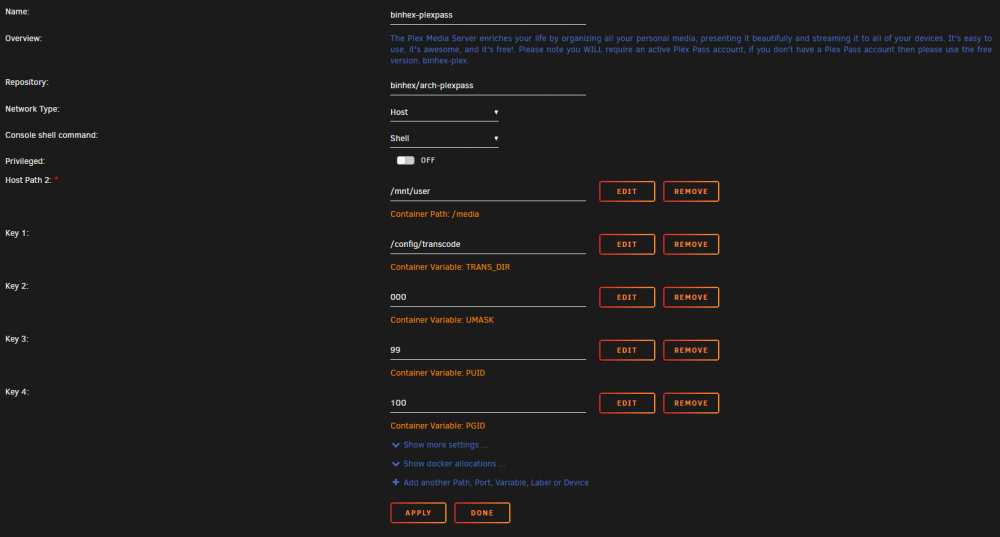
/config/transcode seems to translate to /transcode within the root of the docker directory in appdata. In my case (which should be standard) /mnt/user/appdata/binhex-plexpass/transcode.
-
Confusing. That does not look like the newest binhex-plexpass edition. Here is the current version, fresh out of the APPS tab. Note that the Key variables are in order 1-4 and Key 1 is named different than yours.