krodami
Members
-
Joined
-
Last visited
-
So when i first was assigning the drives it said it was going to erase the parity drive, so i started the array with just the data disks and started it without a the parity disk, I let that run for 10 minutes then shutdown the array, then when i went to add the parity drive I did not see the same warning message so i rolled the dice and started the array, its now doing a parity-sync, so i think we are on the right track.
-
got it working # mount /dev/sdn1 /tmp/sdn So this is what i get from my parity drive # mount /dev/sdr1 /tmp/sdr mount: /tmp/sdr: mount(2) system call failed: Structure needs cleaning. dmesg(1) may have more information after failed mount system call. So the second question is do i just assign the rest of my disks? Is there a way to avoid erasing and rebuilding my parity drive?
-
I tried 2 separate computers and neither of them detect my SanDisk USB flash drive, looks like the thing is dead-dead. So I got a temporary flash drive for now and loaded up a fresh copy of unraid on it. When i log into the web ui, its asking me to assign my disks, but i'm not sure which exact drive is my parity disk. I tried to mount one them with this command but it didn't work # mount -t reiserfs /dev/sdn /tmp/sdn mount: /tmp/sdn: wrong fs type, bad option, bad superblock on /dev/sdn, missing codepage or helper program, or other error. dmesg(1) may have more information after failed mount system call. Any tips to make sure I pick the correct parity drive? Do i need my data drives to be in the exact same order? I would need this info also, would it be in a backup somewhere?
-
Ok I will try that and see how it goes.
-
i am only running a 3 docker containers but for the past several days something has been causing all things docker containers to become unresponsive, during this time i cannot stop docker via the settings UI it says its going to stop but then on page refresh its still running and confirmed this via terminal and still seeing docker service running. i have also deleted my docker img a few times and things are still crashing. This time around I have switch to ipvlan, so we'll see if that changes anything however I would appreciate if someone could take a look at my logs and see if they can find anything interesting. I have attached 2 logs 1 is pre-restart the other is post-restart. unraid-diagnostics-20240212-2350.zip unraid-diagnostics-20240212-2306.zip
-
I noticed a similar issue today; after I updated to version 2024.01.11.1434, a new log file was created. However the old log was still there, maybe this is the same thing you are seeing, and maybe try the fix noted here to see if that fixes your issue.
-
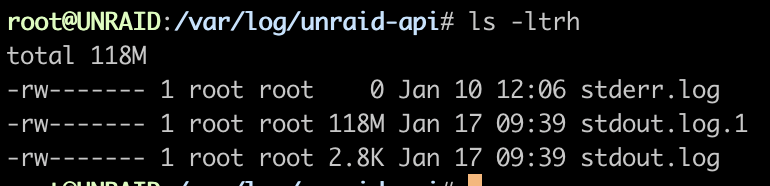
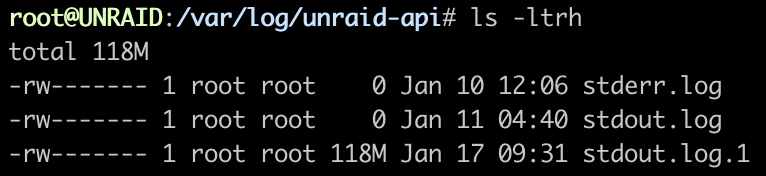
I actually just updated to 2024.01.11.1434 after I posted this as I saw there was a pending update and I see the log has rotated now. The old log is still there; I assume it should be safe to clear out the old log now that I have updated to the latest version. > /var/log/unraid-api/stdout.log.1 I don't think a reboot is required.
-
i did a quick search and unraid-api logs should not exceed 10MB however mine is currently 118MB. Is this limit configured somewhere that I may have accidentally changed? How should I go about cleaning this up?
-
the crashing stopped so i guess its fixed for now...
-
Right these logs came after the crash, so maybe they are not helpful? I will enable syslog server and repost the next time it happens.
-
I have had the server become unresponsive two times in the past 4 days. Unclear why. unraid-diagnostics-20231201-1235.zipunraid-diagnostics-20231205-2022.zip
-
I just wanted to circle back to this and let you know that the second check ran and reports 0 errors upon completion, thanks. I'm still not sure what the first set of errors was all about but I guess everything should be in an ok and healthy state?
-
this is after running the correcting check, i will run another non-correcting check next.
-
unraid-diagnostics-20231108-1539.zip
-
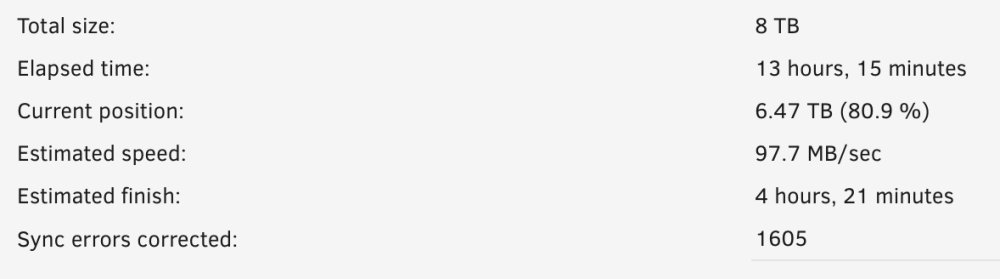
It has not finished yet but i do see this on the dashboard "Sync errors corrected: 1605"