





franco101
Members
-
Joined
-
Last visited
-
From what I researched it’s a problem with Windows 11, the operating system doesn’t like using the iGPU when the OS is Virtualised. I decided to migrate away from W11 VM to unraid docker.
-
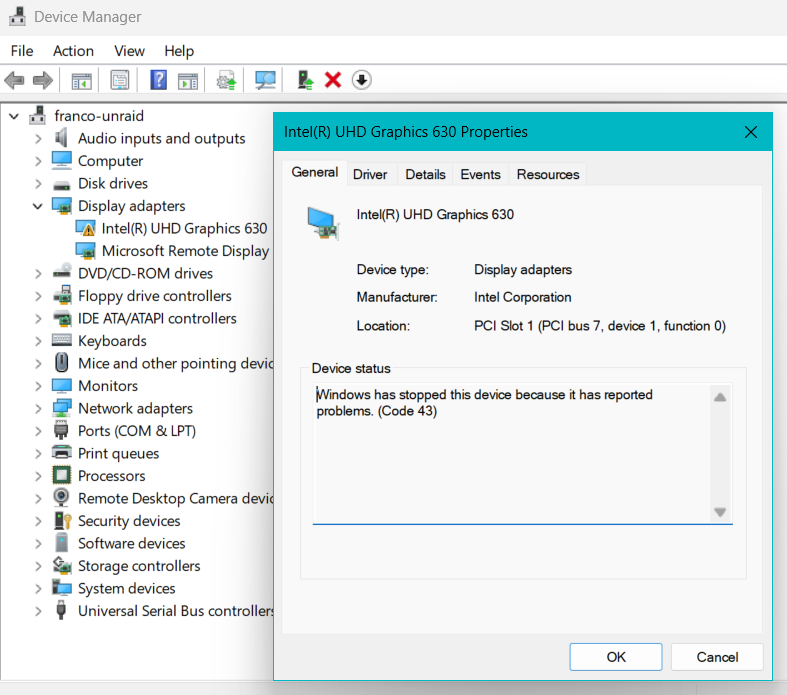
Hello, Recently I've noticed that the onboard iGPU Intel UHD 630 no longer passes through to my Windows 11 VM correctly. When looking inside Device Manager I see error 43. I've spent the past day trying to resolve this issue with no luck in getting it working. Any help would be muchly appreciated!? Thanks IOMMU Groups Hardware Info HP 800 G5 Intel i5-9500 @ 3Ghz RAM 32GB VM xml File <?xml version='1.0' encoding='UTF-8'?> <domain type='kvm'> <name>UNRAIDW11VM</name> <uuid>2c8076e5-ba21-22c4-3053-9c037ad441fe</uuid> <description>W11 VM</description> <metadata> <vmtemplate xmlns="http://unraid" name="Windows 11" icon="windows.png" os="windows11" webui="" iconold="windows.png"/> </metadata> <memory unit='KiB'>22544384</memory> <currentMemory unit='KiB'>22544384</currentMemory> <memoryBacking> <nosharepages/> <source type='memfd'/> <access mode='shared'/> </memoryBacking> <vcpu placement='static'>6</vcpu> <cputune> <vcpupin vcpu='0' cpuset='0'/> <vcpupin vcpu='1' cpuset='1'/> <vcpupin vcpu='2' cpuset='2'/> <vcpupin vcpu='3' cpuset='3'/> <vcpupin vcpu='4' cpuset='4'/> <vcpupin vcpu='5' cpuset='5'/> </cputune> <resource> <partition>/machine</partition> </resource> <os> <type arch='x86_64' machine='pc-i440fx-9.2'>hvm</type> <loader readonly='yes' type='pflash' format='raw'>/usr/share/qemu/ovmf-x64/OVMF_CODE-pure-efi-tpm.fd</loader> <nvram format='raw'>/etc/libvirt/qemu/nvram/2c8076e5-ba21-22c4-3053-9c037ad441fe_VARS-pure-efi-tpm.fd</nvram> </os> <features> <acpi/> <apic/> <hyperv mode='custom'> <relaxed state='on'/> <vapic state='on'/> <spinlocks state='on' retries='8191'/> <vpindex state='on'/> <synic state='on'/> <stimer state='on'/> <vendor_id state='on' value='none'/> </hyperv> <kvm> <hidden state='on'/> </kvm> <vmport state='off'/> <ioapic driver='kvm'/> </features> <cpu mode='host-passthrough' check='none' migratable='off'> <topology sockets='1' dies='1' clusters='1' cores='6' threads='1'/> <cache mode='passthrough'/> </cpu> <clock offset='localtime'> <timer name='hpet' present='no'/> <timer name='hypervclock' present='yes'/> </clock> <on_poweroff>destroy</on_poweroff> <on_reboot>restart</on_reboot> <on_crash>restart</on_crash> <devices> <emulator>/usr/local/sbin/qemu</emulator> <disk type='file' device='disk'> <driver name='qemu' type='raw' cache='writeback' discard='ignore'/> <source file='/mnt/disks/500gb-M2/UNRAID-W10-VM/UNRAID-W10-VM.img'/> <target dev='hdc' bus='sata' rotation_rate='1'/> <boot order='1'/> <address type='drive' controller='0' bus='0' target='0' unit='2'/> </disk> <disk type='file' device='disk'> <driver name='qemu' type='raw' cache='writeback' discard='ignore'/> <source file='/mnt/disks/500gb-M2/WorkingDirectory/W10-VM-W-Drive.img'/> <target dev='hdd' bus='sata' rotation_rate='1'/> <address type='drive' controller='0' bus='0' target='0' unit='3'/> </disk> <disk type='file' device='cdrom'> <driver name='qemu' type='raw'/> <source file='/mnt/user/isos/Win11_24H2_EnglishInternational_x64.iso'/> <target dev='hda' bus='ide'/> <readonly/> <boot order='2'/> <address type='drive' controller='0' bus='0' target='0' unit='0'/> </disk> <disk type='file' device='cdrom'> <driver name='qemu' type='raw'/> <source file='/mnt/user/isos/virtio-win-0.1.285.iso'/> <target dev='hdb' bus='ide'/> <readonly/> <address type='drive' controller='0' bus='0' target='0' unit='1'/> </disk> <controller type='pci' index='0' model='pci-root'/> <controller type='pci' index='1' model='pci-bridge'> <model name='pci-bridge'/> <target chassisNr='1'/> <address type='pci' domain='0x0000' bus='0x00' slot='0x02' function='0x0'/> </controller> <controller type='pci' index='2' model='pci-bridge'> <model name='pci-bridge'/> <target chassisNr='2'/> <address type='pci' domain='0x0000' bus='0x00' slot='0x03' function='0x0'/> </controller> <controller type='pci' index='3' model='pci-bridge'> <model name='pci-bridge'/> <target chassisNr='3'/> <address type='pci' domain='0x0000' bus='0x00' slot='0x05' function='0x0'/> </controller> <controller type='pci' index='4' model='pci-bridge'> <model name='pci-bridge'/> <target chassisNr='4'/> <address type='pci' domain='0x0000' bus='0x00' slot='0x06' function='0x0'/> </controller> <controller type='pci' index='5' model='pci-bridge'> <model name='pci-bridge'/> <target chassisNr='5'/> <address type='pci' domain='0x0000' bus='0x00' slot='0x08' function='0x0'/> </controller> <controller type='pci' index='6' model='pci-bridge'> <model name='pci-bridge'/> <target chassisNr='6'/> <address type='pci' domain='0x0000' bus='0x00' slot='0x09' function='0x0'/> </controller> <controller type='pci' index='7' model='pci-bridge'> <model name='pci-bridge'/> <target chassisNr='7'/> <address type='pci' domain='0x0000' bus='0x00' slot='0x0a' function='0x0'/> </controller> <controller type='ide' index='0'> <address type='pci' domain='0x0000' bus='0x00' slot='0x01' function='0x1'/> </controller> <controller type='sata' index='0'> <address type='pci' domain='0x0000' bus='0x00' slot='0x04' function='0x0'/> </controller> <controller type='virtio-serial' index='0'> <address type='pci' domain='0x0000' bus='0x00' slot='0x0c' function='0x0'/> </controller> <controller type='usb' index='0' model='qemu-xhci' ports='15'> <address type='pci' domain='0x0000' bus='0x00' slot='0x07' function='0x0'/> </controller> <interface type='bridge'> <mac address='52:54:00:a7:27:7b'/> <source bridge='br0'/> <model type='virtio'/> <address type='pci' domain='0x0000' bus='0x00' slot='0x0b' function='0x0'/> </interface> <serial type='pty'> <target type='isa-serial' port='0'> <model name='isa-serial'/> </target> </serial> <console type='pty'> <target type='serial' port='0'/> </console> <channel type='unix'> <target type='virtio' name='org.qemu.guest_agent.0'/> <address type='virtio-serial' controller='0' bus='0' port='1'/> </channel> <input type='mouse' bus='ps2'/> <input type='keyboard' bus='ps2'/> <tpm model='tpm-tis'> <backend type='emulator' version='2.0' persistent_state='yes'/> </tpm> <audio id='1' type='none'/> <memballoon model='virtio'> <address type='pci' domain='0x0000' bus='0x00' slot='0x0e' function='0x0'/> </memballoon> </devices> <seclabel type='dynamic' model='dac' relabel='yes'/> </domain>

-
After having rebuilt a new USB stick for the 3rd time, I found that syslog was set to copy to flash. This was causing a large amount of disk writes and killing off the USBs. I am currently monitoring disk writes to make sure that no plugins are writing to flash. The flash drive is 16GB and has been connected to USB3.0 port for the past 2 years.
-
Hello, I have recently had to replace my flash drive with a new one. The new drive is a 16GB Kingston drive, same make and model as the old one. After rebuilding the flash drive from a backup image/zip, a few days later I am faced with the same issue. “Flash Device Error” Error code: ENOFLASH3 This is annoying as my server has been running solid for over 2 years now. Please can someone help me troubleshoot? Thanks


