





psykix
Members
-
Joined
-
Last visited
Everything posted by psykix
-
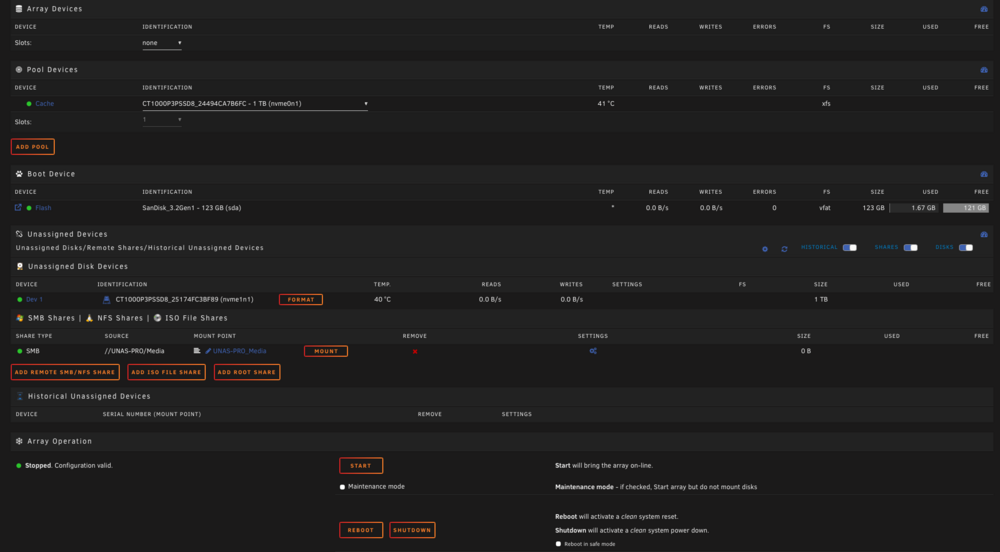
I don't have an array.. I just use SMB share on my UNAS Pro Can I just copy all the data to a share on my UNAS Pro, create new cache pool and then move it back?
-
I can't add a slot. Also, I don't want to lose the current data on the single cache drive - would hate to set all that up again!
-
Works like a charm so far!
-
I'll give it a whirl!
-
I could.. but I'd need to wipe my current working system. Don't mind doing that if it works, but would hate to find out it doesn't!
-
I asked this in pre-sales but not had a response as yet, so may be better asking in here in case someone is doing it.. I used to have a HP Microserver and ran Unraid. I now have a UNAS Pro and a Mini PC with a 10Gbe SFP+ connection. I was thinking of running Unraid on USB, and using 1TB SSD for the cache and then just connecting my UNAS Pro via NFS for my data. Is this feasible? I like the Unraid interface and the docker containers etc..
-
I don't use that functionality tbh. I've just deleted the path.
-
Ah yes. It was Notifiarr. Config Type: Path Name: Storage Disk 1 Container Path: /storage/1 Host Path: /mnt/disk1 Default Value: /mnt/disk1 Access Mode: Read Only Description: Set this and add more disks to report storage usage. What should I change it to?
-
I used to have 4 drives and now just have 3 larger ones (disk 2,3,4). I keep getting the above error in fix common problems. I delete the disk1 and it gets recreated on a reboot I think and then I get the error again. What's recreating it and how do I stop it? Not a show stopper, just intrigued really.
-
nvm.. I had to enable it in the BIOS
-
Just one issue though. I always used to get a warning in fix common problems about write caching being disabled on my Cache drive which has always been attached to the B120i controller. Now I am getting that warning on my array drives too. Is this something that can be enabled on the controller or do I have to do the hdparm thing from command prompt every time I restart the server for every drive??
-
Couldn't have been easier.. Just moved the SAS cable from the LSI card to the internal one. Everything working as per normal!
-
Hmm I'm not sure about that. I know when I used to run Windows on it as the OS then I had to configure it into AHCI mode. I presume UNRAID will just want it as RAID. I'll have a search around.
-
I currently run Unraid on my HP Gen8 Microserver. I have no parity drives. The server has a LSI RAID card in it and it's in IT mode. I originally switched to the LSI card with the intention of adding an external drive enclosure via SFF but that never happened as I just added larger drives. I want to remove the LSI card and go back to using the internal B120i card so that I can install a 10Gbe network card. The server only contains media and a few apps and drives are mechanical so no need for blazing fast performance. I originally moved the drives from B120i to the LSI card and did it without losing any data. I presume I can do the reverse but I cannot for the life of me remember how I did it. Any pointers on how to achieve this?
-
Weird.. rebooted and tried again and it worked fine.
-
Just saw the move flash drive to another PC and edit thing.. hope it doesn’t screw anything else up!
-
Well I have no idea then.. I only ever use one password for my local stuff and it’s not working. What are my options now?
-
I updated to 6.10.3RC couple of days ago, and it forced me to set a password, so I used my usual one. Yesterday I updated to 6.10.4RC and can’t seem to log in. What is the username for the GUI? Is it root? I only ever use the same password locally so don’t understand why it doesn’t work. It’s a pain. Really didn’t need a password, as the server is not public facing.
-
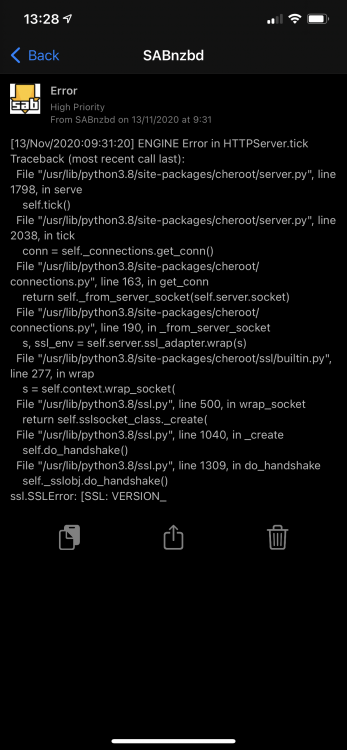
Anyone know what this error pertains to or how to fix? It doesn't break anything that I can see, it's just annoying!
-
Never mind, I can answer my own question. sabyenc is indeed installed 🙂
-
I'm trying to max my speeds on my gigabit internet connection. I've been looking at the high speed downloading link :- https://sabnzbd.org/wiki/advanced/highspeed-downloading The first thing it says it to check sabyenc is installed - is it installed with this docker?
-
Make sure debug logging is not on - for some reason it was on my docker and I did not set it. (Settings, General)
-
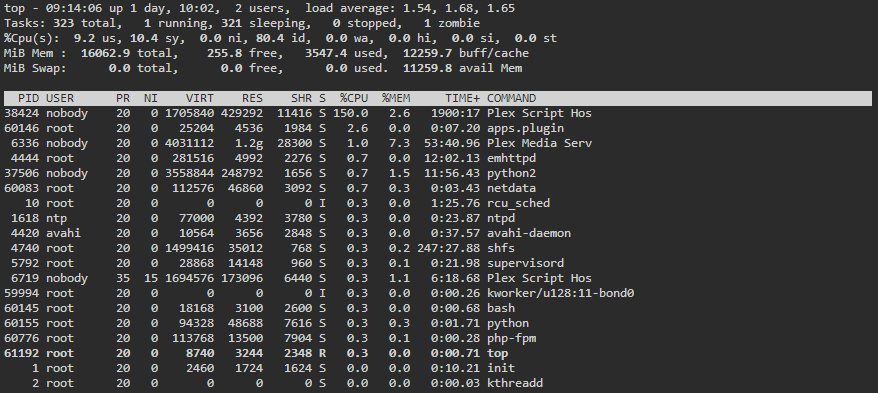
My Unraid server is using circa 20% CPU when idle (array is all spun down) Seems to be Plex - any idea how to fix this? EDIT: looking at logs I realised that Debug was on. Switched it off and restarted the docker. CPU is now 1-2% - will see how it goes.
-
Howdy! Very new to Unraid, and in particular dockers! Is there a way to get the beta version of PMS using this docker? I presume i can't just change the version from within Plex from public to beta and update there - I am assuming that any updates need to be done from Unraid, and not within the app itself? Thanks!


