





Blasman
Members
-
Joined
-
Last visited
Everything posted by Blasman
-
Yes. You may use: php /usr/local/emhttp/plugins/appdata.backup/scripts/backup.php Is using BETA version, it is: php /usr/local/emhttp/plugins/appdata.backup.beta/scripts/backup.php Alternatively, hide output by adding to end of line: > /dev/null 2>&1
-
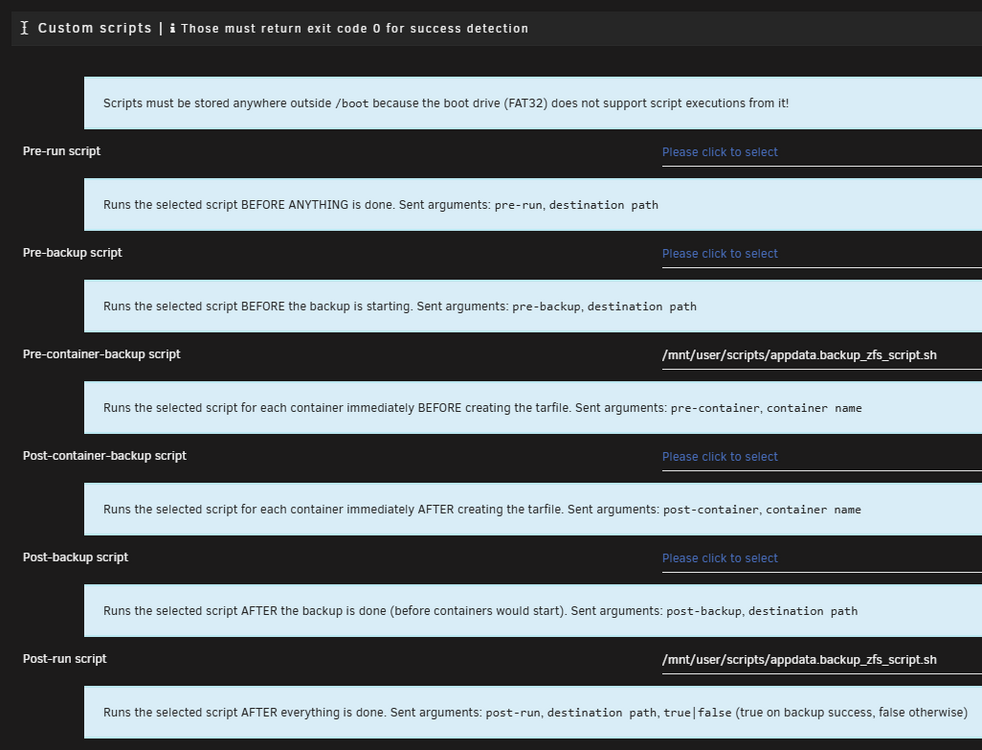
You can click on the script types to expand the help option that shows all the available arguments (see screenshot). Here is an untested 'post-run' script to rsync the backup folder to another destination. I made it fairly quickly with AI but it looks solid. #!/bin/bash # Hardcoded destination path (modify as needed) DESTINATION="/path/to/your/custom/destination/" # Validate arguments if [ "$#" -ne 3 ]; then echo "Error: Invalid number of arguments." echo "Usage: $0 post-run <source-path> true" exit 1 fi # Check if $1 is "post-run" if [ "$1" != "post-run" ]; then echo "Error: First argument must be 'post-run'." exit 1 fi # Check if $3 is "true" if [ "$3" != "true" ]; then echo "Error: Third argument must be 'true'." exit 1 fi SOURCE="$2" # Check if source exists if [ ! -e "$SOURCE" ]; then echo "Error: Source '$SOURCE' does not exist." exit 1 fi # Rsync with common options echo "Syncing '$SOURCE' to '$DESTINATION'..." rsync -avh --progress "$SOURCE" "$DESTINATION" # Check if rsync succeeded if [ $? -eq 0 ]; then echo "✅ Rsync completed successfully." else echo "❌ Rsync failed with error code $?." exit 1 fi
-
This seems like a niche use IMO. Instead of using the scheduler in Appdata Backup, you could just use a cron schedule for a bash script. A quick mock-up based on code I already had written: #!/bin/bash # ---------------- ABORT SCRIPT IF ACTIVE PLEX USER SESSIONS ----------------- # ABORT_SCRIPT_RUN_IF_ACTIVE_PLEX_SESSIONS=false # OPTIONALLY abort the script from running if there are active sessions on the Plex server. PLEX_SERVER_URL_AND_PORT="http://192.168.1.1:32400" # ONLY REQUIRED if using 'ABORT_SCRIPT_RUN_IF_ACTIVE_PLEX_SESSIONS' is set to 'true'. PLEX_TOKEN="xxxxxxxxxxxxxxxxxxxx" # ONLY REQUIRED if using 'ABORT_SCRIPT_RUN_IF_ACTIVE_PLEX_SESSIONS' is set to 'true'. INCLUDE_PAUSED_SESSIONS=false # Include paused Plex sessions as active users. ALSO_ABORT_ON_FAILED_CONNECTION=false # Also abort the script if the connection to the Plex server fails. # Function to abort script if there are active users on the Plex server. abort_script_run_due_to_active_plex_sessions() { local response=$(curl -s --fail --connect-timeout 10 "${PLEX_SERVER_URL_AND_PORT}/status/sessions?X-Plex-Token=${PLEX_TOKEN}") if [[ $? -ne 0 ]] && [[ $ALSO_ABORT_ON_FAILED_CONNECTION == true ]]; then echo "[ERROR] Could not connect to Plex server. Aborting Plex DB Backup." exit 1 elif [[ $response == *'state="playing"'* ]] || ( [[ $INCLUDE_PAUSED_SESSIONS == true ]] && [[ $response == *'state="paused"'* ]] ); then echo "Active users on Plex server. Aborting Plex DB Backup." exit 0 fi } abort_script_run_due_to_active_plex_sessions # run Appdata Backup script, do stuff, etc... /usr/local/emhttp/plugins/appdata.backup.beta/scripts/backup.php
-
You do not even need the plugin for that. There is a script that comes with Unraid (that the app actually uses) that you can just run yourself. /usr/local/emhttp/webGui/scripts/flash_backup It should generate the backup zip file in Unraid's root directory if there is enough space.
-
I've been using this user script for Appdata.Backup for the past six months with no issues. It does everything that I need with ZFS. I hope that it helps. 👍
-
I don't think anyone here was suggesting to shut down dockers every hour for snapshots? I mean, why not a combination of both? You can have snapshots every hour for live dockers, and maybe once a week you have a snapshot scheduled when the dockers are shut down (via this plugin). At the very least, on the off chance that a snapshot does not properly restore for whatever reason, having a snapshot of a shut down docker container will rule out the possibility that the restore did not work properly because the snapshot was taken while the docker was live.
-
For the flash drive, I discovered that you can simply run this built-in Unraid command to back up the flash drive (it's what the plug-in uses as well). It puts the .zip file in Unraid's root directory, so you could simply have another command copy/move the zip after it has been backed up by the command. /usr/local/emhttp/webGui/scripts/flash_backup
-
Do you have a ZFS filesystem by chance? I wrote a custom script for this plug-in that reduces downtime for each docker to less than a second thanks to utilizing ZFS snapshots. I've been using it for three months now, works great for me, hopefully someone else can find it useful as well.
-
If anyone is interested in any nifty ZFS features for this plugin, I created this user script that takes snapshots while the dockers are stopped by the plugin. In addition, in post-run, it can do replications as well as use the created snapshot as a source to create tarfiles and/or rsync'd folders of your appdata. This allows all your dockers to have less than a second of downtime.
-
I wrote this script to be able to back up a single docker container in multiple ways while minimizing docker downtime to less than one second. I run it nightly for Plex as I've found that Plex tends to run a bit smoother if it's restarted every once in a while anyways. Simplified order of operations of this script: Stops docker. Snapshots docker appdata. Starts docker. THEN it will do replications and/or create timestamped tarfiles/rsync folders by using the snapshot as a source. GitHub Link: https://github.com/Blasman/Unraid_Docker_ZFS_AIO_Backup See the sample log file below for a quick idea of what to expect (snapshotting, replicating, and only backing up the Plex DB files): [2024_08_25 05:01:02.840] [PLEX BACKUP STARTED] [2024_08_25 05:01:02.840] Stopping plex docker... [2024_08_25 05:01:08.199] plex docker stopped in 5.357s. [2024_08_25 05:01:08.199] Creating ZFS snapshot of 'pool_main/appdata/plex' using sanoid... [2024_08_25 05:01:08.811] [✔️] 'pool_main/appdata/plex@autosnap_2024-08-25_05:01:08_daily' created in .5912s. [2024_08_25 05:01:08.825] Starting plex docker... [2024_08_25 05:01:09.638] plex docker started in .8106s. ⏱️ 6.795s of total plex downtime since start of 'docker stop' command. [2024_08_25 05:01:09.762] Starting ZFS replication using syncoid... [2024_08_25 05:01:13.586] [✔️] 'pool_main/appdata/plex' >> 'pool_ssds/backup_appdata/plex'. Successful Replication in 3.823s. [2024_08_25 05:01:13.639] Created clone 'pool_main/temp/_temp_plex' from 'pool_main/appdata/plex@autosnap_2024-08-25_05:01:08_daily'. [2024_08_25 05:01:13.685] Mounted 'pool_ssds/backup_plex_db'. [2024_08_25 05:01:13.702] Copying files to '/mnt/pool_ssds/backup_plex_db/[[email protected]] plex Backup'... [2024_08_25 05:01:15.778] [✔️] Copied 1020MB of data in 2.067s. [2024_08_25 05:01:15.866] Destroyed clone 'pool_main/temp/_temp_plex'. [2024_08_25 05:01:17.411] Unmounted 'pool_ssds/backup_plex_db'. [2024_08_25 05:01:17.431] [PLEX BACKUP FINISHED] Run Time: 14.649s.
-
It's in the BETA version of the plugin from the Unraid Community Applications. It's working great for me.
-
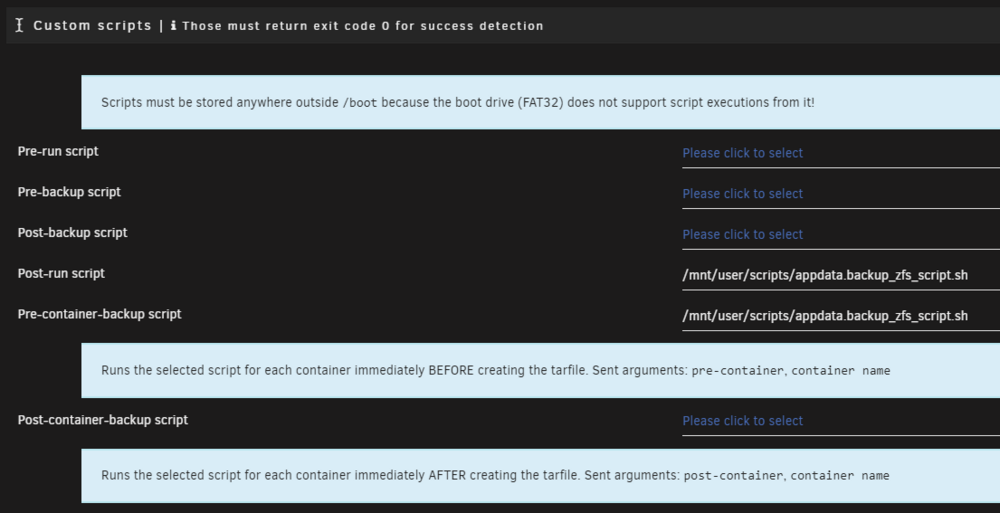
I went ahead and did the pull requests on GitHub. I did three pull requests, one for each file changed, as I have not done a pull request before, and I did not realize that I could have just done one pull request. It was a learning experience, I know now. To keep with the "pre/post script" theme, I added two custom script options. One for running a script before a container backup, and one for just after a container backup. In hindsight, a 'true|false' for the 'Post-container-backup script' would have been consistent with the other post-backup option. In any case, I look forward to seeing any type of "per-container" script that ends up in a future release. Thanks!
-
That sounds good then, I will change the variable name and create a PR. Before I do, I currently have the per-container script immediately *before* the tarfile is created, but perhaps it would be better served immediately *after* the tarfile is created? It is irrelevant in terms of the zfs snapshots, but perhaps there is more usefulness for other custom scripts after the tarfile is created. There could always be multiple "per-container" script options, but that is perhaps a bit overkill.
-
I am curious if there are any plans to release the "per container" script option with the next release of the plugin. Long story short, I edited the code myself to create this option, but it would be nice to see this built-in. The reason being, I wrote a custom script for the plugin that I want to share on GitHub. As a "per-container" script, it creates ZFS snapshots of docker containers while they are stopped by the plugin, and then as a "post-run" script, it will optionally create ZFS replications and optionally create tar files from a temporary cloned dataset of the most recent snapshots that were just taken (allows tar backups while dockers are running). Rather than suggest that the user have to edit the PHP files, perhaps it's best I just wait for the feature to be added to the plugin first if it is just around the corner, otherwise I suppose I'll just release the custom script as is. Thanks!
-
Thanks for this plugin. It's been great! I have a question regarding custom scripts. Would it be possible to be able to run a custom script after dockers are stopped but before anything else happens? Currently, 'pre-backup' custom scripts run before dockers are stopped, and 'post-backup' custom scripts run after backups are done and dockers containers are updated. The reason being is that I wrote some custom ZFS scripts (snapshots, etc) that would ideally work best at the time dockers are stopped and before the update dockers feature happens. I know that 'update dockers' is an option, but I like having my dockers update using the plugin and would like to keep using that feature if possible. Thanks!



