





yendi
Members
-
Joined
-
Last visited
Everything posted by yendi
-
No solution found, I have increased the log size for now…
-
Hello, I have found my docker.log being full. I isolated the culprit: Mosquitto part of the TeslaMate package. As soon as I stop the Mosquitto docker, log spam stops. I dont know how to prevent that to happen, any idea? Thanks ❤️ jupiter-diagnostics-20240627-1447.zip Example of spam: time="2024-06-27T14:43:25.500864810+02:00" level=info msg="loading plugin \"io.containerd.event.v1.publisher\"..." runtime=io.containerd.runc.v2 type=io.containerd.event.v1 time="2024-06-27T14:43:25.500911381+02:00" level=info msg="loading plugin \"io.containerd.internal.v1.shutdown\"..." runtime=io.containerd.runc.v2 type=io.containerd.internal.v1 time="2024-06-27T14:43:25.500929974+02:00" level=info msg="loading plugin \"io.containerd.ttrpc.v1.task\"..." runtime=io.containerd.runc.v2 type=io.containerd.ttrpc.v1 time="2024-06-27T14:43:25.501019767+02:00" level=info msg="starting signal loop" namespace=moby path=/run/docker/containerd/daemon/io.containerd.runtime.v2.task/moby/16abce5f00d38a288b4cb7dde780b5> time="2024-06-27T14:43:28.551807985+02:00" level=info msg="loading plugin \"io.containerd.event.v1.publisher\"..." runtime=io.containerd.runc.v2 type=io.containerd.event.v1 time="2024-06-27T14:43:28.551851444+02:00" level=info msg="loading plugin \"io.containerd.internal.v1.shutdown\"..." runtime=io.containerd.runc.v2 type=io.containerd.internal.v1 time="2024-06-27T14:43:28.551859638+02:00" level=info msg="loading plugin \"io.containerd.ttrpc.v1.task\"..." runtime=io.containerd.runc.v2 type=io.containerd.ttrpc.v1 time="2024-06-27T14:43:28.551947179+02:00" level=info msg="starting signal loop" namespace=moby path=/run/docker/containerd/daemon/io.containerd.runtime.v2.task/moby/16abce5f00d38a288b4cb7dde780b5> time="2024-06-27T14:43:32.184007328+02:00" level=info msg="loading plugin \"io.containerd.event.v1.publisher\"..." runtime=io.containerd.runc.v2 type=io.containerd.event.v1 time="2024-06-27T14:43:32.184078757+02:00" level=info msg="loading plugin \"io.containerd.internal.v1.shutdown\"..." runtime=io.containerd.runc.v2 type=io.containerd.internal.v1 time="2024-06-27T14:43:32.184093047+02:00" level=info msg="loading plugin \"io.containerd.ttrpc.v1.task\"..." runtime=io.containerd.runc.v2 type=io.containerd.ttrpc.v1 time="2024-06-27T14:43:32.184245597+02:00" level=info msg="starting signal loop" namespace=moby path=/run/docker/containerd/daemon/io.containerd.runtime.v2.task/moby/16abce5f00d38a288b4cb7dde780b5> time="2024-06-27T14:43:35.598738771+02:00" level=info msg="loading plugin \"io.containerd.event.v1.publisher\"..." runtime=io.containerd.runc.v2 type=io.containerd.event.v1 time="2024-06-27T14:43:35.598781098+02:00" level=info msg="loading plugin \"io.containerd.internal.v1.shutdown\"..." runtime=io.containerd.runc.v2 type=io.containerd.internal.v1 time="2024-06-27T14:43:35.598788707+02:00" level=info msg="loading plugin \"io.containerd.ttrpc.v1.task\"..." runtime=io.containerd.runc.v2 type=io.containerd.ttrpc.v1 time="2024-06-27T14:43:35.598889455+02:00" level=info msg="starting signal loop" namespace=moby path=/run/docker/containerd/daemon/io.containerd.runtime.v2.task/moby/16abce5f00d38a288b4cb7dde780b5> time="2024-06-27T14:43:39.320129364+02:00" level=info msg="loading plugin \"io.containerd.event.v1.publisher\"..." runtime=io.containerd.runc.v2 type=io.containerd.event.v1 time="2024-06-27T14:43:39.320183510+02:00" level=info msg="loading plugin \"io.containerd.internal.v1.shutdown\"..." runtime=io.containerd.runc.v2 type=io.containerd.internal.v1 time="2024-06-27T14:43:39.320198786+02:00" level=info msg="loading plugin \"io.containerd.ttrpc.v1.task\"..." runtime=io.containerd.runc.v2 type=io.containerd.ttrpc.v1 time="2024-06-27T14:43:39.320301622+02:00" level=info msg="starting signal loop" namespace=moby path=/run/docker/containerd/daemon/io.containerd.runtime.v2.task/moby/16abce5f00d38a288b4cb7dde780b5> time="2024-06-27T14:43:42.669797657+02:00" level=info msg="loading plugin \"io.containerd.event.v1.publisher\"..." runtime=io.containerd.runc.v2 type=io.containerd.event.v1 time="2024-06-27T14:43:42.669840920+02:00" level=info msg="loading plugin \"io.containerd.internal.v1.shutdown\"..." runtime=io.containerd.runc.v2 type=io.containerd.internal.v1 time="2024-06-27T14:43:42.669851816+02:00" level=info msg="loading plugin \"io.containerd.ttrpc.v1.task\"..." runtime=io.containerd.runc.v2 type=io.containerd.ttrpc.v1 time="2024-06-27T14:43:42.669939949+02:00" level=info msg="starting signal loop" namespace=moby path=/run/docker/containerd/daemon/io.containerd.runtime.v2.task/moby/16abce5f00d38a288b4cb7dde780b5> time="2024-06-27T14:43:47.726891737+02:00" level=info msg="loading plugin \"io.containerd.event.v1.publisher\"..." runtime=io.containerd.runc.v2 type=io.containerd.event.v1 time="2024-06-27T14:43:47.726931978+02:00" level=info msg="loading plugin \"io.containerd.internal.v1.shutdown\"..." runtime=io.containerd.runc.v2 type=io.containerd.internal.v1 time="2024-06-27T14:43:47.726944668+02:00" level=info msg="loading plugin \"io.containerd.ttrpc.v1.task\"..." runtime=io.containerd.runc.v2 type=io.containerd.ttrpc.v1 time="2024-06-27T14:43:47.727028874+02:00" level=info msg="starting signal loop" namespace=moby path=/run/docker/containerd/daemon/io.containerd.runtime.v2.task/moby/16abce5f00d38a288b4cb7dde780b5> time="2024-06-27T14:43:55.846218821+02:00" level=info msg="loading plugin \"io.containerd.event.v1.publisher\"..." runtime=io.containerd.runc.v2 type=io.containerd.event.v1 time="2024-06-27T14:43:55.846272281+02:00" level=info msg="loading plugin \"io.containerd.internal.v1.shutdown\"..." runtime=io.containerd.runc.v2 type=io.containerd.internal.v1 time="2024-06-27T14:43:55.846290976+02:00" level=info msg="loading plugin \"io.containerd.ttrpc.v1.task\"..." runtime=io.containerd.runc.v2 type=io.containerd.ttrpc.v1 time="2024-06-27T14:43:55.846396045+02:00" level=info msg="starting signal loop" namespace=moby path=/run/docker/containerd/daemon/io.containerd.runtime.v2.task/moby/16abce5f00d38a288b4cb7dde780b5> time="2024-06-27T14:44:10.523075937+02:00" level=info msg="loading plugin \"io.containerd.event.v1.publisher\"..." runtime=io.containerd.runc.v2 type=io.containerd.event.v1 time="2024-06-27T14:44:10.523115548+02:00" level=info msg="loading plugin \"io.containerd.internal.v1.shutdown\"..." runtime=io.containerd.runc.v2 type=io.containerd.internal.v1 time="2024-06-27T14:44:10.523126999+02:00" level=info msg="loading plugin \"io.containerd.ttrpc.v1.task\"..." runtime=io.containerd.runc.v2 type=io.containerd.ttrpc.v1 time="2024-06-27T14:44:10.523218990+02:00" level=info msg="starting signal loop" namespace=moby path=/run/docker/containerd/daemon/io.containerd.runtime.v2.task/moby/16abce5f00d38a288b4cb7dde780b5> time="2024-06-27T14:44:37.659851316+02:00" level=info msg="loading plugin \"io.containerd.event.v1.publisher\"..." runtime=io.containerd.runc.v2 type=io.containerd.event.v1 time="2024-06-27T14:44:37.659891885+02:00" level=info msg="loading plugin \"io.containerd.internal.v1.shutdown\"..." runtime=io.containerd.runc.v2 type=io.containerd.internal.v1 time="2024-06-27T14:44:37.659905555+02:00" level=info msg="loading plugin \"io.containerd.ttrpc.v1.task\"..." runtime=io.containerd.runc.v2 type=io.containerd.ttrpc.v1 time="2024-06-27T14:44:37.660000924+02:00" level=info msg="starting signal loop" namespace=moby path=/run/docker/containerd/daemon/io.containerd.runtime.v2.task/moby/16abce5f00d38a288b4cb7dde780b5> time="2024-06-27T14:45:30.559861901+02:00" level=info msg="loading plugin \"io.containerd.event.v1.publisher\"..." runtime=io.containerd.runc.v2 type=io.containerd.event.v1 time="2024-06-27T14:45:30.559911983+02:00" level=info msg="loading plugin \"io.containerd.internal.v1.shutdown\"..." runtime=io.containerd.runc.v2 type=io.containerd.internal.v1 time="2024-06-27T14:45:30.559924772+02:00" level=info msg="loading plugin \"io.containerd.ttrpc.v1.task\"..." runtime=io.containerd.runc.v2 type=io.containerd.ttrpc.v1 time="2024-06-27T14:45:30.560026302+02:00" level=info msg="starting signal loop" namespace=moby path=/run/docker/containerd/daemon/io.containerd.runtime.v2.task/moby/16abce5f00d38a288b4cb7dde780b5> time="2024-06-27T14:46:32.192121163+02:00" level=info msg="loading plugin \"io.containerd.event.v1.publisher\"..." runtime=io.containerd.runc.v2 type=io.containerd.event.v1 time="2024-06-27T14:46:32.192167353+02:00" level=info msg="loading plugin \"io.containerd.internal.v1.shutdown\"..." runtime=io.containerd.runc.v2 type=io.containerd.internal.v1 time="2024-06-27T14:46:32.192175170+02:00" level=info msg="loading plugin \"io.containerd.ttrpc.v1.task\"..." runtime=io.containerd.runc.v2 type=io.containerd.ttrpc.v1 time="2024-06-27T14:46:32.192254405+02:00" level=info msg="starting signal loop" namespace=moby path=/run/docker/containerd/daemon/io.containerd.runtime.v2.task/moby/16abce5f00d38a288b4cb7dde780b5> time="2024-06-27T14:47:33.817312625+02:00" level=info msg="loading plugin \"io.containerd.event.v1.publisher\"..." runtime=io.containerd.runc.v2 type=io.containerd.event.v1 time="2024-06-27T14:47:33.817350766+02:00" level=info msg="loading plugin \"io.containerd.internal.v1.shutdown\"..." runtime=io.containerd.runc.v2 type=io.containerd.internal.v1
-
I undestand the use of USB boot to authenticate the installation, but I dont understand why you could not replicate that on a SSD, far more reliable. What prevent Unraid to use SSD UUID instead of USB UUID?
-
Thanks, I will wait for the patched version.
-
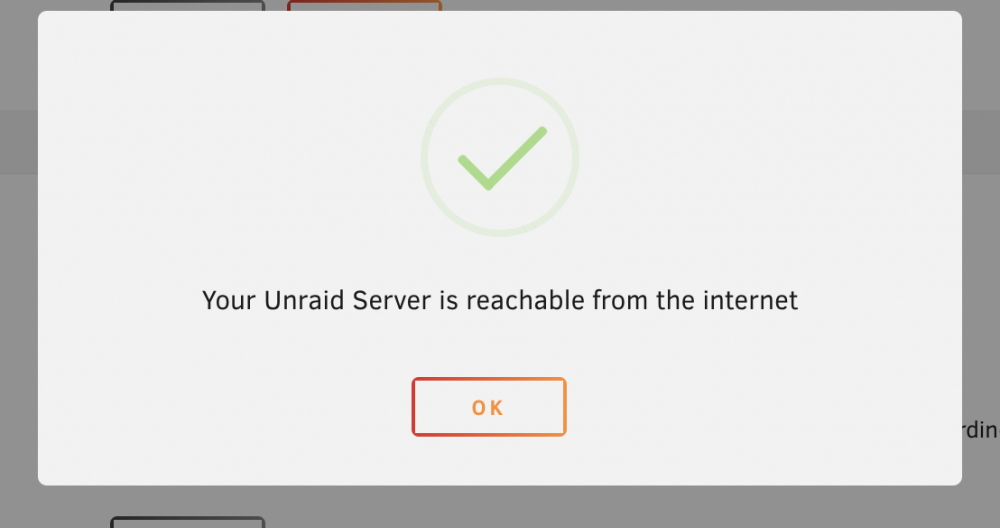
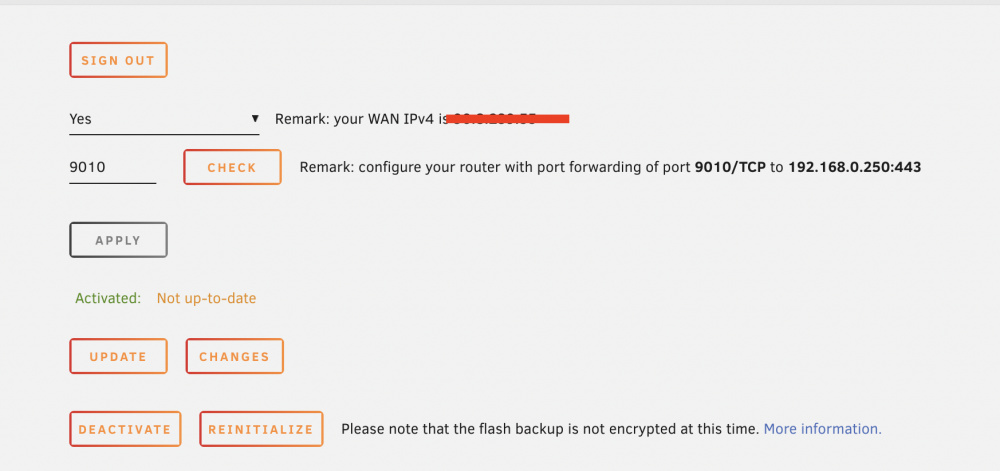
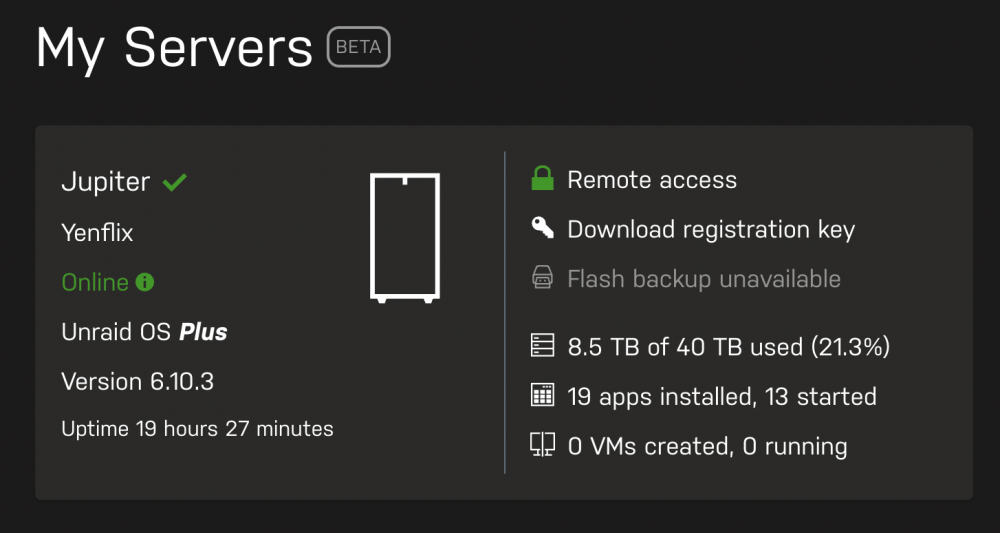
Hello everyone, On a fresh Unraid server I can’t manage to make the flash backup to work (online since 10 days). On my settings I can see the feature activated, I can be reached from the internet but the backup is never updated: “Activated: Not up-to-date” My network setup: ISP router setup with a DMZ (no bridge allowed) to my Unifi Dream Machine Pro My DNS are Cloudflare (1.1.1.1) primary, Google (8.8.8.8) secondary I can resolve backup.unraid.net but 100% ping lost On the UDM Pro I have forwarded the 9010 port to the 443 port on the Unraid server. When I click on the CHECK wan port, I have a success message However the Flash backup stays Not up-to-date. I tried to force update, deactivate/reactivate, reinitialize but nothing works. On the Unraid “My Server” page the Flash Backup appears Unavailable. Has anyone a clue how to solve this ? Thanks


-
If it's not broken, don't fix it ! Same as you, for the moment I fear to touch anything as it is working flawlessly ... Even if it is burning my finger to try mergerfs
-
Will try this probably this weekend! Thanks @DZMM for sharing this with the community !
-
What’s the difference between mergefs and unionfs. What are the benefit to switch to mergefs?
-
So to sum up, you have to create a new userscript that start at startup with: rclone rcd --rc-web-gui --rc-addr :5555 & and then add to your mount --rc --rc-addr=YOURIP:YOURPORT --rc-web-gui --rc-user=test --rc-pass=test --rc-web-gui-update --stats=24h And to your upload script --rc --rc-addr=YOURIP:YOURPORT --rc-web-gui --rc-user=test --rc-pass=test --rc-web-gui-update --stats=24h am I correct? I don't understand the usage of the first script ? (rclone rcd --rc-web-gui --rc-addr :5555 &) What is the purpose? Why a different port as the others?
-
I have this version ! Waseh - 2019.06.24
-
Since I had to format I am using rclone stable instead of beta without issue so far.
-
I had to format and reinstall
-
In my case I had a 256mb of buffet, but because plex was scanning and generating thumbnails it opened enough connections until I was out of memory. It then crash without any error, and mount disappeared.
-
Same as the other guy, do you have enough ram? I had those issues because of only having 8 gigs and plex scanning was creating up to 8 simultaneous connections iirc. Because no available memory rclone crashed like you
-
I had rclone crash because of Ram issues. With 1G buffer, I’m pretty sure its this! Lower your buffer to something like 128 and try again !
-
Yes I will restore all dockers and appdata one by one and I hopefully everything will be okay... Pretty sure Unbalance created that mess... Cheers
-
So I have installed a 6.6.7 unRAID with freshly formatted HDD. I tested around 10 movies hosted on rclone mount and NO ISSUE so far !!! It seems to be working flawlessly, I am so relieved
-
Tonight (in about 8-10 hours, i'm GMT +2).
-
thanks for the input but as stated I just formated everything and started over my server... I was fed up
-
Yeah, I start to really think that UnBalance created that mess
-
Yes, some were working other not, blocking windows explorer/VLC
-
I don't think it was the case as everything in local was working
-
Sorry man, i'm French so my english is not perfect My original usage was everything on Unraid as everyone here, I made several test when the issue started to troubleshoot... I think that my issues started when I shrinked my array (using unbalance) as I had 44Tb before switching to rclone + gdrive and I didn't need all those drives anymore. Maybe the gathering process done by Unbalance created side effects on my unraid installation. So to explain the best possible way, I tried few things: 1/ rclone mounted on unraid: a/ Plex on Unraid: some media do not play b/ Plex on a windows PC targeting the "/rclone_mount" or "/union" share (on unraid): some media do not play c/ "/rclone_mount" (on unraid) accessed via a windows PC: some media do not play (Explorer/VLC freeze) d/ copy of any file works and is playable in local... 2/ rclone mounted on windows a/ Plex on windows: no issue b/ Playing any file directly from the mount: no issue I have formated my HDD and restored the USB stick as a new 6.6.7 and recreating my server as we speak. I have changed my cache drive as xfs (was btrfs) and hopefully it will work... I just have Rclone + scripts and plex installed. I let it create all libraries right now and will test it tonight. FINGER CROSSED !
-
Like HUNDRED of reboots !
-
Hey, So yes I was suffering from this issue, and I downgraded to 6.6.7. Yes I can play from other server using unraid. Anyway I give up, I am formatting and starting from scratch as I write this. Thanks for all the time you took to answer, I will give you an update.


