





IWasJustHere
Members
-
Joined
-
Last visited
-
Perfect! Works now! .cfg file was "Storage" but share is "storage". Its running perfectly. What are the odds. Thanks.
-
The share is "storage". tower-diagnostics-20250312-1742.zip
-
Thanks, I just installed the plug-in now, in hopes it could solve the problem. I have uninstalled had still have the same problem. Either nothing happens when I invoke, or it runs for a few seconds, then stops. I solved the shared folder by correctly putting them in the right share manually, as you eluded to I managed to manually move 50% of my files from cash - so now I can use some of my dockers again.
-
tower-diagnostics-20250312-0859.zip
-
My Cache is full and mover suddenly stopped working for a few days now, worked perfectly for years. i don't get any errors, but nothing happens when i press it. Noting in log either. I have shutdown all dockers ect. rebooted all that. Now to the problem. I manually moved a lot of files from the cache to the array (under Main/Cache/Files). Apparently Unraid decided to make a share for each folder i moved. About 500 folders. Any advise?
-
They are editable again. I didn't do anything - but array is now rebuilding after disk failure, maybe something with this.
-
tower-diagnostics-20250309-2151.zip Here you go!
-
Templets are there - I haven't changes the name and they are not corrupted.
-
Sorry for late reply - I had a array disaster. Here is one for my plex that i can't edit. Best, J my-binhex-plex.xml
-
Quick Q. It seems I have all my most important personal media still intact, and its probably TV/Movies that are gone. Is there anyway to see what is missing? And for the media that shows, is there, do I know it's not corrupted? In other words, will the lost data just not show, or will it show and then be corrupted?
-
Thanks! I will try.
-
Hey, I ran it three times. Keep getting Fatal Error in phase 7: Phase 6 - check inode connectivity... - resetting contents of realtime bitmap and summary inodes - traversing filesystem ... - agno = 0 - agno = 1 - agno = 2 - agno = 3 - agno = 4 - agno = 5 - agno = 6 - agno = 7 - agno = 8 - agno = 9 - agno = 10 - traversal finished ... - moving disconnected inodes to lost+found ... Phase 7 - verify and correct link counts... SB summary counter sanity check failed Metadata corruption detected at 0x48a218, xfs_sb block 0x0/0x1000 libxfs_bwrite: write verifier failed on xfs_sb bno 0x0/0x8 Maximum metadata LSN (1:80) is ahead of log (1:8). Format log to cycle 4. SB summary counter sanity check failed Metadata corruption detected at 0x48a218, xfs_sb block 0x0/0x1000 libxfs_bwrite: write verifier failed on xfs_sb bno 0x0/0x8 xfs_repair: Releasing dirty buffer to free list! xfs_repair: Refusing to write a corrupt buffer to the data device! xfs_repair: Lost a write to the data device! fatal error -- File system metadata writeout failed, err=117. Re-run xfs_repair.
-
“File system corruption detection “ :-O
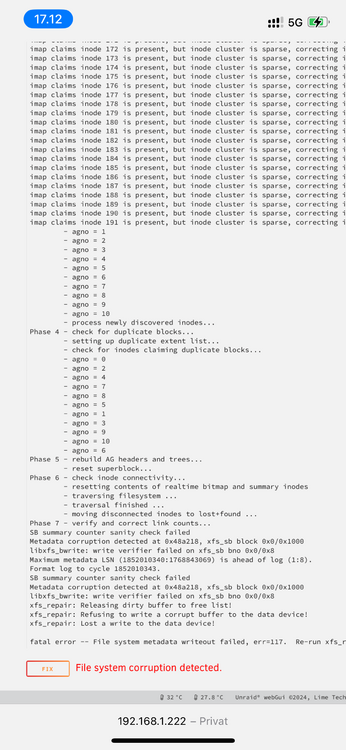
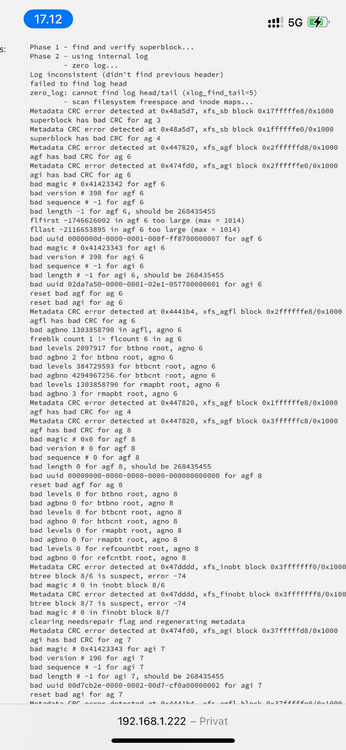
-
“Dirty log detected.” Should I “Zero log”? Phase 1 - find and verify superblock... Phase 2 - using internal log - zero log... Log inconsistent (didn't find previous header) failed to find log head zero_log: cannot find log head/tail (xlog_find_tail=5) ERROR: The log head and/or tail cannot be discovered. Attempt to mount the filesystem to replay the log or use the -L option to destroy the log and attempt a repair.
-
The Check returned with 10 pages of errors. Should I fix? A small cut --- xfs_repair status: Phase 1 - find and verify superblock... Phase 2 - using internal log - zero log... Log inconsistent (didn't find previous header) failed to find log head zero_log: cannot find log head/tail (xlog_find_tail=5) - scan filesystem freespace and inode maps... Metadata CRC error detected at 0x474fd0, xfs_agi block 0x37fffffd8/0x1000Metadata CRC error detected at 0x485fcd, xfs_rmapbt block 0x40/0x1000 Metadata CRC error detected at 0x48a5d7, xfs_sb block 0x7ffffff8/0x1000 btree block 0/8 is suspect, error -74 bad magic # 0 in btrmap block 0/8 bad rmapbt block count 0, saw 1 superblock has bad CRC for ag 1 agi has bad CRC for ag 7 bad magic # 0x41423343 for agi 7 bad version # 196 for agi 7 bad sequence # -1 for agi 7 bad length # -1 for agi 7, should be 268435455 Metadata CRC error detected at 0x48196d, xfs_refcountbt block 0x48/0x1000 bad uuid 00d7cb2e-0000-0002-00d7-cf0a00000002 for agi 7 Metadata CRC error detected at 0x447820, xfs_agf block 0x80000000/0x1000 would reset bad agi for ag 7 btree block 0/9 is suspect, error -74 bad magic # 0x58444233 in refcount btree b ... - agno = 1 - agno = 2 - agno = 3 - agno = 4 - agno = 5 - agno = 6 - agno = 7 - agno = 8 - agno = 9 - agno = 10 - process newly discovered inodes... Phase 4 - check for duplicate blocks... - setting up duplicate extent list... - check for inodes claiming duplicate blocks... - agno = 0 - agno = 1 - agno = 2 - agno = 3 - agno = 4 - agno = 5 - agno = 7 - agno = 9 - agno = 8 - agno = 6 - agno = 10 would rebuild corrupt rmap btrees. would rebuild corrupt refcount btrees. No modify flag set, skipping phase 5 Inode allocation btrees are too corrupted, skipping phases 6 and 7 Maximum metadata LSN (1684631143:1025660244) is ahead of log (0:0). Would format log to cycle 1684631146. No modify flag set, skipping filesystem flush and exiting. --- And a lot more.

