





jazzy192
Members
-
Joined
-
Last visited
-
Nope, it ends in 80. Not sure why that is there as it does have a fixed IP but looking at the logs on the router it says last connected with 192.168.0.127 which is not what it was using when I updated it?
-
I dont know why its saying that? The syslog was named syslog-previous if thats got anything to do with it showing online? Im cannot see it from my UniFI router and cannot ping it.
-
Hello all, I did the update to 7.3.0 but after being asked to restart it will not boot and cannot ping to it anymore. I cannot connect my monitor at the moment as im waiting for delivery of a new one. Is there anything I can do in the mean time? I have attached the syslog. Cheers syslog-previous
-
@patrickstiglerIs this working with Intel Quicksync again?
-
Nope. not running much at all. tower-diagnostics-20241225-0002.zip
-
Ok, mines doing the same again now. Updated to the RC2 to see if that made any difference but nada. Currently on 2024.12.20 CA-Logging-20241224-1604.zip
-
Working so far Squid, kind thanks!
-
Shall do sir
-
What would you recommend Mr Squid?
-
Hello, Not sure whats gone wrong but I was using Nordlynx and it suddenly orphaned itself without me knowing why. I am not unable to access Community Applications and when i click on 'Apps' it goes up with this: Something really wrong went on during get_content Post the resulting file when you click debugging on the left https://forums.unraid.net/topic/38582-plug-in-community-applications/ The debugging file is attached and I made a mew config and USB stick but its still happening. ca_log.txt
-
Just stopped the array and now all the discs (apart from parity) show: 'Unmountable: Unsupported or no file system' If a scroll down to the start/stop array it says the following for all the discs?: 'Format will create a file system in all Unmountable disks.' tower-diagnostics-20230727-0412.zip
-
No worries, here you go: tower-diagnostics-20230726-2149.zip
-
I have just attached the screenshot and there is no point in sending diags again as all I have done is clicked from the diags page back to Main and taken this. I have not done anything else with it.
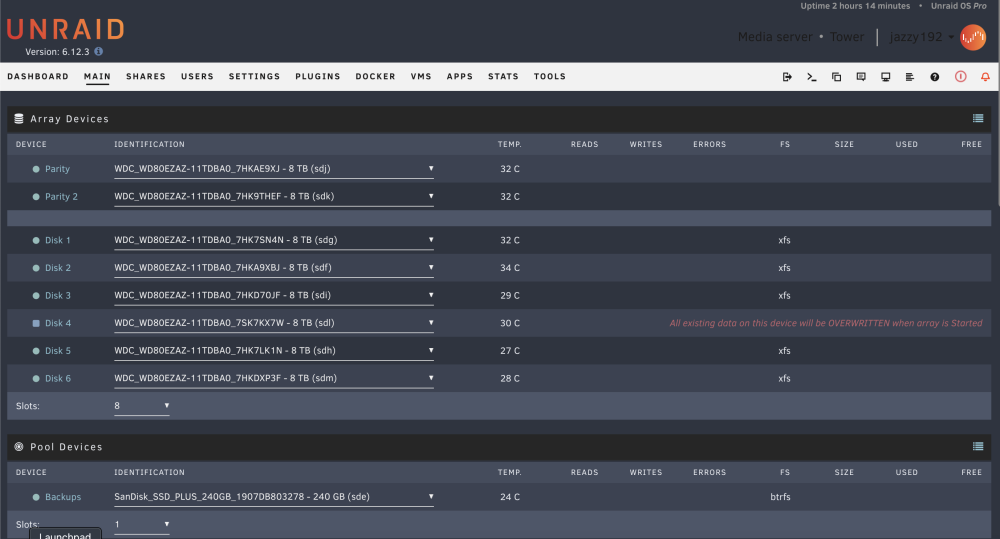
-
I have done all that but it says 'All existing data on this device will be OVERWRITTEN when array is Started'. Shall I start it?
-
Sorry, been on holiday this time. Diagnostics attached. I did all the above and now just need to sort the disc out as it says so I guess I have to do this: https://docs.unraid.net/unraid-os/manual/troubleshooting#unmountable-disks Cheers tower-diagnostics-20230720-0508.zip
