





scania471
Members
-
Joined
-
Last visited
-
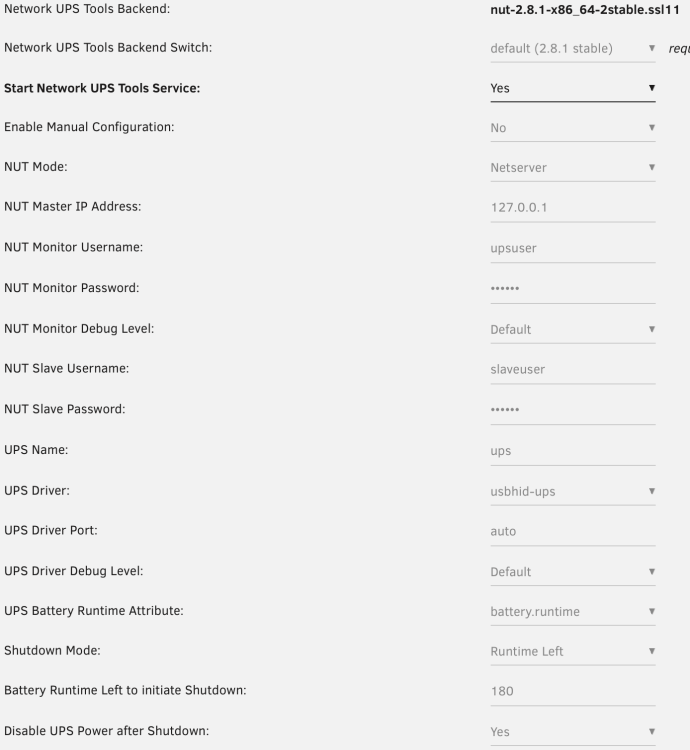
Hi! I have been having a random disconnect problem for the last year and I can't seem to figure out why it happens. I have an APC Back-UPS BX950MI and it randomly disconnects from the server. I have to attach it to a VM, then detach it so the system recognizes it. Previously, the boot USB got disconnected as well and could not remount, only after reboot. That time I thought the USB controller was faulty on the motherboard since I tried every port configuration. Weirdly enough, an external HDD connected to the server did not disconnect. This happened with 6.9.2 and 6.10.3. Since then, I upgraded the license to Plus, updated to 6.12.4, replaced the pendrive and it only disconnects the UPS, every other USB device is fine. If I look at the logs, it starts spamming the following when the UPS is not detected: Dec 31 01:56:26 New-Whonnock upsmon[5327]: Poll UPS [[email protected]] failed - Data stale Dec 31 01:56:28 New-Whonnock usbhid-ups[5319]: device->Product is NULL so it is not possible to determine whether to activate max_report_size workaround Dec 31 01:56:28 New-Whonnock usbhid-ups[5319]: libusb1: Could not open any HID devices: insufficient permissions on everything Dec 31 01:56:30 New-Whonnock usbhid-ups[5319]: device->Product is NULL so it is not possible to determine whether to activate max_report_size workaround Dec 31 01:56:30 New-Whonnock usbhid-ups[5319]: libusb1: Could not open any HID devices: insufficient permissions on everything Tried a different cable and it stopped doing it for a month but then it started doing it again. It usually happens every 2-3 weeks, most of the time between 1-3am when the maintenance tasks are running (docker backup, plex, vm backups, etc...) but I also experienced a disconnect with the previous boot drive that I was doing a parity rebuild during the day and it disconnected the boot drive. It did it 2x in a row, so I had to do the rebuild again and again. It looks like it does it when under some kind of load or something. I attached the full log file and the configuration page of the UPS. Today, the last consumption info came in at 1:14am according to my Grafana dashboard. Thank you very much in advance for your help! syslog.1.txt
-
Oh that's disappointing. It's halfway through its life according to the written data. My plan is to get a Crucial P3 Plus 500GB as it costs the same here as the 500GB versions of both drives you mentioned. (My system is not capable for PCIe 4.0 yet but at least the drive will be capable of that)
-
Hi everyone! I'm having some issues with my server and I would like to ask if my assumptions are on the right track or how the OS handles write jobs. Storage specs: 2x Toshiba P300 3TB (1x parity, 1x array disk) WD Black 1TB (WD1002FAEX) Samsung 640GB (HD642JJ) Seagate Mobile 1TB (ST1000LM035) Kingston A400 240GB (as cache drive) (not the best but faster then most HDDs still) Array uses XFS, cache uses BTRFS Docker folder is on the cache, appdata uses cache for writes. I'm on 6.10.3. I started to have issues when I started a torrent download to the cache drive in the beginning. My connection is 300Mb/s. During the first minute or 2, it was able to use the full bandwidth but then the iowait went up to 85-95%, the system nearly freezed, the download went down to the low 1-5MB/s. When it caught itself, the download went up again but down again and it kept doing the same for the rest of the download. I then started to download to the array and it was not nearly as bad as the cache drive. (Turbo write was on) I know that torrent downloads take up a lot of storage resources but it can't be that bad. I also know that it would be beneficial if the drives were the same specs. I also did some transfer tests using a 5.56GB file on LAN with my MacBook on gigabit ethernet to minimize bottlenecks: Server (used drive: 1TB WD Black) -> MacBook: constant 60-80MB/s MacBook -> Server (used drive: Seagate 1TB): Constant 100-110MB/s for the first ~10s, then varied between 50-80MB/s, sometimes dipped into the low 10-15MB/s for 0.5-1s rarely. Server -> MacBook (used drive: Seagate 1TB): To benchmark the drive. Constant 70-80MB/s. MacBook -> Server (used drive: Kingston SSD): Constant 120MB/s for the fist 10s, then dropped to 1-2MB/s for 15s, went up to 120 again for a few seconds then it didn't exceed 20MB/s (mostly 5-15). It stayed there for the rest of the copy. Server (SSD again) -> MacBook: Constant 120-122MB/s (full gigabit) for the full transfer. Tried MacBook -> Server (cache) again as it seemed quite bad but it did the same. 120MB/s for about 15-18s total randomly, then 18-22MB/s average for the rest of the transfer. Next day, did the same test on the cache drive but maybe even worse. The average was about 10-15MB/s. MacBook -> Server (used drive: Toshiba 3TB): Was similar to the cache drive but never dipped below 50MB/s, average was ~80. Also tried transferring files on the local Windows VM but that was eeeven worse. Copying to the cache drive stopped multiple times and didn't exceed 10MB/s except the first 10sec which was 110-120. Another test but this time on the terminal. From array to cache. First 10s was 200-210 but it dipped to 20-30MB/s and most of the time it stayed there. What I have tried so far: New SATA cable Balancing/srubing/checking filesystem on cache drive My assumption is that the SSD needs to be replaced, my goal is to get some kind of NVMe drive. Is it about right or what other tests can I perform? Thank you in advance!
