





atithasos
Members
-
Joined
-
Last visited
-
Hello, i am trying to install the docker but i am receiving this error root@localhost:# /usr/local/emhttp/plugins/dynamix.docker.manager/scripts/docker run -d --name='storagenode-v3' --net='br0' --ip='192.168.1.230' -e TZ="Europe/Athens" -e HOST_OS="Unraid" -e 'TCP_PORT_28967'='28967' -e 'WALLET'='0xa605c08349a0d6ee8972ec004c1a2da525c55a2d' -e 'EMAIL'='********' -e 'ADDRESS'='******:28967' -e 'STORAGE'='3TB' -e 'TCP_PORT_14002'='14002' -e 'BANDWIDTH'='' -e SETUP=true --mount type=bind,source="/mnt/user/storj/identity/storagenode/",destination=/app/identity --mount type=bind,source="/mnt/user/storj3/data/“,destination=/app/config 'storjlabs/storagenode:latest' The command failed.
-
I manage to work with forge.. you have done great work.... I appreciate your help. As for spigot server i do not know a lot.. I tried local but as I saw it wants only mods from the site and not some that i want...
-
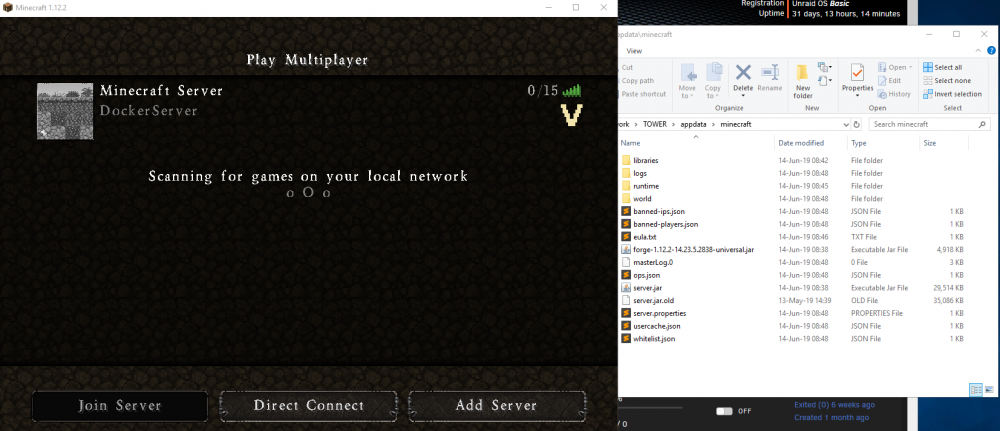
I create a forge server in my desktop and place all the files inside and i rename the minecraft.version to server.jar I run it and I have a vanilla version I made a screen of minecraft and of my folder files What am I doing wrong?
-
I put the forge and the minecraft version (I rename it to server.jar) but i do not know the variables... is there any info with variables? I appreciate your help.
-
Hello I like your minecraft docker, is it possible to make and a forge one???

