




Skip to content
View in the app

A better way to browse. Learn more.

Unraid

A full-screen app on your home screen with push notifications, badges and more.

To install this app on iOS and iPadOS
  1. Tap the Share icon in Safari
  2. Scroll the menu and tap Add to Home Screen.
  3. Tap Add in the top-right corner.
To install this app on Android
  1. Tap the 3-dot menu (⋮) in the top-right corner of the browser.
  2. Tap Add to Home screen or Install app.
  3. Confirm by tapping Install.

humanclone1stgen

Members
  • Joined

  • Last visited

  1. Did a parity check last night which returned 0 errors. Just rebooted and running SMART extended self-tests now. Will update with additional findings. Thanks!
  2. Here's the diagnostics info tron-diagnostics-20220427-1659.zip
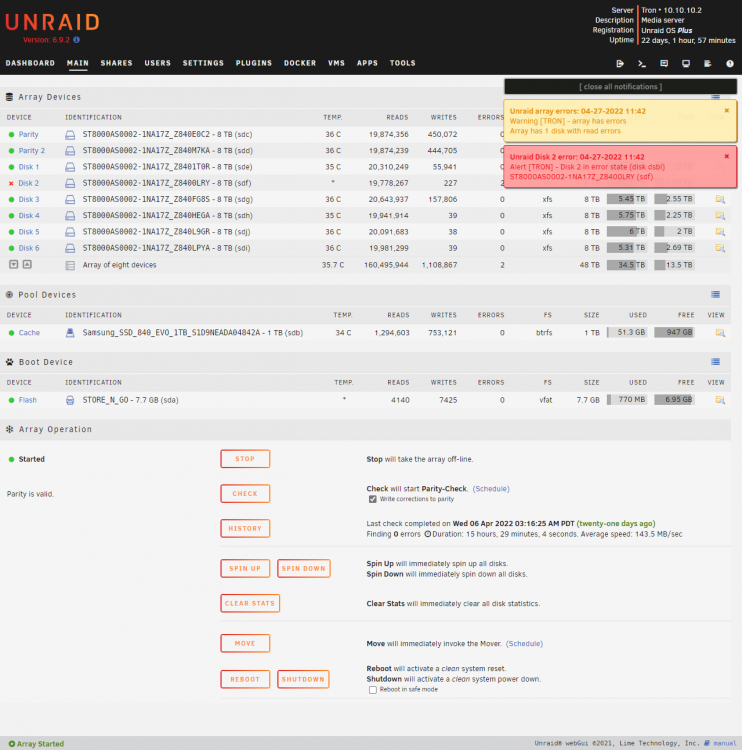
  3. So I came home earlier and noticed this error had popped up while I was out. Tried running both SMART short self-test & SMART extended self-test on Disk 2 but clicking on the START buttons of either tests don't seem to do anything. Should I stop the array first? Not sure what the correct steps are to remedy this issue. TIA!
Account

Navigation

Search

Search

Configure browser push notifications

Chrome (Android)
  1. Tap the lock icon next to the address bar.
  2. Tap Permissions → Notifications.
  3. Adjust your preference.
Chrome (Desktop)
  1. Click the padlock icon in the address bar.
  2. Select Site settings.
  3. Find Notifications and adjust your preference.