





bobo89
Members
-
Joined
-
Last visited
Everything posted by bobo89
-
Situation: I lost my cache array due to an issue running RAM out of spec. I managed to restore all docker containers using a backup. I then lost the USB drive without a backup, but managed to recreate parts of the USB using the files located in a diagnostics file the day before. I lost some customizations including plugins, but drive assignments and share were there. I reinstalled the plugin, and pointed it at the old backup, and.... well now it claims the backups are corrupted with: gzip: stdin: unexpected end of file Zoneminder/data/events/2/2020-08-19/2267/00122-capture.jpg /usr/bin/tar: Unexpected EOF in archive /usr/bin/tar: Unexpected EOF in archive /usr/bin/tar: Error is not recoverable: exiting now Backup/Restore Complete. tar Return Value: Restore finished. Ideally you should now restart your server Backup / Restore Completed Now I used those backups, that are hosted not on the unraid server to restore just the day previous. Nothing should have been accessing them. Yet now all 3 previous days are corrupted. When I pull down the tar and try and open it it does seem to be corrupted. Any idea what happened ?
-
Good idea. I tried that. 2 cameras are h264 the other are h265. Does the selection of of which streaming protocol matter? Poseidon? H265? Just using the whole Web app jokes my browser up. It almost feels like it's a client issue Sent from my SM-N960W using Tapatalk
-
I'm looking for some guidance on using shinobi. I have experienced lots of issues actually running the intreface in a browser. Using chrome and firefox on Ubuntu/Windows, is extremely laggy, and buggy. I watch CPU usage skyrocket on single cores, and modifying regions for recording is impossible. Frequently it misses movements and doesn't record. This is all done with 16GB of ram and 8 cores, and dedicated GPUs. This isn't a resource problem but my environment is unstable. Followed the guide to the letter. Anyone else experienced this ?
-
The answer is yes, you don't want to record to a share on the array due to constant parity calc, and wear on tear on the drive.
-
Just clarifying my understanding here but: " Option to use snapshots to backup VMs without shutting down. be sure to install the qemu guest agent on VMs to enable quiescence, which will improve the integrity of backups. the disk path in the VM config cannot be /mnt/user, but instead must be /mnt/cache or /mnt/diskX." This means I need to go and modify all my vdisk XMLs to point to /mnt/cache as opposed to /mnt/user that they are pointing to now (by default?)
-
I would like to chime in here as well. I have 2x1 TB NVME drives in a RAID1 using BTRFS. My radarr/sab downloads also all sit on the cache. During heavy downloading my iowait also goes as high as 40%. All dockers become unusable during this time. Running 6.7.2. System resources are not a problem with 64 GB of ram and a Ryzen 3900x, it seems to be the implementation of RAID1 Btrfs cache pools.
-
So the only problem was that I mapped to /tmp. Otherwise had I mapped to anything else, that is the proper way to make a share accessible to to a docker container? I have backups that are a month or two old for containers/vms, and anything important is backed up properly. Guess it's a good time to test my restore process as well!
-
I had a major issue with this docker container just now. I could not get the rest of my shares visible from the docker container, so I added a folder configuration like this. For some reason upon starting the docker container, most of the folders were wiped, leaving only 3 shares... 1) Why did this happen? 2) Any chance of recovery the close to 7 TB of data that were wiped?

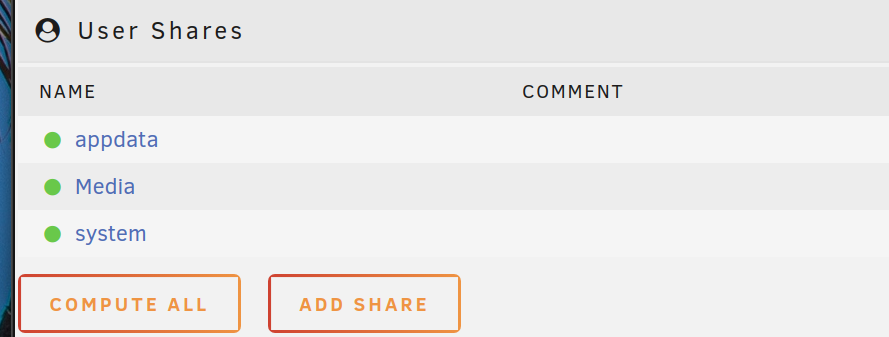
-
How do I run this command if I don't have VM's enabled? I don't have VM's enabled because I have a VM set to autostart, that the instant VMs starts booting, it freezes the system. EDIT: workaround was to rename the image file of the VM found in domain, preventing the VM from starting.
-
I removed the USB from the machine and modified the files on a laptop. The /boot folder would just be the root of the USB key.
-
Just want to let you know this also allows me to passthrough on an x470 platform which doesn't yet have the ABBA bios update: MSI x470 Carbon running the Sep9 2019 bios update, booting in Legacy+UEFI The patched kernel seen above. Ryzen 3900x Saphire rx 480 and a VBIOS file from tech powerup ending(Sapphire.RX480.8192.160921.rom), and has to be in a secondary slot, not the primary.

