






905jay
Members
-
Joined
-
Last visited
Everything posted by 905jay
-
when the gui froze yesterday I also tried restarting nginx and php etc to no avail I am really hoping someone can help us out here with a diagnosis as to what's actually happening and how we can fix it My setup does appear to be very fickle and unstable though. it's always needing a reboot and freezing up Motherboard /CPU /Memory appear to be fine but I am open to suggestions and some evidence
-
I've started having the exact same issue happened yesterday, and I couldn't find a way to resolve it so I had to reboot the server ssh would work, BUT every command I attempted to run would just hang (top /htop /iostat /sar) even though ssh was practically instant nothing has changed that I'm aware of after the hard reboot, the parity check restarted and was running through the night, sometime between 11:30pm last night and 10:am today the entire unraid froze and was inaccessible. I am attaching the diagnostics after another hard reboot. Can anyone help me determine what the issue may be? If this is the wrong place to post please advise, thanks folks Also, I took 2 diagnostics files, one before starting the array, and one after just in case there are differences that could lead to what the issue is with stability and the GUI freezing (which may or may not be related) unRAID_diagnostics_array_down.zip unRAID_diagnostics_array_started.zip
-
I actually just fixed it so what I did is go through the motions of creating another Windows10 VM BUT instead of making a new vDisk I simply selected manual, and pointed to the already existing vdisk that I created before I bunged everything up. Windows10 VM booted as if nothing happened
.thumb.png.2e02ad241f1dbccdb133bf4b25bf723b.png)
-
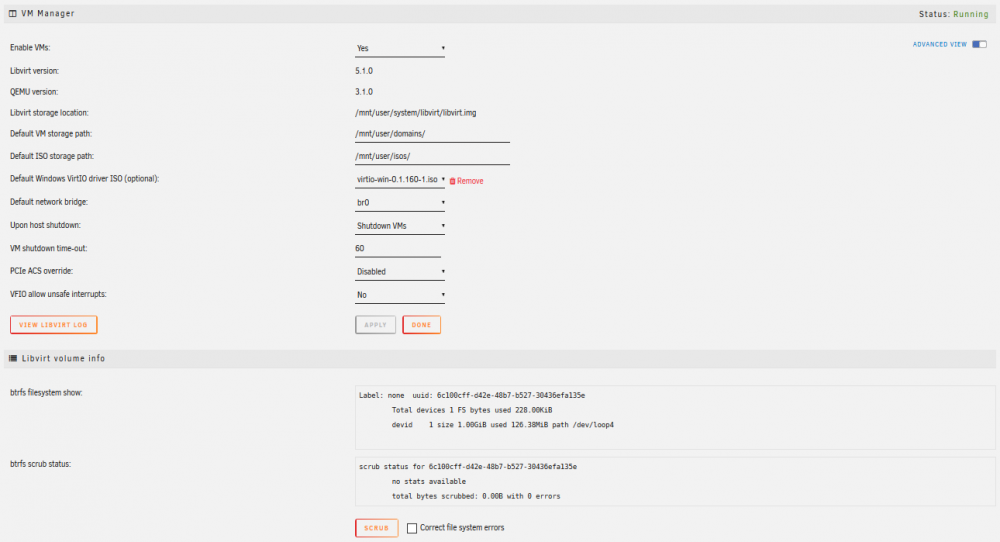
I also deleted my libvirt.img file accidentally I was able to recreate it but VMs section no longer seens my domain that I have created, although I can verify that the domains folders exist can someone help me reimport them so I can boot the VMs?


.png.fa0fde246f8cbe3cb181a6762042d31b.png)


