





page3
Members
-
Joined
-
Last visited
-
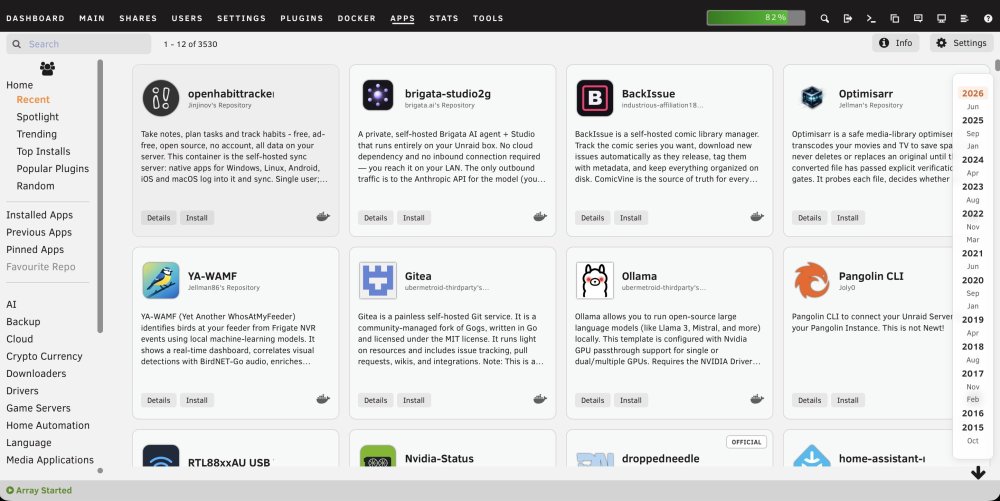
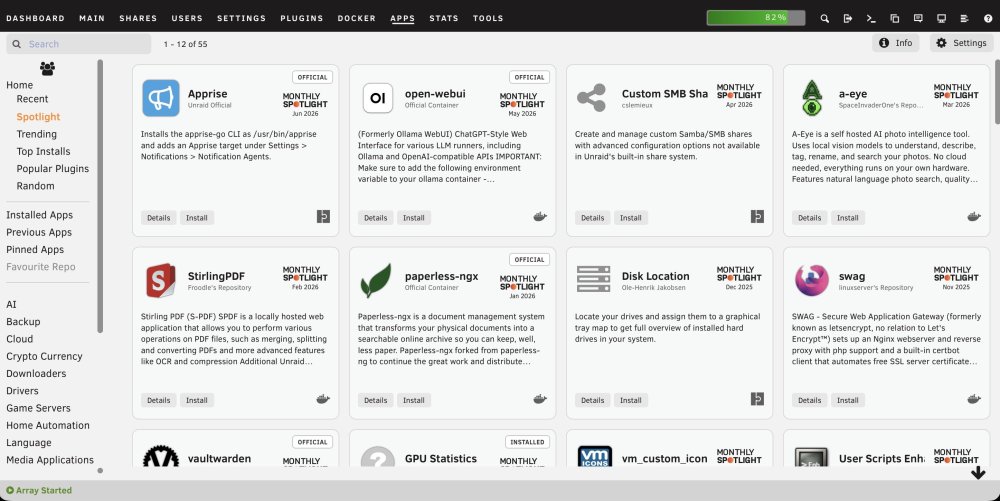
The recent Community Applications layout uses very large cards, which limits a desktop-width Apps page to three applications across and adds some visually strong hover and status styling. I put together the following CSS for the Custom WebUI CSS plugin. It provides four compact columns, contained descriptions, much smaller Spotlight branding, neutral status labels, a restrained hover state, and a translucent Recent-date navigator. Tested on Unraid 7.3.1 using the standard light and Black themes. As this targets Community Applications class names, a future CA update may require adjustments. Global CSS /* Community Applications: compact four-column card layout */ .ca_templatesDisplay { align-items: stretch !important; } .ca_holder.ca_appTemplate { position: relative !important; width: calc(25% - 14px) !important; min-width: 245px !important; max-width: none !important; height: 250px !important; min-height: 250px !important; margin: 7px !important; padding: 12px !important; box-sizing: border-box !important; overflow: hidden !important; display: grid !important; grid-template-columns: minmax(0, 1fr) 72px !important; grid-template-rows: 72px minmax(0, 1fr) 30px !important; grid-template-areas: "app spotlight" "description description" "buttons buttons" !important; column-gap: 10px !important; row-gap: 8px !important; } /* App icon, name and repository */ .ca_holder > .ca_appPopup.ca_backgroundClickable { grid-area: app !important; position: static !important; display: grid !important; grid-template-columns: 58px minmax(0, 1fr) !important; grid-template-rows: auto auto !important; column-gap: 10px !important; align-content: center !important; width: auto !important; min-width: 0 !important; height: auto !important; min-height: 0 !important; margin: 0 !important; padding: 0 !important; } .ca_holder .ca_iconArea { grid-column: 1 !important; grid-row: 1 / span 2 !important; position: static !important; width: 58px !important; height: 58px !important; margin: 0 !important; padding: 0 !important; display: flex !important; align-items: center !important; justify-content: center !important; } .ca_holder .ca_iconArea img, .ca_holder .ca_iconArea .displayIcon { position: static !important; width: 52px !important; height: 52px !important; max-width: 52px !important; max-height: 52px !important; object-fit: contain !important; font-size: 48px !important; } .ca_holder .ca_applicationName { grid-column: 2 !important; grid-row: 1 !important; position: static !important; align-self: end !important; min-width: 0 !important; max-width: 100% !important; margin: 0 0 2px 0 !important; padding: 0 !important; overflow: hidden !important; white-space: nowrap !important; text-overflow: ellipsis !important; font-size: 16px !important; line-height: 1.15 !important; font-weight: 600 !important; } .ca_holder .ca_author { grid-column: 2 !important; grid-row: 2 !important; position: static !important; align-self: start !important; min-width: 0 !important; margin: 0 !important; padding: 0 !important; overflow: hidden !important; white-space: nowrap !important; text-overflow: ellipsis !important; font-size: 10px !important; line-height: 1.2 !important; opacity: 0.7 !important; } /* Monthly Spotlight graphic */ .ca_holder > .homespotlightIconArea { grid-area: spotlight !important; position: static !important; width: 72px !important; height: 56px !important; margin: 5px 0 0 0 !important; padding: 0 !important; display: flex !important; flex-direction: column !important; align-items: center !important; justify-content: center !important; } .ca_holder .homespotlightIconArea > div:first-child { width: 64px !important; height: 22px !important; margin: 0 !important; padding: 0 !important; line-height: 0 !important; } .ca_holder svg.spotlightIcon { display: block !important; width: 64px !important; height: 22px !important; max-width: 64px !important; max-height: 22px !important; } .ca_holder .spotlightDate { margin: 3px 0 0 0 !important; padding: 0 !important; font-size: 9px !important; line-height: 11px !important; } /* Give Spotlight extra clearance only when a status pill is present */ .ca_holder > .cardFlagStack ~ .homespotlightIconArea { margin-top: 18px !important; } /* Description */ .ca_holder > .cardDescription { grid-area: description !important; position: static !important; width: auto !important; height: auto !important; min-height: 0 !important; margin: 0 !important; padding: 0 !important; overflow: hidden !important; } .ca_holder .cardDesc { position: static !important; margin: 0 !important; padding: 0 !important; font-size: 12px !important; line-height: 1.35 !important; font-weight: 400 !important; display: -webkit-box !important; -webkit-box-orient: vertical !important; -webkit-line-clamp: 5 !important; overflow: hidden !important; } /* Details, Install and status icons */ .ca_holder > .ca_bottomLine { grid-area: buttons !important; position: static !important; width: auto !important; height: 30px !important; min-height: 30px !important; margin: 0 !important; padding: 0 !important; display: flex !important; align-items: center !important; gap: 5px !important; } .ca_holder .caButton { position: static !important; margin: 0 !important; padding: 4px 9px !important; font-size: 11px !important; line-height: 1.2 !important; } .ca_holder .ca_bottomLine > span { position: static !important; } .ca_holder .ca_bottomLine > span:last-child { margin-left: auto !important; } /* Subtle status pills: official, installed, etc. */ .ca_holder > .cardFlagStack { position: absolute !important; top: 8px !important; right: 8px !important; z-index: 3 !important; } .cardFlagStack > div { min-width: 0 !important; height: auto !important; margin: 0 !important; padding: 0 !important; background: #fff !important; border: 1px solid rgba(60, 60, 60, 0.35) !important; border-radius: 4px !important; box-shadow: none !important; } .cardFlagStack .installedCardText { min-width: 0 !important; height: auto !important; padding: 4px 7px !important; background: transparent !important; color: #333 !important; text-shadow: none !important; font-size: 9px !important; font-weight: 600 !important; line-height: 1 !important; letter-spacing: 0.4px !important; } .LTOfficialCardBackground, .officialCardBackground, .installedCardBackground { background: #fff !important; border-color: rgba(60, 60, 60, 0.35) !important; } .installedCardBackground { border-style: solid !important; border-width: 1px !important; } /* Keep card hover extremely subtle */ .ca_holder.ca_appTemplate, .ca_holder.ca_appTemplate:hover, .ca_holder.ca_appTemplate:focus, .ca_holder.ca_appTemplate:focus-within { transform: none !important; filter: none !important; outline: none !important; box-shadow: none !important; transition: none !important; } .ca_holder.ca_appTemplate:hover { background-color: rgba(0, 0, 0, 0.015) !important; border-color: rgba(120, 120, 120, 0.16) !important; } .ca_holder:hover .ca_backgroundClickable, .ca_holder:hover .ca_bottomLine, .ca_holder:hover .ca_bottomLineSpotLight { filter: none !important; box-shadow: none !important; } /* Recent page date navigation */ #caAlphaBar { right: 10px !important; padding: 8px 7px !important; background: rgba(255, 255, 255, 0.82) !important; border: 1px solid rgba(80, 80, 80, 0.16) !important; border-radius: 8px !important; box-shadow: 0 2px 10px rgba(0, 0, 0, 0.08) !important; backdrop-filter: blur(5px) !important; -webkit-backdrop-filter: blur(5px) !important; } #caAlphaBar .caAlphaLetter { min-width: 34px !important; padding: 2px 5px !important; color: rgba(35, 35, 35, 0.76) !important; font-size: 11px !important; line-height: 1.15 !important; text-align: center !important; border-radius: 4px !important; } #caAlphaBar .caAlphaYear { color: rgba(25, 25, 25, 0.92) !important; font-size: 13px !important; font-weight: 600 !important; } #caAlphaBar .caAlphaLetter:hover { background: rgba(0, 0, 0, 0.05) !important; } #caAlphaBar .caAlphaActive { background: rgba(245, 110, 35, 0.10) !important; color: #d95f20 !important; } /* Responsive fallbacks */ @media (max-width: 1250px) { .ca_holder.ca_appTemplate { width: calc(33.333% - 14px) !important; } } @media (max-width: 900px) { .ca_holder.ca_appTemplate { width: calc(50% - 14px) !important; } } @media (max-width: 620px) { .ca_holder.ca_appTemplate { width: calc(100% - 14px) !important; min-width: 0 !important; } }Additional CSS for black theme: /* Status pills for Black Theme */ .cardFlagStack > div, .LTOfficialCardBackground, .officialCardBackground, .installedCardBackground { background: #f4f4f4 !important; border-color: rgba(255, 255, 255, 0.35) !important; } .cardFlagStack .installedCardText { color: #222 !important; } /* Recent page date navigation: Black Theme */ #caAlphaBar { background: rgba(32, 32, 32, 0.84) !important; border-color: rgba(255, 255, 255, 0.12) !important; box-shadow: 0 2px 10px rgba(0, 0, 0, 0.28) !important; } #caAlphaBar .caAlphaLetter { color: rgba(255, 255, 255, 0.72) !important; } #caAlphaBar .caAlphaYear { color: rgba(255, 255, 255, 0.92) !important; } #caAlphaBar .caAlphaLetter:hover { background: rgba(255, 255, 255, 0.07) !important; } #caAlphaBar .caAlphaActive { background: rgba(245, 110, 35, 0.18) !important; color: #ff8b4f !important; }
-
Thank you. I will look in to this. I run Immich and postgres is the support Db. I believe it's a big of a resource hog.
-
Advice is to reboot, after posting diagnostics (below). Any assistance most welcome. I’m not seeing any obvious consequences. tower-diagnostics-20240901-0909.zip
-
Oh and I reinstalled the “docker upgrade patch” which got removed during the update.
-
I used this guide but make a note of your dockers first because the template list had everything I’d ever tried.
-
I also rolled back and got exactly this error with my dockers. In my case I fixed it by following the instructions to remove the dockers and re-added them to rebuild the containers. All is now working smoothly again.
-
After upgrading to 6.12 I also started getting these issues, plus the gui becoming unavailable. Then the server crashing - first time in 9 years. Switched to ipvlan which made the server less responsive and started causing network issues. Tried moving dockers to a second network card, but issues persisted. Rolled back to 6.11.5 and all is good again. I’ll wait a while before thinking of upgrading again.
-
That worked great, thank you.
-
This is now showing up as “not available” in my docker containers list, so can’t be updated. Is there anything I need do to fix this?
-
Great to see a replacement for the old docker version, thanks. Weird issue though. Since the recent update if I view using safari (iPad) the interface doesn’t render. The url bar flickers continuously. Seems to work fine on other devices, and the previous version worked fine on the iPad. Any ideas?
-
The Curl command worked! Thank you many times over.
-
Can anyone give any advice on how to get Claim to work, following a password reset as per Plex’s instructions earlier today from the resultant data breech? Password reset. New Claim code obtained and pasted in to docker config. Restart. Navigate to local Plex and log in, but no option to Claim server.
-
Hi Josh. I do appreciate you taking the time, however unfortunately this isn’t the issue. No matter how many times I correct my configuration and remove the unwanted folders, they come back at next restart. I know it’s basic stuff, I know it should work. It just isn’t though. Oh well. It’s working great as configured. It’s clearly nothing to do with your App or template.
-
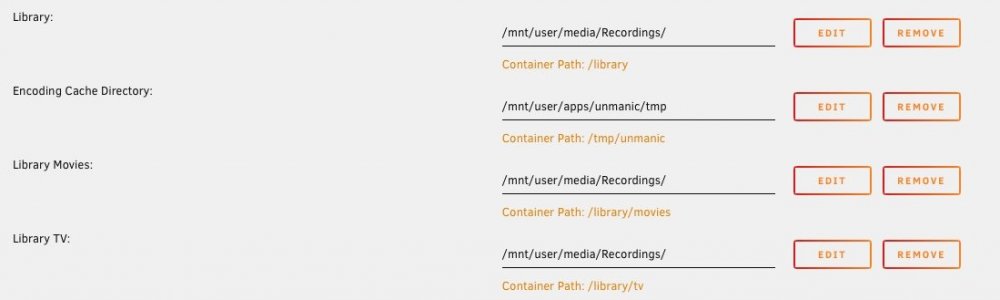
Both 'tv' and 'movies' have come back yet again! This time instead of deleting them I've mapped both to the same folder that I actually want. I only want 'Library' and have no idea where "Movies' and 'TV' keep coming from, no matter how many times I delete them.
-
Hi. Both folders came back again. This time I blanked the content as you suggest followed by save and then I removed them, rather than just 'remove' from the template page. I've also check the config in /boot/config/plugins/dockerMan/templates-user and they do appear to be gone, so we'll see if they stay gone. Thanks.


