





mbush78
Members
-
Joined
-
Last visited
-
Updated to 7.0.0-beta.2 and so far seems buildx is working normally with no extra steps on the users side :)
-
So, when I was provided the steps from the Dev above Inwas also confuse, I didn't f8nd a "flash" directory, what I did was shut the system down, pull the unraid usb drive, and plug it into my PC, then I saw what had been explained. Sorry I didn't include that extra info, at the time I just figured well if I figured it out anyone else can lol.
-
A variation, still download and unzip the file above but, for the user script: #!/bin/bash # Create docker plugins directory mkdir -p /usr/libexec/docker/cli-plugins/ # Install the docker buildx component cp /boot/custom/docker-buildx /usr/libexec/docker/cli-plugins/ chmod +x /usr/libexec/docker/cli-plugins/docker-buildx With this the 'docker build' command uses the new 'docker-buildx'
-
Yea, got this from @DanL via the support ticket I have Hello, It turns out it's pretty simple. Here are the steps: Upzip and put the attached executable in your '/flash/custom/' folder: Add the following commands to a User Script that runs on first array start or to your go file. # Install the docker buildx component cp /boot/custom/docker-buildx /usr/bin/ chmod +x /usr/bin/docker-buildx Now the docker build command will be: docker-buildx build... Let me know if it works for you. Works fine for me. I'll work towards getting this built into Unraid. Dan L docker-buildx.zip
-
You're just missing some single quotes for the command line version. This works: docker run \ -v '/mnt/user/apptmp/alloy/config/config.alloy':'/etc/alloy/config.alloy' \ -v '/mnt/user/apptmp/alloy/data':'/var/lib/alloy/data' \ -p 12345:12345 'grafana/alloy:latest' run --server.http.listen-addr=0.0.0.0:12345 \ --storage.path=/var/lib/alloy/data /etc/alloy/config.alloy docker run -d --name='grafana_alloy' --net='bridge' -e TZ="America/Chicago" -e HOST_OS="Unraid" -e HOST_HOSTNAME="unraid" -e HOST_CONTAINERNAME="grafana_alloy" -l net.unraid.docker.managed=dockerman -p '12345:12345/tcp' -v '/mnt/user/apptmp/alloy/config/config.alloy':'/etc/alloy/config.alloy':'rw' -v '/mnt/user/apptmp/alloy/data':'/var/lib/alloy/data':'rw' 'grafana/alloy:latest' run --server.http.listen-addr=0.0.0.0:12345 --storage.path=/var/lib/alloy/data /etc/alloy/config.alloy The command finished successfully! root@unraid:/mnt/user/apptmp# docker run -v '/mnt/user/apptmp/alloy/config/config.alloy':'/etc/alloy/config.alloy' -v '/mnt/user/apptmp/alloy/data':'/var/lib/alloy/data' -p 12345:12345 'grafana/alloy:latest' run --server.http.listen-addr=0.0.0.0:12345 --storage.path=/var/lib/alloy/data /etc/alloy/config.alloy Unable to find image 'grafana/alloy:latest' locally latest: Pulling from grafana/alloy 062e51aa1fb4: Pull complete 568a2bf5c15e: Pull complete a5989d15309e: Pull complete dec2c180ab5e: Pull complete 538aed975229: Pull complete 8f4b5a01bf79: Pull complete 2e8fdb5249b7: Pull complete 680f4980a78e: Pull complete b50d16a2a55f: Pull complete 10fa0ec2e27f: Pull complete f2044796f2e3: Pull complete d711b3e3ab2d: Pull complete Digest: sha256:21248ad12831ad8f7279eb40ecd161b2574c2194ca76e7413996666d09beef6c Status: Downloaded newer image for grafana/alloy:latest ts=2024-04-20T11:32:35.539372042Z level=info "boringcrypto enabled"=false ts=2024-04-20T11:32:35.539391212Z level=info msg="running usage stats reporter" ts=2024-04-20T11:32:35.539394852Z level=info msg="starting complete graph evaluation" controller_path=/ controller_id="" trace_id=8eefe7ba571d06d72adae41eee1e925c ts=2024-04-20T11:32:35.539401922Z level=info msg="applying non-TLS config to HTTP server" service=http ts=2024-04-20T11:32:35.539404792Z level=info msg="finished node evaluation" controller_path=/ controller_id="" trace_id=8eefe7ba571d06d72adae41eee1e925c node_id=http duration=9.72µs ts=2024-04-20T11:32:35.539409422Z level=info msg="finished node evaluation" controller_path=/ controller_id="" trace_id=8eefe7ba571d06d72adae41eee1e925c node_id=cluster duration=770ns ts=2024-04-20T11:32:35.539413422Z level=info msg="finished node evaluation" controller_path=/ controller_id="" trace_id=8eefe7ba571d06d72adae41eee1e925c node_id=ui duration=660ns ts=2024-04-20T11:32:35.539417062Z level=info msg="finished node evaluation" controller_path=/ controller_id="" trace_id=8eefe7ba571d06d72adae41eee1e925c node_id=tracing duration=7.51µs ts=2024-04-20T11:32:35.539425671Z level=info msg="finished node evaluation" controller_path=/ controller_id="" trace_id=8eefe7ba571d06d72adae41eee1e925c node_id=logging duration=58.119µs ts=2024-04-20T11:32:35.539456141Z level=info msg="finished node evaluation" controller_path=/ controller_id="" trace_id=8eefe7ba571d06d72adae41eee1e925c node_id=remotecfg duration=24.39µs ts=2024-04-20T11:32:35.539464411Z level=info msg="finished node evaluation" controller_path=/ controller_id="" trace_id=8eefe7ba571d06d72adae41eee1e925c node_id=labelstore duration=1.93µs ts=2024-04-20T11:32:35.539470341Z level=info msg="finished node evaluation" controller_path=/ controller_id="" trace_id=8eefe7ba571d06d72adae41eee1e925c node_id=otel duration=430ns ts=2024-04-20T11:32:35.539475211Z level=info msg="finished complete graph evaluation" controller_path=/ controller_id="" trace_id=8eefe7ba571d06d72adae41eee1e925c duration=165.439µs ts=2024-04-20T11:32:35.539561361Z level=info msg="scheduling loaded components and services" ts=2024-04-20T11:32:35.53970125Z level=info msg="starting cluster node" peers="" advertise_addr=127.0.0.1:12345 ts=2024-04-20T11:32:35.539850499Z level=info msg="peers changed" new_peers=0d3e537e0714 ts=2024-04-20T11:32:35.540061967Z level=info msg="now listening for http traffic" service=http addr=0.0.0.0:12345 <?xml version="1.0"?> <Container version="2"> <Name>grafana_alloy</Name> <Repository>grafana/alloy:latest</Repository> <Registry/> <Network>bridge</Network> <MyIP/> <Shell>sh</Shell> <Privileged>false</Privileged> <Support/> <Project/> <Overview/> <Category/> <WebUI/> <TemplateURL/> <Icon/> <ExtraParams/> <PostArgs>run --server.http.listen-addr=0.0.0.0:12345 --storage.path=/var/lib/alloy/data /etc/alloy/config.alloy</PostArgs> <CPUset/> <DateInstalled>1713615655</DateInstalled> <DonateText/> <DonateLink/> <Requires/> <Config Name="HTTP_PORT" Target="12345" Default="" Mode="tcp" Description="" Type="Port" Display="always" Required="false" Mask="false">12345</Config> <Config Name="config" Target="/etc/alloy/config.alloy" Default="" Mode="rw" Description="" Type="Path" Display="always" Required="false" Mask="false">/mnt/user/apptmp/alloy/config/config.alloy</Config> <Config Name="data" Target="/var/lib/alloy/data" Default="" Mode="rw" Description="" Type="Path" Display="always" Required="false" Mask="false">/mnt/user/apptmp/alloy/data</Config> </Container>
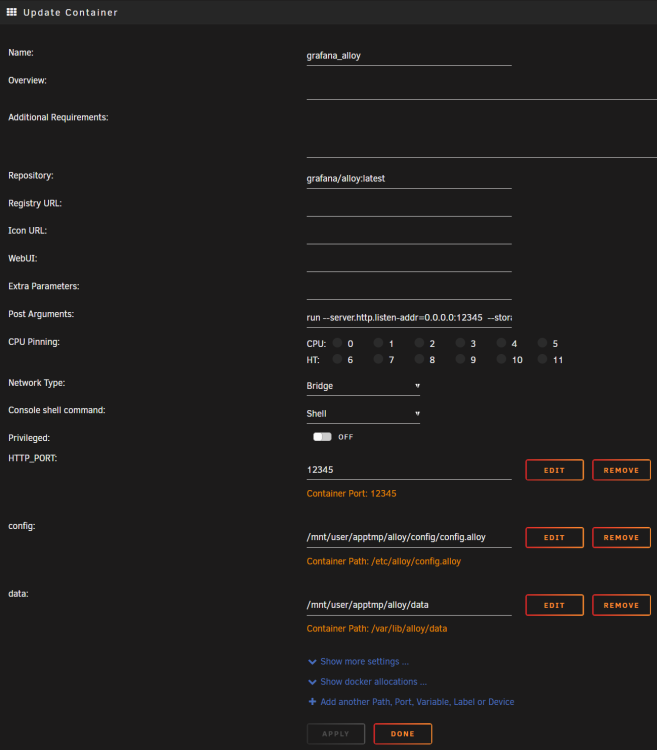
-
ok, now I don't recall if I got an automated response. So I resubmitted, and this time, I have a response and I can see the support ticket. Will wait and see. Thanks.
-
Nope, not a peep yet.
-
Are we like the only weird-o's that were building docker images in unraid? Or are we just to only two that somehow broke their system lol. I haven't tried it yet but was thinking maybe I'll create a fresh install of the trial build on some random usb stick just to see if buildx works there and it's really just my issue or if its truly busted 😕 really dunno what else to do. Is there someplace to submit bug tickets that I've totally overlooked somewhere? I was blind, https://account.unraid.net/troubleshoot going there allowed me to submit a support ticket.
-
After updating, If I'm ssh'd into my UnRaid and I try to 'docker build...' It now fails with the error: ERROR: BuildKit is enabled but the buildx component is missing or broken. Install the buildx component to build images with BuildKit: https://docs.docker.com/go/buildx I can't add docker-buildx to /root/.docker/cli-plugins/ it saves but won't become executable. For now I just copy it into /usr/libexec/docker/cli-plugins/docker-buildx but that get's wiped anytime the box gets rebooted. Any help would be appreciated. Thanks.
-
did everything move from /opt to /config intentionally? Just want to be sure before I go flipping all my path settings around etc etc. And, user is now "abc" ? Also, thanks for all this.
-
symlink it inside the base directory to resolve that. LogInit: Base Directory: /serverdata/serverfiles/Engine/Binaries/Linux/ [S_API] SteamAPI_Init(): Loaded local 'steamclient.so' OK.

