





talonserver
Members
-
Joined
-
Last visited
-
Hmm, I know some people virtualize Unraid. Do you think it would accept a VHD created by the hypervisor?
-
And using a VHD (.img) file for metadata?
-
It's always struck me as odd that everyone uses dedicated drives for Metadata Special Devices on their ZFS pools considering the metadata size is much smaller than common drive sizes and you are taking up four PCIe lanes per disk just to store the metadata. I get it in the enterprise or production, but homelab? Seems overkill. With most consumer motherboards offering a limited number of slots, I got to thinking; what if you mirrored two NVMe drives for redundancy and either partitioned it or created a VHD and told Unraid to use that as the Metadata Special Device? Some searching seems to show that that is possible, but I wanted to ask around to get second opinions. So say you had a mirrored pool of NVMe with 1TB of usable storage and HDD pool was 30TB. Well, if you did what I'm thinking, you can split the NVMe pool in half and dedicate half to metadata and the other half can still be usable for VMs, Docker, etc. I imagine in homelab, this would be safe to do because the wear on these drives even from doing all that extra work would be low. I do have a test system I can set up to try it with, but I thought that before I went through all the trouble with that I would ask here. Anyone have any thoughts?
-
K thanks!
-
I'm going rackmount now and need a new UPS. I'm thinking of going with Eaton this time, but when I look at the supported models it doesn't list all of them on this page: https://networkupstools.org/ddl/Eaton/index.html I was thinking of something from the Eaton 5P or Eaton 5PX G2 series, but I don't see many listed there. Any thoughts on that? Should it still work as the protocol is the same?
-
Ah. Thanks!
-
Thanks, I can do it that way I guess, but the FAQ mentioned a button. It would be helpful to know where that is or at least what it looks like as I prefer to do these sorts of things per the manual. ie "A button will appear letting you upgrade a pool to support the new ZFS features"
-
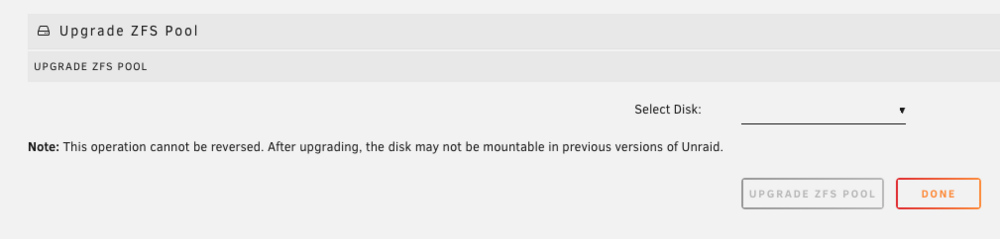
I am not seeing a way to upgrade my ZFS pool and cache (not array). I have two NVMe mirrored and two SATA SSD mirrored using the 6.12.x version of ZFS, but when I search for upgrade this is what I find. I cannot select any disks. So I'm not sure what the steps are to upgrade my ZFS version.
-
What sort of issues are people encountering with binhex's Plex container?
-
Thanks!
-
Oh, cool. I misunderstood. Thanks for showing the screenshots. I assume that has hooks to send alerts to email if you've got that set up?
-
The CyberPower CP1500PFCLCD I have does have a self test function that can be triggered with the software it looks like, but you're saying there isn't a way to trigger it via NUT or the Unraid terminal?
-
How does one determine the health of the battery using NUT? I don't think my UPS displays battery health on the LCD screen and I don't want to do the ol' pull the plug from the wall trick to test.
-
Ah, I had forgotten about those. That's probably the solution. I'll find out when they mandate it in September, but Unraid was able to send a test message with the app password.
-
As far as I'm aware... Microsoft wants two factor, so not username and password over SMTP any longer. They made this change in Outlook desktop/other email clients some years ago.
