





jagr200
Members
-
Joined
-
Last visited
-
Bumping this up for others. This is a great idea. I keep having to change from 8.8.8.8 to 192.168.1.1 for my wireguard to work. It will work for weeks on one or the other and then it stops. So I use OpenVPN to get back in(server is remote 100% of the time) and I change it to the other and wireguard works again. OpenVPN is depreciated so I was worried eventually that workaround wouldn't work. Made this change and it seems to be working well.
-
I fixed mine by downloading new openvpn files and putting them in the docker image. On Saturday or Sunday I couldn't use the VPN on my other devices. I believe they changed the server I used. But not sure.
-
Same as well. Unable to access WebUI. Absolutely no changes. Haven't tried to use it in about a week as it was on autopilot until now. Works fine with VPN off..... So this is yet again a problem with PIA.
-
Any chance you can help me out? I can't get a Rust docker working....
-
Any chance you can help me out? I can't get a Rust docker working....
-
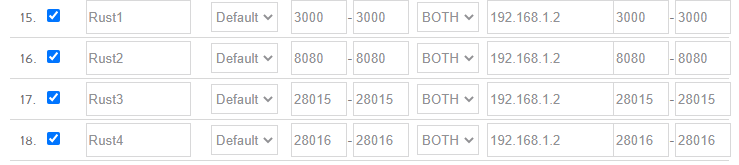
Any chance you can share your Rust port forwarding? I can't get mine to connect to the rust server browser.
-
So you are saying I should have it set to UDP? Because I do. I can connect on the local network. But I am unable to connect via outside connection. It isn't publishing to the Rust server browser. Do you have experience with a Rust server docker?
-
New update. So going in the Steam Server browser I could find it. I can also add it as a favorite and then go into Rust and find it in my favorite servers and connect that way. The second I delete it from my favorites I can not find it again except for in my History. So it doesn't look to be out on the open server list. Which is what I would like. I would also like to figure out how to add the RCON to be able to see server stats etc. I would also love to get this working with the Rust+ Companion Application. I appreciate your help.
-
No worries. Nothing abnormal from what I can see. Spawning 50814 entities 33432 / 50814 done. Enforcing SpawnPopulation Limits done. Initializing 55837 entity links done. Initializing 752 stability supports done. Initializing 50858 entity save caches done. Gamemode Convar : No Gamemode. [S_API] SteamAPI_Init(): Loaded local 'steamclient.so' OK. CAppInfoCacheReadFromDiskThread took 2 milliseconds to initialize CApplicationManagerPopulateThread took 0 milliseconds to initialize (will have waited on CAppInfoCacheReadFromDiskThread) RecordSteamInterfaceCreation (PID 105): SteamGameServer013 / RecordSteamInterfaceCreation (PID 105): SteamUtils010 / Setting breakpad minidump AppID = 252490 RecordSteamInterfaceCreation (PID 105): SteamGameServer013 / RecordSteamInterfaceCreation (PID 105): SteamUtils010 / RecordSteamInterfaceCreation (PID 105): SteamNetworking006 / RecordSteamInterfaceCreation (PID 105): SteamGameServerStats001 / RecordSteamInterfaceCreation (PID 105): STEAMINVENTORY_INTERFACE_V003 / RecordSteamInterfaceCreation (PID 105): STEAMUGC_INTERFACE_VERSION015 / Missing interface adapter for STEAMUGC_INTERFACE_VERSION015 RecordSteamInterfaceCreation (PID 105): STEAMAPPS_INTERFACE_VERSION008 / [S_API FAIL] Tried to access Steam interface SteamNetworkingUtils003 before SteamAPI_Init succeeded. RecordSteamInterfaceCreation (PID 105): SteamNetworkingUtils003 / RecordSteamInterfaceCreation (PID 105): SteamNetworkingSockets009 / Warning: failed to init SDL thread priority manager: SDL not found SteamServer Initialized IP address from external API: IDELETEDTHISIP Server startup complete SteamServer Connected BradleyAPC Spawned at :(751.9, 36.2, 1076.3) Checking for new Steam Item Definitions..
-
Just tried. No go. Tries to connect twice and fails.
-
So I tried to connect on the LAN via steam server browser and it doesnt show up. So Im not sure what is happening.
-
Question. Installing Rust docker. It starts and runs. But won't show in their server browser. I believe I forwarded the ports as other dockers such as factorio work. But can't figure this one out. Any ideas?
-
It isn't support for mods. It is support for their basic docker that they have created and maintained. It just isn't accessing the mods folder. Why? I don't know. Literally nobody on earth knows. Nobody has tried to figure it out. I can put any mod I want into the local client files. And it just works. Because it is a simple system. But for some reason the docker image isn't pulling those mods from within the mod folder. It is overwritting the mod-settings.json file every time the server is shut down though..... So is it working? To a point. But it isn't working correctly. Because for well over a year it worked. And with the full release of the game it is no longer working. And it is so incredibly frustrating that NOBODY cares. The mod system for factorio is so incredibly simple. It is literally a zipped folder inside of a "mods" folder in the directory. That is it. It should then populate those mods and create a mods-settings.json that tells the client which mods are active and inactive. I can put the correct json in. Start the server and the mods aren't active. But the json is correct. Shut down the server and the json has been overwritten only showing the base game as active and nothing else listed.
-
Posted on the github and on the factorio forums. Github maintainer said they don't provide support or assistance. Game loads as normal. But mods do not work. They used to work. At this point I'm not sure why they maintain it because they won't offer any support for issues.....
-
Literally about 100 hours since Feb 9 trying to get Factorio to load the mods. It simply will not load mods onto the server. It worked before. It no longer does. Anyone have success with it? Or is this docker officially no longer supported?

