





Entxawp
Members
-
Joined
-
Last visited
-
AMP Advanced Edition since 09/02/2021.
-
Since 2.7.2.0 only about 10 instances start/activate, the rest fails with "error 135". tried the basic things like reconfiguring with the license but it does not work, anyone else able to find a solution to this yet? "Couldn't reconfigure the instance: AMP configuration failed with return code 135"
-
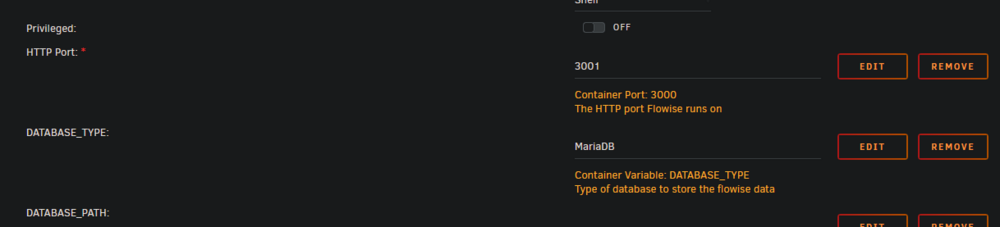
Also got into the WebUI, just remove the top PORT variable, there is a bunch of things double in the template

-
This is a issue in the template, re-add the variable and it does work, the WebUI is still unreachable though, haven't figured out yet why that is happening.
-
If anyone ever want to clone a snapshot from one pool to another pool here is how you can do so on Unraid 6.12.x with ZFS Master. zfs send pool1/dataset@snapshot_name | zfs receive pool2/dataset It will look something like this in practice: zfs send bxtyr/appdata@2024-09-02-190650 | zfs receive ark/test If the dataset "test" already existed you'll have to add the -F zfs send bxtyr/appdata@2024-09-02-190650 | zfs receive -F ark/test You'll have to mount the dataset if it's not available root@Example:~# cd /mnt/ark/test root@Example:~# bash: cd: /mnt/ark/test: No such file or directory root@Example:~# zfs mount ark/test root@Example:~# cd /mnt/ark/test root@GExample:/mnt/ark/test#
-
I need to extract the save file but it says it's no longer there /home/amp/.config/Epic/FactoryGame/Saved/SaveGames/
-
Thank you for the container and all the information that comes with it! I've been useing the container for a little while now and I'm wondering if there is a way to automate the plot command on start-up and then every hour untill X amount are active.
-
[13:04:45] [Core Info] : Running in a Docker environment. [13:04:45] [Core Warning] : Current time zone is set to CET - Servers should ideally be UTC to avoid time-zone related issues [13:04:45] [Core Info] : OS: Linux / x86_64 [13:04:45] [Core Info] : CPU: AMD Ryzen Threadripper 1920X 12-Core Processor (12C/24T) [13:04:45] [Core Info] : AMP Instance ID: 3debdf2f-9fbe-40cd-a0f2-b20105ed69af [13:04:46] [ModuleLoader Info] : Loaded MinecraftModule version 1.0.0.3 by CubeCoders Limited [13:04:46] [ModuleLoader Info] : Loaded FileManagerPlugin version 1.0.0.0 by CubeCoders Limited [13:04:46] [ModuleLoader Info] : Loaded EmailSenderPlugin version 1.0.0.0 by CubeCoders Limited [13:04:46] [ModuleLoader Info] : Loaded WebRequestPlugin version 1.0.0.0 by CubeCoders Limited [13:04:46] [ModuleLoader Info] : Loaded LocalFileBackupPlugin version 1.0.0.0 by CubeCoders Limited [13:04:46] [ModuleLoader Info] : Loaded CommonCorePlugin version 1.0.0.0 by CubeCoders Limited [13:04:46] [FileManager Notice] : Using keypair with fingerprint FX/QoxIyrsFiw16bF1wBi9B42GEI7tpg4JOj4qsdzuM= [13:04:46] [FileManager Info] : SFTP Server started on 0.0.0.0:2225 [13:04:46] [Core Error] : No valid AMP licence was found. Please run `ampinstmgr reactivate BungeeCordProxy` to reactivate this instance. Just the reactivate with ampisntmgr. Also I did not set a static MAC address (doing it right now) EDIT: This indeed solved the problem, thank you very much
-
Heyo, I'm having trouble when I run weekly backups, just like after last week's back-up all of the instances have licence problems and need to be reactivated. Apearenly this is due to a wrong auth server URL, how do I fix this?
-
I'm trying to install Pterodactyl but I'n not getting the full filestructure (no core.js) so I can't complete the nodes. Am I doing something wrong, are there more commands that I need to run after installing both the Panel and Deamon?
-
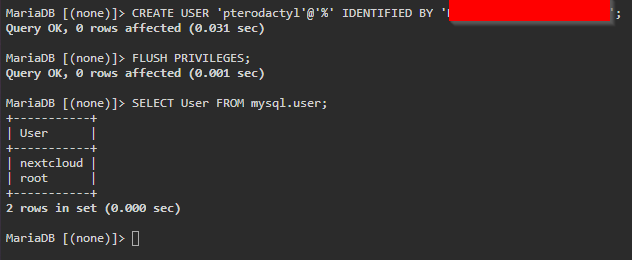
Hi everyone, I am having some issues with MariaDB, namely with creating a new user. Half a week ago I also had an issue where it dropped all the mysql.user passwords after a gracefull reboot of unraid so it might have to do something with that. In the picture you can see MariaDB does say the command worked but actualy it didn't. Hope someone can help, Ent.
-
I've solved the issue. The Issue seems to stem form the MariaDB server. It looks like the password or something else expired and the solve is to root into MariaDB and reset the password the same as it was before. Logging in as root on the MariaDB server UPDATE mysql.user SET authentication_string = PASSWORD('same_password_as_before') WHERE User = 'nextcloud' AND Host = 'localhost'; FLUSH PRIVILEGES; GRANT ALL PRIVILEGES ON nextcloud.* TO 'nextcloud' IDENTIFIED BY 'same_password_as_before'; exit;
-
Hi everyone, After rebooting my Unraid server I'm facing this issue. Internal Server Error The server encountered an internal error and was unable to complete your request. Please contact the server administrator if this error reappears multiple times, please include the technical details below in your report. More details can be found in the server log. The error occured after a reboot of the system, before the system worked as normal. nextcloud/log/php/error.log: [25-Oct-2020 02:00:00] NOTICE: fpm is running, pid 767 [25-Oct-2020 02:00:00] NOTICE: ready to handle connections [25-Oct-2020 10:31:40] NOTICE: Terminating ... [25-Oct-2020 10:31:40] NOTICE: exiting, bye-bye! [25-Oct-2020 10:36:27] NOTICE: fpm is running, pid 352 [25-Oct-2020 10:36:27] NOTICE: ready to handle connections [25-Oct-2020 10:38:38] NOTICE: Terminating ... [25-Oct-2020 10:38:38] NOTICE: exiting, bye-bye! [25-Oct-2020 11:14:25] NOTICE: fpm is running, pid 350 [25-Oct-2020 11:14:25] NOTICE: ready to handle connections [25-Oct-2020 11:35:39] NOTICE: Terminating ... [25-Oct-2020 11:35:39] NOTICE: exiting, bye-bye! [25-Oct-2020 11:36:04] NOTICE: fpm is running, pid 353 [25-Oct-2020 11:36:04] NOTICE: ready to handle connections [25-Oct-2020 12:09:18] NOTICE: Terminating ... [25-Oct-2020 12:09:18] NOTICE: exiting, bye-bye! [25-Oct-2020 12:09:53] NOTICE: fpm is running, pid 352 [25-Oct-2020 12:09:53] NOTICE: ready to handle connections [25-Oct-2020 12:12:20] NOTICE: Terminating ... [25-Oct-2020 12:12:20] NOTICE: exiting, bye-bye! [25-Oct-2020 12:15:23] NOTICE: fpm is running, pid 351 [25-Oct-2020 12:15:23] NOTICE: ready to handle connections [25-Oct-2020 13:30:22] NOTICE: Terminating ... [25-Oct-2020 13:30:22] NOTICE: exiting, bye-bye! [25-Oct-2020 13:54:58] NOTICE: fpm is running, pid 353 [25-Oct-2020 13:54:58] NOTICE: ready to handle connections [25-Oct-2020 13:56:51] NOTICE: fpm is running, pid 353 [25-Oct-2020 13:56:51] NOTICE: ready to handle connections [25-Oct-2020 14:03:05] NOTICE: Terminating ... [25-Oct-2020 14:03:05] NOTICE: exiting, bye-bye! [25-Oct-2020 14:07:12] NOTICE: fpm is running, pid 352 [25-Oct-2020 14:07:12] NOTICE: ready to handle connections [25-Oct-2020 14:07:48] NOTICE: Terminating ... [25-Oct-2020 14:07:48] NOTICE: exiting, bye-bye! [25-Oct-2020 14:11:43] NOTICE: fpm is running, pid 350 [25-Oct-2020 14:11:43] NOTICE: ready to handle connections Log nextcloud/data/nextcloud.log: {"reqId":"CCCcKu04Y2M3kUn1R4dQ","level":2,"time":"2020-09-01T13:45:34+00:00","remoteAddr":"192.168.178.86","user":"--","app":"no app in context","method":"GET","url":"/","message":"Could not detect any host in http:///data/htaccesstest.txt","userAgent":"Mozilla/5.0 (Windows NT 10.0; Win64; x64) AppleWebKit/537.36 (KHTML, like Gecko) Chrome/85.0.4183.83 Safari/537.36","version":""} {"reqId":"CCCcKu04Y2M3kUn1R4dQ","level":2,"time":"2020-09-01T13:45:34+00:00","remoteAddr":"192.168.178.86","user":"--","app":"no app in context","method":"GET","url":"/","message":"Could not detect any host in https:///data/htaccesstest.txt","userAgent":"Mozilla/5.0 (Windows NT 10.0; Win64; x64) AppleWebKit/537.36 (KHTML, like Gecko) Chrome/85.0.4183.83 Safari/537.36","version":""} {"reqId":"CCCcKu04Y2M3kUn1R4dQ","level":3,"time":"2020-09-01T13:45:34+00:00","remoteAddr":"192.168.178.86","user":"--","app":"jsresourceloader","method":"GET","url":"/","message":"Could not find resource js/setup.js to load","userAgent":"Mozilla/5.0 (Windows NT 10.0; Win64; x64) AppleWebKit/537.36 (KHTML, like Gecko) Chrome/85.0.4183.83 Safari/537.36","version":""} {"reqId":"hMxCPGlNGrJBXrNDg4iR","level":2,"time":"2020-09-01T13:49:10+00:00","remoteAddr":"192.168.178.86","user":"--","app":"no app in context","method":"POST","url":"/index.php","message":"Could not detect any host in http:///data/htaccesstest.txt","userAgent":"Mozilla/5.0 (Windows NT 10.0; Win64; x64) AppleWebKit/537.36 (KHTML, like Gecko) Chrome/85.0.4183.83 Safari/537.36","version":""} {"reqId":"hMxCPGlNGrJBXrNDg4iR","level":2,"time":"2020-09-01T13:49:10+00:00","remoteAddr":"192.168.178.86","user":"--","app":"no app in context","method":"POST","url":"/index.php","message":"Could not detect any host in https:///data/htaccesstest.txt","userAgent":"Mozilla/5.0 (Windows NT 10.0; Win64; x64) AppleWebKit/537.36 (KHTML, like Gecko) Chrome/85.0.4183.83 Safari/537.36","version":""} {"reqId":"hMxCPGlNGrJBXrNDg4iR","level":3,"time":"2020-09-01T13:49:13+00:00","remoteAddr":"192.168.178.86","user":"--","app":"jsresourceloader","method":"POST","url":"/index.php","message":"Could not find resource js/setup.js to load","userAgent":"Mozilla/5.0 (Windows NT 10.0; Win64; x64) AppleWebKit/537.36 (KHTML, like Gecko) Chrome/85.0.4183.83 Safari/537.36","version":"19.0.2.2"} {"reqId":"lWUIfyi5d3uK6vIRZ5bh","level":2,"time":"2020-09-01T13:50:20+00:00","remoteAddr":"192.168.178.86","user":"--","app":"no app in context","method":"POST","url":"/index.php","message":"Host 192.168.178.76 was not connected to because it violates local access rules","userAgent":"Mozilla/5.0 (Windows NT 10.0; Win64; x64) AppleWebKit/537.36 (KHTML, like Gecko) Chrome/85.0.4183.83 Safari/537.36","version":"19.0.2.2"} {"reqId":"lWUIfyi5d3uK6vIRZ5bh","level":2,"time":"2020-09-01T13:50:20+00:00","remoteAddr":"192.168.178.86","user":"--","app":"no app in context","method":"POST","url":"/index.php","message":"Host 192.168.178.76 was not connected to because it violates local access rules","userAgent":"Mozilla/5.0 (Windows NT 10.0; Win64; x64) AppleWebKit/537.36 (KHTML, like Gecko) Chrome/85.0.4183.83 Safari/537.36","version":"19.0.2.2"} {"reqId":"lWUIfyi5d3uK6vIRZ5bh","level":3,"time":"2020-09-01T13:50:23+00:00","remoteAddr":"192.168.178.86","user":"--","app":"jsresourceloader","method":"POST","url":"/index.php","message":"Could not find resource js/setup.js to load","userAgent":"Mozilla/5.0 (Windows NT 10.0; Win64; x64) AppleWebKit/537.36 (KHTML, like Gecko) Chrome/85.0.4183.83 Safari/537.36","version":"19.0.2.2"} {"reqId":"DV1mdsZsyFRGmQvaHT9C","level":2,"time":"2020-09-01T13:50:53+00:00","remoteAddr":"192.168.178.86","user":"--","app":"no app in context","method":"POST","url":"/index.php","message":"Host 192.168.178.76 was not connected to because it violates local access rules","userAgent":"Mozilla/5.0 (Windows NT 10.0; Win64; x64) AppleWebKit/537.36 (KHTML, like Gecko) Chrome/85.0.4183.83 Safari/537.36","version":"19.0.2.2"} {"reqId":"DV1mdsZsyFRGmQvaHT9C","level":2,"time":"2020-09-01T13:50:53+00:00","remoteAddr":"192.168.178.86","user":"--","app":"no app in context","method":"POST","url":"/index.php","message":"Host 192.168.178.76 was not connected to because it violates local access rules","userAgent":"Mozilla/5.0 (Windows NT 10.0; Win64; x64) AppleWebKit/537.36 (KHTML, like Gecko) Chrome/85.0.4183.83 Safari/537.36","version":"19.0.2.2"} {"reqId":"DV1mdsZsyFRGmQvaHT9C","level":3,"time":"2020-09-01T13:50:57+00:00","remoteAddr":"192.168.178.86","user":"--","app":"jsresourceloader","method":"POST","url":"/index.php","message":"Could not find resource js/setup.js to load","userAgent":"Mozilla/5.0 (Windows NT 10.0; Win64; x64) AppleWebKit/537.36 (KHTML, like Gecko) Chrome/85.0.4183.83 Safari/537.36","version":"19.0.2.2"} Any help is appriciated, Ent
-
oh, well that fixes it then, thank you
-




