





Geoff Bland
Members
-
Joined
-
Last visited
Everything posted by Geoff Bland
-
You were correct. I triple checked this time and now all the disks had blue icons and I was able to correctly configure the array. Started and rebuilding parity now.
-
Yes - I did this. Made sure I selected "Retain All" and made doubly sure I pressed Apply and then Done. Should I be selecting "None" in New Config instead of "Retain all" ?
-
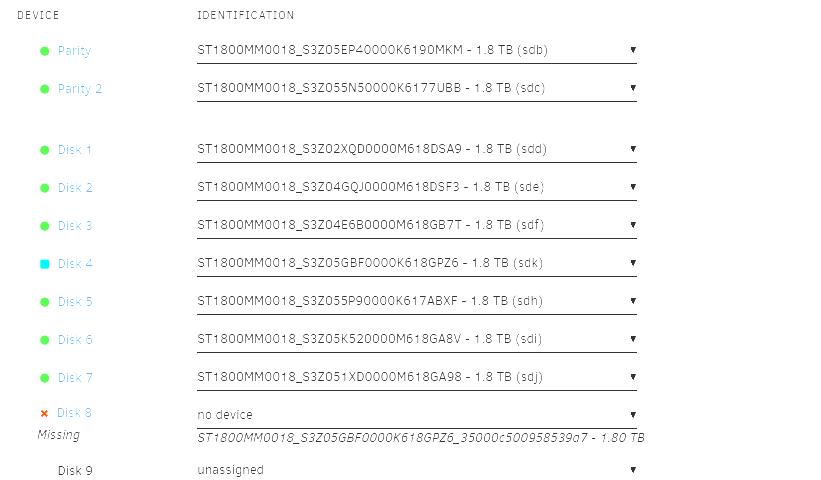
OK I tried this and it did not work. On step 5 of the above I am unable to move the disks around. If I move the next disk into the unassigned slot where the failed disk was and move all the following disks up one then I am unable to start the Array - "Invalid Configuration" and all but the next disk shows a red x and complains about "Missing" disk. If I move the last disk into the unassigned slot where the failed disk was leaving the other disks as they are then I am unable to start the Array - "Invalid Configuration" and the last (now empty) slot shows a red x and complains about "Missing" disk. What am I doing wrong?
-
Thanks for the response. So: Move all files off emulated disk onto another disk (using Unbalanced). Check and double check nothing remains on the emulated disk. Stop array Set new config - using Tools | New Config Remove unassigned failed disk and move all disks after this “up one” in the array list of disks. Restart array ensuring with parity rebuilt Is this correct?
-
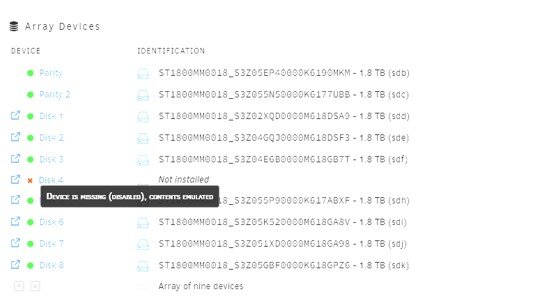
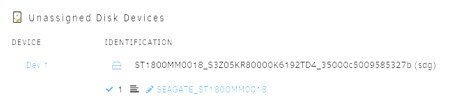
I have a failed disk in my array. I have plenty of free space in my array so I thought just to remove this disk. I followed the instructions at https://docs.unraid.net/unraid-os/manual/storage-management/ and https://docs.unraid.net/unraid-os/manual/storage-management/#reset-the-array-configuration to set the failed disk as unassigned. The failed disk now shows up in unassigned devices. But I thought this will rebuild the array from parity – but it appears to have done nothing and the missing disk just shows as “Not Installed” with the hint “Device is missing (disabled). Contents emulated”. To fix this I am planning on doing the following: 1. Move all files off emulated disk onto another disk (using Unbalanced). 2. Check and double check nothing remains on the emulated disk. 3. Stop array 4. Remove unassigned failed disk and move all disks after this “up one” in the array list of disks. 5. Restart array without parity rebuild Am I correct in thinking this will work?
-
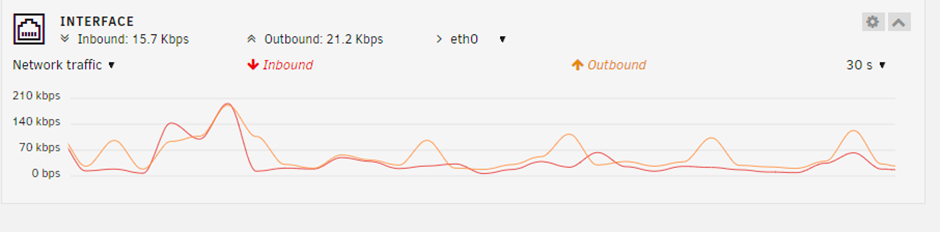
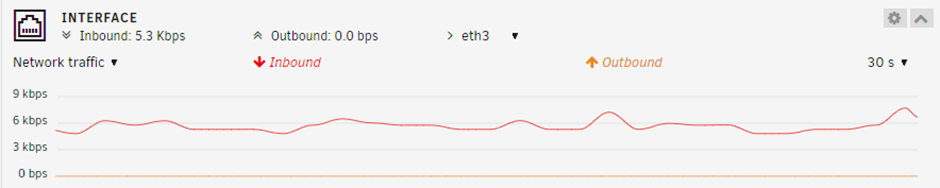
I have just added a new 10GB network card to my Unraid server (previously it had 2 1GB NICs) and have seen Unraid pick it up straight away and add it into the bond. Seems to be working fine. However, I am questioning if I have this set up in the most optimal way. I currently have no other servers with a 10GB NIC but will have this soon and will then be able to test so this post is just to gather some thoughts and information from people that have experience with this just to check my own understanding. I also plan to remove the 2nd 1GB NIC now I have the 10GB NIC working. I have set binding mode set as “active-backup (1)” and all 3 NIC are seen in the bond; eth0, eth1 and eth3 (being 1GB, 1GB and 10GB NICs respectively. With “active-backup” mode I would have expected one NIC to be used exclusively and a second NIC only to be used if the first failed. But what I’m seeing is the first old 1GB NIC being used most and the new 10GB NIC being used a little, so that is unexpected. The second 1GB NIC (eth1) is on a "private" test LAN so there's no traffic on that. Is this because everything connecting to the Unraid server is currently doing so only at 1GB? Ideally, I assume I would like the 10GB interface to be used for most things and the 1GB interface only to be used as a backup? Is my assumption correct and how do I set this in Unraid.

-
I've been using this simple yet very useful app for many years now. I'm just reinstalling it on a new UNRAID server but when I click "Install" from the UNRAID Apps the UNRAID web page stalls, the UNRAID "busy" animation is shown and the "Add Container" settings page is never shown. I can see anything in the log files showing any error. I have tried restarting docker and the UNRAID server this did not help. Other docker apps are not affected and bring up their "Add Container" settings pages with no problem. Edit: I was able to install the S3Backup container manually by using the Add Container option on the Docker page.
-
I just tried this on a 4K screen. It only seems to split into 3 columns when the browser width is 2000px, this seems a bit excessive as there's plenty of space for 3 columns at narrower browser widths. Compared with Unraid 6.11.5 the browser display has to be quite a bit wider before it displays 3 columns. Font size set to normal in Display Settings in both cases. Setting Font size Small in Display Settings makes no difference.
-
On the Shares page it is difficult to see at a glance what the initial and preferred/moved storage options are. That is it is difficult to see the difference between "Cache ---> Array" and "Cache <--- Array". Whilst maybe this current ordering is trying to show the primary and secondary storage, we know the Cache must always be the primary storage so this ordering does not help. It would be more obvious if instead the column showed either "Cache ---> Array" or "Array ---> Cache". This way also matches the mover selection when a Share is created/edited.
-
I have started getting delays with Unraid file shares when doing any operation (viewing files in directoires, file copies etc) with Windows, this did work fine but has started happening over the last several weeks. I am also seeing associated errors in the UNRAID logs. For example, from my windows PC if I open a new directory in Windows File Explorer, then File Explorer freezes for several minutes, then I see a warning in the UNRAID logs and then immediately Windows File Explorer comes back to life and shows the directory contents. The log errors are all of the form (when viewing a share) : May 6 12:53:55 UNRAID smbd[31869]: [2023/05/06 12:53:55.447545, 0] ../../source3/smbd/files.c:1199(synthetic_pathref) May 6 12:53:55 UNRAID smbd[31869]: synthetic_pathref: opening [Share/[email protected]/Share/Data/C/Users/Username/AppData/Local/Google/Chrome/User Data/Default/Cache/Cache_Data/f_05a0b8 (2023_05_06 04_52_58 UTC)] failed or (when copying up an iso) May 6 12:47:28 UNRAID smbd[31869]: [2023/05/06 12:47:28.820231, 0] ../../source3/smbd/files.c:1199(synthetic_pathref) May 6 12:47:28 UNRAID smbd[31869]: synthetic_pathref: opening [Operating Systems/Ubuntu/ubuntu-23.04-desktop-amd64 (1).iso] failed If I reboot the UNRAID server then it starts working fine for a few hours and then the freezes and log errors start up again. Restarting samba with /etc/rc.d/rc.samba restart shows the following error in the logs May 6 12:57:37 UNRAID02 smbd[31869]: [2023/05/06 12:57:37.828986, 0] ../../lib/util/fault.c:184(smb_panic_log) May 6 12:57:37 UNRAID02 smbd[31869]: PANIC (pid 31869): assert failed: (fh->fd == -1) || (fh->fd == AT_FDCWD) in 4.17.3 May 6 12:57:37 UNRAID02 smbd[31869]: [2023/05/06 12:57:37.829787, 0] ../../lib/util/fault.c:292(log_stack_trace) May 6 12:57:37 UNRAID02 smbd[31869]: BACKTRACE: 39 stack frames: May 6 12:57:37 UNRAID02 smbd[31869]: #0 /usr/lib64/libgenrand-samba4.so(log_stack_trace+0x2e) [0x149415d7664e] May 6 12:57:37 UNRAID02 smbd[31869]: #1 /usr/lib64/libgenrand-samba4.so(smb_panic+0x9) [0x149415d768a9] May 6 12:57:37 UNRAID02 smbd[31869]: #2 /usr/lib64/libsmbd-base-samba4.so(+0x4d10b) [0x14941615710b] May 6 12:57:37 UNRAID02 smbd[31869]: #3 /usr/lib64/libtalloc.so.2(+0x44df) [0x149415d264df] May 6 12:57:37 UNRAID02 smbd[31869]: #4 /usr/lib64/libsmbd-base-samba4.so(file_free+0xd6) [0x1494161642e6] May 6 12:57:37 UNRAID02 smbd[31869]: #5 /usr/lib64/libsmbd-base-samba4.so(close_file_free+0x29) [0x149416194d49] May 6 12:57:37 UNRAID02 smbd[31869]: #6 /usr/lib64/libsmbd-base-samba4.so(+0x5d046) [0x149416167046] May 6 12:57:37 UNRAID02 smbd[31869]: #7 /usr/lib64/libsmbd-base-samba4.so(+0x5d1ce) [0x1494161671ce] May 6 12:57:37 UNRAID02 smbd[31869]: #8 /usr/lib64/libsmbd-base-samba4.so(files_forall+0x19) [0x149416163119] May 6 12:57:37 UNRAID02 smbd[31869]: #9 /usr/lib64/libsmbd-base-samba4.so(file_close_user+0x3d) [0x14941616325d] May 6 12:57:37 UNRAID02 smbd[31869]: #10 /usr/lib64/libsmbd-base-samba4.so(smbXsrv_session_logoff+0x4d) [0x1494161e000d] May 6 12:57:37 UNRAID02 smbd[31869]: #11 /usr/lib64/libsmbd-base-samba4.so(+0xd6445) [0x1494161e0445] May 6 12:57:37 UNRAID02 smbd[31869]: #12 /usr/lib64/libdbwrap-samba4.so(+0x5d18) [0x149415a59d18] May 6 12:57:37 UNRAID02 smbd[31869]: #13 /usr/lib64/libdbwrap-samba4.so(+0x5f3a) [0x149415a59f3a] May 6 12:57:37 UNRAID02 smbd[31869]: #14 /usr/lib64/libdbwrap-samba4.so(dbwrap_traverse+0x7) [0x149415a57f67] May 6 12:57:37 UNRAID02 smbd[31869]: #15 /usr/lib64/libsmbd-base-samba4.so(smbXsrv_session_logoff_all+0x5b) [0x1494161e07fb] May 6 12:57:37 UNRAID02 smbd[31869]: #16 /usr/lib64/libsmbd-base-samba4.so(+0xdca0b) [0x1494161e6a0b] May 6 12:57:37 UNRAID02 smbd[31869]: #17 /usr/lib64/libsmbd-base-samba4.so(smbd_reinit_after_fork+0) [0x1494161e6ff0] May 6 12:57:37 UNRAID02 smbd[31869]: #18 /usr/lib64/libsmbd-shim-samba4.so(exit_server_cleanly+0x14) [0x149415d7b284] May 6 12:57:37 UNRAID02 smbd[31869]: #19 /usr/lib64/libsmbd-base-samba4.so(+0xa08e2) [0x1494161aa8e2] May 6 12:57:37 UNRAID02 smbd[31869]: #20 /usr/lib64/libtevent.so.0(tevent_common_invoke_signal_handler+0xa6) [0x149415d3d936] May 6 12:57:37 UNRAID02 smbd[31869]: #21 /usr/lib64/libtevent.so.0(tevent_common_check_signal+0xc3) [0x149415d3da93] May 6 12:57:37 UNRAID02 smbd[31869]: #22 /usr/lib64/libtevent.so.0(+0xea59) [0x149415d3fa59] May 6 12:57:37 UNRAID02 smbd[31869]: #23 /usr/lib64/libtevent.so.0(+0xcd77) [0x149415d3dd77] May 6 12:57:37 UNRAID02 smbd[31869]: #24 /usr/lib64/libtevent.so.0(_tevent_loop_once+0x91) [0x149415d38b61] May 6 12:57:37 UNRAID02 smbd[31869]: #25 /usr/lib64/libtevent.so.0(tevent_common_loop_wait+0x1b) [0x149415d38e3b] May 6 12:57:37 UNRAID02 smbd[31869]: #26 /usr/lib64/libtevent.so.0(+0xcd17) [0x149415d3dd17] May 6 12:57:37 UNRAID02 smbd[31869]: #27 /usr/lib64/libsmbd-base-samba4.so(smbd_process+0x817) [0x1494161adce7] May 6 12:57:37 UNRAID02 smbd[31869]: #28 /usr/sbin/smbd(+0xb090) [0x5604970ba090] May 6 12:57:37 UNRAID02 smbd[31869]: #29 /usr/lib64/libtevent.so.0(tevent_common_invoke_fd_handler+0x91) [0x149415d39791] May 6 12:57:37 UNRAID02 smbd[31869]: #30 /usr/lib64/libtevent.so.0(+0xec87) [0x149415d3fc87] May 6 12:57:37 UNRAID02 smbd[31869]: #31 /usr/lib64/libtevent.so.0(+0xcd77) [0x149415d3dd77] May 6 12:57:37 UNRAID02 smbd[31869]: #32 /usr/lib64/libtevent.so.0(_tevent_loop_once+0x91) [0x149415d38b61] May 6 12:57:37 UNRAID02 smbd[31869]: #33 /usr/lib64/libtevent.so.0(tevent_common_loop_wait+0x1b) [0x149415d38e3b] May 6 12:57:37 UNRAID02 smbd[31869]: #34 /usr/lib64/libtevent.so.0(+0xcd17) [0x149415d3dd17] May 6 12:57:37 UNRAID02 smbd[31869]: #35 /usr/sbin/smbd(main+0x1489) [0x5604970b7259] May 6 12:57:37 UNRAID02 smbd[31869]: #36 /lib64/libc.so.6(+0x23177) [0x149415b44177] May 6 12:57:37 UNRAID02 smbd[31869]: #37 /lib64/libc.so.6(__libc_start_main+0x85) [0x149415b44235] May 6 12:57:37 UNRAID02 smbd[31869]: #38 /usr/sbin/smbd(_start+0x21) [0x5604970b7b31] May 6 12:57:37 UNRAID02 smbd[31869]: [2023/05/06 12:57:37.830194, 0] ../../source3/lib/dumpcore.c:315(dump_core) May 6 12:57:37 UNRAID02 smbd[31869]: dumping core in /var/log/samba/cores/smbd This is UNRAID version 6.11.5. I have the following SMB settings [global] idmap config * : backend = tdb idmap config * : range = 1000-7999 idmap config DOMAIN : backend = rid idmap config DOMAIN : range = 10000-4000000000 unraid02-diagnostics-20230506-1307.zip
-
Yes, done. Thanks.
-
Suggestion for an improvement: Please see this support issue I raised: Fix Common Problems Reporting Server Out Of Memory Errors Basically if a container that has restricted RAM runs out of that RAM UNRAID will "sacrifice the child" and kill the container process, this gets reported to the syslog. Fix Common Problems reports this as if the server has run out of memory. It would be nicer to report that "container X has run out of memory...".
-
OK I've done some further research. This may be a false alarm from the Fix Common Problems plugin. The actual error is "Memory cgroup out of memory", this is not the server running out of memory - rather a single container, which was constrained to 2GB total, has run out of memory. The OS has restarted just that container and flagged this warning. So the warning from Fix Common Problems about "Your server has run out of memory..." is a bit misleading (and overly worrying). Perhaps Fix Common Problems can detect this as a different kind of error and report "Your container X has run out of memory..."
-
Thanks for the quick response. >If it's a one time thing you can ignore, It's ocurred twice now. Both in the last 3 weeks. If it occurs again I'll post back here. >if it keeps happening try limiting more the RAM for VMs and/or docker containers, the problem is usually not just about not enough RAM but more about fragmented RAM, Can you explain some more on this point please? As I have less than 25% utilization of RAM on this server (over 100GB RAM free) it would be strange for fragmentation to occur, this normally only occurs when RAM usage is getting over 50%. A quick look at top shows over 104GB is used by cache and this gets reallocated as application RAM as needed. >alternatively a small swap file on disk might help, you can use the swapfile plugin: Can you also explain a bit more about this, as I understood it virtual memort won't use swap unless the server gets very low on physical RAM (regardless of any fragmentation)?
-
Checking the syslog I think I see that there's an error caused by a docker container: Mar 20 04:27:41 UNRAID02 kernel: oom-kill:constraint=CONSTRAINT_MEMCG,nodemask=(null),cpuset=75989cd4cdfb95d6d4cc0def9b3ed1360cd6f88458130216d3fb6f75b56036b6,mems_allowed=0-1,oom_memcg=/docker/75989cd4cdfb95d6d4cc0def9b3ed1360cd6f88458130216d3fb6f75b56036b6,task_memcg=/docker/75989cd4cdfb95d6d4cc0def9b3ed1360cd6f88458130216d3fb6f75b56036b6,task=s3cmd,pid=17525,uid=0 Mar 20 04:27:41 UNRAID02 kernel: Memory cgroup out of memory: Killed process 17525 (s3cmd) total-vm:567788kB, anon-rss:516056kB, file-rss:0kB, shmem-rss:0kB, UID:0 pgtables:1152kB oom_score_adj:0 ... Mar 20 04:28:34 UNRAID02 kernel: oom-kill:constraint=CONSTRAINT_MEMCG,nodemask=(null),cpuset=75989cd4cdfb95d6d4cc0def9b3ed1360cd6f88458130216d3fb6f75b56036b6,mems_allowed=0-1,oom_memcg=/docker/75989cd4cdfb95d6d4cc0def9b3ed1360cd6f88458130216d3fb6f75b56036b6,task_memcg=/docker/75989cd4cdfb95d6d4cc0def9b3ed1360cd6f88458130216d3fb6f75b56036b6,task=s3cmd,pid=17526,uid=0 But this container is set up so it can only use 2GB of ram (using extra parameter --memory=2G) and usually only uses a fraction of that. So how can this be causing Out of Memory errors on the server itself?
-
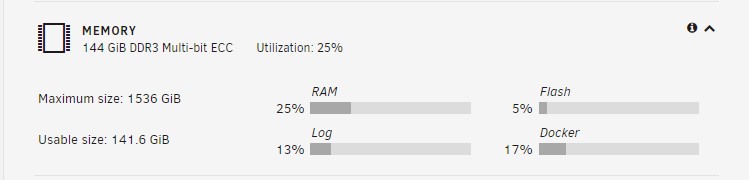
The Fix Common Problems plugin is reporting that Out Of Memory errors are detected on my UNRAID server. This server has 144GB of RAM and as it is mostly used for storage only 25% of the RAM is actually used. This server has been working fine for several years. I have only had this issue occur twice now in the last 3 weeks, I have restarted my server between these reported errors. Other than this being reported by Fix Common Problems the server has been stable. In the logs I just notice constant SMB warnings (100s every minute) but these can be ignored according to another post of the forums. Mar 20 15:39:50 UNRAID02 smbd[10630]: synthetic_pathref: opening [<user>@<path> (2023_03_20 15_04_28 UTC)] failed What do I need to investigate to determine what is causing this? This is UNRAID 6.11.5 I attach diagnostics. unraid02-diagnostics-20230320-1539.zip

-
Weird. My /mnt directory has the expected 755 permissions and works fine with this. root@UNRAID:/# ls -la / | grep mnt drwxr-xr-x 16 root root 320 Nov 15 16:27 mnt/
-
This is a workaround for the issue that has been found and has worked for a number of users. Use this fix at your own risk. The problem appears to be that Unraid is using a later version of the Samba Service but with an ID mapper (idmap_hash) that was end of life over 5 years ago and is known to cause issues. The fix is to "correct" Unraid's standard server configuration for Samba to use the correct ID mappers. These sites were of particular use: https://support.microfocus.com/kb/doc.php?id=7007006 https://lists.samba.org/mailman/listinfo/samba https://www.samba.org/samba/docs/current/man-html/ https://www.samba.org/samba/docs/current/man-html/idmap_hash.8.html https://www.samba.org/samba/docs/current/man-html/idmap_tdb.8.html https://www.samba.org/samba/docs/current/man-html/idmap_rid.8.html NOTE after this fix, as user IDs get changed, permissions need to be re-applied (although see also GrantE's post that details you can do some calculation to determine the new ID range for users and preserve any correct working permissions). Workaround UNRAID Samba Access Issues. Open the Unraid terminal, ">_" button on top of each Unraid page. First back up smb-extra.conf file as follows: cp /boot/config/smb-extra.conf /boot/config/smb-extra.conf.bkp Edit the contents of /boot/config/smb-extra.conf and add these lines, replacing <SHORT_DOMAIN_NAME> with the name of your domain (the same as appears in the "AD short domain name" field of your Unraid SMB settings): [global] idmap config * : backend = tdb idmap config * : range = 1000-7999 idmap config <SHORT_DOMAIN_NAME> : backend = rid idmap config <SHORT_DOMAIN_NAME> : range = 10000-4000000000 The idea is that RID ID mappings are consistent and a given domain account will always map to the same local ID on Unraid, so if for some reason the IDs get reset the same domain accounts will remap to the same local IDs and retain access rights. Also a range of tdb IDs is assigned in case any SMB accounts are used without a domain. This will be shown as "extra configuration" on the Unraid SMB Settings page. Other Unraid plugins (such as unassigned devices) may also add configuration to this same smb-extra.conf - leave these as is and just add these extra lines to the top. Then reboot Unraid (just restarting the SMB service does not work fully). Finally check and fix all your permissions, as detailed below. Reset/Re-apply UNRAID Permissions. Open the Unraid terminal, ">_" button on top of each Unraid page. Run the following commands where <share> is the name of the share (each can take a long time if you have many files). chown -R root /mnt/user/<Share> chgrp -R domain\ users /mnt/user/<Share> setfacl -R -b /mnt/user/<Share> chmod -R g+rwx /mnt/user/<Share> If you need Windows permissions on the folder then apply permissions via Windows (NOT via Unraid Share SMB User Access settings). Open UNRAID Shares in File Explorer. Right click on the Share, select Properties. Select Security tab. Click "Advanced". Add, remove and alter permissions as required - note you may need to check the "Replace child object permissions" options to get this to work properly. Hit apply If using NFS from this share just refresh it (add/delete a space on the NFS rule and hit Apply) on UNRAID for some reason these seem to lose access rights when Windows changes the permission even when they should not. Some commands to diagnose issues: root@UNRAID01:~# net ads info Checks UNRAID is correctly joined to your AD domain. net ads user --user=DomainName/username --password=********* Checks UNRAID can correctly connect to Windows AD users and get user access information. wbinfo -i username Checks UNRAID can authenticate this user with Windows AD users and get this user's access information.
-
Myself and many other users are experiencing many issues with SMB shares using Windows Active Directory since upgrading to 6.10.2. Upgrading to later versions has not fixed this, tested on 6.10.3 and 6.11.1 These issues are reported in this forum thread: Reported symptoms are: Intermittent access issues from Windows PCs to the Unraid shares. Occasionally only some user accounts are affected and some accounts are fine and have no problems. UNRAID log drive filling up due to very large syslog files. The syslog shows continual refused mount requests for my account and this seems to be as it cannot convert my SID to a UID. Jul 15 21:58:49 UNRAID01 smbd[****]: check_account: Failed to convert SID S-1-5-21-XXXXXXXX-XXXXXXXX-XXXXXXXX-1105 to a UID (dom_user[DOMAIN\username) The /var/log/samba/log.smbd log file is also full of the same error message. Also calling wbinfo fails for some user's Windows accounts: root@UNRAID01:~# wbinfo -i myuser failed to call wbcGetpwnam: WBC_ERR_DOMAIN_NOT_FOUND Could not get info for user myuser root@UNRAID01:~# wbinfo -i okuser okuser:*:NNNNNNNN:NNNNNNNNNN:okuser:/home/DOMAIN/okuser:/bin/false Potential workarounds for this issue are reported in this thread:
-
I finally found a solution to this. I disabled SMB and the re-enabled it again. First stop the array (From MAIN hit Stop) In Settings | SMB in SMB Settings set SMB Enabled to "No" In Settings | SMB in SMB Settings set SMB Enabled back to "Yes (Active Directory)" Then enter the AD username and password to and Hit Join as usual and now it Joins the AD domain. Finally restart the array. I checked all configuration files before and after doing this, there's no significant different other than what you would expect now UNRAID is domain joined so I can only assume this is some error in a cached value in UNRAID or SMB that resetting SMB cleared out.
-
I have an UNRAID server previously working fine and attached to an AD domain but after restart I noticed that the server name had gone back to "Tower" and the timezone had reset itself. I corrected both of these and rebooted. All other settings seemed to be OK. All disks and shares intact. But now I cannot connect to my AD domain - I could do with some help diagnosing this issue. UNRAID version is 6.10.3. Domain Controller is Windows Server 2022. Under Settings | SMB Settings Enable SMB: Yes (Active Directory) Hide "dot" files: No Enable SMB Multi Channel: No Enhanced macOS interoperability: Yes Enable NetBIOS: No Enable WSD: Yes WSD options [experimental]: <blank> Under Settings | SMB Settings | SMB Extras Samba extra configuration: [global] idmap config * : backend = tdb idmap config * : range = 1000-7999 idmap config NEWT : backend = rid idmap config NEWT : range = 10000-4000000000 #unassigned_devices_start #Unassigned devices share includes include = /tmp/unassigned.devices/smb-settings.conf #unassigned_devices_end Under Settings | SMB Settings | Active Directory Settings AD Join Status: Not joined AD domain name (FQDN): NEWT.newtcomputing.com AD short domain name: NEWT AD account login: unraid AD account password: ******** AD initial owner: unraid AD initial group: Domain Users Under Settings | Network UNRAID server has a static IP. IPv4 DNS server has a static IP and points to primary Domain controller. I can ping my Domain controller by fully qualified name: root@UNRAID02:~# ping DC05.NEWT.newtcomputing.com PING DC05.NEWT.newtcomputing.com (192.168.1.15) 56(84) bytes of data. 64 bytes from DC05.NEWT.newtcomputing.com (192.168.1.15): icmp_seq=1 ttl=128 time=0.308 ms Times are in sync and the same for UNRAID server and AD server. Kerberos settings are as follow: root@UNRAID02:~# ls -la /etc/krb5.conf -rw-r--r-- 1 root root 69 Jun 14 18:32 /etc/krb5.conf root@UNRAID02:~# cat /etc/krb5.conf [libdefaults] dns_lookup_kdc = true dns_lookup_realm = false The "unraid" AD account I have used is a Domain Admin account. I have also tried other administrators accounts these also do not work. I have tested I am using the correct password and that the "unraid" account is valid and works. I have deleted the computer object from AD and tried, this still did not work. If I run the join from the command line I get an unhelpful message. root@UNRAID02:~# net ads join -S 192.168.1.15 --user=administrator --password=****** Host is not configured as a member server. Invalid configuration. Exiting.... Failed to join domain: This operation is only allowed for the PDC of the domain. unraid02-diagnostics-20221007-2206.zip
-
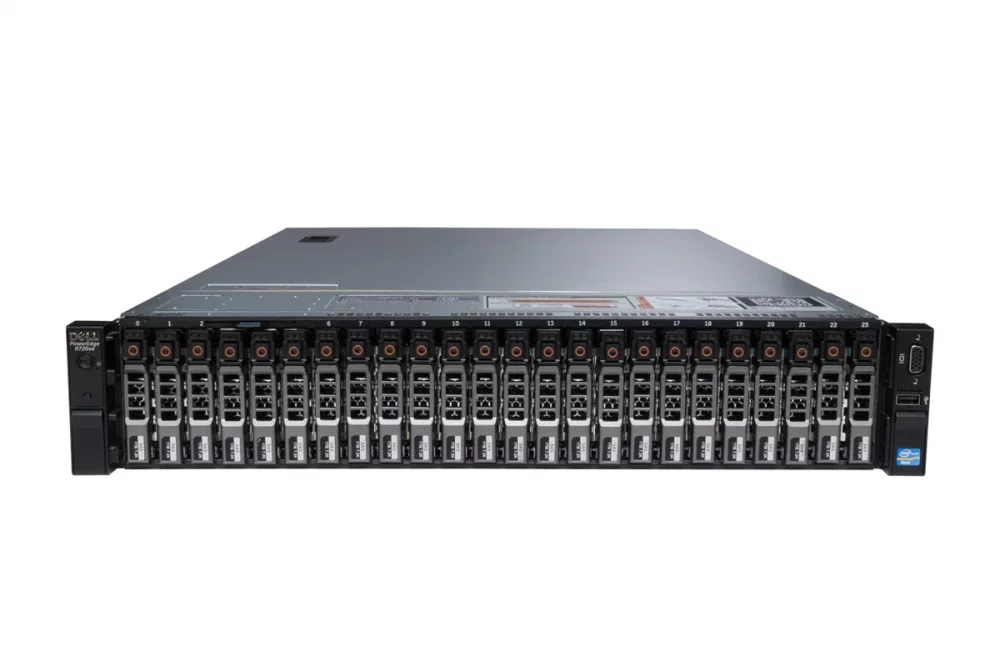
Love these images. Any chance of one for a Dell Poweredge R720XD - it'll probably work for the R710XD, R730XD and R740XD too.
-
OK thanks for the info. I just found it states this in the documentation too, no support for SAS drives for SMART. https://wiki.unraid.net/Manual/Storage_Management#SMART_Monitoring
-
I have a set of SAS drives attached to my newly built UNRAID server - all looks to be working fine, it's well used and weekly parity checks report no errors. However running a SMART check with UNRAID always comes back the message "Errors occurred - Check SMART report" - this happens on every one of my disks. These are all HGST 2.5" SAS drives, 10K RPM 6GB/s drives. Checking the SMART reports however there are no obvious errors - I can't see anything that jumps out to me from the report as an error - what is the problem here: smartctl 7.3 2022-02-28 r5338 [x86_64-linux-5.15.46-Unraid] (local build) Copyright (C) 2002-22, Bruce Allen, Christian Franke, www.smartmontools.org === START OF INFORMATION SECTION === Vendor: HGST Product: HUC10121CLAR1200 Revision: F840 Compliance: SPC-4 User Capacity: 1,200,243,695,616 bytes [1.20 TB] Logical block size: 512 bytes Rotation Rate: 10020 rpm Form Factor: 2.5 inches Logical Unit id: 0x5000cca072c0f454 Serial number: L0KE3NJJ Device type: disk Transport protocol: SAS (SPL-4) Local Time is: Mon Aug 22 11:15:06 2022 BST SMART support is: Available - device has SMART capability. SMART support is: Enabled Temperature Warning: Enabled Read Cache is: Enabled Writeback Cache is: Disabled === START OF READ SMART DATA SECTION === SMART Health Status: OK Current Drive Temperature: 36 C Drive Trip Temperature: 85 C Manufactured in week 24 of year 2016 Specified cycle count over device lifetime: 50000 Accumulated start-stop cycles: 146 Specified load-unload count over device lifetime: 600000 Accumulated load-unload cycles: 1954 Elements in grown defect list: 0 Vendor (Seagate Cache) information Blocks sent to initiator = 6406933419887951872 Error counter log: Errors Corrected by Total Correction Gigabytes Total ECC rereads/ errors algorithm processed uncorrected fast | delayed rewrites corrected invocations [10^9 bytes] errors read: 0 26 0 26 9375467 57872.791 0 write: 0 0 0 0 410956 59555.397 0 verify: 0 32 0 32 1412031 71078.167 0 Non-medium error count: 0 SMART Self-test log Num Test Status segment LifeTime LBA_first_err [SK ASC ASQ] Description number (hours) # 1 Background short Completed - 43795 - [- - -] Long (extended) Self-test duration: 18 seconds [0.3 minutes] Background scan results log Status: waiting until BMS interval timer expires Accumulated power on time, hours:minutes 43795:04 [2627704 minutes] Number of background scans performed: 584, scan progress: 0.00% Number of background medium scans performed: 584 Protocol Specific port log page for SAS SSP relative target port id = 1 generation code = 1 number of phys = 1 phy identifier = 0 attached device type: expander device attached reason: SMP phy control function reason: unknown negotiated logical link rate: phy enabled; 6 Gbps attached initiator port: ssp=0 stp=0 smp=0 attached target port: ssp=0 stp=0 smp=1 SAS address = 0x5000cca072c0f455 attached SAS address = 0x500056b37789abff attached phy identifier = 33 Invalid DWORD count = 0 Running disparity error count = 0 Loss of DWORD synchronization count = 0 Phy reset problem count = 0 relative target port id = 2 generation code = 1 number of phys = 1 phy identifier = 1 attached device type: no device attached attached reason: unknown reason: power on negotiated logical link rate: phy enabled; unknown attached initiator port: ssp=0 stp=0 smp=0 attached target port: ssp=0 stp=0 smp=0 SAS address = 0x5000cca072c0f456 attached SAS address = 0x0 attached phy identifier = 0 Invalid DWORD count = 0 Running disparity error count = 0 Loss of DWORD synchronization count = 0 Phy reset problem count = 0
-
Thanks for this write up - still works perfectly in 2022. One small difference, I found my VM images had the extension .vdi and not .qcow2 but copying them still works. Not sure if the different extension is just a later VM engine or just a change in the extension used by UNRAID.




