





thefrankcorp
Members
-
Joined
-
Last visited
-
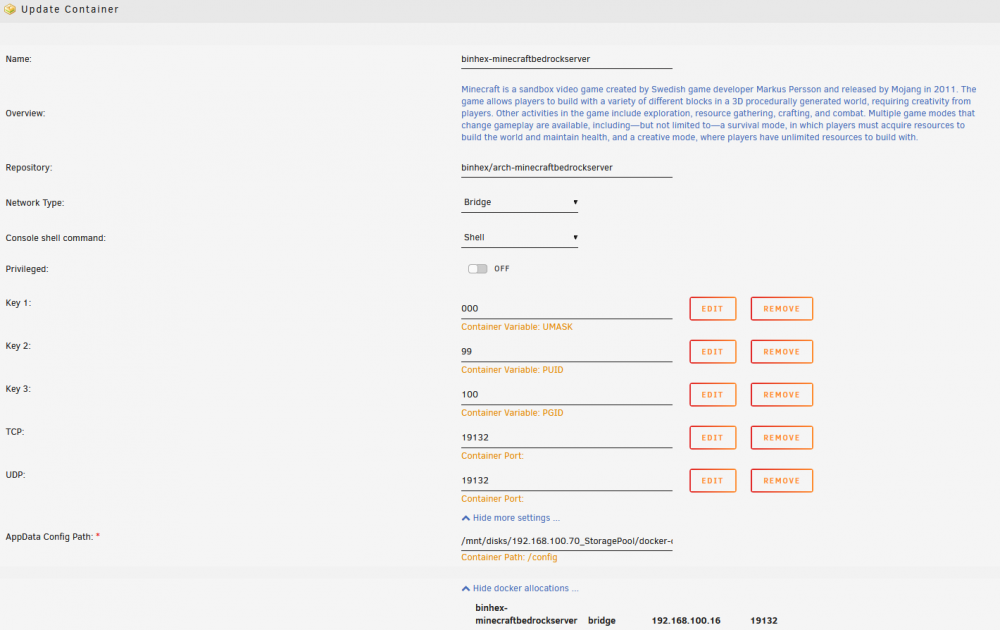
Hello, Still pretty new to unraid and docker, but am slowly working my way through. I am having trouble connecting to the bedrock server. I think it may be because of UDP/TCP ports. I have tried a few different settings, but I am at a lose. I am simply trying to run the Bedrock server on my LAN. When I run a LAN game from my Win 10 machine, all the other clients (Xbox, other PC's) can see the server under the "Friends >LAN GAMES" tab in Minecraft and can connect to it. So I guess its not a LAN specific issue. But with the bedrock server, none of the clients can see the Server game. This leads me to think its the way I have setup the Docker. But I may be mistaken. My config is in the screen caps below. Any ideas how I can fix this? or perhaps a resource that I could read to learn more? Many Thanks

-
Hi, Any update on this? I have a similiar issue.

