Matthews
Members
-
Joined
-
Last visited
-
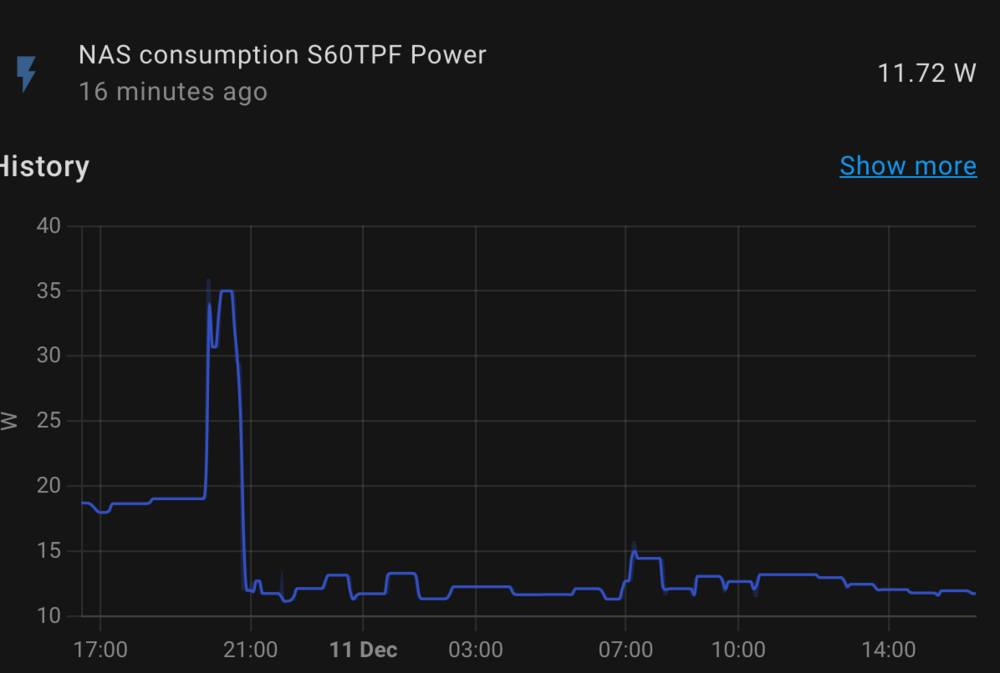
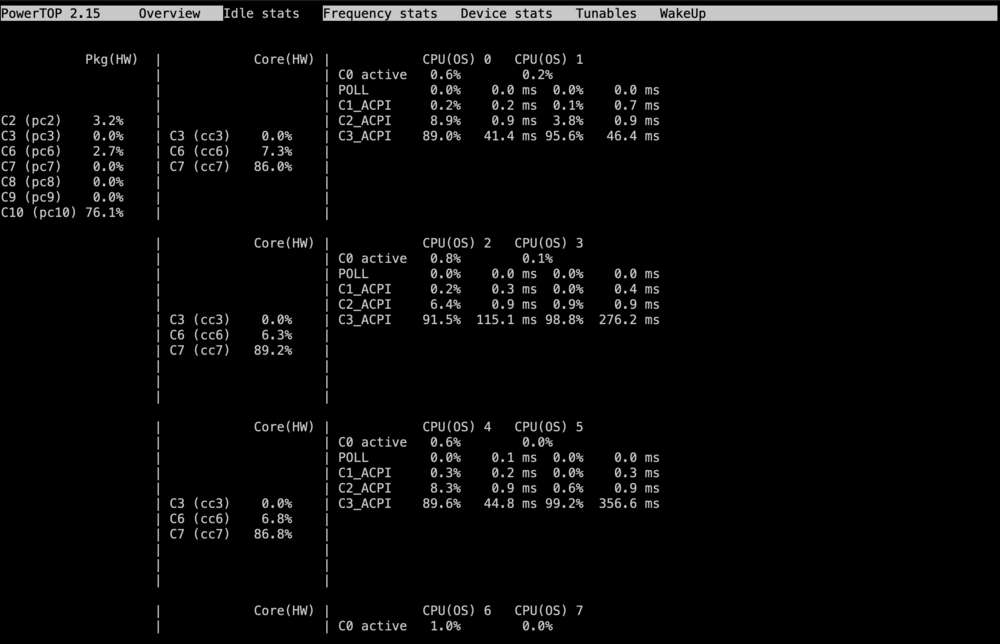
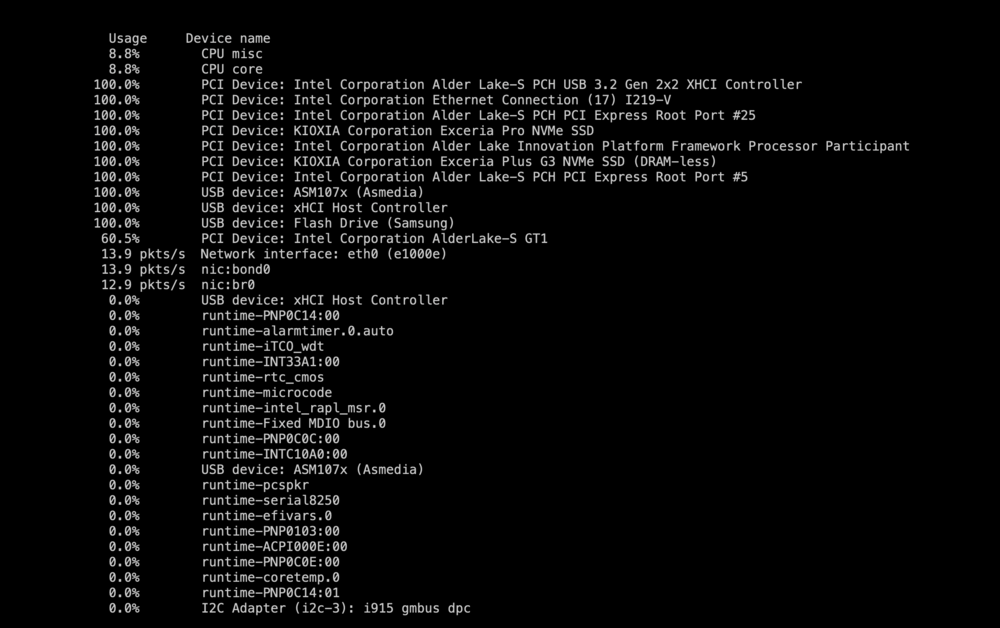
Hi, As of lately as prices of electricity have been rising everywhere and as I was running an older (spare parts from 2016) Unraid server 24/7 which last I had measured (last i remember, been awhile) 60-100w idle consumption. Which for a small server was in my opinion to high of a consumption, main problem was cpu had no igpu and had to run a dgpu (extra 11W just for idling 95% of the time) and also PSU is older than 10 years and is showing signs that it will bite the dust soon. Anyhow I decided after watching a ton of videos from Wolfgang's Channel on how to build a power efficient server and all the different aspects you need to be aware to efficiently build an actually low power idle server (PSU, MB, HBA, ASMP, HBA, L0sL1, powertop, even the damn nvme ssds needed to support ASPM...). Quite helpful videos to start the journey and would recommend. I decided to research (as best as I could given the time I had). I found the list from HardwareLuxx which had loads of builds that achieved amazing results but sadly no newer gen CPUs were included (13th, 14th Intel) and no full ATX that I could find as well as at least 6-8x Sata ports for HDDs and SSDs. Good sources to get some ideas as to what you will need to look for in hardware and software to get higher C-states: - HardwareLuxx - list of prebuilds that achieved low idle consumption (PSUs, MBs,..) - Wolfgangs YT channel - Matt Gadient - actual guide on a low idle build (good for specific details and why you might not be getting higher C states) - Asrock guide for hidden BIOS settings - a must to achieve higher C states on Asrock boards (beware you are dealing with BIOS and you might brick the MB so thread carefully) - Fellow Unraidian Mgutt (thank you for the tool) - Powertop - a must tool for getting those sweet C6+ states Main goals: - ASPM needs to be supported by each device (quite hard to find data for certain devices) - MB is better to be SFF (ITX or mATX) for lowest idle cons., but if you need the ports or will need them ATX is the way to go, plan accordingly - Intel xx500 for Intel UHD 770 if you need transcoding (12th, 13th and 14th gen are all the same igpu) - nvme - mainly price and ASPM support (not all nvme have ASPM support) - No HBAs - unless buying newer gen with ASPM support or ASM1166 SATA expander (that might have ASPM support) Thus I pulled the plug and went for a 13th gen Intel build below. Build: - ASRock Z690 Extreme Intel Z690 Sun. 1700 Dual Channel DDR4 ATX - 8x Sata ports (3x nvme - but only 2 chipset linked can be used so CPU can reach C10, use Intel 1gb Lan - realtek has some issues and Consumption did not fall below 18w) - Intel Core i5 13500 - stock cooler - not that biosflashback is a must when buying older MBs with newer CPU support - Corsair Vengance 32gb (2x16gb) 3200 - 650 Watt Corsair RM Series RM650 - can confirm low quality capac. are actually heard when near the pc, actually ear next to the case, just fyi. (if that bothers you go with the RMx series, japanese cap) - 1TB KIOXIA Exceria Plus G3 - 1TB KIOXIA Exceria Pro - Fractal Design Define R5 - can fit at least 8 HDDs + some thin sata cables for easier managing 4x4 and 6x6 (will see how they fair, some reviews state that ppl are getting errors since the cables are low quality) Price: 690-ish, 600-ish 12th gen you can save around 50-100 (igpu is the same, just no DDR5 support) Good to know: Build is super quiet, I can barely hear it. Even the stock case fans I cannot hear. Without HDDs ofc. For 3x+ 18tb Exos Seagate and 4x 4tb WD Red and 1x SSD cache I decided it was best not to use HBAs or any sata cards for now as I wanted as less of added hardware to keep the power cons. to the minimum. Might have to go ASM1166 as it has ASPM support for better realibility. Currently running C10 with 12w (from the wall) - without HDDS, only using 2x nvme ssds as I am still testing. No mouse, no monitor. Just eth cable is plugged in. Power Consumption with spinned down HDDs hopefully will be in the low 30w range. Consumption (from wall) - CPU, MB, 2x Nvme(chipset) and USB (unraid), 1x CPU fan and 2x case fan - hidden BIOS settings enabled per guide, ASPM all enabled, powertop, As many who have bought asrock mbs might have noticed that its almost impossible to reach C10 states, yet here we are. Happy with the new build, next ill try ITX or mATX build for even lower idle backup server, the only issue is I have an old 5820k cpu id like to use that AFAIK has not mITX/mATX mbs avaliable and no igpu. And all SSD, which I know Unraid and Parity dont go well together, if anyone has tips or running an all SSD server I am all ears if they are running them in pool (can I have more than 3 ssds in a pool with protection?). What I hope to give here is i guess if someone else will be deciding to go this route that there are options and low-ish idle can be achieved, even with an ATX build, even on Asrock boards and a normal low wattage PSU.
-
I do. But I don't like the solution I am using,its not very fail proof. Do you have any good suggestion as to what to use for local backup? I prefer non cloud solutions tho it probably is the cheapest. Best practice is afaik Server - different location server - and extra protection with copies on the cloud.
-
Just thought to write that the rebuild went trough smoothly. Ran a parity check afterwards (without writing corrections to the parity). It looked good, so I ran it again with writing corrections to the parity. It finished today and I re-enabled docker/VMs. Everything is working. Will keep an eye out for a few day and look into setting up notification system, as suggested by @trurl. @trurl Thank you for your guidance! P.s. now I am looking into a small low power backup NAS or going for dual parity - was lucky with 2nd hdd not failing on me during rebuild.
-
It seems okay, did not check everything except important stuff, so cant say 100% sure but looks good so far. I went into unRaid docs and found this for anyone that face similar issue with one parity. If the disk is not disabled, it means parity reconstructed the data. If it doesnt, the disk automatically is disabled. trurl It seem rebuild worked and the disk2 only had minor files that were corrupted as the disk is failing. Not sure to what extent as I need to check all the files but so far so good. Will let the rebuild finish as to not stress the hdd more. disk2 has been replaced and data rebuild is on the way. In about 5 hours it should finish and we will see.
-
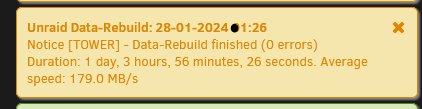
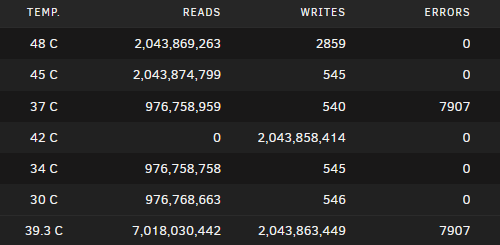
Rebuild just finished. As requested attached diagnostics after the rebuild. Notifications claims 0 errors (perhaps parity calculated corrections or i am not understanding it correctly?), yet the main tab claims finding 7907 errors. A bit confused. Well I think for ease of use, dual parity makes sense for exactly such occasions with combination of local backup of only important files. I think I will order a new drive next week and go dual parity. afterRebuildtower-diagnostics-20240128-0251.zip

-
Correct. Crap. So I need to setup dual parity. Is there a chance that the rebuild does work? I only have local notifications, havent looked into email notifications yet, but I am on it every day and if something comes up I check it. HDD was looking okay before removing the drive. I was even checking the stats before running to select a drive that is oldest, all had 0 on the critical errors. Before running a rebuild i disabled dockers and VM was not running. I am not sure tho if anything got written as there are writes on the drives since last boot up, not sure if writes happened during rebuild but everything was turned off (VM/Docker). I assume we are waiting for rebuild to finish, if it finishes successfully I change disc2 to rebuild it. If it does not, we try "It might be better to New Config original disk3 back into the array and rebuild disk2 instead." Could you let me know if this is what you meant - it means I remove the disk2-failing one, re-add the original disk3 and put the new disk in place of failing disk2 and do a data rebuild? P.s. The rebuild is in progress and is now at 46%, another 12-15 hours and it should finish. Error count is not increasing.
-
Will def. replace disc2. Question is what to do till then. Do you perhaps know if 1 disc parity is protecting me in this scenario (1 drive emulated - data rebuild, and 1 failing drive)? Important stuff, yes, a backup. But not of of media which is i guess not critical, but still quite a workload to redo it all and would like to avoid doing it, as it will take years to redo :/ I still have original disc3, only unplugged it and still sitting in the same spot. Just replacing it because of age and higher capacity, will be replacing two more in a short while. Update: Data rebuild at 26%, error count has maintained the same at OU 1032.
-
First of all Hi, As the title already says, during a Data rebuild (added a new drive - not the failing drive), one of the drives started showing errors (the bad kind and quite high count - drive might be failing, would need to turn of and check all the cables if perhaps one got loose or PSU issue, which i suspect with this system (old-ish PSU)). Speed of the rebuild fell down to 1 MB/s but the data rebuild continued and is now continuing at normal speeds. My question is, after reading through different posts, some suggest to leave the data rebuild to finish and then swap the failing HDD with a new/working one. But I am afraid of the drive failing during the rebuild (not sure if 1 parity drive is enough to emulate the failing drive and protect me from a failing drive) or to stop the data rebuild and put the old drive back and switch the failing drive with the new one (that is currently being rebuilt). My question is - Is 1-parity protecting me in this scenario (1 drive emulated - data rebuild, and 1 soon to be an unmountable drive but currently is not)? Also what is the best way to proceed in this scenario, continue or stop and re-add the drive back? Thank you for any clarification, first time I have an issue with two drives at the same time. *Attached diagnostics. thetower-diagnostics-20240126-2211.zip
-
I decided that if all else has failed that the problem might be the USB stick. Took it out and ran chkdsk and it came back okay. I decided i would try a fresh instal of unraid and voila it worked! I re-added every disk in the right slot and it seems all the data is intact, except dockers and settings need to be reconfigured but im looking it as a plus, it might be more stable this way and I get to maybe optimize certain settings all over again! I am really happy, I basically gave up when i got that message and was sure all was lost! I did notice i have a cache drive in btrfs and the array in xfs, which is strange. Should I reformat the cache drive to xfs? (I read that it is not the best to have the cache in btrfs formating as problems are more common. I am looking for stability)
-
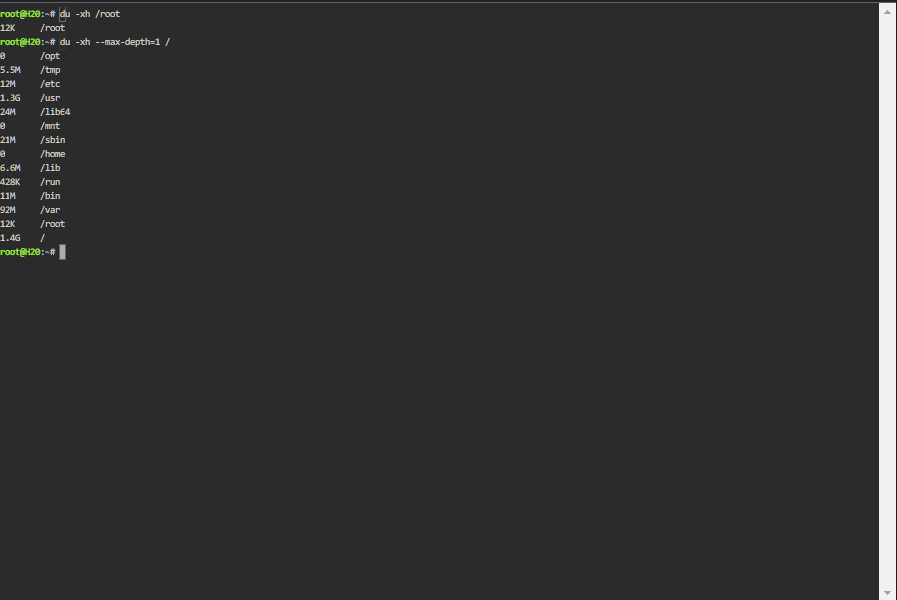
Somehow im still logged in my browser so I can access the terminal window. I dont know if this helps..
-
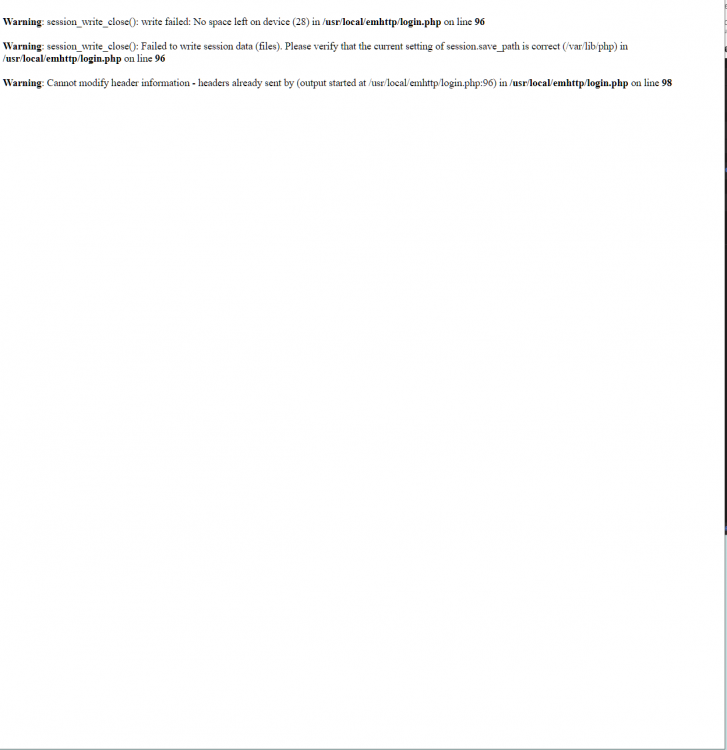
I had a problem with an unmountable cache drive that did not want to mount. I tried saving the backup data (wasnt that important, just metadata I belive). I found this topic and followed the instructions Now I believe I have just destroyed my array with the command below and lost it all: For a cache device (or pool) stop the array and use sdX: btrfs check --repair /dev/sdX1 Replace X with actual device (use cache1 for a pool), don't forget the 1 in the end, e.g., /dev/sdf1 I cant get any diagnostics, nothing worked. I tried restarting the server to see if the issue would at least let me to get back to the array (worked when I did the mount function). Any help appreciated, I am lost with btrfs!
-
One more question how do you change this topic to (SOLVED)?
-
So guys I have ran the third check(except few bios settings & removing 2 drives off a controller, nothing changed). All errors have dissapeared. I repeat! This is great news, but I am still not sure how and why is this happening. Bcs im not sure what is happening with my unraid server. I will try the upgrading parity drive and on Thursday i am installing a new controller card JMB585 and hooking up all the disk to it (read that since 6.1 onwards i can switch up ports). Thank you for your help. h20-diagnostics-20211221-0951.zip
-
I have already ran it. All night. No errors at all.
-
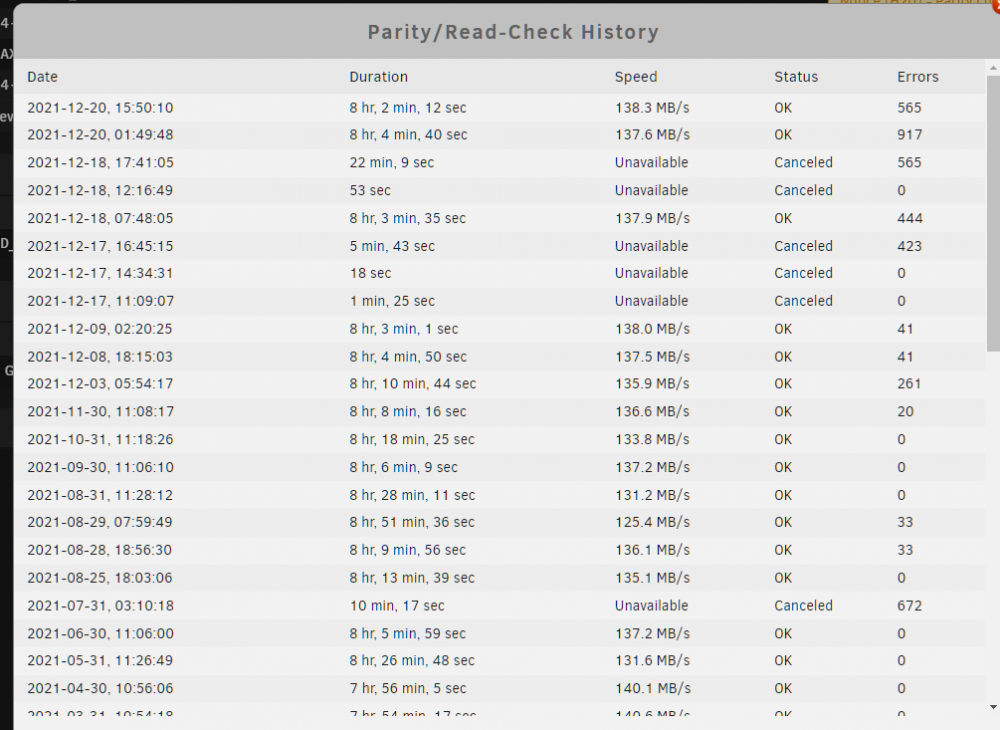
So i unhooked the 2 drives and made some bios changes and voilà ran parity 2 times without a problem. Not sure if HW (PSU maybe, or my controller card - getting new one on thursday) or software (plugin). So after running it twice i did one without "write corrections to parity" and the second one with "write corrections to parity" and they both worked (aka no crash/freeze). Somehow tho on the second one it still found 565 errors and did not fix them. My plan is running it again and seeing if it corrects errors. If it doesnt, what should i do? Does safe mode not write corrections to parity or is it just in need of another parity sync check or file sys corruption of sorts? attached diag. and parity history h20-diagnostics-20211220-1931.zip