





dtctechs
Members
-
Joined
-
Last visited
Everything posted by dtctechs
-
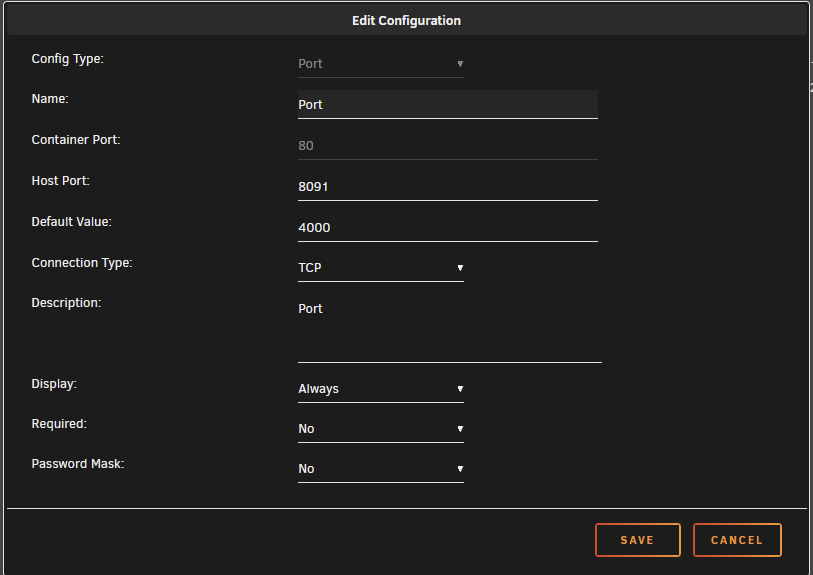
Still in the same situation. How can I manually change the internal port as it's greyed out? Below is an image of my container config. Note, I installed a new instance on another server via portainer and and copied my conf.yml over there and it's working properly.
-
My Dashy docker isn't working. The container is running and seems to be functioning as normal however no response on the normal URL (http://10.x.x.x:8091). I've had it on local port `8091` for as long as I can remember. I've attempted force upgrade and change the internal port# with no luck. The docker logs indicate that it loaded correctly; the full log is below. Are we waiting just waiting for an unRAID docker container update? Log: Welcome to Dashy! 🚀 Your new dashboard is now up and running with Docker ******************************************************************************************* Using Dashy V-3.0.0. Update Check Complete ✅ Dashy is Up-to-Date WARNING Compiled with 1 warning2:52:24 PM warning asset size limit: The following asset(s) exceed the recommended size limit (9.54 MiB). This can impact web performance. Assets: item-icons/dashboard-icons/.git/objects/pack/pack-a4097755b8b0228a64c7df124996a2421b7f3876.pack (21.8 MiB) File Size Gzipped dist/js/chunk-vendors.92e65062.js 6358.33 KiB 2293.83 KiB dist/js/dashy.43c6539a.js 768.52 KiB 231.87 KiB dist/js/chunk-4cfc5864.4aba8cfa.js 250.36 KiB 74.98 KiB dist/precache-manifest.dab5592d8f70277 96.49 KiB 23.45 KiB 2f46de6348e5654ef.js dist/js/chunk-50f31ec3.96f6cd6b.js 79.45 KiB 19.64 KiB dist/js/chunk-180be55e.f947613e.js 15.94 KiB 5.30 KiB dist/js/chunk-468d3a74.a5fc4bfa.js 15.58 KiB 4.49 KiB dist/js/chunk-03c5a0ba.399ef71d.js 15.38 KiB 5.04 KiB dist/js/chunk-16e26d5d.ee5b2c63.js 14.94 KiB 4.49 KiB dist/js/chunk-2642eaf9.4eed1878.js 14.39 KiB 4.88 KiB dist/js/chunk-0367deae.f8ce8511.js 13.15 KiB 4.52 KiB dist/js/chunk-7bba3126.e4385130.js 12.26 KiB 4.26 KiB dist/js/chunk-08ca355a.26f829d9.js 11.12 KiB 4.12 KiB dist/js/chunk-38169201.f89dfac1.js 11.10 KiB 4.44 KiB dist/js/chunk-460e6092.c50e1a0e.js 11.02 KiB 4.07 KiB dist/js/chunk-445cc501.4e92c9f7.js 10.89 KiB 4.09 KiB dist/js/chunk-187213fc.f70a23c4.js 10.80 KiB 4.03 KiB dist/js/chunk-edbdb67c.2a7383c8.js 9.28 KiB 3.32 KiB dist/js/chunk-2925d418.d00939dd.js 9.04 KiB 3.08 KiB dist/js/chunk-93c6be8c.e412d699.js 8.25 KiB 3.10 KiB dist/js/chunk-c8bd4cd0.da35f1b3.js 8.07 KiB 2.99 KiB dist/js/chunk-0248a1e9.d8ae36a6.js 8.03 KiB 2.86 KiB dist/js/chunk-7ba8e45c.31261b47.js 7.82 KiB 2.96 KiB dist/js/chunk-49f2d909.cbc33fa0.js 7.73 KiB 2.87 KiB dist/js/chunk-7e15df28.012f53d9.js 7.61 KiB 2.66 KiB dist/js/chunk-070d32ac.458ca0d0.js 7.35 KiB 2.87 KiB dist/js/chunk-0894290e.7f4f8889.js 7.11 KiB 2.69 KiB dist/js/chunk-e77c83e6.48594eb8.js 7.05 KiB 2.65 KiB dist/js/chunk-92c623f0.7b960119.js 7.02 KiB 2.81 KiB dist/js/chunk-fc7a7722.2250ffe1.js 6.96 KiB 2.59 KiB dist/js/chunk-0c7116ec.15f56f4d.js 6.88 KiB 2.76 KiB dist/js/chunk-29548417.1b7f8472.js 6.56 KiB 2.59 KiB dist/js/chunk-26dbf0a4.f1a7a0e0.js 6.25 KiB 2.52 KiB dist/js/chunk-1b35c628.bfc608ce.js 6.20 KiB 2.50 KiB dist/js/chunk-88331f84.e7726ecb.js 6.16 KiB 2.53 KiB dist/js/chunk-8db027b8.4a5649f0.js 6.15 KiB 2.44 KiB dist/js/chunk-15b37c0a.fecf5ad8.js 6.10 KiB 2.45 KiB dist/js/chunk-b7e4a5ce.c1e5d13d.js 6.09 KiB 2.57 KiB dist/js/chunk-f05c978e.1921df2e.js 6.07 KiB 2.40 KiB dist/js/chunk-7abb8001.1fb01462.js 6.07 KiB 2.26 KiB dist/js/chunk-32eb6af1.d683115c.js 6.02 KiB 2.55 KiB dist/js/chunk-04659cb4.924484e8.js 5.99 KiB 2.39 KiB dist/js/chunk-44cb61f1.0013706e.js 5.97 KiB 2.08 KiB dist/js/chunk-4073bae0.51329ecf.js 5.93 KiB 1.91 KiB dist/js/chunk-11e20f6f.68f8e974.js 5.88 KiB 2.19 KiB dist/js/chunk-08fae180.5daf04b7.js 5.85 KiB 2.41 KiB dist/js/chunk-4ab61964.aa761fe6.js 5.83 KiB 2.44 KiB dist/js/chunk-b52460ac.ae1e2d77.js 5.74 KiB 2.37 KiB dist/js/chunk-cd40f4ae.ed73fab0.js 5.69 KiB 2.34 KiB dist/js/chunk-ecec4fc4.dedf003b.js 5.68 KiB 2.44 KiB dist/js/chunk-4ef6dcf5.778ab1cf.js 5.67 KiB 2.36 KiB dist/js/chunk-7c4d77dc.c25c13cb.js 5.40 KiB 2.26 KiB dist/js/chunk-bd9012c4.e4b54229.js 5.38 KiB 2.32 KiB dist/js/chunk-21680640.a656bd80.js 5.35 KiB 2.22 KiB dist/js/chunk-043d9c91.c014b344.js 5.29 KiB 2.17 KiB dist/js/chunk-f539423c.7c46861d.js 5.26 KiB 2.15 KiB dist/js/chunk-6b5de1e1.c41bee96.js 5.24 KiB 2.10 KiB dist/js/chunk-4f2c58c5.f336971c.js 5.03 KiB 2.00 KiB dist/js/chunk-736b2ef0.1b65ea1f.js 5.03 KiB 2.06 KiB dist/js/chunk-f38e0ad2.7a41f73d.js 5.01 KiB 2.13 KiB dist/js/chunk-3a3d0cd8.81d833a5.js 4.99 KiB 2.15 KiB dist/js/chunk-674ac328.b3d128f3.js 4.99 KiB 2.22 KiB dist/js/chunk-cee89fa8.0d3bc86e.js 4.92 KiB 2.12 KiB dist/js/chunk-677c8830.d65a072e.js 4.85 KiB 2.06 KiB dist/js/chunk-0633ac20.674a3d69.js 4.81 KiB 2.04 KiB dist/js/chunk-6a170920.666bec94.js 4.69 KiB 2.06 KiB dist/js/chunk-c02e690a.ea23b03d.js 4.51 KiB 1.92 KiB dist/js/chunk-b25c821e.8af52b87.js 4.33 KiB 1.91 KiB dist/js/chunk-781da5fb.be037a62.js 4.32 KiB 1.45 KiB dist/js/chunk-b54d81ae.b4cb65ce.js 4.31 KiB 1.87 KiB dist/js/chunk-aa9cebcc.2f578d67.js 4.10 KiB 1.60 KiB dist/js/chunk-665a1900.a7d21b0f.js 3.69 KiB 1.69 KiB dist/js/chunk-14192a80.056262ad.js 3.64 KiB 1.51 KiB dist/js/chunk-1e169674.7a54b293.js 2.88 KiB 1.36 KiB dist/js/chunk-6ab1f28d.9a3be93f.js 2.83 KiB 1.33 KiB dist/js/chunk-72e3b16c.0f88bca5.js 2.80 KiB 1.30 KiB dist/js/chunk-75cc9f4d.a5021e27.js 2.74 KiB 1.30 KiB dist/js/chunk-0387fd77.c052ffac.js 2.74 KiB 1.27 KiB dist/js/chunk-0044633e.3dc0bad5.js 2.40 KiB 1.11 KiB dist/js/chunk-284f6914.401e1214.js 2.32 KiB 1.10 KiB dist/js/chunk-73f090a0.0e3ec0c9.js 2.31 KiB 1.12 KiB dist/js/chunk-0c51289a.eac23d06.js 2.27 KiB 1.06 KiB dist/js/chunk-7132ce43.f79ba314.js 2.22 KiB 1.08 KiB dist/js/chunk-2d225b78.80adc7b1.js 2.05 KiB 1.09 KiB dist/js/chunk-2ab49ff8.5963cee6.js 1.91 KiB 0.99 KiB dist/js/chunk-c0f28fc6.2dbaa6ba.js 1.91 KiB 0.94 KiB dist/js/chunk-d42744f4.6acd67c8.js 1.90 KiB 0.98 KiB dist/js/chunk-7795c4fe.770bf2c1.js 1.04 KiB 0.57 KiB dist/service-worker.js 1.04 KiB 0.61 KiB dist/js/chunk-3767f013.3b314b6a.js 0.75 KiB 0.45 KiB dist/css/dashy.7b92443f.css 269.76 KiB 32.87 KiB dist/css/chunk-fc7a7722.f1790b34.css 11.54 KiB 1.75 KiB dist/css/chunk-03c5a0ba.fdf5ccee.css 9.49 KiB 1.81 KiB dist/css/chunk-0248a1e9.2af758e1.css 7.32 KiB 1.32 KiB dist/css/chunk-4073bae0.262be67e.css 5.86 KiB 1.00 KiB dist/css/chunk-0c7116ec.8d663b8e.css 3.98 KiB 0.96 KiB dist/css/chunk-29548417.1e586604.css 3.78 KiB 0.69 KiB dist/css/chunk-7795c4fe.8e5b7c8e.css 3.78 KiB 0.92 KiB dist/css/chunk-2642eaf9.103376cf.css 3.54 KiB 0.86 KiB dist/css/chunk-93c6be8c.b621be85.css 3.53 KiB 0.88 KiB dist/css/chunk-2925d418.2f4219ad.css 3.48 KiB 0.77 KiB dist/css/chunk-26dbf0a4.3f521e8a.css 3.31 KiB 0.86 KiB dist/css/chunk-c8bd4cd0.25b1ca48.css 3.28 KiB 0.83 KiB dist/css/chunk-vendors.d8067ad8.css 2.74 KiB 0.83 KiB dist/css/chunk-f05c978e.04b75e3f.css 2.67 KiB 0.59 KiB dist/css/chunk-7e15df28.208bbeec.css 2.51 KiB 0.64 KiB dist/css/chunk-0367deae.0f98d711.css 2.48 KiB 0.67 KiB dist/css/chunk-4cfc5864.9357c852.css 2.48 KiB 0.57 KiB dist/css/chunk-14192a80.31a5db2c.css 2.38 KiB 0.58 KiB dist/css/chunk-49f2d909.26592934.css 2.38 KiB 0.57 KiB dist/css/chunk-7ba8e45c.17242d8b.css 2.30 KiB 0.55 KiB dist/css/chunk-7bba3126.b97a92c1.css 2.17 KiB 0.56 KiB dist/css/chunk-7c4d77dc.8c1925ff.css 2.06 KiB 0.49 KiB dist/css/chunk-781da5fb.38b3bad4.css 2.03 KiB 0.56 KiB dist/css/chunk-8db027b8.377fb75a.css 2.01 KiB 0.57 KiB dist/css/chunk-edbdb67c.0de3bd5e.css 1.94 KiB 0.56 KiB dist/css/chunk-e77c83e6.729d6dc8.css 1.93 KiB 0.55 KiB dist/loading-screen.css 1.93 KiB 0.65 KiB dist/css/chunk-04659cb4.f809b0eb.css 1.86 KiB 0.50 KiB dist/css/chunk-08ca355a.0e2f8538.css 1.85 KiB 0.55 KiB dist/css/chunk-460e6092.0bcf49d9.css 1.85 KiB 0.56 KiB dist/css/chunk-88331f84.b825db4a.css 1.81 KiB 0.55 KiB dist/css/chunk-070d32ac.3ca152a5.css 1.80 KiB 0.51 KiB dist/css/chunk-445cc501.d9af4531.css 1.79 KiB 0.53 KiB dist/css/chunk-187213fc.851bbb61.css 1.78 KiB 0.52 KiB dist/css/chunk-180be55e.2679cb7e.css 1.77 KiB 0.53 KiB dist/css/chunk-6ab1f28d.dcd44809.css 1.65 KiB 0.42 KiB dist/css/chunk-21680640.f72d1c0d.css 1.64 KiB 0.51 KiB dist/css/chunk-32eb6af1.b73f2acc.css 1.59 KiB 0.48 KiB dist/css/chunk-4ab61964.950bd772.css 1.57 KiB 0.49 KiB dist/css/chunk-92c623f0.7601575f.css 1.55 KiB 0.47 KiB dist/css/chunk-b52460ac.d91d8d0b.css 1.49 KiB 0.47 KiB dist/css/chunk-4f2c58c5.e91567b0.css 1.38 KiB 0.43 KiB dist/css/chunk-aa9cebcc.43dd3768.css 1.36 KiB 0.41 KiB dist/css/chunk-7abb8001.d5057fa6.css 1.30 KiB 0.44 KiB dist/css/chunk-468d3a74.e7e4907a.css 1.26 KiB 0.42 KiB dist/css/chunk-38169201.87f602e2.css 1.16 KiB 0.46 KiB dist/css/chunk-15b37c0a.ebae7724.css 1.15 KiB 0.36 KiB dist/css/chunk-16e26d5d.97cc876a.css 1.14 KiB 0.41 KiB dist/css/chunk-ecec4fc4.7db7f641.css 1.12 KiB 0.36 KiB dist/css/chunk-0633ac20.857ad57c.css 1.04 KiB 0.34 KiB dist/css/chunk-bd9012c4.bbf2305d.css 1.04 KiB 0.34 KiB dist/css/chunk-043d9c91.9438acdb.css 0.93 KiB 0.37 KiB dist/css/chunk-1b35c628.f7e5ac71.css 0.90 KiB 0.31 KiB dist/css/chunk-4ef6dcf5.f9dd4bd8.css 0.88 KiB 0.30 KiB dist/css/chunk-f539423c.4b2b2c2a.css 0.88 KiB 0.33 KiB dist/css/chunk-3a3d0cd8.5aaf7cba.css 0.88 KiB 0.33 KiB dist/css/chunk-11e20f6f.070a8cfa.css 0.87 KiB 0.35 KiB dist/css/chunk-b7e4a5ce.df4ad987.css 0.86 KiB 0.32 KiB dist/css/chunk-f38e0ad2.1ea48a31.css 0.84 KiB 0.28 KiB dist/css/chunk-0894290e.edb63a9d.css 0.79 KiB 0.32 KiB dist/css/chunk-0387fd77.7aa83618.css 0.75 KiB 0.28 KiB dist/css/chunk-6b5de1e1.9eb66c9f.css 0.71 KiB 0.31 KiB dist/css/chunk-44cb61f1.025edb8a.css 0.69 KiB 0.31 KiB dist/css/chunk-736b2ef0.98820bcd.css 0.60 KiB 0.33 KiB dist/css/chunk-677c8830.df6a5b00.css 0.59 KiB 0.23 KiB dist/css/chunk-284f6914.58ade778.css 0.46 KiB 0.24 KiB dist/css/chunk-08fae180.9b2da476.css 0.46 KiB 0.22 KiB dist/css/chunk-0c51289a.d6684378.css 0.38 KiB 0.17 KiB dist/css/chunk-1e169674.98a4aa99.css 0.36 KiB 0.16 KiB dist/css/chunk-75cc9f4d.98a4aa99.css 0.36 KiB 0.16 KiB dist/css/chunk-d42744f4.f1c873fc.css 0.36 KiB 0.16 KiB dist/css/chunk-674ac328.d604576c.css 0.36 KiB 0.19 KiB dist/css/chunk-2ab49ff8.2ca1d591.css 0.36 KiB 0.16 KiB dist/css/chunk-6a170920.3839d02e.css 0.31 KiB 0.20 KiB dist/css/chunk-c0f28fc6.b67ed63a.css 0.22 KiB 0.16 KiB dist/css/chunk-3767f013.c9ab3ab3.css 0.11 KiB 0.10 KiB dist/css/chunk-cee89fa8.0918bc41.css 0.08 KiB 0.10 KiB dist/css/chunk-b54d81ae.61a081a9.css 0.08 KiB 0.10 KiB dist/css/chunk-665a1900.eeb31e13.css 0.07 KiB 0.09 KiB dist/css/chunk-b25c821e.f58ec558.css 0.07 KiB 0.09 KiB dist/css/chunk-c02e690a.ccf83212.css 0.06 KiB 0.08 KiB dist/css/chunk-cd40f4ae.90cf07cd.css 0.06 KiB 0.07 KiB dist/css/chunk-0044633e.0e433876.css 0.00 KiB 0.02 KiB dist/css/chunk-7132ce43.0e433876.css 0.00 KiB 0.02 KiB dist/css/chunk-72e3b16c.0e433876.css 0.00 KiB 0.02 KiB dist/css/chunk-73f090a0.0e433876.css 0.00 KiB 0.02 KiB Images and other types of assets omitted. DONE Build complete. The dist directory is ready to be deployed. INFO Check out deployment instructions at https://cli.vuejs.org/guide/deployment.html
-
Thank you. Worked like a charm.
-
Greetings, my USB flash drive died last night shortly after backing up. I took the existing flash drive and attempted to check it's integrity on another computer. Unfortunately, it has a Data error (cyclic redundancy check) in diskpart and seems unrecoverable. I restored the backup to a new USB flash drive and renamed all previous trail, business, and pro.key files. When logging am I prompted with "Missing Key FIle", as to be expected. I've attempted to "Recover Key" and that options provides another trial key that does not work. Is there a way transfer the license to a new USB/GUID without contacting support? Or am I just to wait until their response? Any responses are appreciated.
-
Thanks for this, was able to follow these steps and get Nextcloud back online.
-
That was it. Thanks a ton.
-
I've previously had 1 unassigned device, with one created share being shared via SMB. I also had a user-pool.rootshare that was being share via SMB. After the recent update I noticed my Windows and Linux boxes had no access to these shares. I checked the UD settings for each share and the "Share" was toggled off. I toggled it on for both of these devices, however, they are still unavailable via SMB from Windows or Linux. I completely removed the rootshare and re-added, with no success. I also rebooted the server. The shares exist in /mnt/user/disks and /mnt/remotes, and the share names are working internally for scripts that use the UD share names. But I cannot access them over the network. Any assistance is appreciated. I've attached diagnostics after recent reboot. Both of the drive share and rootshare are currently flagged with "Share" on. When I browse to the server URL via SMB it doesn't show either share created with UD, where they were previously. unraid-diagnostics-20230418-1736.zip
-
Ah... Thanks for the update bin, I will look into this. EDIT: Regenerated Mullvad wg0.conf and everything is working.
-
I tried the the binhex-qbittorrentvpn docker as well and am getting the errors as I posted previously. I will sit tight until there's an update.
-
My container connection recently stopped working. No change in the VPN account, settings ,etc. (Mullvad). I can open up the web console, I am able to add torrents, but the downloads are not starting. I forced update, however, I haven't tried to rebuild the docker completely. The logs are below: 2022-12-18 09:45:27,973 DEBG 'start-script' stdout output: -------------------- 2022-12-18 09:45:27,975 DEBG 'start-script' stdout output: [info] Attempting to bring WireGuard interface 'up'... 2022-12-18 09:45:27,987 DEBG 'start-script' stderr output: Warning: `/config/wireguard/wg0.conf' is world accessible 2022-12-18 09:45:27,993 DEBG 'start-script' stderr output: [#] ip link add wg0 type wireguard 2022-12-18 09:45:27,995 DEBG 'start-script' stderr output: [#] wg setconf wg0 /dev/fd/63 2022-12-18 09:45:27,997 DEBG 'start-script' stderr output: [#] ip -4 address add 10.66.136.182/32 dev wg0 2022-12-18 09:45:28,003 DEBG 'start-script' stderr output: [#] ip link set mtu 1420 up dev wg0 2022-12-18 09:45:28,006 DEBG 'start-script' stderr output: [#] resolvconf -a wg0 -m 0 -x 2022-12-18 09:45:28,016 DEBG 'start-script' stderr output: could not detect a useable init system 2022-12-18 09:45:28,061 DEBG 'start-script' stderr output: [#] wg set wg0 fwmark 51820 2022-12-18 09:45:28,062 DEBG 'start-script' stderr output: [#] ip -4 route add 0.0.0.0/0 dev wg0 table 51820 2022-12-18 09:45:28,063 DEBG 'start-script' stderr output: [#] ip -4 rule add not fwmark 51820 table 51820 2022-12-18 09:45:28,065 DEBG 'start-script' stderr output: [#] ip -4 rule add table main suppress_prefixlength 0 2022-12-18 09:45:28,068 DEBG 'start-script' stderr output: [#] sysctl -q net.ipv4.conf.all.src_valid_mark=1 2022-12-18 09:45:28,070 DEBG 'start-script' stderr output: [#] iptables-restore -n 2022-12-18 09:45:28,074 DEBG 'start-script' stderr output: [#] '/root/wireguardup.sh' 2022-12-18 09:45:28,080 DEBG 'start-script' stderr output: egrep: warning: egrep is obsolescent; using grep -E 2022-12-18 09:45:29,086 DEBG 'start-script' stderr output: egrep: warning: egrep is obsolescent; using grep -E 2022-12-18 09:45:29,093 DEBG 'start-script' stderr output: egrep: warning: egrep is obsolescent; using grep -E --- Update- I completely reinstalled the docker into a new folder, new ports, etc. However I am still getting the same errors in the logs.
-
I have a very similar setup. Nextcloud and Vaultwarden behind Cloudflare proxy using NPM. I believe the only difference is that you are using custom proxy where I am using bridge for both containers. Are both containers on custom proxy? Is either container working via NPM? What are the IP:Port# of each? So if you go to Nextcloud or Vaultwarden and go to WEB UI it opens the exact same page with the exact same address in the address bar?
-
Great docker. I've been using it extensively since it originally became available on CA. Is there currently any way to get the dockerized version to 16?
-
Tested and confirmed. Living in the lower Southeast US the next-gen Bahamas & Mexico port forwarding is light years faster than Berlin! Thanks a lot dude. Your work is always appreciated.
-
PIA Finally posted some info on NextGen port-forwarding. There's 3 official bash scripts here that are available to be pulled via Github. I thought folks in this thread would be interested. Please forgive me if this has already been mentioned. https://www.privateinternetaccess.com/helpdesk/kb/articles/next-generation-port-forwarding
-
Can you point me towards where this log is stored?
-
I'm having a problem with the built in proxy. I've had it running through binhex-qbittorrent privoxy ip:port for the longest time. The same proxy settings are working in binhex-radarr, also tested successfully on a windows box. When the proxy is enabled I can't 'Add Series', when I turn proxy off 'Add Series' works as normal. Would anything have changed to cause this issue or is it somewhere on my end?
-
I believe this has been mentioned in this thread, however, search terms are hard 😕 In the normal docker list dockers start in that order, from top to bottom, implementing 'wait' if enabled. What is the proper order that dockers start in when using folders? Am I correct in thinking the order is as follows: Folder 1 Docker 1 {Starts 1st} [Wait: 60] Docker 1.1 {Starts 2nd after 60 seconds} Docker 1.2 {Starts 3rd} Folder 2 Docker 2 {Starts 4th} Docker 2.1 {Starts 5th} Docker 2.2 {Starts 6th} Again, thanks for the a great plugin and your prompt replies to all of these requests!
-
That's good enough for me. I appreciate your suggestion!
-
I am using the Docker Preview: No Icon option. I am also using Theme Engine. It seems in all themes the docker list text color is the same, a light gray color. It makes the docker lists very hard to read in most themes. Image below. Is there anyway to change this text color?

-
I am using uGet. I am unable to sort columns. I've tried in WebVNC and direct VNC. For example when I click 'Complete' column, the session flashes and organizes for 1-2 seconds then reverts right back to the previous sorting. I am not sure if this is some sort of restriction or a problem on my end. Any help is appreciated.
-
Got it. Thanks fellas.
-
Greetings - This looks awesome, however upon installation I receive the following: root@localhost:# /usr/local/emhttp/plugins/dynamix.docker.manager/scripts/docker run -d --name='trilium' --net='bridge' -e TZ="America/New_York" -e HOST_OS="Unraid" -p '8888:8080/tcp' -v '/mnt/user/appdata/trilium':'/root/trilium-data':'rw' -v '{2}':'/root/trilium-data/backup':'rw' 'zadam/trilium:0.43.2' /usr/bin/docker: Error response from daemon: create {2}: "{2}" includes invalid characters for a local volume name, only "[a-zA-Z0-9][a-zA-Z0-9_.-]" are allowed. If you intended to pass a host directory, use absolute path. See '/usr/bin/docker run --help'. The command failed.
-
Disregard, I figured it out 5 seconds after posting. Thanks for the great plugin!
-
I have built a couple Arch Linux VMs using xf86-qxl-video drivers. The drivers seem to work proper, I have all the resolutions in my display settings, lspci shows Red Hat Qxl drivers, etc. However using a GUI via VNC is extremely slow graphic wise. I have an AMD 3900x, VM has 4 threads, 8gb RAM. System resources look fine but switching between windows (redraw) is painfully slow regardless of wallpaper, window manager settings, etc. However if I go to Virt-Manager docker and change the Video from QXL to Virtio the GUI works flawlessly even with compositing. Has anyone else experienced this? Is there something in my VM settings that need to be tweaked to support QXL? Example XML below. <?xml version='1.0' encoding='UTF-8'?> <domain type='kvm'> <name>Arch-Mate</name> <uuid>6819f532-76c6-6a28-4886-0d3a0dcabd78</uuid> <metadata> <vmtemplate xmlns="unraid" name="Arch" icon="arch.png" os="arch"/> </metadata> <memory unit='KiB'>8388608</memory> <currentMemory unit='KiB'>8388608</currentMemory> <memoryBacking> <nosharepages/> </memoryBacking> <vcpu placement='static'>4</vcpu> <cputune> <vcpupin vcpu='0' cpuset='8'/> <vcpupin vcpu='1' cpuset='9'/> <vcpupin vcpu='2' cpuset='10'/> <vcpupin vcpu='3' cpuset='11'/> </cputune> <os> <type arch='x86_64' machine='pc-q35-4.2'>hvm</type> </os> <features> <acpi/> <apic/> </features> <cpu mode='host-passthrough' check='none'> <topology sockets='1' cores='2' threads='2'/> <cache mode='passthrough'/> <feature policy='require' name='topoext'/> </cpu> <clock offset='utc'> <timer name='rtc' tickpolicy='catchup'/> <timer name='pit' tickpolicy='delay'/> <timer name='hpet' present='no'/> </clock> <on_poweroff>destroy</on_poweroff> <on_reboot>restart</on_reboot> <on_crash>restart</on_crash> <devices> <emulator>/usr/local/sbin/qemu</emulator> <disk type='file' device='disk'> <driver name='qemu' type='raw' cache='writeback'/> <source file='/mnt/disks/SanDisk_X400_M.2_2280_512GB_163377423207/VM/Mate/vdisk1.img'/> <target dev='hdc' bus='virtio'/> <boot order='1'/> <address type='pci' domain='0x0000' bus='0x04' slot='0x00' function='0x0'/> </disk> <controller type='usb' index='0' model='ich9-ehci1'> <address type='pci' domain='0x0000' bus='0x00' slot='0x07' function='0x7'/> </controller> <controller type='usb' index='0' model='ich9-uhci1'> <master startport='0'/> <address type='pci' domain='0x0000' bus='0x00' slot='0x07' function='0x0' multifunction='on'/> </controller> <controller type='usb' index='0' model='ich9-uhci2'> <master startport='2'/> <address type='pci' domain='0x0000' bus='0x00' slot='0x07' function='0x1' multifunction='on'/> </controller> <controller type='usb' index='0' model='ich9-uhci3'> <master startport='4'/> <address type='pci' domain='0x0000' bus='0x00' slot='0x07' function='0x2'/> </controller> <controller type='pci' index='3' model='pcie-root-port'> <model name='pcie-root-port'/> <target chassis='3' port='0x12'/> <address type='pci' domain='0x0000' bus='0x00' slot='0x02' function='0x2'/> </controller> <controller type='pci' index='4' model='pcie-root-port'> <model name='pcie-root-port'/> <target chassis='4' port='0x13'/> <address type='pci' domain='0x0000' bus='0x00' slot='0x02' function='0x3'/> </controller> <controller type='pci' index='5' model='pcie-root-port'> <model name='pcie-root-port'/> <target chassis='5' port='0x14'/> <address type='pci' domain='0x0000' bus='0x00' slot='0x02' function='0x4'/> </controller> <controller type='pci' index='6' model='pcie-root-port'> <model name='pcie-root-port'/> <target chassis='6' port='0x15'/> <address type='pci' domain='0x0000' bus='0x00' slot='0x02' function='0x5'/> </controller> <controller type='virtio-serial' index='0'> <address type='pci' domain='0x0000' bus='0x03' slot='0x00' function='0x0'/> </controller> <controller type='sata' index='0'> <address type='pci' domain='0x0000' bus='0x00' slot='0x1f' function='0x2'/> </controller> <controller type='pci' index='0' model='pcie-root'/> <controller type='pci' index='1' model='pcie-root-port'> <model name='pcie-root-port'/> <target chassis='1' port='0x10'/> <address type='pci' domain='0x0000' bus='0x00' slot='0x02' function='0x0' multifunction='on'/> </controller> <controller type='pci' index='2' model='pcie-root-port'> <model name='pcie-root-port'/> <target chassis='2' port='0x11'/> <address type='pci' domain='0x0000' bus='0x00' slot='0x02' function='0x1'/> </controller> <filesystem type='mount' accessmode='passthrough'> <source dir='/mnt/user/'/> <target dir='unraid'/> <address type='pci' domain='0x0000' bus='0x01' slot='0x00' function='0x0'/> </filesystem> <interface type='bridge'> <mac address='52:54:00:fc:e3:b8'/> <source bridge='br0'/> <model type='virtio'/> <address type='pci' domain='0x0000' bus='0x02' slot='0x00' function='0x0'/> </interface> <serial type='pty'> <target type='isa-serial' port='0'> <model name='isa-serial'/> </target> </serial> <console type='pty'> <target type='serial' port='0'/> </console> <channel type='unix'> <target type='virtio' name='org.qemu.guest_agent.0'/> <address type='virtio-serial' controller='0' bus='0' port='1'/> </channel> <input type='tablet' bus='usb'> <address type='usb' bus='0' port='1'/> </input> <input type='mouse' bus='ps2'/> <input type='keyboard' bus='ps2'/> <graphics type='vnc' port='-1' autoport='yes' websocket='-1' listen='0.0.0.0' keymap='en-us'> <listen type='address' address='0.0.0.0'/> </graphics> <video> <model type='qxl' ram='65536' vram='65536' vgamem='16384' heads='1' primary='yes'/> <address type='pci' domain='0x0000' bus='0x00' slot='0x01' function='0x0'/> </video> <memballoon model='virtio'> <address type='pci' domain='0x0000' bus='0x05' slot='0x00' function='0x0'/> </memballoon> </devices> </domain>
-
I did but apparently I fat-fingered the address. Everything is working properly, thank you.


