





bugsysiegals
Members
-
Joined
-
Last visited
Everything posted by bugsysiegals
-
Thanks for the link, I just needed to add - ffmpeg:camera#audio=aac to my cameras under go2rtc. But as I look at the camera section in your link, my camera settings look different ... can you confirm I'm benefitting from go2rtc with these settings? # Required cameras: # Required: name of the camera Driveway1: # Optional: Enable/Disable the camera (default: shown below). # If disabled: config is used but no live stream and no capture etc. # Events/Recordings are still viewable. enabled: true # Required: ffmpeg settings for the camera ffmpeg: # Required: A list of input streams for the camera. See documentation for more information. inputs: # Required: the path to the stream # NOTE: path may include environment variables or docker secrets, which must begin with 'FRIGATE_' and be referenced in {} - path: rtsp://liveview:{FRIGATE_RTSP_PASSWORD}@x.x.x.x:554/cam/realmonitor?channel=1&subtype=1 #1/0 ... 1920x1080 ... 1/1 ... 704x480 ... 1/2 ... 1280x720 # Required: list of roles for this stream. valid values are: audio,detect,record # NOTICE: In addition to assigning the audio, detect, and record roles # they must also be enabled in the camera config. roles: # - audio - detect - path: rtsp://liveview:{FRIGATE_RTSP_PASSWORD}@x.x.x.x:554/live roles: - record # Optional: stream specific global args (default: inherit) # global_args: # Optional: stream specific hwaccel args (default: inherit) # hwaccel_args: # Optional: stream specific input args (default: inherit) # input_args: # Optional: camera specific global args (default: inherit) # global_args: # Optional: camera specific hwaccel args (default: inherit) # hwaccel_args: # Optional: camera specific input args (default: inherit) # input_args: # Optional: camera specific output args (default: inherit) # output_args: detect: width: 704 height: 480 live: stream_name: Driveway1 # Optional: timeout for highest scoring image before allowing it # to be replaced by a newer image. (default: shown below) best_image_timeout: 60 # Optional: Configuration for how camera is handled in the GUI. ui: # Optional: Adjust sort order of cameras in the UI. Larger numbers come later (default: shown below) # By default the cameras are sorted alphabetically. order: 0 # Optional: Whether or not to show the camera in the Frigate UI (default: shown below) dashboard: true
-
I cannot hear any audio through my iPhone on live view even after enabling audio. Is there some special config setting I need to make?
-
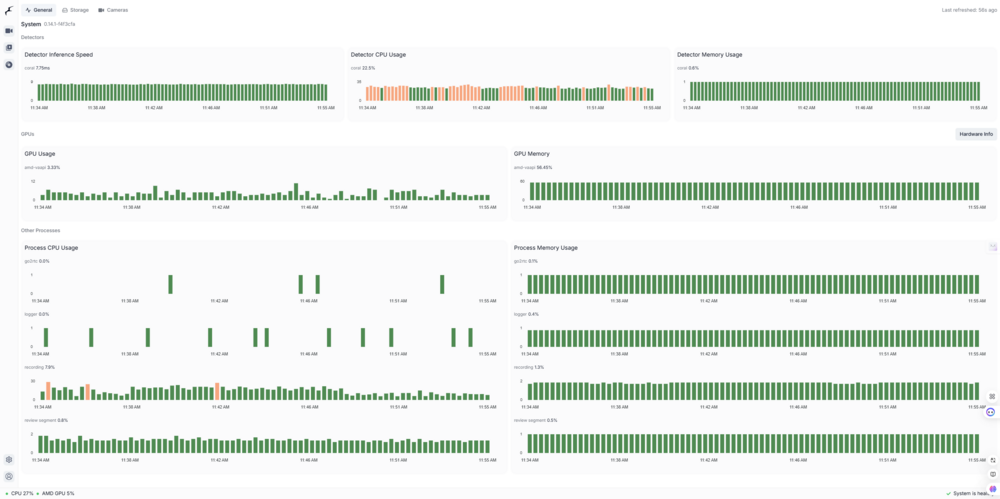
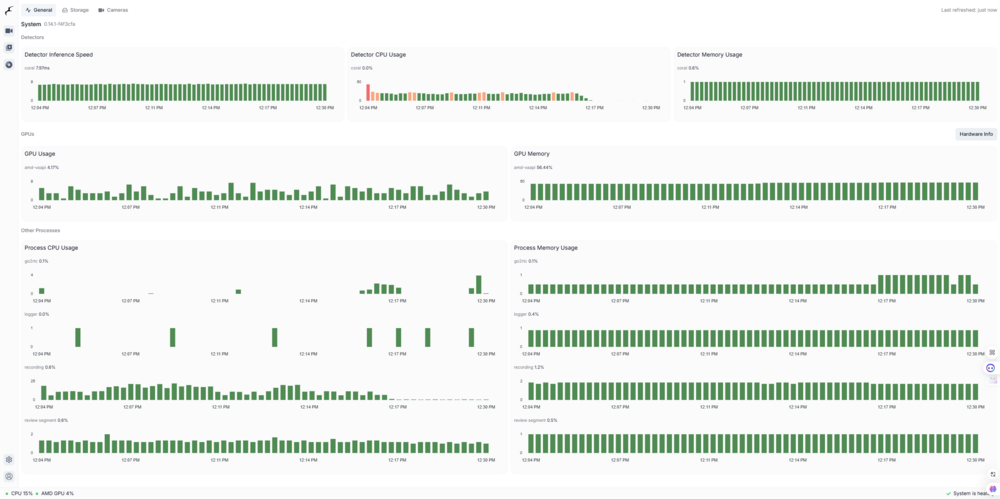
My unRAID server is running at 8-12% CPU without Frigate Docker running and 33% with it running. If I recall it was closer to 20% before v14. When I first opened the new Frigate UI, I noticed enable detect, recording, and snapshots icons for each camera were not highlighted so I clicked each of them thinking they'd need to be enabled. I just unchecked them and my server is back to 15-20% CPU; however, it's not detecting and creating any alerts/recordings for motion. Any ideas why such an increase in CPU increase with the updated Frigate v14? With the detect, recording, and snapshots enabled in the UI for all cameras With the detect, recording, and snapshots disabled in the UI for all cameras
-
If I’m not mistaken when unRAID creates the top level dataset mover can still move everything from cache to array or vice-versa; however, any datasets created by yourself, at least if done with SIO’s auto dataset script, will no longer be able to be moved with mover. It’s been a bit and I think I posted these details in another post but if my memory serves me correctly the files get moved but the source folders/files never get deleted and then they exist on both cache and array. It seems is perhaps a permissions error in deleting the dataset? This issue can easily be created by making a folder with subfolders/files on the array, having mover move it to the cache, using the auto dataset script to convert those subfolders to datasets, changing the share from cache to array, and running mover again which will not move everything back to the cache.
-
No, I never got VPN protection to work and received a letter from my ISP in the past so I moved to usenet. I’ve shutdown Radarr/Sonarr and will check activity tomorrow morning.
-
Hi, thanks for the quick reply @trurl ... attached. FWIW - I installed File Activity plugin and see several movie/show files. I'm not sure if Radarr/Sonarr tasks that run multiple times per hour, and can't be adjusted, would cause this? I also noticed some CCTV which is probably Frigate but am not sure why it would be doing anything with a share that's set to Cache and should only be moved to the Array by mover whenever it runs. I also notice a photo is OPEN and while I pass in /data/media to my media dockers, they do not have my photos added to their library so this is really bizzare. I also see a few .tmp files and am not sure what that's about.
-
I've set my disks to spin down when not in use since they shouldn't be being accessed very often at all; however, I've been randomly finding at least one disk and parity online. Whenever I see them online I check active streams and open files but see nothing connecting to them. That said, I just clicked on log and see a lot of disk notifications for SMART and spin down. I've read it's not healthy to have the disks spinning up/down more than 5 times per day and I'm way over this amount ... how do I find the cause of this? Jan 2 10:02:27 unRAID emhttpd: read SMART /dev/sdg Jan 2 10:02:27 unRAID emhttpd: read SMART /dev/sdc Jan 2 10:18:58 unRAID emhttpd: spinning down /dev/sdg Jan 2 10:18:58 unRAID emhttpd: spinning down /dev/sdc Jan 2 10:44:38 unRAID emhttpd: read SMART /dev/sdf Jan 2 10:44:49 unRAID emhttpd: read SMART /dev/sdc Jan 2 10:59:39 unRAID emhttpd: spinning down /dev/sdf Jan 2 10:59:50 unRAID emhttpd: spinning down /dev/sdc Jan 2 11:02:51 unRAID emhttpd: read SMART /dev/sdg Jan 2 11:02:51 unRAID emhttpd: read SMART /dev/sdc Jan 2 11:19:23 unRAID emhttpd: spinning down /dev/sdg Jan 2 11:19:23 unRAID emhttpd: spinning down /dev/sdc UPDATE: I installed File Activity plugin and noticed ... Frigate was offloading files every hour for it's retention policy. I've requested they do this once per day instead and in the meantime turned retention up to 365 days. Radarr/Sonarr has scheduled tasks running more than every hour that cause the Array to spin up. Since the developers can't trust people to manage their own media server settings, I powered these down and have switched to streaming media rather than downloading it.
-
I moved all my folders/files off my Cache drive to upgrade firmware. I switched my share settings to move back from Array to Cache, ran Mover, and while the folders/files moved, only AppData folder became a dataset. Is this normal or should the sub-folders have also become datasets?
-
I recently converted my Cache drive to ZFS and discovered only the top level directories are automatically converted into ZFS datasets. Since I want to take snapshots of specific Dockers or specific VM's, I need Appdata and Domain sub-folders to be datasets. I used SpaceInvaderOne's Auto Dataset script to automatically convert sub-folders into datasets; however, once you do this, mover will move some but not all files from Cache to Array. I know I can't delete the folders/files from Cache using MC as it says they're in use. I suspect the script does something when converting which prevents deletion which is affecting mover. Is this a bug or enhancement Mover needs to have added?
-
It says I may lose the data on the drives. I have all my appdata, domains, etc. on my 2 NVME ZFS cache pool ... should I move the data to the array first or it's unlikely to lose all my data?
-
I upgraded my cache pool to ZFS and would like to start taking snapshots of my Docker apps but I've noticed Lidarr, Radarr, and Sonarr seem unnecessarily large in size because they include MediaCover data. In my mind if I can move this folder out of the Docker I can keep snapshots very small and if everything falls apart these files are automatically downloaded anyways. Does this make sense and does anybody do this today? I presume I would have to create a folder on the array, pass the folder into the Docker, and then somehow change the MediaCover folder within the Docker to link to the array folder?
-
Do you know if the script will convert a root folder into a dataset if it's not already or will it only convert sub-folders into datasets if the root folder is already a dataset?
-
Thanks for the feedback. This is good if your root directories are datasets but doesn't work if they're folders. I took the long route of having mover move everything off the array to the cache and then having it move everything back which created all root folders on cache as datasets. That said, I just found that if I use the plugin to create a dataset, I can then move all sub-folders/files into that dataset, delete the original folder, and rename the dataset. If I'm correct that it works in this way, this would have saved me several hours ... hopefully this helps somebody else down the road ...
-
I've several folders on my ZFS cache which I moved from the array using MC instead of the Mover so the folder and all sub-directories/files are not datasets. I believe I can move these back to the array and then move them again with mover to make them datasets but is there an easier way with some command/script?
-
Thanks for the clarity, learned something new today! I assume XFS behaves in the same way which is why unRAID allows you to add different size disks to the array? Since my cache disks are the same size and I'd like the advanced features of ZFS I'll go with raid0, thanks again!
-
I'd not chosen raid0 to potentially avoid wasting time rebuilding the "appdata" drive assuming it wasn't the one to fail but I think I should've chosen raid0 ... I was planning to run a script to backup critical files anyways so the downside of raid0 is having to copy critical files back from the array where I had a 50% of avoid with mirror but the benefit is using all the disk space of both drives and a potential speed increase?
-
Thanks for sharing how you can assign shares to different pools but this would mean I'd only be able to assign 1 pool/drive to "movies" and the data could not "spillover" onto the NVME which only has appdata, domains, isos, docker.img, and libvirt so this disk would always sit with 1.75TB of unused space. Instead, I'd like the NVME pool to behave like the array, just without without parity, so /mnt/cache/movies/ will find all movies regardless of whether it's on NVME1 or NVME2 just like the array does with /mnt/user/movies. This allows me to use both NVME fully without 1 sitting there only consuming 250GB since appdata, domains, isos, Docker.img, and Libvirt will never grow much bigger for me. I was thinking the single mode was doing what I'm saying but perhaps it's something not yet implemented into unRAID?
-
I've around 250GB being used for appdata, data (recently downloaded media before offloading to the array), domains, isos, system (libvirt), and docker.img. I was hoping to use the remaining 1.75TB on this drive and 2TB on the other drive for downloading media and hosting it here until it's 90% full at which point I begin offloading the oldest files to the array. I'd wanted to keep these in the same pool in order to use a single path in all of my dockers for downloaded media. I suspect 'll lose this ability if I put these in 2 separate pools?
-
Per the title, I added 2x 2TB NVME drives to my server. I formatted both as ZFS, created a pool, added both devices (Cache and Cache 1), selected the Cache, and can only select ZFS RAID0 or Mirror. Whether I start or stop the array I cannot get to any place for Balance or to select Single mode. What am I doing wrong? I'm on version 6.12.4.
-
I just found Disk 2 with a Red X and it said Not Installed. I'd just ran PowerTop so I assume as the warning suggested it shut down my controller and the disk went offline. Even though it has a Red X I can see it down below, mount it, see the files, and SMART has no errors. Edit: When I stop the array, I can see Disk 2 says Device is Missing (Disabled) Contents Emulated. How do I get this disk re-activated into the array without losing any data? Update: While the array was stopped, I selected my missing Disk, started the array, it said it was a new disk, and I selected Start to rebuild the disk. It said while the disk was being rebuilt it was usable probably because it's emulated from Parity. I've shutdown all Dockers/VM's so it can finish without any other read/writes in the next 12h it will take to rebuild. Hopefully this was the right move...
-
Per your suggestion, it seems all clips/recordings would be written to the cache and never moved to the array since /config path points to appdata which is set to cache:prefer. Is this correct?
-
I already had unRAID cctv share to cache=yes and appdata to cache=prefer; however, my config.yaml is pointed to /media/frigate/frigate.db and Frigate Docker is set with Config: /mnt/cache/appdata/frigate and Media: /mnt/cache/cctv/frigate. I used to have the Docker pointed to /mnt/user and switched it to /mnt/cache but seems you'd suggest changing back to /mnt/user and using the share settings to leave Frigate appdata on the cache drive if space exists and write new clips/recordings to the cache drive which are then offloaded only when mover is run? If changing Frigate back to /mnt/user ... do I still change the config.yaml to /config which is appdata leaving all clips/snapshots on the cache drive or leave it as-is /media so that they're written to cache and offloaded when the mover runs?
-
I switched from /user path to /cache path because some transfers were slow and I read this is because of FUSE but more importantly my drives can never spin down if I'm using /user and read/write files on the array all day long. It seems the best method is to use the /cache and only move files which to the array which are older than "X" days old using the mover tuning plugin but I'm just not sure how to prevent it from moving the folders and only moving the files. Have I misunderstood unRAID about the points below? I do not want slow transfers and want my array to spin down rather than running all day.
-
I've a cctv share listed as Yes:Cache. Frigate config path is /mnt/cache/appdata/frigate and media path is /mnt/cache/cctv/frigate. I've setup my dockers to use the cache otherwise the array disks never spin down but unfortunately mover seems to keep moving clips and recordings folder with associated files to the array causing Frigate to crash. I've downloaded mover tuner with age plugin to solve the issue of all my recent clips (14 days) not being accessible from the interface but this doesn't stop the folders from being migrated. How can I stop these folders from being moved and instead files in the folder older than 14 days?
-
Thanks, good to know. About the appdata ... I stopped my Dockers before doing any of this and simply changed /mnt/user to /mnt/cache which worked for all Dockers except Home Assistant VM will no longer start and is just a Black UEFI interactive screen. Did I do something out of sequence and any way to recover? I created a new Linux VM, pointed it to the cache\domains\folder and the qcow2 file and it started right up.

