





mhweb
Members
-
Joined
-
Last visited
Everything posted by mhweb
-
I have an aoc-sas2lp-h8ir RAID card on a Supermicro 2U 12 Bay LFF Server X9DRi-F server, but it appears that the card does not support IT mode. So, first, can someone confirm that I can't use this card to passthrough the hard drives to the OS? Second, if not, can someone can recommend a RAID card with support for IT Mode I might be able to get on ebay for cheap?
-
You guys were right, I had both PSUs installed, but only one with power. Removed the extra power supply and it's now working. Thanks for the help.
-
@StevenDGoing to try this, because I have both in, but only one plugged in. Thanks
-
I recently purchased the Supermicro 12 Bay LFF Server X9DRi-F 2x Xeon E5-2650 16 Core 32GB HW RAID 2PS, but immediately after I turned it on there is a single (1) very loud beep that never stops and all the drive bays lights go red for a few seconds. The screen shows a post, but the loud beeps continues making the system unusable. Does anyone knows the problem and how to fix it?
-
@ich777 I think it's working. Thank you for the help!
-
@ich777 I've never edited the go fila before, could you please guide me? Thanks
-
@ich777 yes, the tuner is showing, added to plex. Will rebooting unraid will discomfiture it again? thanks
-
@ich777 this is the lsmod result after 'modprobe cx23885': Module Size Used by si2157 20480 4 lgdt3306a 28672 4 cx25840 57344 2 cx23885 163840 0 altera_ci 16384 1 cx23885 tda18271 49152 1 cx23885 altera_stapl 28672 1 cx23885 m88ds3103 24576 1 cx23885 videobuf2_dvb 16384 1 cx23885 snd_pcm 90112 1 cx23885 snd_timer 32768 1 snd_pcm snd 53248 3 snd_timer,cx23885,snd_pcm soundcore 16384 1 snd videobuf2_dma_sg 16384 1 cx23885 tveeprom 24576 1 cx23885 i2c_mux 16384 2 lgdt3306a,m88ds3103 cx2341x 24576 1 cx23885 dvb_core 98304 4 m88ds3103,altera_ci,cx23885,videobuf2_dvb regmap_i2c 16384 1 m88ds3103 videobuf2_memops 16384 1 videobuf2_dma_sg videobuf2_v4l2 24576 1 cx23885 videobuf2_common 45056 3 videobuf2_v4l2,cx23885,videobuf2_dvb videodev 188416 5 cx2341x,videobuf2_v4l2,videobuf2_common,cx23885,cx25840 mc 32768 6 videodev,si2157,videobuf2_v4l2,dvb_core,videobuf2_common,cx25840 xt_CHECKSUM 16384 1 ipt_REJECT 16384 2 ip6table_mangle 16384 1 ip6table_nat 16384 1 iptable_mangle 16384 1 vhost_net 24576 1 tun 45056 4 vhost_net vhost 28672 1 vhost_net vhost_iotlb 16384 1 vhost tap 24576 1 vhost_net xt_MASQUERADE 16384 4 iptable_nat 16384 1 nf_nat 36864 3 ip6table_nat,iptable_nat,xt_MASQUERADE xfs 671744 4 dm_crypt 40960 2 dm_mod 102400 5 dm_crypt dax 36864 1 dm_mod md_mod 45056 3 ip6table_filter 16384 1 ip6_tables 28672 3 ip6table_filter,ip6table_nat,ip6table_mangle iptable_filter 16384 1 ip_tables 28672 3 iptable_filter,iptable_nat,iptable_mangle mlx4_en 110592 0 mlx4_core 270336 1 mlx4_en igb 176128 0 i2c_algo_bit 16384 1 igb ipmi_ssif 28672 0 sb_edac 24576 0 x86_pkg_temp_thermal 16384 0 intel_powerclamp 16384 0 coretemp 16384 0 kvm_intel 212992 5 kvm 421888 1 kvm_intel crct10dif_pclmul 16384 1 crc32_pclmul 16384 0 crc32c_intel 24576 3 ghash_clmulni_intel 16384 0 aesni_intel 364544 4 crypto_simd 16384 1 aesni_intel cryptd 16384 4 crypto_simd,ghash_clmulni_intel glue_helper 16384 1 aesni_intel rapl 16384 0 intel_cstate 16384 0 i2c_i801 24576 0 i2c_smbus 16384 1 i2c_i801 input_leds 16384 0 intel_uncore 131072 0 i2c_core 45056 16 tda18271,videodev,si2157,lgdt3306a,i2c_mux,i2c_algo_bit,igb,m88ds3103,tveeprom,i2c_smbus,dvb_core,i2c_i801,cx23885,cx25840,regmap_i2c,ipmi_ssif led_class 16384 1 input_leds ahci 40960 7 libahci 28672 1 ahci wmi 24576 0 acpi_ipmi 16384 0 ipmi_si 49152 1 acpi_power_meter 20480 0 button 16384 0 acpi_pad 24576 0
-
@ich777 OK, unplugged the server, waited, and then after restart, the same as the image I posted earlier. pass is unraid7 Thanks,
-
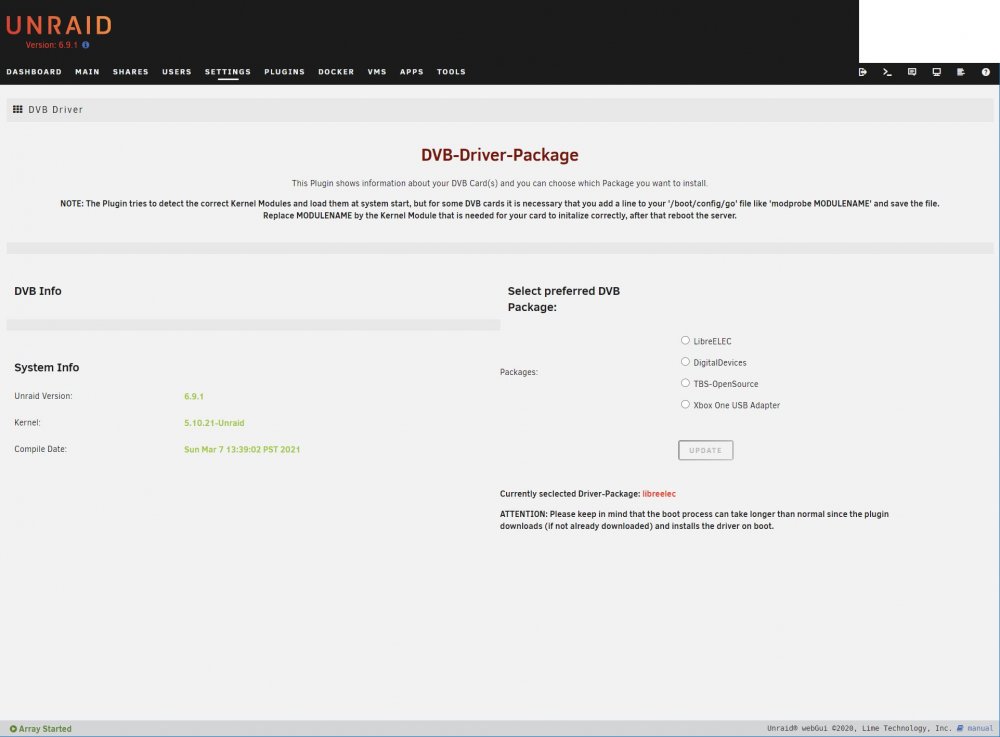
@ich777 I upgraded to version 6.9.1 with the tuner installed in the server, then I installed the plugin, and this is what I have: Did something go wrong? Thanks,
-
@ich777when I check for updates, i only get 6.9.1. any way to update only to 6.8.3?
-
@ich777 the only reason I didn't upgrade was because I have important data in the store array and didn't want to come across unknown or known bugs that could cause data loss. Thanks,
-
@ich777 got it! I'm in version 6.8.0. Is there any other way to get it work with this version? Thanks,
-
How to install the DVB Driver Plugin, when I search the Community Applications, I get a "No Matching Applications Found" message. Also, I'm not sure what you mean with the mention. When I click your name it takes me to your profile and won't let me reply to the message. Thanks,
-
@ich777 How can install the Hauppauge WinTV-quadHD on unraid version 6.8.0? Thanks,
-
@Zonediver @tjb_altf4 @Herbiewalker Thank you guys, I'm looking into the info to get card. Are you guys using pfsense or MicroTik switch for 10GB switching? Or else?
-
I have an unraid server with a X10SRL-F supermicro motherboard, and I'm trying to find a compatible 10gb network card. Does anyone know any compatible network card I should buy? Doing some research, I found mentions that Mellanox ConnectX-2 should be a good choice. Is this true? I have also the Mellanox ConnectX-3 really cheap online, would this one work with unraid.
-
So, I installed the official PlexMediaServer on unRAID, but I have a Plex Pass and I don't know if I'm running the regular version or pass version of the server. Is there any way to tell?

