






CorserMoon
Members
-
Joined
-
Last visited
Everything posted by CorserMoon
-
I wish you could install from the results page like before instead of having to click on the app first and then click install.
-
Thanks for the tip. I'll try that after memtest finishes a pass. 45% and no errors so far. Aside from the obvious, whats the difference between having docker as a folder vs img?
-
I'm trying to get better at investigating so forgive my questions. But how do you know that the log errors like: Oct 30 00:03:11 Executor kernel: verify_parent_transid: 7967 callbacks suppressed Oct 30 00:03:11 Executor kernel: BTRFS error (device loop2): parent transid verify failed on 17584734208 wanted 1640023 found 1639989 are from docker.img? I also see that those errors started after the log space errors, so maybe the docker.log is filling first and then throwing those errors that look like docker.img corruption? In the meantime, I'll run a memtest and see if that's ok.

-
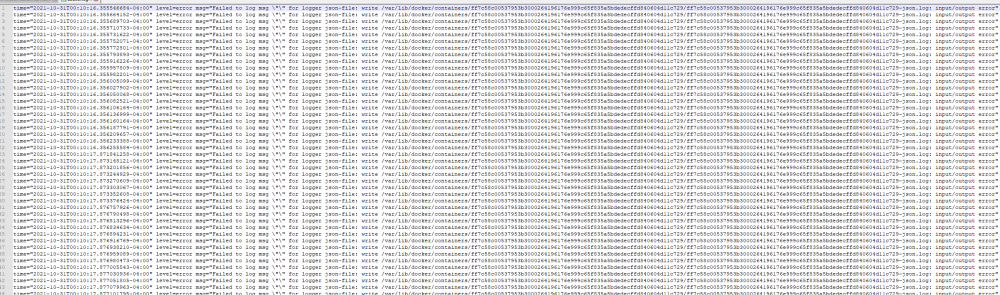
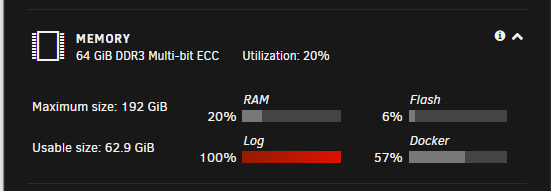
OK, log file filled back up again over night, docker.img still at only 57% utilization. The docker.log.1 file is filled with this: Attached latest diagnostic file. I deleted and rebuilt the docker.img so that shouldn't be the issue. executor-diagnostics-20211031-1258.zip
-
Thanks for the help. I followed the guide to delete and reinstall the containers and everything worked like a charm except for swag and a couple other containers that were using a custom docker network that wasn't preserved. I created the customer network via the terminal command docker network create swagnet Is there a better way to create a custom docker network that will remain if docker.img is deleted?
-
How do you know the img is corrupt? I've checked the paths and they are working correctly. I increased to 50gb because I was about 80% full when using the default size. I run a lot of containers and several are ~3gb each freshly installed. I think I figured out the culprit though. I translated the container IDs in the log output to the container name. It turns out that the container(s) in question were trying to write to a secondary cache pool I created which was full. This also explains the space unavailable errors I was seeing in the syslog. I cleared some space in this cache pool and will see if that does the trick.
-
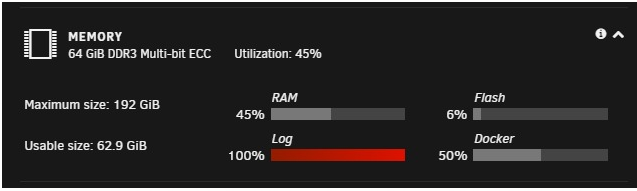
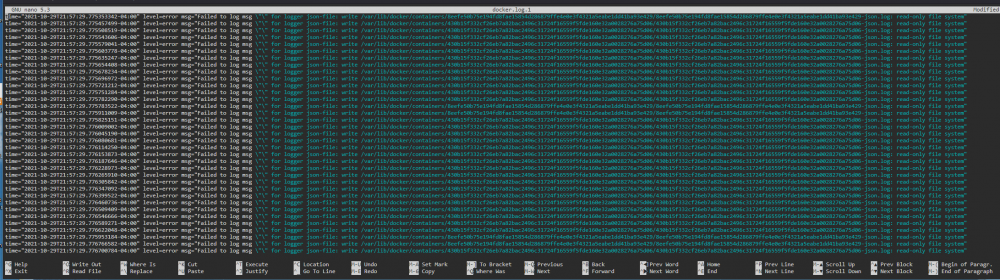
I actually checked the docker img, it's sitting at 50% and was when the log filled. Here is a screenshot I grabbed: And in the screenshot in the previous post, you can see that docker.log.1 is 127mb. I grabbed it off the server to check and it is in fact 127mb and full almost entirely of those "...read only file system" errors .
-
A few days ago I woke up to Plex not working and the container refusing to start. Quickly learned that the docker log was full. I rebooted the system and all was fine. I monitored the log size for the next couple days and it stayed at 1%. This morning however, back to 100%. I need help trying to figure out what is causing this issue. The docker.log is full of the errors that you see in the below screenshot. I've also attached my diagnostic zip. I've since rebooted the server to get everything working again. executor-diagnostics-20211030-0853.zip
.png.608cc21d00e714f15d6c1eccd1dd2a0c.png)
-
I keep having an issue where the USB path changes. I'm using a zstick plugged into one of the USB ports on my supermicro motherboard. I run this to see where the USB is mapped to: for sysdevpath in $(find /sys/bus/usb/devices/usb*/ -name dev); do ( syspath="${sysdevpath%/dev}" devname="$(udevadm info -q name -p $syspath)" [[ "$devname" == "bus/"* ]] && continue [[ "$devname" == "input/"* ]] && continue [[ "$devname" == "video0"* ]] && continue eval "$(udevadm info -q property --export -p $syspath)" [[ -z "$ID_SERIAL" ]] && continue busnum="$(udevadm info -a -p $(udevadm info -q path -n /dev/$devname) | awk -F "==" '/busnum/ {gsub("\"","");print $2}' | head -1)" devnum="$(udevadm info -a -p $(udevadm info -q path -n /dev/$devname) | awk -F "==" '/devnum/ {gsub("\"","");print $2}' | head -1)" bus_dev=${busnum}:${devnum} lsusb="$(lsusb -s $bus_dev)" echo "$lsusb - /dev/$devname" ) done This will show something like this: So I'll enter that in the container, discover all my zwave devices, set everything up fine. And maybe several days later, maybe after a reboot, maybe after removing the zstick to go include some devices and reinserting (into the same USB slot) the path has changed. I know this becuase all of a sudden openHAB isn't seeing any of my devices or the zstick. So I run that same command above, and all of a sudden the zstick usb location is /dev/ttyACM1 instead of /dev/ttyACM0. Why is this happening? Is there a better, permanent path that I am not seeing? This is driving me nuts. EDIT: OK, just happened again. I unplugged it, included a new zwave switch, plugged back into the same USB port, and now its showing the location as /dev/ttyACM1 What is going on??
-
Is there a way to get openvn working in this container or should I just use the binhex container that already has it? My experience with linuxserver containers has been much better over all...


.png.608cc21d00e714f15d6c1eccd1dd2a0c.png)