





Sublivion
Members
-
Joined
-
Last visited
-
Image just updated to include the hotfix.
-
I have updated the image now, do not have public repo atm.
-
@Asghan probably not as it's only leisure... if I have some extra time someday maybe I could then upgrade but I doubt it.
-
Hello, Aug 3 18:18:18 Dunkin php-fpm[10040]: [WARNING] [pool www] child 4710 exited on signal 9 (SIGKILL) after 246.847517 seconds from start Aug 3 18:18:20 Dunkin php-fpm[10040]: [WARNING] [pool www] child 10288 exited on signal 9 (SIGKILL) after 209.727298 seconds from start Aug 3 18:19:31 Dunkin php-fpm[10040]: [WARNING] [pool www] child 7051 exited on signal 9 (SIGKILL) after 304.937449 seconds from start I have been having this problem since 6.12.3 (updated from 6.11). GUI doesn't load when this issue is happening... diagnostics-20230803-1822.zip
-
I'm seeing this same thing. Had to delete all those extra params to get the container to start again.
-
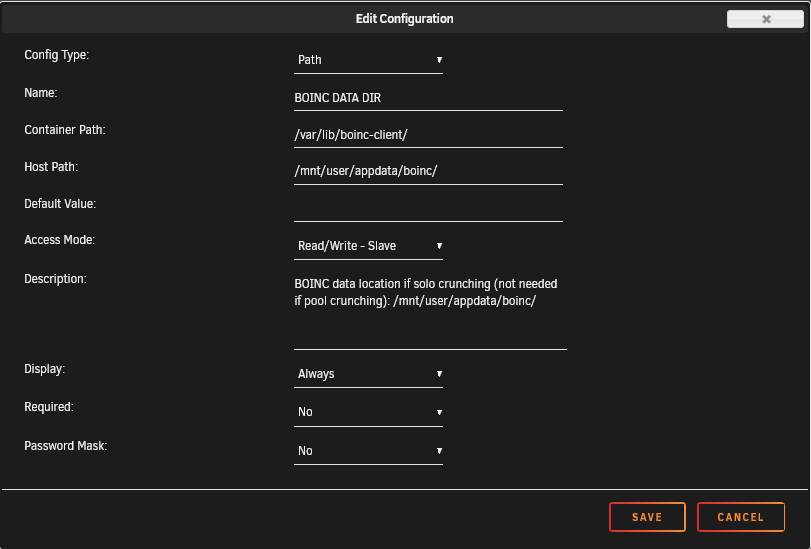
How to setup BOINC for POOL crunching with this container: Just follow the detailed pool crunching instructions in https://gridcoin.us/ You don't need to specify BOINC DATA DIR with pool crunching. How to setup BOINC for SOLO crunching with this container: You can install separate BOINC container (if not using already) and specify BOINC DATA DIR to Gridcoin container (XML just updated to include boinc data dir location). If you don't have BOINC DATA DIR in your container options you can manually add it yourself) Point Host Path to correct location. You can then press the "beacon" button in the Gridcoin wallet and do the steps needed for solo crunching. Follow solo crunching guide in https://gridcoin.us/ for more detailed instructions.
-
Gridcoin is an open source cryptocurrency (Ticker: GRC) which securely rewards volunteer computing performed on the BOINC platform. https://gridcoin.us/ Via this docker you can access your wallet via VNC or NoVNC. More info about the docker container: https://hub.docker.com/r/sublivion/gridcoinwalletgui Remember to backup your wallet and conf from time to time! You can install separate BOINC container to use with this container. Gridcoin blockchain is around ~4GB, so the wallet needs to sync the whole blockchain in order to work.
-
I had the same prob. I created a new database by using mariadb, then just set shinobi to use that location. Then on the next bootup shinobi will create whatever is needed... Use spaceinvaders nextcloud youtube video as example how to create database using mariadb.
-
@SpaceInvaderOne This docker seems to use ffmpeg 3.3.4: /opt/shinobi # ffmpeg ffmpeg version 3.3.4-static but shinobi docs are saying to use at least 3.4.6: "You should be on FFMPEG 3.4.6 or above for the best performance." https://hub.shinobi.video/articles/view/DmWIID78VtvEfnf edit: after todays update 4.2.1
-
I also had to modify the script a little to work. My other drive states only standby when spun down and unknown when spun up. I just modified the script to check standby state to calculate spun down disk if (strpos($result,"standby") ) { $totalSpunDown++; } Log after the change (at first both disks running, then spinning them down one at a time): Dec 16 22:31:40 Dunkin root: #012/dev/sdc:#012 drive state is: active/idle Dec 16 22:31:40 Dunkin root: #012/dev/sdf:#012 drive state is: unknown Dec 16 22:31:40 Dunkin root: Total Spundown: 0 Dec 16 22:31:58 Dunkin emhttpd: req (55): cmdSpindown=disk1&startState=STARTED&csrf_token=**************** Dec 16 22:31:58 Dunkin kernel: mdcmd (131): spindown 1 Dec 16 22:32:10 Dunkin root: #012/dev/sdc:#012 drive state is: standby Dec 16 22:32:10 Dunkin root: #012/dev/sdf:#012 drive state is: unknown Dec 16 22:32:10 Dunkin root: Total Spundown: 1 Dec 16 22:32:10 Dunkin root: Entering Normal Mode Dec 16 22:32:10 Dunkin kernel: mdcmd (132): set md_write_method 0 Dec 16 22:32:10 Dunkin kernel: Dec 16 22:32:13 Dunkin emhttpd: req (56): cmdSpindown=disk2&startState=STARTED&csrf_token=**************** Dec 16 22:32:13 Dunkin kernel: mdcmd (133): spindown 2 Dec 16 22:32:40 Dunkin root: #012/dev/sdc:#012 drive state is: standby Dec 16 22:32:40 Dunkin root: #012/dev/sdf:#012 drive state is: standby Dec 16 22:32:40 Dunkin root: Total Spundown: 2 btw hitting 1 gigabit/s (lan max) now with turbo mode, nice!

