





GTP
Members
-
Joined
-
Last visited
-
I was running a parity check when Unraid found errors on disk 5 and 6. I cancelled the parity check and stopped the array. I ran a check and repair on disks 5 and 6 but no errors were found. I also conducted smart checks on disk 5 but that also completed with no error. I restarted the array but Disk 5 is still disabled. I realize I have a lot of disks so please know that the errors I am seeing are coming from disks 5 and 6 only. I have attached diagnostics. All disks Smart checks as healthy on the dashboard even the disabled disk. Thank you for your help, GTP tower-diagnostics-20211009-2251.zip
-
Everything looks great, I don't see any issues at all thank you so much for all your help! You Rock!! @trurl
-
@trurl Alright I am going to install those then, is there anything else I need to do or did you just help me clean-up my entire system? Thank you, GTP
-
@trurl I have re-created the docker image at 20GB and posted the new diagnostics. I don't think I want all those dockers I had before. I think I just want binhex-plexpass, GAPS, Tautulli and OMBI for now. Thank you for all you help! Please let me know what the next steps are? Thank you, GTP tower-diagnostics-20210922-1724.zip
-
@trurl Yes, all my disks are enabled and mounted except for sdf which is a 12tb drive I was planning on adding once I got the rig up and working again. It has not been pre-cleared or formatted. I am waiting to do that until after we have resolved all my other issues. The good news is I am no longer receiving that warning message I was receiving yesterday preventing me from formatting the disk. I believe it had to do with the plugin. After I updated all my plugins the error disappeared. So after we fix everything else and it is running a little while I will pre-clear and format the new disk with no errors hopefully. On the dashboard all my disks are healthy and contain no smart warnings. I just checked the contents of the lost and found drive and it has files from Disk 6,8,9, and 11 on it but I am fine with losing it, I can always re-download. I have installed the Fix common problems plugin and will resolve all issues found. I want my ISO's on my Array, I guess instead of the cache right? What would I need to do to move the files? I ran Mover again but I am still seeing the files from Appdata on my array in Disk 21(just the lets encrypt folder that I don't use any longer)? I have attached Diagnostics. Thank you, GTP tower-diagnostics-20210922-1441.zip
-
@trurlI have posted my diagnostics after following the steps correctly. I have not reinstalled docker and will wait for your reply. Thank you for your help! Thank you, GTP tower-diagnostics-20210922-1215.zip
-
I'm sorry I misunderstood. I will complete the steps correctly and get you the diagnostic file before reinstalling docker. I incorrectly assumed that once Mover had completed it would correct the issue, my apologies. I will post the diagnostic tomorrow morning. Thank you for your help Thank you, GTP
-
I am not using letsencrypt. I don't need it anymore. I haven't worked on the server in several months so many things could be out of date.
-
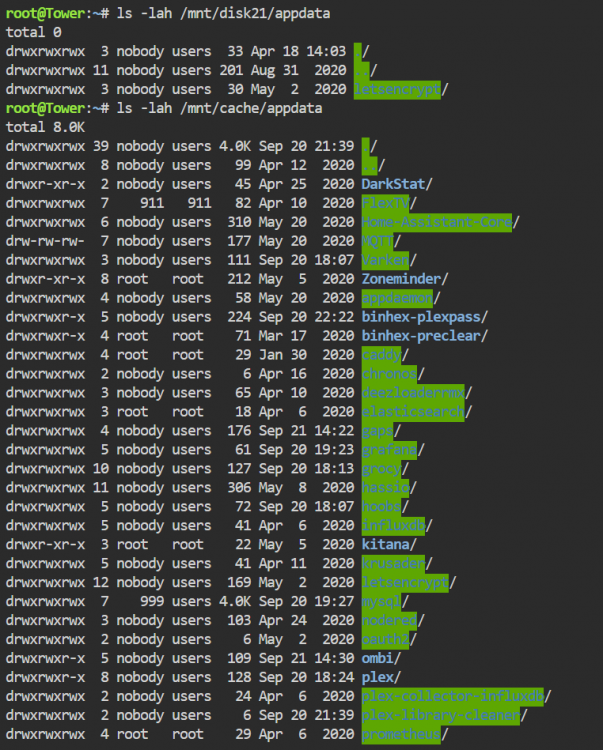
@trurl I am using Brave but I turned off all shields. I switched to chrome and I managed to get the terminal window to chow up but the error in the screenshot from before persists. I have also attached a screenshot of what was displayed when I ran the commands you requested. It looks like some leftover containers from the old docker image that didn't get deleted for some reason? Thank you for your help, GTP
-
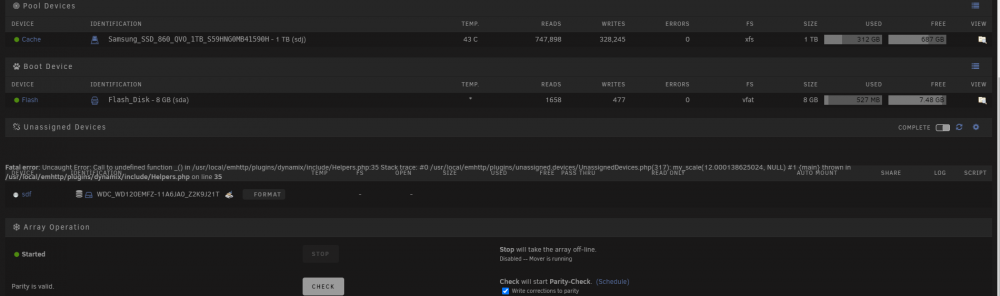
@ChatNoir I just left it open for a minute and nothing happened. Thank you for the advice though, it was worth a shot! I am also seeing this weird error in the screenshot below. Thank you, GTP
-
@trurl Do I have to enable terminal or bash in 6.9.2? When I click on the terminal icon in the upper right hand corner, the terminal window pops up but I cannot type anything and there is no ">"? So I cannot type the command you requested. What should I do? Thank you, GTP tower-diagnostics-20210921-1237.zip
-
@trurl I have ran the steps posted above and attached the new diagnostics. What would you like me to do as the next step? Thank you, GTP tower-diagnostics-20210920-2044.zip
-
@trurlThe Parity Rebuild completed successfully!!!! I have attached the Diagnostic file after the rebuild completed. Please let me know what I should do next to clean-up my system or if I should start a new thread? Thank you, GTP tower-diagnostics-20210920-1755.zip
-
@trurlI am only a few hours away from a successful rebuild. What steps do you recommend taking next? I know I have issues with my cache and docker images as well as my version, would you mind telling me where I should start? Thank you for all your help. I will send you a fresh diagnostic once the rebuild finishes. Thank you, GTP
-
That is normal for my system an 8 tb rebuild has always taken about 2 and a half days and about 3 for a 12tb. I must have port multipliers. I have four drives plugged directly into the motherboard and the rest using pci SATA expansion cards. I absolutely will not use the system during the rebuild and I will disable docker now. Thank you for the advice. Have a great weekend! Thank you, GTP

