





Carlos
Members
-
Joined
-
Last visited
Everything posted by Carlos
-
Hi there, It happens sometimes, next time a docker update fails rollback to previous release just changing "latest" for the previous working version "2022.7.20-ls101" in the docker template. Cheers
-
Today's build is broken, I had to rollback to linuxserver/sickchill:2021.7.23 repository to make it work again
-
Nevermind, looks like it's fixed with the latest client update recently deployed Cheers
-
Hi there folks! Today an expired certificate error message from my Win10 Nextcloud client hit me when I logged in. Looking around I found this, should I clic "Trust this certificate anyway" and forget about it or should I change something in my SWAG config? Thanks
-
As far as I know it's recommended to set up the DNS in the template and not in the Pi-hole config. Cheers
-
Well, I finally found the issue. My ISP updated the fiber router and that caused my problem connecting to the server using WiFi. Surprisingly using the 5GHz WiFi worked fine. Anyway, rolled back the firmware, blocked remote updates and now it's working fine again. Thanks
-
Hi there, As as said before, my smartphone won't connect to the Nextcloud server using the domain via WiFi neither using the browser nor the app (using 4G works fine). For a moment Pi-Hole crossed my mind as a possible cause but disabling it nothing changes. Cheers
-
It was working fine till latest Nextcloud update PS: my PC access the Nextcloud server (in the same LAN) using the domain (via browser and desktop app) without problems
-
I've been fiddling with this mess all afternoon and I'm still at square one... I even nuked Nextcloud+MariaDB and started over but the result is the same. My Android phone connects fine via 4G (cellular data) but there's no way to make it work via WiFi with the reverse proxy active (swag) nor app nor android browser. However, if Nextcloud is set without reverse proxy (access via 192.168.x.x) my Android phone can connect fine... I'm starting to think there's some problem between swag and this Nextcloud update. PS: the media visualization problem was fixed ditching SMB/CIFS external storage and mappig the shares as local
-
Hello folks! Latest update (v21) is been anything but a smooth ride... After updating to v21 (when supposedly it was going to update to v20.x.x) it's been a constant battle. First I fixed the well known error messages "/well-known/*" updating my default file. But I still suffering (literally xD) a problem with photo/video upload from my Android phone. Since the update my phone only connects to the server while in 4G, when is connected via WiFi is not able to connect to the server (I'm using Swag with DuckDNS) neither using the app or browser. Adding insult to injury all photos/videos uploaded via cellular data open fine via SMB but don't work when I access them with my PC browser to my Nextcloud (no preview/corrupted and error when opening file). Cheers


-
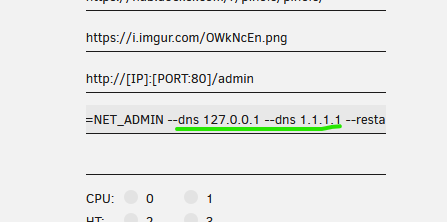
Hi there! Am I the only one with problems with latest update? Had to roll it back to v5.7 to make it work again. Thanks EDIT: Got it fixed deleting dns from "Extra parameters"
-
Hi there, I had it working again just editing the template and using as repository: linuxserver/sickchill:amd64-version-2021.3.28.post3 As @huladaddy said before, changing back to "latest" repository is working fine again. Cheers
-
Same here
-
Hello there, Had this problem for the first time ever (looks like it happened after a Nextcloud docker's update). Rebooting the server fixed (at least for now). Cheers.
-
Thanks! I should've looked the FAQ first. Even tough, for a moment I thought I was going dumb, looks like Spain is not working with that fix, tried Toronto and worked like a charm... Cheers
-
Hi there, I had the (previous) latest version working fine till now, I just update it and now it won't connect. Tried updating OVPN files without positive result. I have attached the log to see if it's helpful Thanks qbt log.txt
-
Hi guys, Latest update also has broken my qBittorrentVPN ¿is there any way to rollback to previous release? Thanks in advance
-
Hi there folks! Has anyone using WireGuard tested CPU performance vs OpenVPN? I have no problem with the speed I get using OpenVPN over PIA, but if the CPU usage is lower using WireGuard I'll end up making the change. I already noticed a big improvement in CPU usage when I got an old i5 with AES-NI using OpenVPN (half CPU usage actually). Cheers
-
Hi there folks, I'm having an intermitent problem where finished downloads aren't moved to the "complete" folder. When it happens I'm not able to remove the torrent from webUI, after restarting the container it seems to work again (the removing part) but I have to move the downloads manually from "incomplete" folder to "complete" folder. Any idea what could be causing the problem? Thanks
-
Hi there, I was having the same problem, thanks for the tips. A little guide step by step for noobs (like me): Open a console (in docker) Turn on maintenance mode: sudo -u abc php7 /config/www/nextcloud/occ maintenance:mode --on Go to: cd /config/www/nextcloud/ Run the command: sudo -u abc php7 occ db:convert-filecache-bigint Turn off maintenance mode: sudo -u abc php7 /config/www/nextcloud/occ maintenance:mode --off Restart the container Cheers


