





broncosaddict
Members
-
Joined
-
Last visited
Everything posted by broncosaddict
-
Both commands ran without issue. Don't know if this helps, but I forgot to post it the other day. I tried rerunning the benchmark the same day this failed. It started from the beginning again, but it went twice as far....the first time it failed around the 10 minute mark, the second was around the 20 minute mark. At that point I benchmarked the disks that hadn't been one by one and had no problems. Did the same with the other unraid setup.
-
It works perfectly fine and it wasn't bothering me. My fault, I thought I read in one of the post you wanted to notified. Thanks!
-
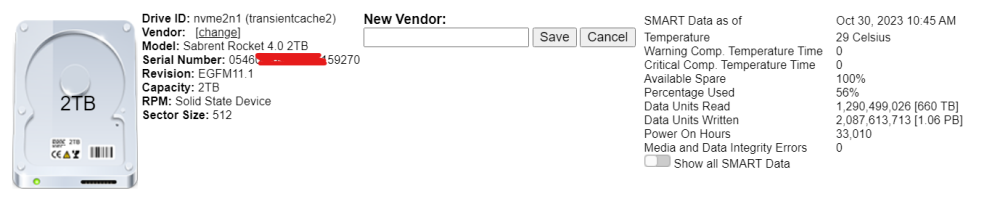
Don't know if you can do anything about it, but my Sabrent Rocket SSD's aren't parsing correctly. I've attached a screenshot to show you what I mean. Let me know if you need any additional info. Thanks!
-
I just installed and ran it for the first time on 2 different unraid servers (6.12.4). After going for a while, they both stopped with the same error below. Am I doing something wrong? Unrelated, just something I noticed, there is a typo, "iw" in "following" needs to be flipped: Bandwidth was capped on the folloiwng drives Thanks in advance for any help that can be provided! 10:31:40 Spot: [30] ScanLoc: [1831412] SizeLoc: [2.4 TB] Avg: [187.74 MB] AvgMin: [187.43 MB] AvgMax: [188.74 MB] Chart1.series[10].addPoint([2400468336640,187735433]); parent.document.getElementById('Speed_controller_0000_0a_00_0').innerHTML=''; CMD: dd if=/dev/sdj of=/dev/null bs=1310720 skip=2136647 iflag=direct conv=noerror status=progress 10:31:57 Spot: [35] ScanLoc: [2136647] SizeLoc: [2.8 TB] Avg: [175.23 MB] AvgMin: [174.33 MB] AvgMax: [175.64 MB] Chart1.series[10].addPoint([2800545955840,175233181]); parent.document.getElementById('Speed_controller_0000_0a_00_0').innerHTML=''; CMD: dd if=/dev/sdj of=/dev/null bs=1310720 skip=2441883 iflag=direct conv=noerror status=progress 10:32:14 Spot: [40] ScanLoc: [2441883] SizeLoc: [3.2 TB] Error: Error invoking external process The error occurred in /var/www/BenchmarkDriveController.cfm on line 845 843: "chmod 666 #ResultsFN#" & Chr(10)> 844: <CFFILE action="write" file="#OutDir#/read_spot_#Spot2#.sh" mode="766" output="#cmd#" addnewline="NO"> 845: <CFEXECUTE name="#OutDir#/read_spot_#Spot2#.sh" timeout="3060" /> 846: <CFSET Result=GetReadAvg(ResultsFN,Drive.Attrib.Configuration.RPM,2,MaxGap)> 847: <CFELSE> 848: <CFOUTPUT>CMD: dd if=/dev/#DriveID# of=/dev/null bs=#BS# skip=#ScanLoc# iflag=direct conv=noerror status=progress<br>
-
The idea is what brought me here, I hate losing command history after reboots....very, very irritating I haven't had a chance to reboot to validate, but I'm very excited about it...it's the little things in life 🙂 fwiw: You don't need to do anything special to write it to ram, history is already stored in memory. It does not write to disk until you logout of the session. This can be validated by looking at your .bash_history file it will have the time/date of when you last logged out of a session. You can also vi the file and you'll not see any of the commands from your current session.
-
I realize this is an old thread and everyone may already be aware, but this is incorrect. It would not be continuous writes to the flash drive. Bash history is stored in memory until you logout/exit the shell...at that point it is written to disk. So it's a single write per shell session.
-
Yeah, that's what I was thinking as well, just wanted to get a second set of eyes to make sure I wasn't missing something. Thanks for taking a look!
-
This morning my server was unresponsive/crashed. GUI was unavailable, ping showed unreachable (so no ssh). Looking at syslog, one second everything is normal then nothing until It starts booting up. Since it was a dirty shutdown, parity check immediately started up which somewhat sucks because it takes a couple of days and it just finished running one last week (no errors). Everything else started up and is running without issue. From my understanding, such sudden crash/unresponsiveness points to some type of hardware issue. Nothing has changed or been acting up on that front, so I'm not really sure where to begin. Hoping somebody can point/guide me along a path to help identify the problem. I did make 3 changes a few days ago without any issue until this morning: 1) updated from 6.10.3 to 6.11 2) I changed emby to transcode to 8g tmpfs, ramdisk (I always have 20G free) -- Also, this occurred after all dockers were restarted and emby had not been used since the restart. 3) I added the disable mitigation plugin I don't think they are related, but without any error, I have no idea. I would think I would have seen something in the logs somewhere...right? I do have syslog server running and have included the remote syslog file (syslog-10.10.10.1.log) in the diagnostics zip alongside the "normal" syslog. Any help will be greatly appreciated, hopefully something stands out to someone. Thanks! media1-diagnostics-20221003-1030.zip
-
Thank you so much. I would have never connected it to an issue with the browser...once I included that in my search the known issue popped right up. You are correct I was using firefox....I opened the gui in chrome, rebooted unraid, started the array and everything is back to normal. Thanks again!
-
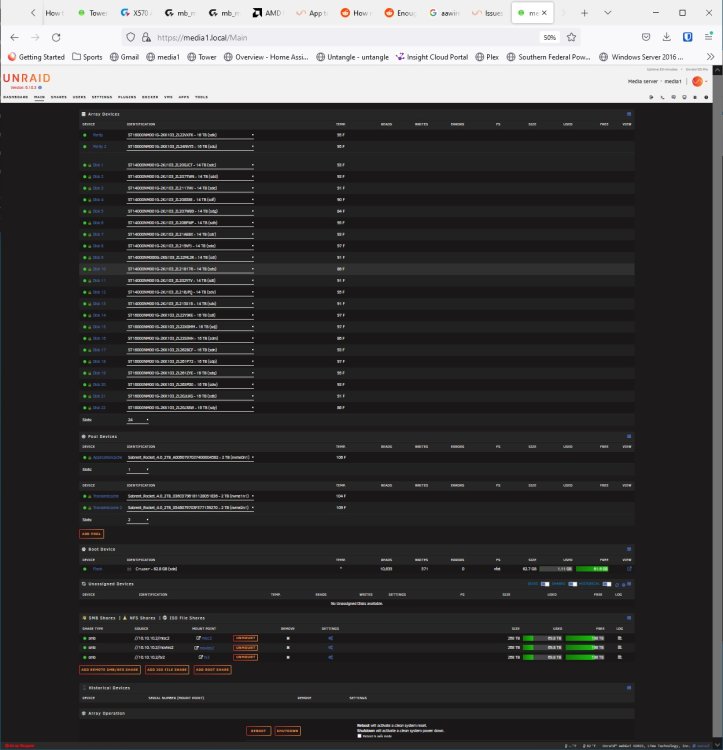
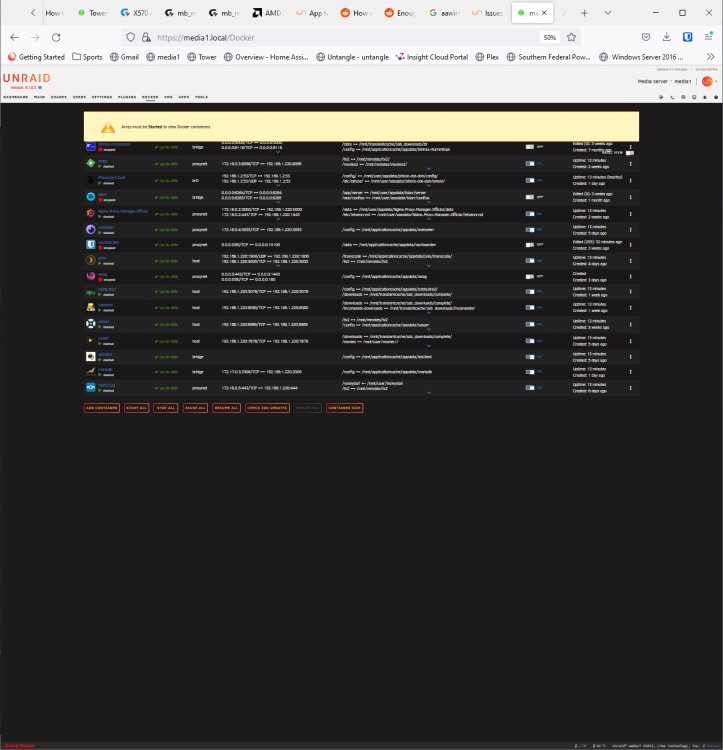
Came home today and my unraid server was down (crashed). I started it back up, got into the gui and started the array. As it was starting, once it finished with the last disk, I had a browser pop-up saying it needed to resend data and to refresh. I refreshed the page and now it shows a pool that does not appear to be started, however, my vm's and dockers are up and running. At the top of both the docker and vm screen it says the array needs to be started first. The only recent change I made was to LOCAL TLD (set it to empty) and re-provisioning the certificate on the Management access screen, so I reverted it back to "local" and re-provisioned the certificate. I would guess it is not related but just wanted to rule it out first as I have noticed a sluggishness with the GUI since making that change. I see some errors in the diag log but honestly don't know which ones are "normal" and can be ignored vs actual errors to be concerned with. That along with the behavior of seeing the pool down but dockers/vm's up has me very confused. -Also, all my shares are accessible and I was able to read/write a file to each of them. And I did try rebooting, but behavior remains unchanged. Hoping someone can provide some guidance or direction. Any help will be greatly appreciated. media1-diagnostics-20220904-1607.zip
-
Alright, good to know. Thanks for all the information and help!! Much appreciated.
-
Well, the question has been answered, the drive is dead. Tried rebooting, changing the slot in the server twice, and running Seagate tools. Unraid and Seagate tools see's all the other disks except the one that generated the errors. After the reboot, it showed as no device and there was nothing listed in the available devices. It's under warranty so I'm going to do an exchange. My understanding is I can use everything as normal and will be fine as long as I don't lose 2 more drives (I had dual parity drives). Correct? When the replacement comes in, it is just a matter of swapping it out and rebuilding the drive. Correct?
-
Thanks for the quick answer. A quick follow up question, by rebuild, are you saying the drive is still good and rebuild the existing drive or a rebuild using a new drive? --Or will this be unknown until I get I can get it back online with a smart test? Yeah, kept getting NFS errors (stale file) and gave up on it. Swapped to using SMB. (I'm assuming the errors you referred to were from a couple of days ago) I forgot about the mover logging, was doing some troubleshooting and never turned it off. Good catch, thanks for that. Thanks again!
-
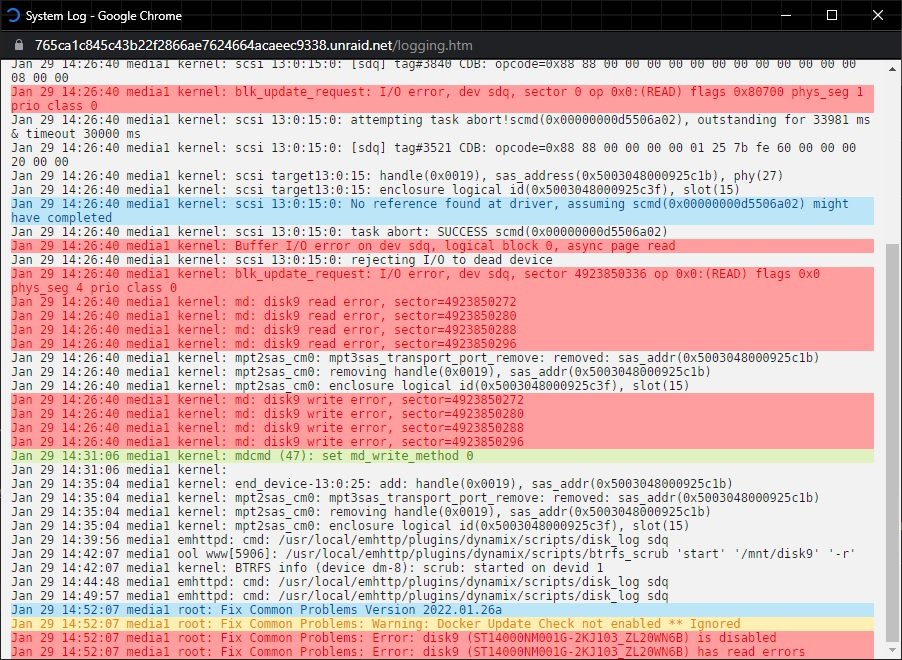
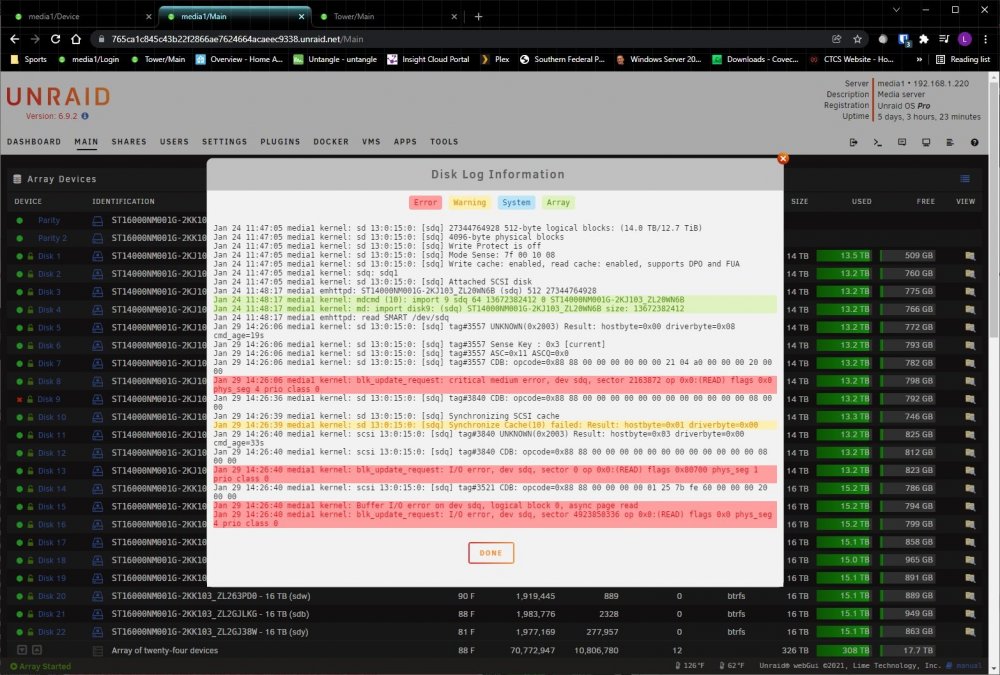
Unraid: 6.9.2 Filesytem: BTRFS Just started receiving drive errors and currently running the btrfs scrub process.t I'm assuming that won't resolve the issue and am trying to figure out proper next steps. Hoping someone can help decipher the log and point me in the right direction. I'm attaching diagnostics and a couple of screen shots, one showing the syslog errors and the other showing the errors in the disk log. media1-diagnostics-20220129-1453.zip
-
Storage was easy fix. Doing a search, I think I'm one of the "lucky" ones having an issue with the AOC-SAS2LP-MV8, swapped it for an LSI appears to have done the trick....no more errors. I still can't disable VM's, but since I'm not running any right now, not really a concern. Thanks again for the help and pointing out the storage issue!
-
I rebooted the server and was able to change the address assignment to automatic...in hindsight, I vaguely remember putting the IP in during setup...which I probably shouldn't have. Was able to install the plugin without a hitch. Looks like I do have a problem with my storage piece I get to work on...aside from creating the pool I haven't done anything or put anything into yet...thankfully. Makes working on it/fixing it much easier not having to worry about losing data. Thanks guys for the quick help, much appreciated!!
-
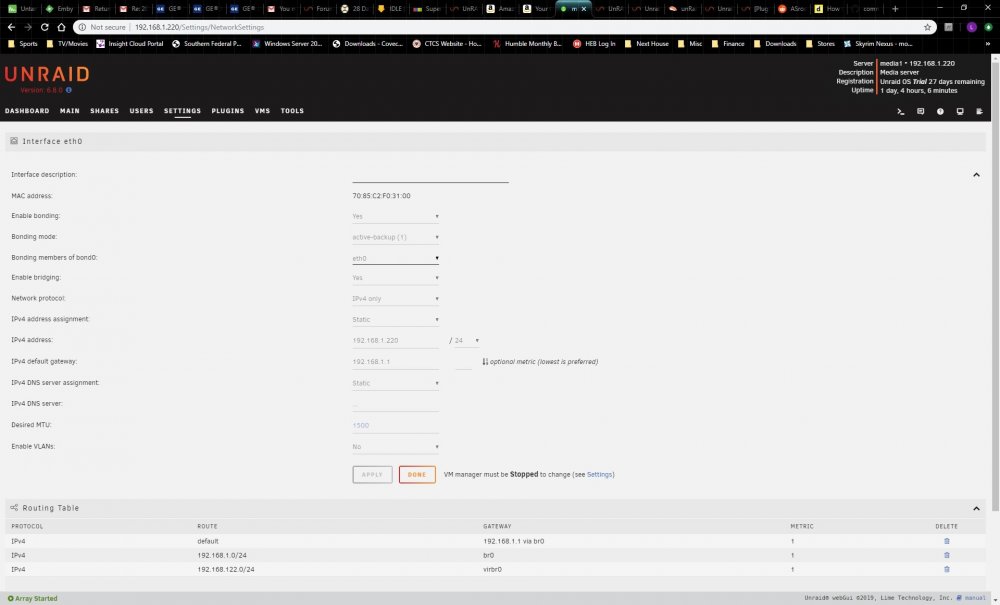
Don't know if it helps, but here's a screen shot of my network tab.
-
I do (or should) have the dhcp off, I have it configured in my router to give it a static ip. I'm trying to add the dns entries now but I can't turn off vms. I've tried stop all from vms (I have none installed anyways), as well disable in VM manager. I hit apply, but it doesn't stick and continues to say running.
-
Doesn't it pick that up from the gateway?
-
Thanks, I will look at it. I wasn't sure if my old controller would work or not, but I saw healthy/online on the dashboard and thought everything was good so didn't look any further. Once I get this plugin problem resolved, I will try swapping the controller out and see if that resolves the issue. Thanks again for pointing that out.
-
Hey everyone, New to unraid, just installed the trial and am trying to install the CA plugin. Aside from the initial install, I've only created my pool and cache. I haven't "tweaked" anything but I must have done something wrong somewhere along the line as I am getting a network error when trying to install the plugin Using this url: https://raw.githubusercontent.com/Squidly271/community.applications/master/plugins/community.applications.plg I get this: plugin: installing: https://raw.githubusercontent.com/Squidly271/community.applications/master/plugins/community.applications.plg plugin: downloading https://raw.githubusercontent.com/Squidly271/community.applications/master/plugins/community.applications.plg plugin: downloading: https://raw.githubusercontent.com/Squidly271/community.applications/master/plugins/community.applications.plg ... failed (Network failure) plugin: wget: https://raw.githubusercontent.com/Squidly271/community.applications/master/plugins/community.applications.plg download failure (Network failure) Everything I see network wise works fine...but as I'm new to unraid, I really don't know what "fine" should be. Any help would be greatly appreciated. I've attached the diagnostics. Thanks! media1-diagnostics-20191219-1145.zip




