KeyBoardDabbler
Members
-
Joined
-
Last visited
-
Extended SMART test is still in progress 70%. As mentioned i replaced the sata cable prior to starting SMART test. However, I do also use a power splitter for 4 disks. I will check if the disk is powered from this after test completes.
-
hi, my system completely locked up on me, webui not responsive and console reboot timed out. After power cycle, system started up and parity check under way. Disk 8 then showed "Errors 2050" ``` The diagnostics identify what happened to Disk 8 after reboot: 16:37:12: Disk 8 mounted successfully; XFS completed journal recovery. 16:37:44: A correcting parity check started. 16:42:22: The controller lost the disk. Read/write operations failed, and the controller removed it. 16:42:37: The same disk returned as sds, previously sdh, reporting a power-on or device reset. ``` I rebooted, checked cables and brought array back online. showed disk 8 as offline and emulated. I read the rebuild-onto-itself procedure. after bringing the array up with disk 8 selected as no device. Disk 7 started getting errors? i swapped sata cable, currently running extended smart test on disk 8. Array mounted with disk 8 emulated, Disk 7 looking normal so far. If smart test passes i will try stopping and reassigning disk 8. holy-grail-diagnostics-20260913-1748.zipholy-grail-diagnostics-20260913-1707.zip
-
yes, i pulled the files and tested the console from windows initially. I have since run an image using wine, server_configuration.scnf is working for me. However as you said console doesn't. I noticed a user from the Wreckfest discord has posted a python script that manages logging, console output, and key press automation while running a virtual display in wine. But this isn't official and goes back to you not being comfortable releasing a container without proper support which is totally fine.
-
After some testing Wreckfest 2 has a similar web console to the original game, typing `help` generated a list of commands. Being EA there may be bugs but is working. I also pulled the default server settings conf file. { "bbmeta": "scnf v0 n1", "net server config": [ { "bbmeta": "ncnf v1 n1", "name": "Your Server Name", "description": "Your Server Welcome Message or Rules etc.", "password": "ServerPassword", "game port": 30100 } ], "game server config": [ { "bbmeta": "gcnf v0 n1", "event rotation name": "", "default event": [ { "bbmeta": "ecnf v0 n1", "level": [ { "bbmeta": "mlvl v1 n1", "level id": "track07_1", "weather path": "data/property/weather/track07_1_bluesky_2.weat", "ai set path": "career/ai-class-all.aist", "game mode id": "bangerrace" } ], "rules": [ { "bbmeta": "evru v4 n1", "laps": 3, "time limit": 3, "number of teams": 2, "max number of participants": 24, "flags": "", "car reset delay (seconds)": 2, "vehicle damage id": "normal" } ], "bot count": 8 } ], "countdown time": 100000, "flags": "leader enabled" } ] } there is also a `server_privilege.sprv` file, to add roles or restrictions. { "bbmeta": "sprv v0 n1", "roles": [ { "bbmeta": "ssrl v0 n3", "platform id": 11111111111111111, "role": "moderator" }, { "platform id": 77777777777777777, "role": "vip" }, { "platform id": 17171717171717171, "role": "admin" } ], "bans": [] } Lastly you can set the server save data path by using launch arg "--save-dir=[path]" Example: "Wreckfest2.exe --server --save-dir=${SERVER_DIR}/"
-
It seems anonymous login now works for Wreckfest 2 (app id 3519390). I tested this by updating the GAME_ID on the original Wreckfest template, seemed to download the server files. `Success! App '3519390' fully installed.` Is it possible to update the ports to reflect or would a new image need to be built?
-
I have since made 500gb of free space on each drive. I ran 3 loops through memtest with zero errors and removed the Tips and Tweaks plugin as suggested by a user on reddit. Upgraded to 7.1.0-beta-2 yesterday. i noticed in the patch notes "Live Updates Paused", could this of caused the system to fail leaving the webui open in a browser tab on beta-1? if it was a network issue i would expect to see in the logs containers going offline. The fact the system just "halts" make me think its unraid crashing?
-
thankyou for reminding me, i do have this enabled already. Although there is nothing standing out in the log prior to the crash. Would a full disk cause this behavior? i am using unbalance now to rule this out. (Mar 28 19:29:16 holy-grail shfs: assign_disk: /tv/The/Season 01 (28) No space left on device)
-
Hi all, I am hoping to get some guidance on how to diagnose my system further. I have attached the diagnostics report taken from the server but it seems like the logs are after the system has rebooted. If this is the case, 1. Next time how can i save the correct data before power cycle the system. 2. do i have any other options then to power cycle when it happens. Stable system prior to upgrading to the new platform hardware, i was running 7.0.1 and recently moved to 7.1.0-beta.1 for the intel igpu support. Second time this has issue has happened, webui not accessible all docker containers not reachable unable to ping the machine. I ended up power cycling the system both times and ran parity, all seems okay on reboot but something is happening causing the system to crash. thanks holy-grail-diagnostics-20250328-2009.zip
-
I am setting up the mover feature in Unraid for the first time and want to configure it to fit my setup. I have 4x 4TB SSDs in a ZFS RAIDZ1 and multiple user shares (TV, Movies, Documentaries, etc.). I’d like to: - Only include specific folders within shares in the cache (avoid caching random old episodes). - Move data off the cache once it reaches a certain %, prioritizing older files. I understand you can exclude files from being moved off the cache via exclude file list but is there a way to exclude them from being moved onto the cache instead? Can this setup be achieved with the current plugin by Masterwishx? What is the difference that simple mover offers. Basically I want to only include certain shows / movies on the cache. How are you guys prioritizing your Plex/ Jellyfin content. Thanks
-
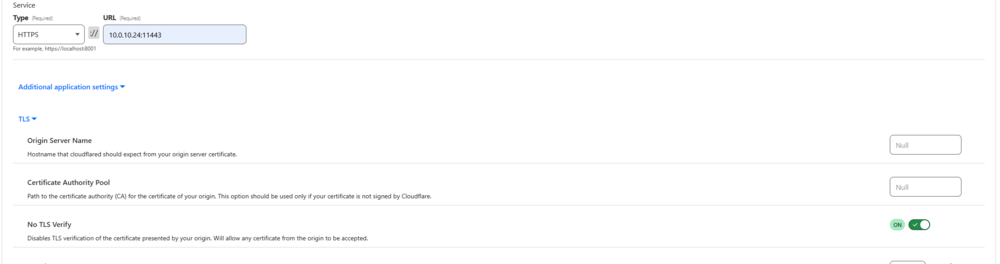
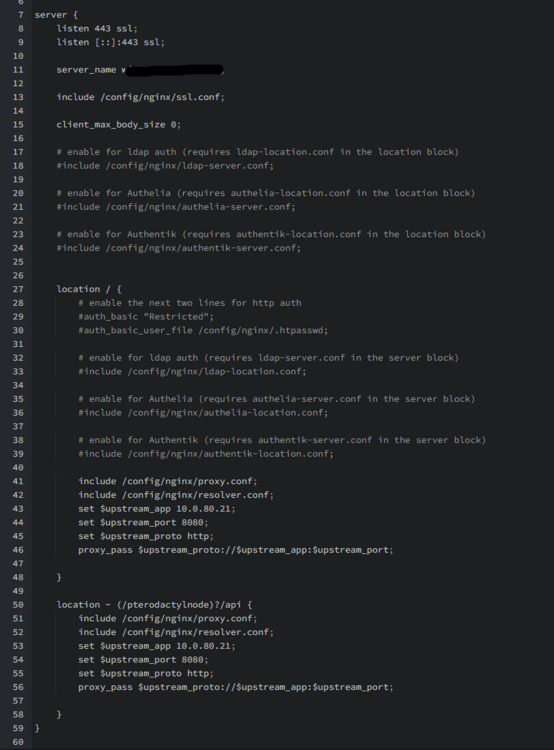
thankyou for clarifying, this is how i thought it to worked. The wording of "its working fine with cloudflare tunnels on 443" made me think you was pointing the CF tunnel hostname to 433 but you are using 172.17.0.1:8080. This is how i tested without going through swag, still unable to communicate, at a loss what to try next.. :Update, at last, it was a typo in the wings nginx!!

-
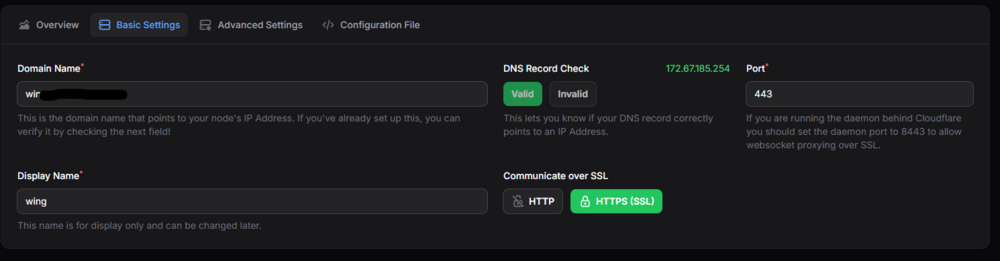
I found ssl_protocols but not proxy_ssl_protocols. I also tried connecting the tunnel direct to the container instead of going through swag with no luck. You mentioned "its working fine with cloudflare tunnels on 443" but your template is using 8080?

-
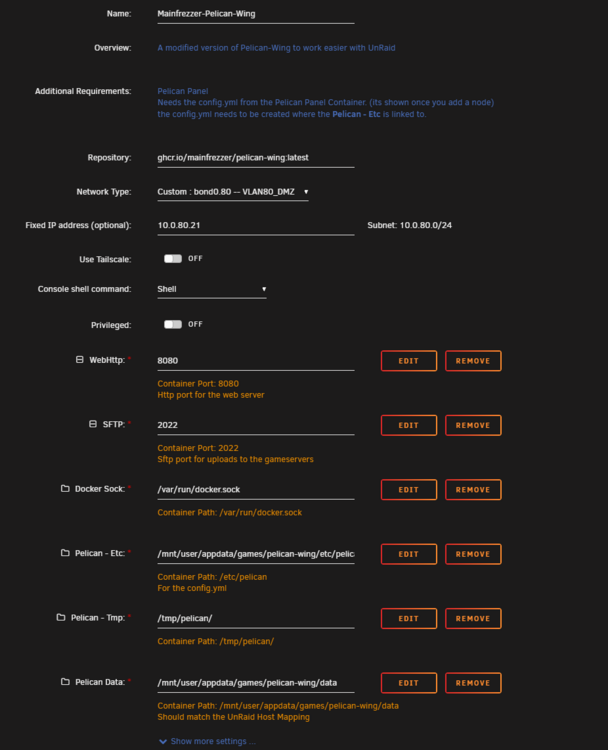
I have the same settings, although the Cloudflare tunnel points to swag and it doesn't communicate. I will try connecting the tunnel straight to the wings container.
-
I included the certs in the correct path to prevent the fatal error. Unfortunately this does not help and still unable to get a healthy status.
-
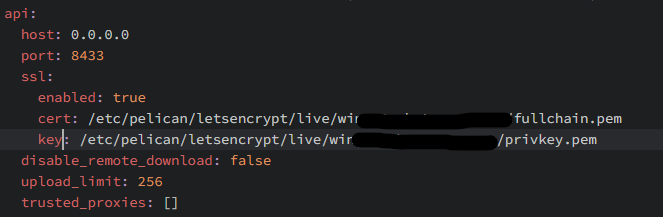
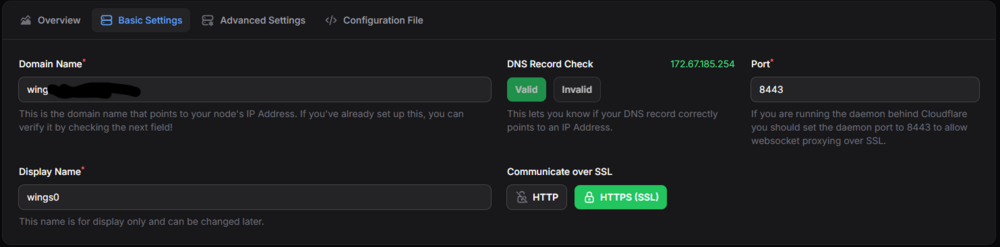
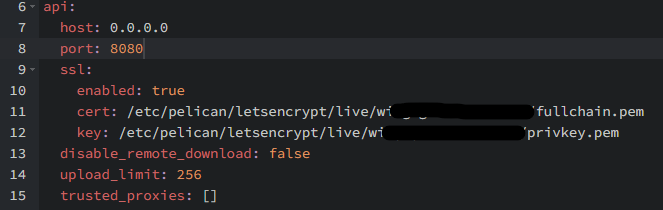
while making sure i stopped the container and updated the config.yml, i have tried 8080, 433 and 8443 with no luck. I also changed this on the template and nginx to match.
-
That makes sense now, i appreciate your input. Can confirm the error 500 has not popped up yet either.. Regarding the wings image, do i need to change the port from 8080 to 8433 if going through Cloudflare. DNS check is valid but health check is unable to connect.