





Clayton
Members
-
Joined
-
Last visited
-
yeah i couldn't get past the "Missing or invalid config" unless i used the external proxy address. but i ran into another issue which has me giving up on this project for the time being. i uploaded a few folders worth of files. couldn't have been more than 3 folders with 10 documents each and the application only uploaded 4 documents and acted like it was still uploading. it wasnt more than 8MB worth of PDF's. Then i tried it from my phone and the docker hung along with my whole server. reboot and a parity check later (no issues found) and now the docker wont start. i tried deleting just the docker image and reinstalling it and i get a 500 error when i try to login. not getting the warm and fuzees to host my personal data. might revisit later.
-
Wanted to give OpenCloud a try. Wasn't a fan of NextCloud. I understand this is a new project. i was able to stand things up fairly easy, working through a few issues. i wanted to be able to access this without my reverse proxy right away but i ended up setting it up just because i couldn't get it to work. In the end its that OC_URL value that locks in the acceptable URL. From what i can tell, OC_INSECURE does nothing. Even if set to true, it still hangs up on the cert. http will not load a page saying "client sent an HTTP request to an HTTPS server". My question: is there a way to access with 2 urls? an internal and external?
-
I seem to have fixed it. i was on Unraid 6.12.13 and I upgraded to 6.12.14. after the reboot the plugin started running. now the fun part. Thanks anyway!
-
Hello, was recommended to try this tool out to view why my array keeps spinning up when there should be no activity. i notice the status always says "stopped" even after starting it. viewing the share or disk activity and starting it behaves the same.

-
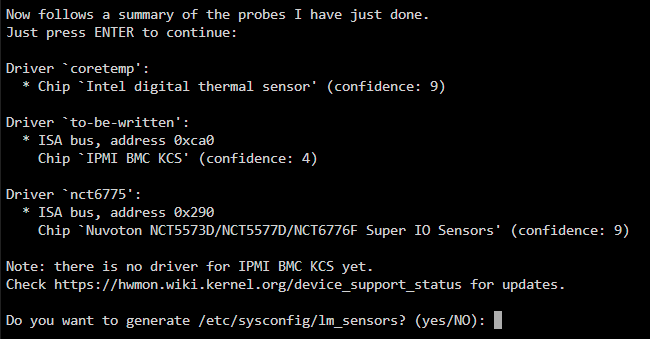
hey, i recently upgraded my unraid server case to a rack mount case and it has some pretty loud fans that don't need to run at 100% all the time. got a pwn controller and the fans spin down now before the OS loads. however i noticed in unraid they report running at zero rpm. i'm not 100% sure if this ever worked as i didnt care before since all my fans would just ran at 100% with a 12v power and no pwm. i have an ASRockRack EPC612D8A. i tried the work around to no luck. nct6775 did pop up like in your example so i followed the guide to the letter. my system and cpu core temps did work before and still do now after the workaround. i did not generate the lm_sensors file since that did not come up in your guide so i stopped at that point on the terminal. thank you ahead of time.

-
ok, so i have several issues. since this sounds like a bit of an overhaul, do you have any guides or documentation references for all the steps? it would be a huge ordeal if i had to start from scratch so i want to make sure i'm not making any assumptions. i have a backup of my OS flash drive but i take it you are saying i need to backup my cache drive? 1. backup something? 2. delete cache pool? 3. recreate cache pool? 4. configure docker network to ipvlan 5. restore config/dockers?
-
happened again, different dockers. is it all docker images? also, when doing a btrfs scan, this came up. [1/7] checking root items [2/7] checking extents data extent[82600927232, 36864] referencer count mismatch (root 5 owner 260 offset 5683093504) wanted 0 have 1 data extent[82600927232, 36864] bytenr mimsmatch, extent item bytenr 82600927232 file item bytenr 0 data extent[82600927232, 36864] referencer count mismatch (root 9944610707867697157 owner 4294936705 offset 5683093504) wanted 1 have 0 backpointer mismatch on [82600927232 36864] ERROR: errors found in extent allocation tree or chunk allocation [3/7] checking free space tree [4/7] checking fs roots root 5 inode 3518051 errors 200, dir isize wrong root 5 inode 6903716 errors 1, no inode item unresolved ref dir 3518051 index 751667 namelen 17 name WiredTiger.turtle filetype 1 errors 5, no dir item, no inode ref root 5 inode 6903718 errors 1, no inode item unresolved ref dir 3518051 index 751670 namelen 17 name WiredTiger.turtle filetype 1 errors 5, no dir item, no inode ref root 5 inode 6903719 errors 1, no inode item unresolved ref dir 3518051 index 751672 namelen 17 name WiredTiger.turtle filetype 1 errors 5, no dir item, no inode ref root 5 inode 6903720 errors 1, no inode item unresolved ref dir 3518051 index 751674 namelen 17 name WiredTiger.turtle filetype 1 errors 5, no dir item, no inode ref root 5 inode 6903721 errors 1, no inode item unresolved ref dir 3518051 index 751676 namelen 17 name WiredTiger.turtle filetype 1 errors 5, no dir item, no inode ref root 5 inode 6903723 errors 1, no inode item unresolved ref dir 3518051 index 751679 namelen 17 name WiredTiger.turtle filetype 1 errors 5, no dir item, no inode ref root 5 inode 6903725 errors 1, no inode item unresolved ref dir 3518051 index 751682 namelen 17 name WiredTiger.turtle filetype 1 errors 5, no dir item, no inode ref root 5 inode 6903727 errors 1, no inode item unresolved ref dir 3518051 index 751685 namelen 17 name WiredTiger.turtle filetype 1 errors 5, no dir item, no inode ref root 5 inode 6903729 errors 1, no inode item unresolved ref dir 3518051 index 751688 namelen 17 name WiredTiger.turtle filetype 1 errors 5, no dir item, no inode ref root 5 inode 6903730 errors 1, no inode item unresolved ref dir 3518051 index 751690 namelen 17 name WiredTiger.turtle filetype 1 errors 5, no dir item, no inode ref root 5 inode 6903731 errors 1, no inode item unresolved ref dir 3518051 index 751692 namelen 17 name WiredTiger.turtle filetype 1 errors 5, no dir item, no inode ref root 5 inode 6903732 errors 1, no inode item unresolved ref dir 3518051 index 751694 namelen 17 name WiredTiger.turtle filetype 1 errors 5, no dir item, no inode ref root 5 inode 6903733 errors 1, no inode item unresolved ref dir 3518051 index 751696 namelen 17 name WiredTiger.turtle filetype 1 errors 5, no dir item, no inode ref root 5 inode 6903735 errors 1, no inode item unresolved ref dir 3518051 index 751699 namelen 17 name WiredTiger.turtle filetype 1 errors 5, no dir item, no inode ref root 5 inode 6903737 errors 1, no inode item unresolved ref dir 3518051 index 751702 namelen 17 name WiredTiger.turtle filetype 1 errors 5, no dir item, no inode ref root 5 inode 6903739 errors 1, no inode item unresolved ref dir 3518051 index 751705 namelen 17 name WiredTiger.turtle filetype 1 errors 5, no dir item, no inode ref root 5 inode 6903740 errors 1, no inode item unresolved ref dir 3518051 index 751707 namelen 17 name WiredTiger.turtle filetype 1 errors 5, no dir item, no inode ref root 5 inode 6903741 errors 1, no inode item unresolved ref dir 3518051 index 751709 namelen 17 name WiredTiger.turtle filetype 1 errors 5, no dir item, no inode ref root 5 inode 6903742 errors 1, no inode item unresolved ref dir 3518051 index 751711 namelen 17 name WiredTiger.turtle filetype 1 errors 5, no dir item, no inode ref root 5 inode 6903744 errors 1, no inode item unresolved ref dir 3518051 index 751714 namelen 17 name WiredTiger.turtle filetype 1 errors 5, no dir item, no inode ref root 5 inode 6903746 errors 1, no inode item unresolved ref dir 3518051 index 751717 namelen 17 name WiredTiger.turtle filetype 1 errors 5, no dir item, no inode ref root 5 inode 6903748 errors 1, no inode item unresolved ref dir 3518051 index 751720 namelen 17 name WiredTiger.turtle filetype 1 errors 5, no dir item, no inode ref root 5 inode 6903750 errors 1, no inode item unresolved ref dir 3518051 index 751723 namelen 17 name WiredTiger.turtle filetype 1 errors 5, no dir item, no inode ref root 5 inode 6903751 errors 1, no inode item unresolved ref dir 3518051 index 751725 namelen 17 name WiredTiger.turtle filetype 1 errors 5, no dir item, no inode ref root 5 inode 6903752 errors 1, no inode item unresolved ref dir 3518051 index 751727 namelen 17 name WiredTiger.turtle filetype 1 errors 5, no dir item, no inode ref root 5 inode 6903753 errors 1, no inode item unresolved ref dir 3518051 index 751729 namelen 17 name WiredTiger.turtle filetype 1 errors 5, no dir item, no inode ref root 5 inode 6903754 errors 1, no inode item unresolved ref dir 3518051 index 751731 namelen 17 name WiredTiger.turtle filetype 1 errors 5, no dir item, no inode ref root 5 inode 6903756 errors 1, no inode item unresolved ref dir 3518051 index 751734 namelen 17 name WiredTiger.turtle filetype 1 errors 5, no dir item, no inode ref root 5 inode 6903758 errors 1, no inode item unresolved ref dir 3518051 index 751737 namelen 17 name WiredTiger.turtle filetype 1 errors 5, no dir item, no inode ref root 5 inode 6903759 errors 1, no inode item unresolved ref dir 3518051 index 751739 namelen 17 name WiredTiger.turtle filetype 1 errors 5, no dir item, no inode ref root 5 inode 6903760 errors 1, no inode item unresolved ref dir 3518051 index 751741 namelen 17 name WiredTiger.turtle filetype 1 errors 5, no dir item, no inode ref root 5 inode 6903762 errors 1, no inode item unresolved ref dir 3518051 index 751744 namelen 17 name WiredTiger.turtle filetype 1 errors 5, no dir item, no inode ref root 5 inode 6903764 errors 1, no inode item unresolved ref dir 3518051 index 751747 namelen 17 name WiredTiger.turtle filetype 1 errors 5, no dir item, no inode ref root 5 inode 6903765 errors 1, no inode item unresolved ref dir 3518051 index 751749 namelen 17 name WiredTiger.turtle filetype 1 errors 5, no dir item, no inode ref root 5 inode 6903766 errors 1, no inode item unresolved ref dir 3518051 index 751751 namelen 17 name WiredTiger.turtle filetype 1 errors 5, no dir item, no inode ref root 5 inode 6903768 errors 1, no inode item unresolved ref dir 3518051 index 751754 namelen 17 name WiredTiger.turtle filetype 1 errors 5, no dir item, no inode ref root 5 inode 6903770 errors 1, no inode item unresolved ref dir 3518051 index 751757 namelen 17 name WiredTiger.turtle filetype 1 errors 5, no dir item, no inode ref root 5 inode 6903771 errors 1, no inode item unresolved ref dir 3518051 index 751759 namelen 17 name WiredTiger.turtle filetype 1 errors 5, no dir item, no inode ref root 5 inode 6903772 errors 1, no inode item unresolved ref dir 3518051 index 751761 namelen 17 name WiredTiger.turtle filetype 1 errors 5, no dir item, no inode ref root 5 inode 6903774 errors 1, no inode item unresolved ref dir 3518051 index 751764 namelen 17 name WiredTiger.turtle filetype 1 errors 5, no dir item, no inode ref root 5 inode 6903776 errors 1, no inode item unresolved ref dir 3518051 index 751767 namelen 17 name WiredTiger.turtle filetype 1 errors 5, no dir item, no inode ref root 5 inode 6903777 errors 1, no inode item unresolved ref dir 3518051 index 751769 namelen 17 name WiredTiger.turtle filetype 1 errors 5, no dir item, no inode ref root 5 inode 6903778 errors 1, no inode item unresolved ref dir 3518051 index 751771 namelen 17 name WiredTiger.turtle filetype 1 errors 5, no dir item, no inode ref root 5 inode 6903780 errors 1, no inode item unresolved ref dir 3518051 index 751774 namelen 17 name WiredTiger.turtle filetype 1 errors 5, no dir item, no inode ref root 5 inode 6903782 errors 1, no inode item unresolved ref dir 3518051 index 751777 namelen 17 name WiredTiger.turtle filetype 1 errors 5, no dir item, no inode ref root 5 inode 6903783 errors 1, no inode item unresolved ref dir 3518051 index 751779 namelen 17 name WiredTiger.turtle filetype 1 errors 5, no dir item, no inode ref root 5 inode 6903784 errors 1, no inode item unresolved ref dir 3518051 index 751781 namelen 17 name WiredTiger.turtle filetype 1 errors 5, no dir item, no inode ref root 5 inode 6903786 errors 1, no inode item unresolved ref dir 3518051 index 751784 namelen 17 name WiredTiger.turtle filetype 1 errors 5, no dir item, no inode ref root 5 inode 6903788 errors 1, no inode item unresolved ref dir 3518051 index 751787 namelen 17 name WiredTiger.turtle filetype 1 errors 5, no dir item, no inode ref root 5 inode 6903789 errors 1, no inode item unresolved ref dir 3518051 index 751789 namelen 17 name WiredTiger.turtle filetype 1 errors 5, no dir item, no inode ref root 5 inode 6903790 errors 1, no inode item unresolved ref dir 3518051 index 751791 namelen 17 name WiredTiger.turtle filetype 1 errors 5, no dir item, no inode ref root 5 inode 6903792 errors 1, no inode item unresolved ref dir 3518051 index 751794 namelen 17 name WiredTiger.turtle filetype 1 errors 5, no dir item, no inode ref root 5 inode 6903794 errors 1, no inode item unresolved ref dir 3518051 index 751797 namelen 17 name WiredTiger.turtle filetype 1 errors 5, no dir item, no inode ref root 5 inode 6903795 errors 1, no inode item unresolved ref dir 3518051 index 751799 namelen 17 name WiredTiger.turtle filetype 1 errors 5, no dir item, no inode ref root 5 inode 6903796 errors 1, no inode item unresolved ref dir 3518051 index 751801 namelen 17 name WiredTiger.turtle filetype 1 errors 5, no dir item, no inode ref root 5 inode 6903798 errors 1, no inode item unresolved ref dir 3518051 index 751804 namelen 17 name WiredTiger.turtle filetype 1 errors 5, no dir item, no inode ref root 5 inode 6903800 errors 1, no inode item unresolved ref dir 3518051 index 751807 namelen 17 name WiredTiger.turtle filetype 1 errors 5, no dir item, no inode ref ERROR: errors found in fs roots Opening filesystem to check... Checking filesystem on /dev/sdc1 UUID: 0c76de6d-7b0a-4244-b02e-92e26745ad34 found 65529974784 bytes used, error(s) found total csum bytes: 23398580 total tree bytes: 339673088 total fs tree bytes: 251461632 total extent tree bytes: 50266112 btree space waste bytes: 76053004 file data blocks allocated: 362050203648 referenced 57746354176 darktower-diagnostics-20231127-1816.zip
-
Hello, i recently had an issue when upgrading to the latest version of unraid. I ended up fixing the issue and i thought i was good. 3 or 4 times now however i have gone to use one of my dockers and they were not responsive. rebooting unraid or the array seemed to fix it for another day or two and the issue would come back. today i went to use a docker and it was not working but this time the webgui would hang after login. i ended up connecting to the console and running the reboot command. that failed so in the end i pressed the restart button. server came up good and is currently running a check on the array. this will likely happen again in a day or two. could anyone take a look at the support bundle and give me an idea what is broken? darktower-diagnostics-20231126-1444.zip
-
Think i figured it out. Looked like someone on the forum had the same issue. ran this command "btrfs rescue zero-log /dev/ssd1". SSD1 was displayed on my console as the device missing a log which could not be automatically recovered. restarted my array after running the command and my cache returned. i did have to reinstall two dockers as they were orphaned but otherwise i think i am in good shape.

-
if i put the array in maintenance mode, and run the check, i get this btrfs check status: [1/7] checking root items [2/7] checking extents data extent[82600927232, 36864] referencer count mismatch (root 5 owner 260 offset 5683093504) wanted 0 have 1 data extent[82600927232, 36864] bytenr mimsmatch, extent item bytenr 82600927232 file item bytenr 0 data extent[82600927232, 36864] referencer count mismatch (root 9944610707867697157 owner 4294936705 offset 5683093504) wanted 1 have 0 backpointer mismatch on [82600927232 36864] ERROR: errors found in extent allocation tree or chunk allocation [3/7] checking free space tree [4/7] checking fs roots root 5 inode 3518051 errors 200, dir isize wrong root 5 inode 6903716 errors 1, no inode item unresolved ref dir 3518051 index 751667 namelen 17 name WiredTiger.turtle filetype 1 errors 5, no dir item, no inode ref root 5 inode 6903718 errors 1, no inode item unresolved ref dir 3518051 index 751670 namelen 17 name WiredTiger.turtle filetype 1 errors 5, no dir item, no inode ref root 5 inode 6903719 errors 1, no inode item unresolved ref dir 3518051 index 751672 namelen 17 name WiredTiger.turtle filetype 1 errors 5, no dir item, no inode ref root 5 inode 6903720 errors 1, no inode item unresolved ref dir 3518051 index 751674 namelen 17 name WiredTiger.turtle filetype 1 errors 5, no dir item, no inode ref root 5 inode 6903721 errors 1, no inode item unresolved ref dir 3518051 index 751676 namelen 17 name WiredTiger.turtle filetype 1 errors 5, no dir item, no inode ref root 5 inode 6903723 errors 1, no inode item unresolved ref dir 3518051 index 751679 namelen 17 name WiredTiger.turtle filetype 1 errors 5, no dir item, no inode ref root 5 inode 6903725 errors 1, no inode item unresolved ref dir 3518051 index 751682 namelen 17 name WiredTiger.turtle filetype 1 errors 5, no dir item, no inode ref root 5 inode 6903727 errors 1, no inode item unresolved ref dir 3518051 index 751685 namelen 17 name WiredTiger.turtle filetype 1 errors 5, no dir item, no inode ref root 5 inode 6903729 errors 1, no inode item unresolved ref dir 3518051 index 751688 namelen 17 name WiredTiger.turtle filetype 1 errors 5, no dir item, no inode ref root 5 inode 6903730 errors 1, no inode item unresolved ref dir 3518051 index 751690 namelen 17 name WiredTiger.turtle filetype 1 errors 5, no dir item, no inode ref root 5 inode 6903731 errors 1, no inode item unresolved ref dir 3518051 index 751692 namelen 17 name WiredTiger.turtle filetype 1 errors 5, no dir item, no inode ref root 5 inode 6903732 errors 1, no inode item unresolved ref dir 3518051 index 751694 namelen 17 name WiredTiger.turtle filetype 1 errors 5, no dir item, no inode ref root 5 inode 6903733 errors 1, no inode item unresolved ref dir 3518051 index 751696 namelen 17 name WiredTiger.turtle filetype 1 errors 5, no dir item, no inode ref root 5 inode 6903735 errors 1, no inode item unresolved ref dir 3518051 index 751699 namelen 17 name WiredTiger.turtle filetype 1 errors 5, no dir item, no inode ref root 5 inode 6903737 errors 1, no inode item unresolved ref dir 3518051 index 751702 namelen 17 name WiredTiger.turtle filetype 1 errors 5, no dir item, no inode ref root 5 inode 6903739 errors 1, no inode item unresolved ref dir 3518051 index 751705 namelen 17 name WiredTiger.turtle filetype 1 errors 5, no dir item, no inode ref root 5 inode 6903740 errors 1, no inode item unresolved ref dir 3518051 index 751707 namelen 17 name WiredTiger.turtle filetype 1 errors 5, no dir item, no inode ref root 5 inode 6903741 errors 1, no inode item unresolved ref dir 3518051 index 751709 namelen 17 name WiredTiger.turtle filetype 1 errors 5, no dir item, no inode ref root 5 inode 6903742 errors 1, no inode item unresolved ref dir 3518051 index 751711 namelen 17 name WiredTiger.turtle filetype 1 errors 5, no dir item, no inode ref root 5 inode 6903744 errors 1, no inode item unresolved ref dir 3518051 index 751714 namelen 17 name WiredTiger.turtle filetype 1 errors 5, no dir item, no inode ref root 5 inode 6903746 errors 1, no inode item unresolved ref dir 3518051 index 751717 namelen 17 name WiredTiger.turtle filetype 1 errors 5, no dir item, no inode ref root 5 inode 6903748 errors 1, no inode item unresolved ref dir 3518051 index 751720 namelen 17 name WiredTiger.turtle filetype 1 errors 5, no dir item, no inode ref root 5 inode 6903750 errors 1, no inode item unresolved ref dir 3518051 index 751723 namelen 17 name WiredTiger.turtle filetype 1 errors 5, no dir item, no inode ref root 5 inode 6903751 errors 1, no inode item unresolved ref dir 3518051 index 751725 namelen 17 name WiredTiger.turtle filetype 1 errors 5, no dir item, no inode ref root 5 inode 6903752 errors 1, no inode item unresolved ref dir 3518051 index 751727 namelen 17 name WiredTiger.turtle filetype 1 errors 5, no dir item, no inode ref root 5 inode 6903753 errors 1, no inode item unresolved ref dir 3518051 index 751729 namelen 17 name WiredTiger.turtle filetype 1 errors 5, no dir item, no inode ref root 5 inode 6903754 errors 1, no inode item unresolved ref dir 3518051 index 751731 namelen 17 name WiredTiger.turtle filetype 1 errors 5, no dir item, no inode ref root 5 inode 6903756 errors 1, no inode item unresolved ref dir 3518051 index 751734 namelen 17 name WiredTiger.turtle filetype 1 errors 5, no dir item, no inode ref root 5 inode 6903758 errors 1, no inode item unresolved ref dir 3518051 index 751737 namelen 17 name WiredTiger.turtle filetype 1 errors 5, no dir item, no inode ref root 5 inode 6903759 errors 1, no inode item unresolved ref dir 3518051 index 751739 namelen 17 name WiredTiger.turtle filetype 1 errors 5, no dir item, no inode ref root 5 inode 6903760 errors 1, no inode item unresolved ref dir 3518051 index 751741 namelen 17 name WiredTiger.turtle filetype 1 errors 5, no dir item, no inode ref root 5 inode 6903762 errors 1, no inode item unresolved ref dir 3518051 index 751744 namelen 17 name WiredTiger.turtle filetype 1 errors 5, no dir item, no inode ref root 5 inode 6903764 errors 1, no inode item unresolved ref dir 3518051 index 751747 namelen 17 name WiredTiger.turtle filetype 1 errors 5, no dir item, no inode ref root 5 inode 6903765 errors 1, no inode item unresolved ref dir 3518051 index 751749 namelen 17 name WiredTiger.turtle filetype 1 errors 5, no dir item, no inode ref root 5 inode 6903766 errors 1, no inode item unresolved ref dir 3518051 index 751751 namelen 17 name WiredTiger.turtle filetype 1 errors 5, no dir item, no inode ref root 5 inode 6903768 errors 1, no inode item unresolved ref dir 3518051 index 751754 namelen 17 name WiredTiger.turtle filetype 1 errors 5, no dir item, no inode ref root 5 inode 6903770 errors 1, no inode item unresolved ref dir 3518051 index 751757 namelen 17 name WiredTiger.turtle filetype 1 errors 5, no dir item, no inode ref root 5 inode 6903771 errors 1, no inode item unresolved ref dir 3518051 index 751759 namelen 17 name WiredTiger.turtle filetype 1 errors 5, no dir item, no inode ref root 5 inode 6903772 errors 1, no inode item unresolved ref dir 3518051 index 751761 namelen 17 name WiredTiger.turtle filetype 1 errors 5, no dir item, no inode ref root 5 inode 6903774 errors 1, no inode item unresolved ref dir 3518051 index 751764 namelen 17 name WiredTiger.turtle filetype 1 errors 5, no dir item, no inode ref root 5 inode 6903776 errors 1, no inode item unresolved ref dir 3518051 index 751767 namelen 17 name WiredTiger.turtle filetype 1 errors 5, no dir item, no inode ref root 5 inode 6903777 errors 1, no inode item unresolved ref dir 3518051 index 751769 namelen 17 name WiredTiger.turtle filetype 1 errors 5, no dir item, no inode ref root 5 inode 6903778 errors 1, no inode item unresolved ref dir 3518051 index 751771 namelen 17 name WiredTiger.turtle filetype 1 errors 5, no dir item, no inode ref root 5 inode 6903780 errors 1, no inode item unresolved ref dir 3518051 index 751774 namelen 17 name WiredTiger.turtle filetype 1 errors 5, no dir item, no inode ref root 5 inode 6903782 errors 1, no inode item unresolved ref dir 3518051 index 751777 namelen 17 name WiredTiger.turtle filetype 1 errors 5, no dir item, no inode ref root 5 inode 6903783 errors 1, no inode item unresolved ref dir 3518051 index 751779 namelen 17 name WiredTiger.turtle filetype 1 errors 5, no dir item, no inode ref root 5 inode 6903784 errors 1, no inode item unresolved ref dir 3518051 index 751781 namelen 17 name WiredTiger.turtle filetype 1 errors 5, no dir item, no inode ref root 5 inode 6903786 errors 1, no inode item unresolved ref dir 3518051 index 751784 namelen 17 name WiredTiger.turtle filetype 1 errors 5, no dir item, no inode ref root 5 inode 6903788 errors 1, no inode item unresolved ref dir 3518051 index 751787 namelen 17 name WiredTiger.turtle filetype 1 errors 5, no dir item, no inode ref root 5 inode 6903789 errors 1, no inode item unresolved ref dir 3518051 index 751789 namelen 17 name WiredTiger.turtle filetype 1 errors 5, no dir item, no inode ref root 5 inode 6903790 errors 1, no inode item unresolved ref dir 3518051 index 751791 namelen 17 name WiredTiger.turtle filetype 1 errors 5, no dir item, no inode ref root 5 inode 6903792 errors 1, no inode item unresolved ref dir 3518051 index 751794 namelen 17 name WiredTiger.turtle filetype 1 errors 5, no dir item, no inode ref root 5 inode 6903794 errors 1, no inode item unresolved ref dir 3518051 index 751797 namelen 17 name WiredTiger.turtle filetype 1 errors 5, no dir item, no inode ref root 5 inode 6903795 errors 1, no inode item unresolved ref dir 3518051 index 751799 namelen 17 name WiredTiger.turtle filetype 1 errors 5, no dir item, no inode ref root 5 inode 6903796 errors 1, no inode item unresolved ref dir 3518051 index 751801 namelen 17 name WiredTiger.turtle filetype 1 errors 5, no dir item, no inode ref root 5 inode 6903798 errors 1, no inode item unresolved ref dir 3518051 index 751804 namelen 17 name WiredTiger.turtle filetype 1 errors 5, no dir item, no inode ref root 5 inode 6903800 errors 1, no inode item unresolved ref dir 3518051 index 751807 namelen 17 name WiredTiger.turtle filetype 1 errors 5, no dir item, no inode ref ERROR: errors found in fs roots Opening filesystem to check... Checking filesystem on /dev/sdc1 UUID: 0c76de6d-7b0a-4244-b02e-92e26745ad34 found 45175795712 bytes used, error(s) found total csum bytes: 23448228 total tree bytes: 337723392 total fs tree bytes: 251805696 total extent tree bytes: 48201728 btree space waste bytes: 75900706 file data blocks allocated: 330542399488 referenced 37386350592
-
yeah, i'm using btrfs and the option is grayed out when the array is started. i take it that's in error?


-
Hello, I just ran my upgrade to 6.12.4 and on boot i noticed none of my dockers were running or existed. cache drives show green however i see an error in the size, used, free space saying "Unmountable: Unsupported or no files system". i was looking at https://docs.unraid.net/legacy/FAQ/check-disk-filesystems/#checking-and-fixing-drives-in-the-webgui but i got to the last step in preparing and i don't see what it says i should. my check box is grayed out and telling me to put the array in maintenance mode but earlier it said i had to have the array running for btrfs. confused and don't want to lose anything. any advice? darktower-diagnostics-20231112-1051.zip
-
btw, pool is restored after removing the pool members and adding them back in. all is well, thank you for your help!
-
its an HP H240 card running in HBA mode, a common card i see mentioned in the unraid forums but most mentions i have found is drives not being seen. I think its due to running older firmware. ill look into possibly replacing the card if that's the cause of my instability. my main focus at this point is how i can recover the cache drives. they look to be in an emulation state so i would assume that means i can recover them.
-
For example it was an unassigned drive. I renamed a mount partition and or repointed my docker or vm references. The drive and it's data is intact, just need to repoint to it. Idk about cache drives. Since my dockers and vms are running right now, does that mean my cache drive can be restored to the pool?


