VladoPortos
Members
-
Joined
-
Last visited
Everything posted by VladoPortos
-
Manual installation: Save your configs first ! export in plugin tab go to folder view and export all Remove the FolderView from plugin by uninstalling it. Manual installation Copy the folder.view2.plg file to /boot/config/plugins/ folder. Copy the latest 'folder.view2-.txz' archive to /boot/config/plugins/folder.view2/ folder. In Unraid webui go to Plugins -> Install Plugin tab, click on the folder config -> plugins -> folder.view2.plg and press install button. Use the Import to import the setting you exported... If you get mismatched dockers in folders like some people there is guide few post back how to enable debug mode, and to get the logs. I would ask you to send me personal message here with the logs it should help pinpoint the issue.
-
@BalHaise yes this is known issue, and actually fixed in beta release, if you scroll bit back its here as files. But when I tried to release it some people experienced mixed dockers in wrong folders... so I had to pull it back and waiting for weekend to have some time and try to fix it (I'm having hard time replicate the issue though )
-
I need to check what's going on with the containers not staying in their folders in the beta version, and somehow simulate it on my test boxes. Hopefully within next weak I can have this fixed.
-
Well I do not have it, and you also ( i think ) does not have it. Its the beta package you are running ( and me as well ). So I need to check the logs send and try to find out why for the two users above it did not order the dockers under correct folder ( although I specifically fixed that part, so its a mystery for now, but I'll try have a look today evening if I can. maybe its just something simple )
-
Before you update back, can you enable the debug mode and send me PM with the output so I have another log to compare to ? Thanks. I have reverted to previous version and will have to try and find out why its not ordering it for you guys correctly.
-
Ok I will roll back the update, until its fixed.
-
This is strange, because this issue happened to me when I was working on it and I fixed it to not to do that :D Does anybody else have this issue ? (Maybe I fixed it just on my two boxes ) If you can, save your config ( export json ) uninstall and install the plugin. Import settings and see if that fixed it. If not. I will ask you to edit two files in the plugin /usr/local/emhttp/plugins/folder.view2/scripts/docker.js At start of the file is: const FOLDER_VIEW_DEBUG_MODE = false; // Added for debuggingChange that to: true And /usr/local/emhttp/plugins/folder.view2/server/lib.php Also at start of the file is: define('FV2_DEBUG_MODE', false); // << SET TO true TO ENABLE LOGGING TO FILE >>Change that to: true Than in unraid, open web console ctrl+shift+j (usualy) and go to docker tab. Copy / Paste the everything to me in private message and I can hopefully see why in your case its out of order
-
Will have a look at that :)
-
Ah you are right, I have changed it to https://forums.unraid.net/topic/189167-plugin-folderview2 might be a moment for the CA to pick it up.
-
I have released the new version with hopefully fixed Advance View, and IPs in links. There might be issue with custom css themes cause the advance view was rebuild a lot.
-
### 23.05.2025 - Fixed forced rescan upon long inactivity, app now checks if the DB is populated already and not force rescan if not needed, Leaving it to periodic check or manual trigger. - thumbnail.png. If there is no thumbnail.png, default thumbnail is used. If there is thumbnail.png, it will be used and added to DB. If you add thumbnail.png to a course via edit the local thumbnail.png will be replaced with the one added. Already existing thumbnails should be managed via UI, adding new thubnail file manualy to existing one in folder will not change it. - Added Button to browse non video files in course folderm, with option to download individual files. Should be at bottom of the individual course display. Hopefully nothing broke :D
-
Did you try the beta package I posted here ? this should be fixed... well partially .. that message is for links that are "unknown" to unraid and once you click remember it will not pop up .. that can be affected by plugin ( I had to anotate certains links to not trigger it, but its not advised to do for other than internal links ). If the issue is that the missing IP that should be fixed in the beta release... but I think I will release it during weekend and see what happens :D Im running the beta release for over week with no issue, but it would be better if more people tested it.
-
NO worries, I/O - Meaning that Input/Output basically if you have a lot of tutorials stored and have the info in individual files, the program would had to go and fetch each json file for each course every time you refresh UI, that mean reading the filesystem, loading the file, parsing it process it and that for each file over and over... making it accessing the disk a lot and slowing the whole thing down like crazy :) json files: currently not needed, not used. The info is left over from old version and needs to be cleaned by me. The SQLite database file hold a lot of info, like the course structure, users, their progress, etc.. usually you do not need to go and look into it I can make a button that allow to basically browse the folder where the given course is, filter out the video files and leave only "other" files that user can than click and download, that should be fairly easy to do. In next update admin will have option to see users, and change their passwords, delete account, and block registrations to site. I could add also maybe more detail view when clicked on user name in there with what they completed and progress since the info is stored in the SQLite DB per user and can be easily accessed. I will think about it, and try to add it.
-
Oh man I need to updated documentation :D 1. the json idea was at the start where I thought it would be easier for users to define the tutorial folder structure etc... and to run id DB free, this very fast become an issue with I/O trying to read the files all the time slowed the app way way to much, caching the jsons made the app not updating reliably.... Therefore it was moved to local sqlite DB ( its just a file based DB that can be easily read /edit/exported with for example https://sqlitebrowser.org) I can however add option for user to export and import the whole database from UI for backups maybe ? The image is stored in database, converted to base64. Kind of gets back to the issue of excessive I/O operations . However it would probably be better idea it save it also in the folder and during scan if the image is not in DB to fall back for the local file and load it to DB ( I'm making note for my self :) ) This is not impossible, just I'm not sure what would be the best place to display the files... there can be a lot of different files, extensions etc... maybe I could create "folder" button for each "section" that would open the location as kind of file browser ? ( I'm open to suggestion ) I just do not want to automatically organize and manage the additional file extensions it would be a nightmare :D I'm open to ideas, this version is literally the very first working releasable iteration :) Other requested options I want to implement is speed up/slow down of playback and there was something else ( need to check git requests ) but I did not have time yet ( work, family the usual suspects... ) but hopefully soon I can get to updating the project.
-
Beta is out and I need at least few people to test it before I can send it to CA store for update, so we do not break something for everybody Its here few post back.
-
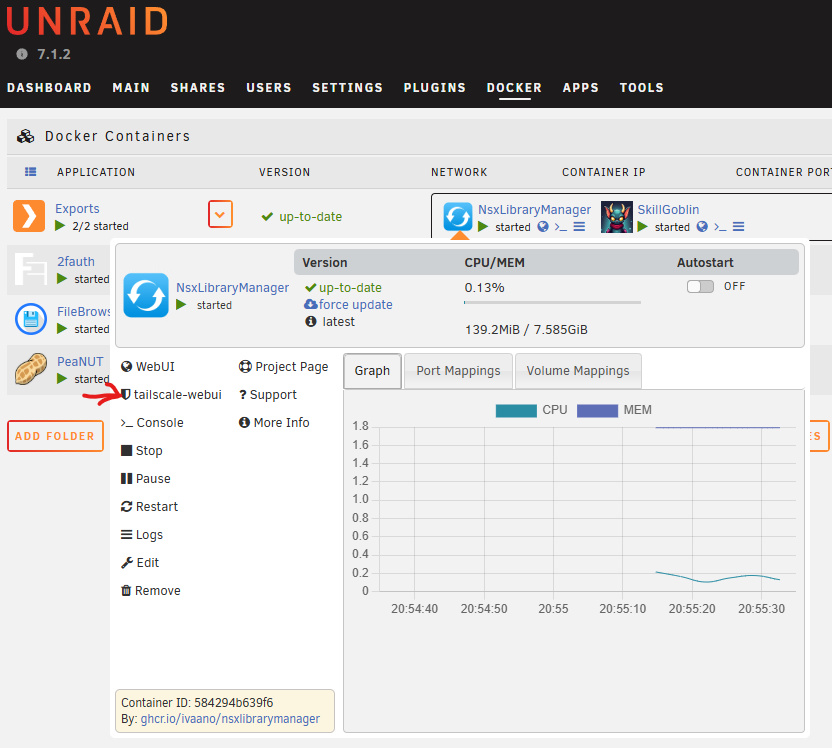
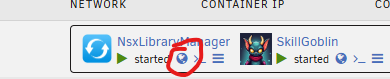
Guys, not a simple fix as I hoped... had to rewrite some stuff due to changes in unraid 7+ also the css theme for folderview will need to be updated so if you are brave enough to test this beta please disable theme. It works for me ( as usually that does not mean much... ) but also @Masterwishx was helping a lot with testing and seems like its working for him as well. - Advance view was reworked a lot - Added TailScale link to advanced view ( for some reason the translation is not loaded for it, could be a cache issue... but report back if it does look like this for you and I will have to rework the language/translation part next ) - The links in the folder priew should work again - In this "beta" there is a debug option turned on, and its talking to web console a bit whats happening when docker tab loads etc... this help when you have issue you can save it to file and send it to me. - It also create log in /tmp/folder_view2_php_debug.log so you can drop that for me as well.. So please give it a test and let me know, then I will update Unraid listing and make it the default version (just with debug turned off :D) folder.view2.plgfolder.view2-2025.05.16.txz
-
I'm working on it with Masterwishx in PMs I'm on to the issue. There is one with the advance context view as you say... it does not show for me at all due to what seems like javescript execution error. And the one in the global icon I think I solved (not released yet, I want to fix both issues first )
-
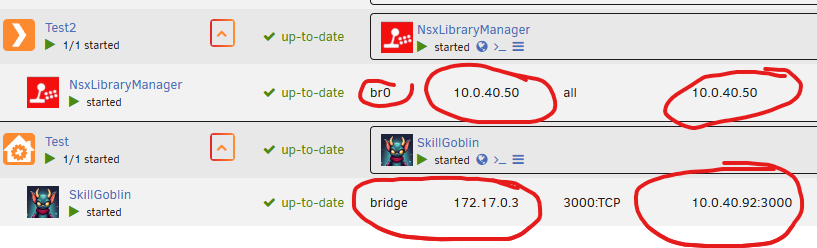
When you look at the VM info do you see the IP there ? (Like on attached image here)
-
Ah bugger, I need your help guys ! I literally can not reproduce the issue. Here is the video, this is on 7.1.2 with current plugin version and some random containers... I have tried to add them to folders, advance view, normal view, different network settings and I can always see the WebUI link correctly. ( This was also opened in incognito to prevent cache or something ) If you have this issue, please look at the video and what I have tried, then check your settings and post them here so I can try to reproduce it. Thanks, and sorry for delays. EDIT: I also installed Tailscale and tried with that enabled, its not in the video, but wanted to try and it worked ok as well... folderview is not really resolving the [IP] variable on its own but its taking it from unraid.
-
Finally some free hours, updating my dev box to 7.1.2 and my main is 7.0 so this will be references for now. And going to look into that link/webUI issue. Hopefully update will be up in few hours.
-
Not fully, I had it ready...and wanted to have it out on Monday, but ended up on mandatory first aid training that I have to go to office for and that took most of the day... so I hope I can finish meetings today and nothing blow up and can finish it today and release tomorrow.
-
I'm on it, hopefully by Monday I can get it out. sadly bills paying work needs to take precedence until weekend
-
Hi all, wohoo celebration! 🎆 we are in Unraid Store ! Time to start fixing and improving I have some work this week but after work hours I can start look liking into stuff.
-
I can't tell when it will be added, so if you need it side load
-
Nope