





tschinz
Members
-
Joined
-
Last visited
-
hello @lowly-grate5136, If I remember correctly I change the password on the terminal with the following command passwd [user] Cheers
-
FYI @Goodboy428 you terminal comand didn't work since you probably don't have a dev/md1 - 5 partition. by default filesystems get names sad, sdb ... and the partition can be access adding the corresponding partition number e.g. /dev/sda1 Then for my unmountable drive Problem. I launched the command xfs_repair -L which deleted the Log file and potentially some data. but the disk came again mountable and works as expected. Thank you all for the help. As for the explanation why the parity was still valid even when one disk was missing: The parity check is validating the disks not the filesystems. As long as the disk was accessible and had the correct data the parity check come back valid. I hope this helps some future guys desperate to recover a unmountable disk. Thanks @JorgeB and @itimpi for your help
-
Hello JorgeB thanks for the reply, I tried that in the console and the webgui but there seems a problem Phase 1 - find and verify superblock... Phase 2 - using internal log - zero log... ERROR: The filesystem has valuable metadata changes in a log which needs to be replayed. Mount the filesystem to replay the log, and unmount it before re-running xfs_repair. If you are unable to mount the filesystem, then use the -L option to destroy the log and attempt a repair. Note that destroying the log may cause corruption -- please attempt a mount of the filesystem before doing this. Well the webui won't mount the filesystem since it is unmountable. In the console I don't know how since unraid doesn't have enties in the fstab file. How could I attempt to mount it a where without corrupting anything. I could try with the -L option xfs_repair -h xfs_repair: invalid option -- 'h' Usage: xfs_repair [options] device Options: -f The device is a file -L Force log zeroing. Do this as a last resort. -l logdev Specifies the device where the external log resides. -m maxmem Maximum amount of memory to be used in megabytes. -n No modify mode, just checks the filesystem for damage. (Cannot be used together with -e.) -P Disables prefetching. -r rtdev Specifies the device where the realtime section resides. -v Verbose output. -c subopts Change filesystem parameters - use xfs_admin. -o subopts Override default behaviour, refer to man page. -t interval Reporting interval in seconds. -d Repair dangerously. -e Exit with a non-zero code if any errors were repaired. (Cannot be used together with -n.) -V Reports version and exits. What do you think? Thanks
-
Small update, on the syslog there are some errors related to xfs and the problematic disk Nov 15 19:10:53 node kernel: I/O error, dev sdc, sector 264 op 0x0:(READ) flags 0x80700 phys_seg 2 prio class 2 Nov 15 19:10:53 node kernel: ata4.00: exception Emask 0x11 SAct 0x10000 SErr 0xc80100 action 0x6 frozen Nov 15 19:10:53 node kernel: ata4.00: irq_stat 0x48000008, interface fatal error Nov 15 19:10:53 node kernel: I/O error, dev sdh, sector 1000215040 op 0x0:(READ) flags 0x80700 phys_seg 1 prio class 2 Nov 15 19:10:53 node kernel: ata4.00: exception Emask 0x11 SAct 0x2 SErr 0x680100 action 0x6 frozen Nov 15 19:10:53 node kernel: ata4.00: irq_stat 0x48000008, interface fatal error Nov 15 19:11:39 node kernel: XFS (md1p1): Internal error i != 1 at line 2125 of file fs/xfs/libxfs/xfs_alloc.c. Caller xfs_free_ag_extent+0x404/0x6af [xfs] Nov 15 19:11:39 node kernel: CPU: 1 PID: 12773 Comm: mount Tainted: P O 6.1.49-Unraid #1 Nov 15 19:11:39 node kernel: Call Trace: Nov 15 19:11:39 node kernel: XFS (md1p1): Internal error xfs_efi_item_recover at line 632 of file fs/xfs/xfs_extfree_item.c. Caller xlog_recover_process_intents+0x9c/0x25e [xfs] Nov 15 19:11:39 node kernel: CPU: 1 PID: 12773 Comm: mount Tainted: P O 6.1.49-Unraid #1 Nov 15 19:11:39 node kernel: Call Trace: Nov 15 19:11:39 node kernel: XFS (md1p1): Internal error xfs_trans_cancel at line 1097 of file fs/xfs/xfs_trans.c. Caller xfs_efi_item_recover+0x16a/0x1a8 [xfs] Nov 15 19:11:39 node kernel: CPU: 1 PID: 12773 Comm: mount Tainted: P O 6.1.49-Unraid #1 Nov 15 19:11:39 node kernel: Call Trace: Nov 15 19:11:39 node emhttpd: /mnt/disk1 mount error: Unsupported or no file system Nov 15 19:21:01 node root: Fix Common Problems: Error: disk1 (WDC_WD60EFRX-68L0BN1_WD-WX32D80K4NE4) has file system errors ()
-
Dear Unraid members/community, for the first time I really need your help, my server started acting strangely (unresponsive) and I had to restart it. This happened perhaps three times (over a couple of months). There was also twice a power outage last month. I never saw any problem and I never found out why the server hang. I believe that it's the Ryzen c-state problem but unconfirmed. Now since today this happened: - Then all docker containers disappeared. - Then I saw that disk1 is "Unmountable: Unsupported or no file system". The disk shows no problems and SMART values are all good. - The parity comes back valid - Many files disappeared on the SMB. All files are shown on disk2 I believe all files from disk 1 are gone...... I have a image of the current main and one from before the problem see attached. My questions: - How can data disappear with a 3 disk pool including a parity.... - How can it be that I'n not notified about a unmountable disk - What would be best do to - Format the unmountable disk? - rebuild it? - How can it be that suddently many files are missing and the parity is still valid???? - What can I do to pinpoint the problem? - How can I restore my data? - Do you need to know more? What? PS: I'm running unread 6.12.4 PPS: I have a backup from Monday and all the missing data can be found there on the external backup drive. But there are many important files and I'm sweating... Thanks for all the help.
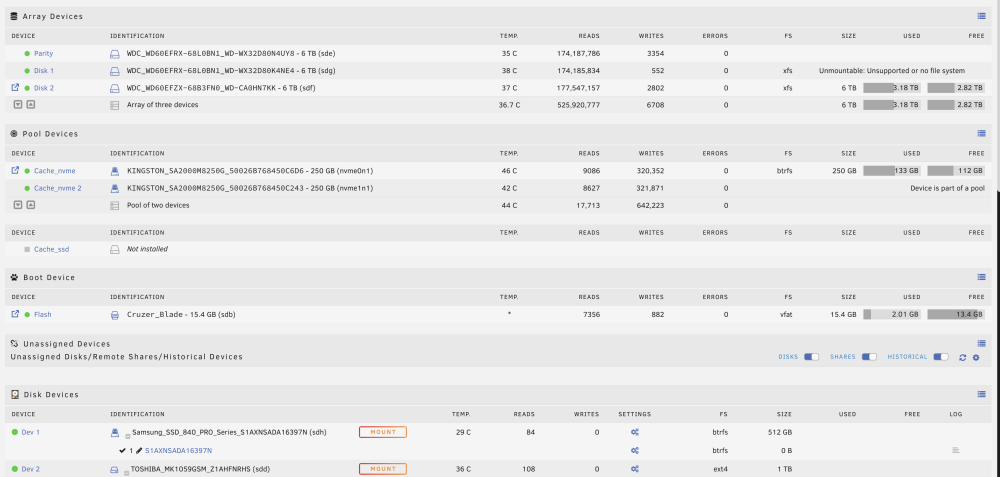
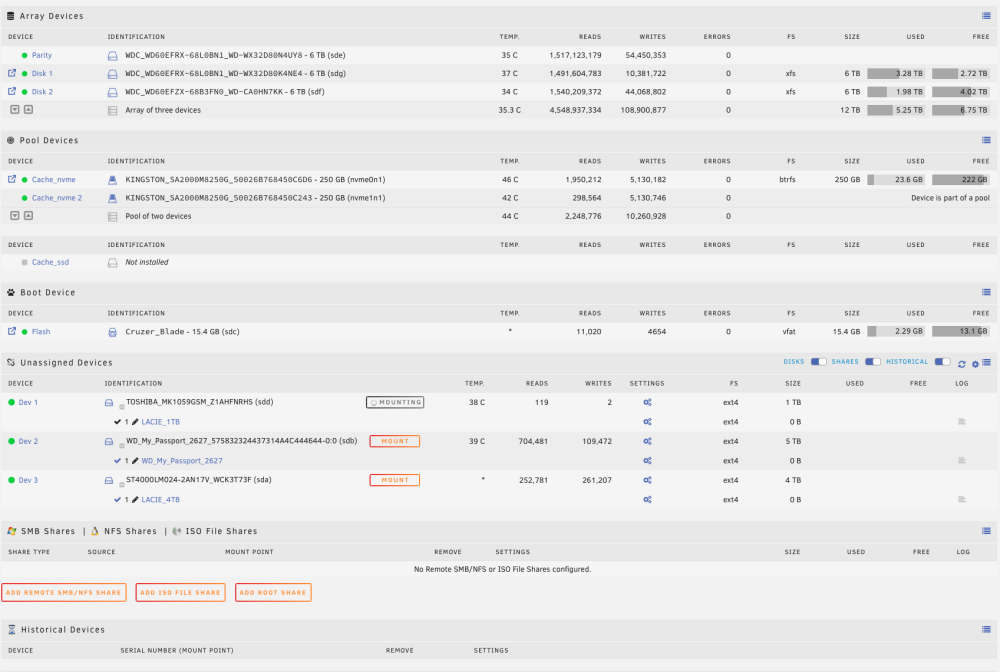
-
I needed to do a hard reboot. The WebUI and after a while even the Terminal was unresponsive. I tried to install the Unraid version 6.12.3 again with the same problem. Most of the CPU's went to 100 %. The web showed the following: I apparently stoppes at inflating syslinux.cfg. Anyone an Idea or the same problem, I can't upgrade to Unraid Version 6.12.3 thanks
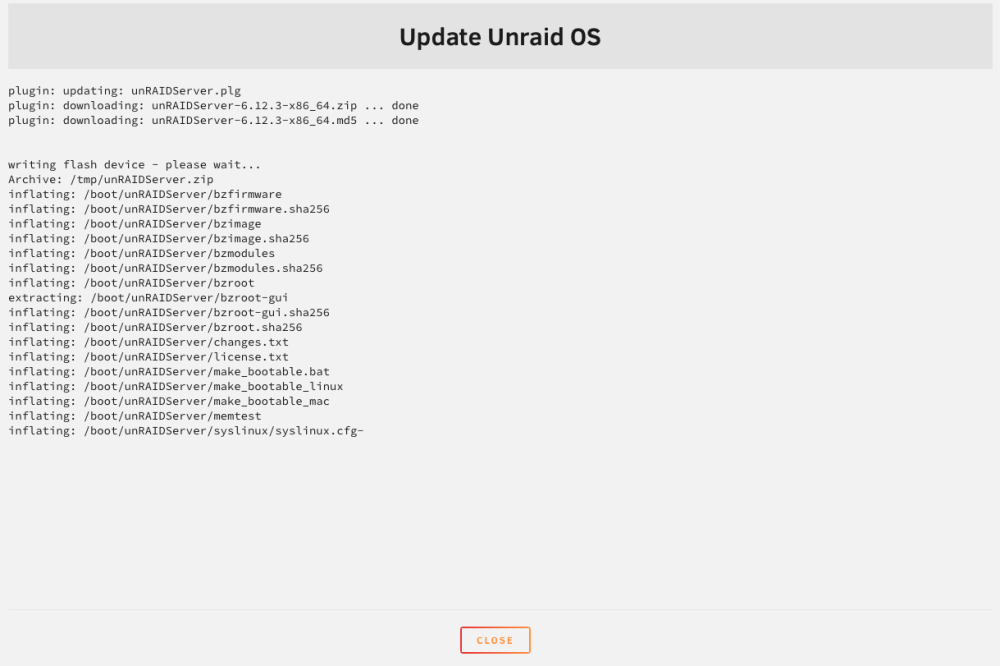
-
I started the update to 6.12.3. The upgrade process runs in the background but for 5 h is stuck on 100% CPU. Should I restart or wait even longer or kill the task? The Shellscript /tmp/unRAIDServer.sh is stuck apparently. Any idea how to process?

-
I have the same problems here. did you find a solution?? any help is appreciated. Tschinz
-
with the at command you can get an email command | at now
-
Thanks ICDeadPpl, that worked. I've in one main script multiple sub user scripts I would like to launch. Is it possible to wait for one command to finish before launching the next? Currently both are started at the same time because of the "at now" command. I there a method to launch the second after the first is finished. Thanks for the help
-
Hello guys, i've tried searching within this huge thread but I couldn't find a working answer. I want to call from one user script another user script. For this the following command was used. echo "/boot/config/plugins/user.scripts/scripts/backup_onedrive/script" | at now But I got following error sh: line 18: /boot/config/plugins/user.scripts/scripts/backup_onedrive/script: Permission denied I tried via the console to sudo chmod +x /boot/config/plugins/user.scripts/scripts/backup_onedrive/script But the execute x flag is never applied. Any tips or hints? Thanks in advance tschinz


