





Mat W
Members
-
Joined
-
Last visited
-
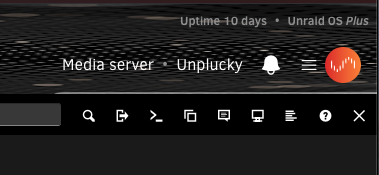
Assuming you're talking about the "disable plugins" safe mode... It's the X in the upper right hand corner of the GUI, just below the profile icon.
-
It's also reporting that dynamix.safe.mode.plg is not known as of today.
-
Last update: End result, my old USB decided to leave the chat AND the unRAID USB Creator decided it didn't want to fully create the new USB so I had to manually create it by extracting my backup to the new USB drive. Booted right up, imported key and I am back in business as if nothing went wrong. Side note: the nVidia driver was missing and had to be reinstalled but after a reboot all was happy. I'll update my original post for historical purposes.
-
Ok... So after much troubleshooting, I determined that the unRAID USB Creator was not working properly and did not install all of the folders and files from the USB backup I pulled down from Connect. Unsure why it is failing but unzipping the Flash backup shows all of the expected files/folders. I am in the process of manually extracting to the USB drive now. Will update again once it is complete and I have attempted to boot.
-
Ugh. System isn't booting as if the USB drive isn't bootable. Take it back over to Windows and run make_bootable.bat as admin and it complains that syslinux executable not found.
-
I've been in IT for 30 years and I can't count the number of times I've seen a reboot trigger a drive failure.
-
Yup. Thankfully it backed up successfully during the upgrade process! Might just stop fighting with the USB drive with an unknown age ;)
-
Problem I'm fighting now is getting windows to mount it, which I'm guessing might point at the USB being corrupted and not just some files. Will continue to fight with it, great way to start a Monday.
-
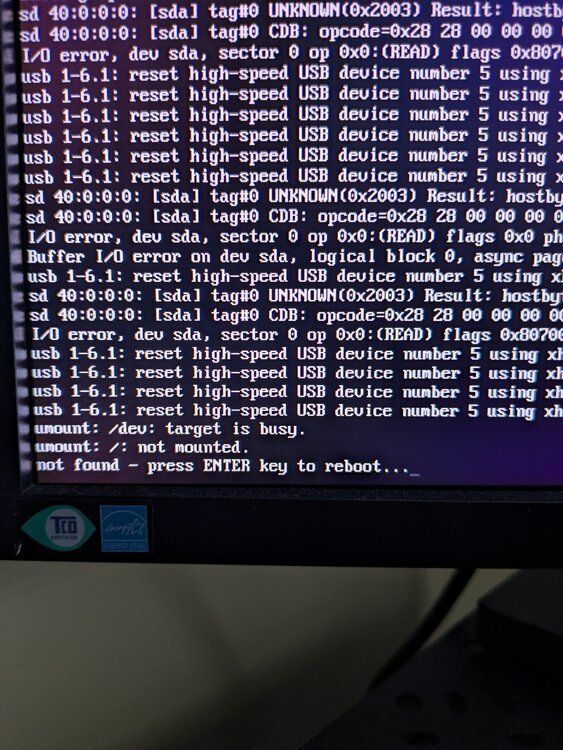
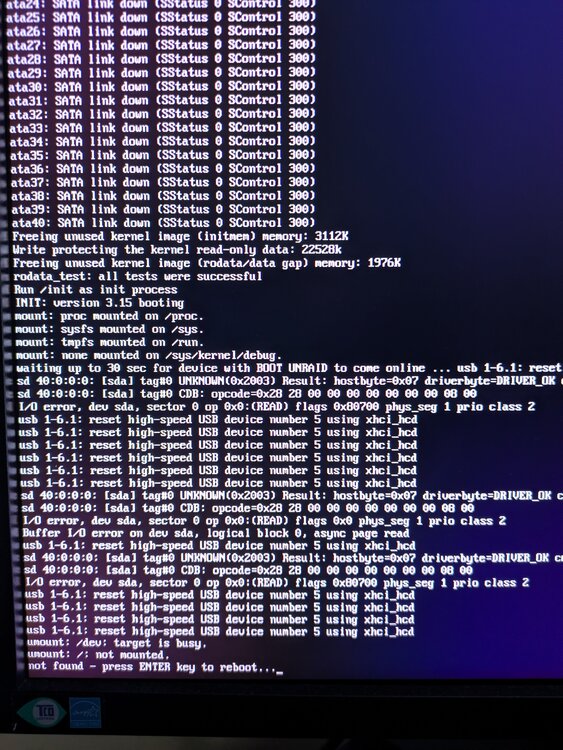
Looking at the screenshots, it looks like maybe the USB image got corrupted during the upgrade given the I/O errors for sda?
-
RESOLVED - My original USB died and I just needed to pull down the backup made right before the upgrade, manually extract it to a new USB (the unRAID USB Creator was not doing it properly for some reason), boot up and import the key. I'm back up and running. Just upgraded to 7.2.2 and it's not booting (see screenshots). It says the following and then say "hit enter to reboot". I'm going to continue troubleshooting and would prefer not have to reinstall the flash drive if avoidable. Please help. umount /dev: target is busy umount /: not mounted not found - press ENTER key to reboot...
-
Appreciate the heads up about 7.2+. Still really grateful that you republished this for 7.1.
-
@VladoPortos a 1000 thanks to you!!!
-
Yeah, no worries really. I monitor the Pi it's running on and there is the Pi-hole dashboard itself. Was mostly redundant for me if I'm being honest.
-
Looks like the new version of Pi-Hole (ver 6) breaks the exporter. The only way to have a token is to enable auth which then requires a password (sid=blah) which returns a csrf(?) token to also be included with requests. You can use an app token but I think it still hands out a csrf token that needs to be used. Honestly, APIs have always confused me. haha. If a password is not set, then there is no need for a token of any kind but the pi-hole exporter plugin requires a token. Just thought I'd pass all of this along...
-
Mat W changed their profile photo
-
Well, I think updating unraid-api has resolved my issue. After the update it wrote INFO level logs into stdout.log and hasn't written anything more to stdout.log.1. I'll continue to monitor but I believe that "fixed" it. root@Unplucky:/var/log/unraid-api# ls -alh total 37M drw-r--r-- 2 root root 100 Jan 11 04:40 ./ drwxr-xr-x 13 root root 780 Jan 12 08:11 ../ -rw------- 1 root root 146 Jan 3 12:40 stderr.log -rw------- 1 root root 2.8K Jan 12 08:11 stdout.log -rw------- 1 root root 37M Jan 12 08:11 stdout.log.1


