





cometship
Members
-
Joined
-
Last visited
-
Any other suggestions, please?
-
Good idea Squid. Unfortunately, Macrium does not allow mapped network drives as sources.
-
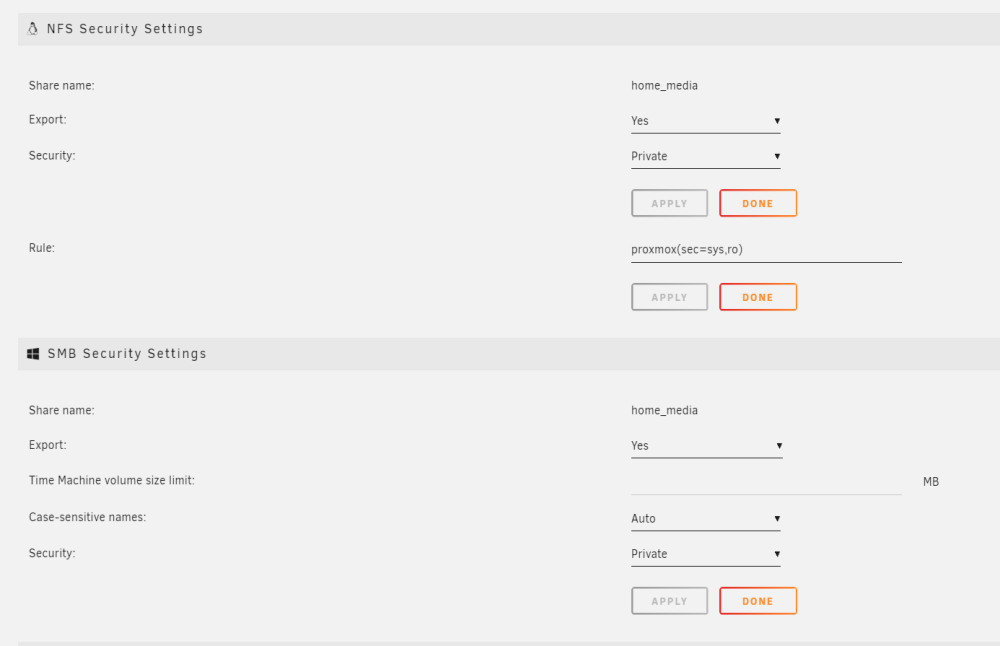
Logs attached for 6.11.5. Windows can access unraid share, but Macrium Reflect 7.3.6391 triggers the following error messages and cannot access the share. This works intermittently since I've been successful at backing to NAS share before. Tried rebooting Unraid. Many of these when Macrium launches: NASBoy nginx: 2023/05/31 15:05:23 [error] 4141#4141: *37665 limiting requests, excess: 20.913 by zone "authlimit", client: 192.168.1.14, server: , request: "PROPFIND /login HTTP/1.1", host: "nasboy" Other threads talks about closing hanging webguis. But Macrium is a standalone app, no browser. The PC running Macrium is 192.168.1.14. I also use a pfSense router. Any connection there? What does this mean and is there a work around? Thx! nasboy-diagnostics-20230531-1510.zip
-
Thanks! The subvolume creation created the new share as you indicated. I then used the UNRAID GUI to finish configurating the new share, moved data into the new share, and took a snapshot successfully.
-
I configured 4x1TB SSDs as BTRFS RAID1 cache pool for media only shares. I did an initial scrub, configured a weekly scrub and monthly balance. I have a separate backup scheme in case of trouble. Everything appears to be working fine but the test of time is needed. I've used ZFS snapshots on PROXMOX and wanted to explore BTRFS snapshots with UNRAID. See https://linuxhint.com/use-btrfs-snapshots/ btrfs subvolume list /mnt/cache_raid returns blank. Maybe because there's only top root subvolume with no label? Can you confirm UNRAID does not create subvolumes for each share that uses this cache pool? btrfs filesystem show /mnt/cache_raid/ Label: none uuid: bbdb2e06-2722-4d3a-80d2-XXXX Total devices 4 FS bytes used 325.33GiB devid 1 size 931.51GiB used 164.00GiB path /dev/sdb1 devid 2 size 931.51GiB used 163.03GiB path /dev/sdc1 devid 3 size 931.51GiB used 163.03GiB path /dev/sdd1 devid 4 size 931.51GiB used 164.00GiB path /dev/sde1 btrfs subvolume show /mnt/cache_raid/ / Name: <FS_TREE> UUID: 901b6a05-c459-4c95-a11f-XXXX Parent UUID: - Received UUID: - Creation time: 2023-01-05 16:56:59 -0800 Subvolume ID: 5 Generation: 151 Gen at creation: 0 Parent ID: 0 Top level ID: 0 Flags: - Send transid: 0 Send time: 2023-01-05 16:56:59 -0800 Receive transid: 0 Receive time: - Snapshot(s): So pls confirm the commands to make a read only snapshot of top level BTRFS: mkdir -v /mnt/cache_raid/.snapshots - create snapshot directory btrfs subvolume snapshot -r /mnt/cache_raid /mnt/cache_raid/.snapshots/`hostname`-`date +%y%m%d`-`date +%H%M` btrfs subvolume list /mnt/cache_raid - list subvolumes and snapshots Comments and feedback if I should stay away from exploring this are welcome.
-
After upgrading to 6.11.5 I get NVME overheated warning emails at random times 2-3 times a week with no corresponding entries in system log. There is no expected process writing to shares using this NVME as cache. Temperature returns to normal email after < 2hrs. Besides upgrading to 6.11.5, I did add an HBA card to the server (unrelated but mentioned for completeness). Shouldn't high temperature events be in the system log? Logs attached. Email: Event: Unraid Cache_nvme_app disk temperature Subject: Alert [NASBOY] - Cache_nvme_app disk overheated (84 C) Description: Samsung_SSD_980_1TB_S64ANJ0R920903T (nvme0n1) Importance: alert
-
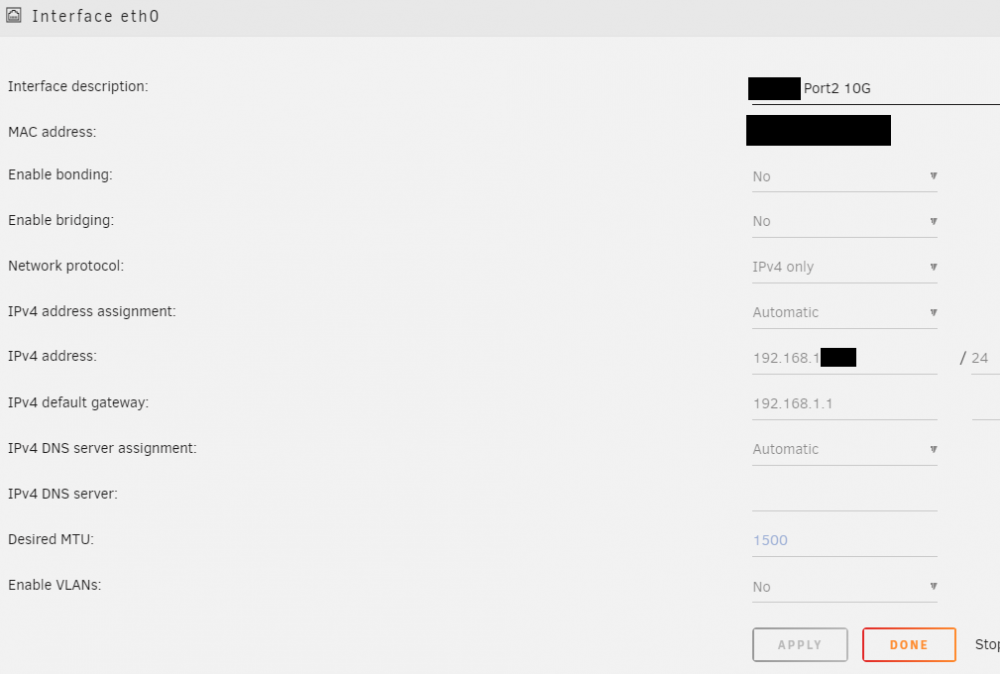
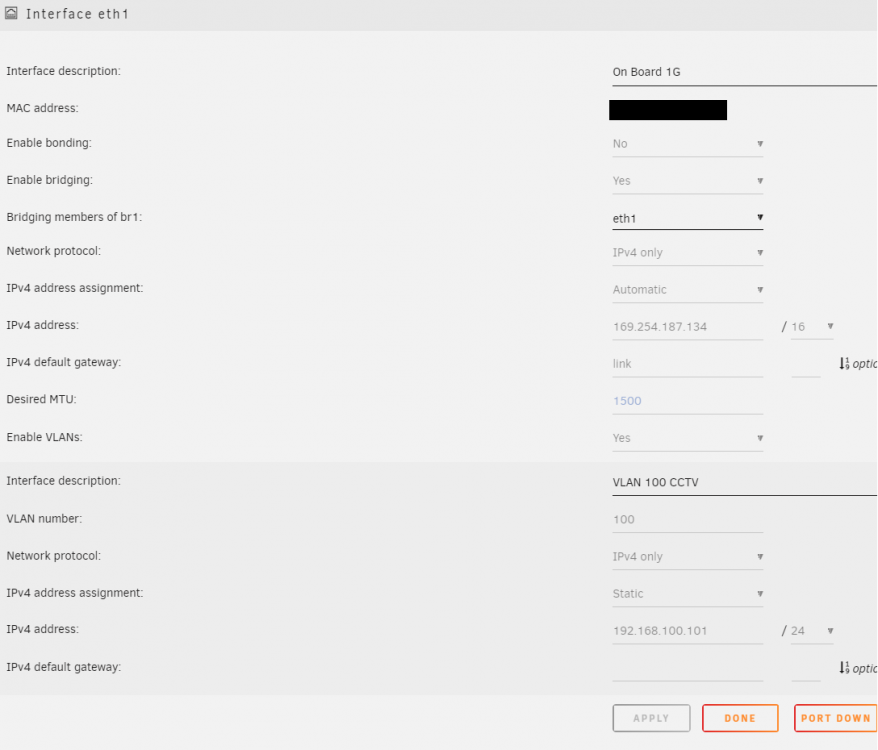
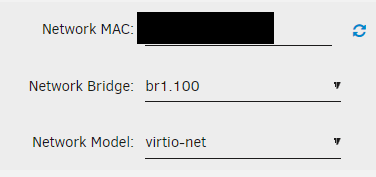
See below screenshots of 2 ethernet physical connections in UNRAID. Objective is to install Shinobi docker for CCTV on separate VLAN that should not have access to array data or mgt interfaces. et0 10G NIC is intended for UNRAID array sharing only. Working OK. eth1 1G MB NIC is intended for Shinobi VLAN bridge. CCTV cameras on that VLAN should not have access to eth0 and array. Bridging has been enabled for eth1 and CCTV VLAN 100 Switch has been configured to isolate eth1 physical from 192.168.1.1/24. That's why eth1 is not able to talk to router and gets automatic private IP address: 169.254.187.134 Please help me review Network Settings configuration: Thanks! Creating a VM to check VLAN is accessible: Options are virbr0 (assume means eth0 virtual bridge), br1 (assume means eth1 virtual bridge) & br1.100 (CCTV VLAN)
-
Turns out this is port scan from Gryphon. I disabled SSH port un UNRAID management tab since I don't use ssh. From Gryphon support: "Our Gryphon has a firewall that will block/filter inbound traffic. the Gryphon regularly scans ports that are open and will give you a notification for an open port. You will then determine if that port is used by an application or website and is safe to leave as open. Here are some options you can choose for a port scan detection result. 1. Quarantine - can’t access the internet on the rogue device (stops the device) 2. Monitor – to monitor the device and keep you posted. 3. Delete – delete the notification but will notify again when there is another scan 4. Ignore - will NOT notify the user for 7 days The quarantine will have your device totally blocked. Thank you, Gryphon Support/FE Customer Support Line +1 (480) 428-4016"
-
No. I have a Gryphon tower AC3000.
-
What are these login attempts in system log? Googling shows is related to SSH from 192.168.1.1. I see about 100 of these warning over a 2 sec interval in sys log every few days. Is these an SSH attempt from router gateway, or coming from another network device? Hopefully not from the internet. Thanks Jan 16 02:19:24 NASBoy sshd[4420]: Connection from 192.168.1.1 port 57549 on 192.168.1.242 port 22 rdomain "" Jan 16 02:19:24 NASBoy sshd[4420]: Unable to negotiate with 192.168.1.1 port 57549: no matching key exchange method found. Their offer: diffie-hellman-group14-sha1,diffie-hellman-group-exchange-sha1,diffie-hellman-group1-sha1 [preauth] .... (many attempts over 2 sec)
-
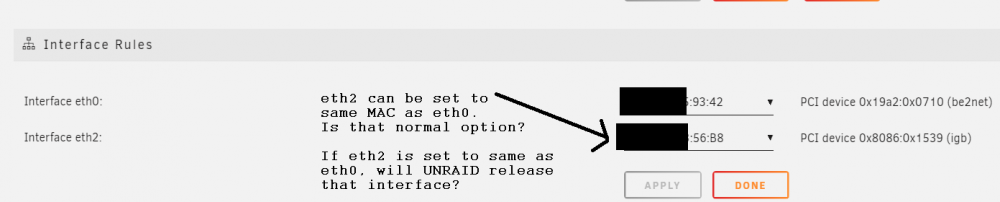
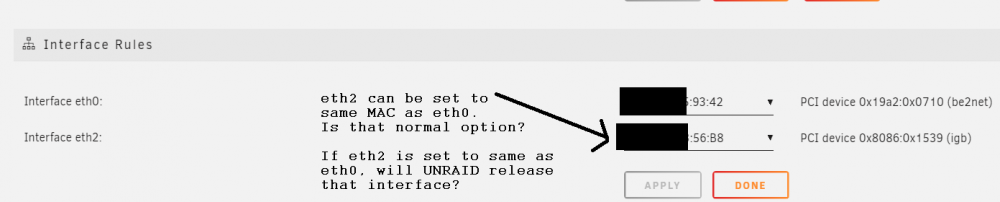
Hi, please find attached diagnostics. The Fix Common Problems Plugin found no errors. How do I release a NIC interface from UNRAID that is labeled in Network Settings as 'shutdown inactive', and in System Devices page as 'In Use by Unraid'? NICs are not bonded or bridged. Do I just set above eth2 to same MAC as eth0? Is that the procedure to remove a NIC that is in use by UNRAID? Thank you for your help.

-
How do I release a NIC interface from UNRAID that is labeled in Network Settings as 'shutdown inactive', and in System Devices page as 'In Use by Unraid'? Do I just set above eth2 to same MAC as eth0? Is that the procedure to remove a NIC that is in use by UNRAID? Don't want to try without getting some confirmation to avoid braking something and then have to figure out the fix. More details in the User Guide could help with questions like this. Maybe I'm not looking at the right wiki. Thanks
-
I cannot find in user guide a description of Settings : Network Settings : interface rules. So I turned to the forum. My UNRAID uses eth0 (10Gig NIC port2) as primary connection. I successfully bound eth1 (10Gig NIC Port1) using "System Devices : Bind Selected..." button. eth2 is onboard LAN (shutdown inactive, 'In Use by Unraid') and appears as second option in interface rules. See pic below. In interface rules I get the option to set eth2 to same MAC as eth0. Is that normal to set both eth0 and eth2 to same MAC? If I set eth2 to same as eth0, does that mean that onboard NIC (eth2) will be released by UNRAID? Thanks for great forum support!
-
(update) Asrock provided an engineering BIOS that separated the devices from 5 to 21 IOMMU groups. I've had great customer service from them in the past. They delivered again.
-
Thank you ljm42 for detailed response and downsides of virtualizing the router. Just because it can be done it doesn't mean we should. I think my family will appreciate a stable router. I was swayed by the related SpaceInvader video, but he has a physical backup router that enables when the array is down A Shinobi docker seems like a better fit for UNRAID with vlans for security.




