marc0777
Members
-
Joined
-
Last visited
-
Hello everyone! After a long time I was able to work on the NAS, and I managed to solve the problem! The problem was a faulty BIOS, made for a slightly different version of my NAS. I installed it after reading on the internet that it should've fixed some problems when using OSes different than the one it was sold with, however the CPU management was completely broken. After finding and installing the original BIOS now performance are what I would expect. Indeed I reach around 100 MB/s both when reading and writing using NFS over a 1gbps link. Thanks again to everyone for the support!
-
So I tried changing every option in the BIOS but with no success, performances are still abysmal. Moreover I had to disable cache for all my NFS shares or they would continuously giving stale file handle errors. Since there doesn't seem to be a solution to this problems I'll switch to another OS as soon as I have the time to move all the files around again.
-
After some more digging it looks like the CPU is stuck in the C1E state, which makes me pretty sure it's a BIOS problem. Unfortunately I'm currently far from where I keep the NAS, so I'll have to wait or find someone who can go and check for me sooner. Anyway, I'll update you as soon as I have news regarding that. Any suggestions instead on NFS? Despite the upgrade and switching to NFS 4.2 I'm still getting stale file handles 2-3 times a day...
-
So assuming there is something wrong with the CPU performances, what could be limiting them and what should I check? I tried setting the governor to performance but this didn't seem to change anything. I don't know if this might be related, but output of cpufreq-info shows: cpufreq-info cpufrequtils 008: cpufreq-info (C) Dominik Brodowski 2004-2009 Report errors and bugs to [email protected], please. analyzing CPU 0: no or unknown cpufreq driver is active on this CPU maximum transition latency: 4294.55 ms. analyzing CPU 1: no or unknown cpufreq driver is active on this CPU maximum transition latency: 4294.55 ms. analyzing CPU 2: no or unknown cpufreq driver is active on this CPU maximum transition latency: 4294.55 ms. analyzing CPU 3: no or unknown cpufreq driver is active on this CPU maximum transition latency: 4294.55 ms.
-
Please notice that the D2550 I've got is slower than a J1900. However md5sum is currently held back by read speeds, since I can reach higher speeds when not reading from disk: dd if=/dev/zero bs=1M count=1k | md5sum 1024+0 records in 1024+0 records out 1073741824 bytes (1.1 GB, 1.0 GiB) copied, 9.21265 s, 117 MB/s cd573cfaace07e7949bc0c46028904ff - My CPU doesn't support frequency scaling so it's always running at full frequency, 1.86GHz. As you can see from below it's indeed running at that frequency.
-
This is the result of the command you wrote: dd if=/dev/zero of=/dev/null bs=1M count=10000 10000+0 records in 10000+0 records out 10485760000 bytes (10 GB, 9.8 GiB) copied, 8.05482 s, 1.3 GB/s Using md5sum from the array I reach the usual speeds of around 30MB/s, and the process using more CPU is shfs. Doing the same from the cache (SSD) I get around 64MB/s, which is the highest speed I've seen so far.
-
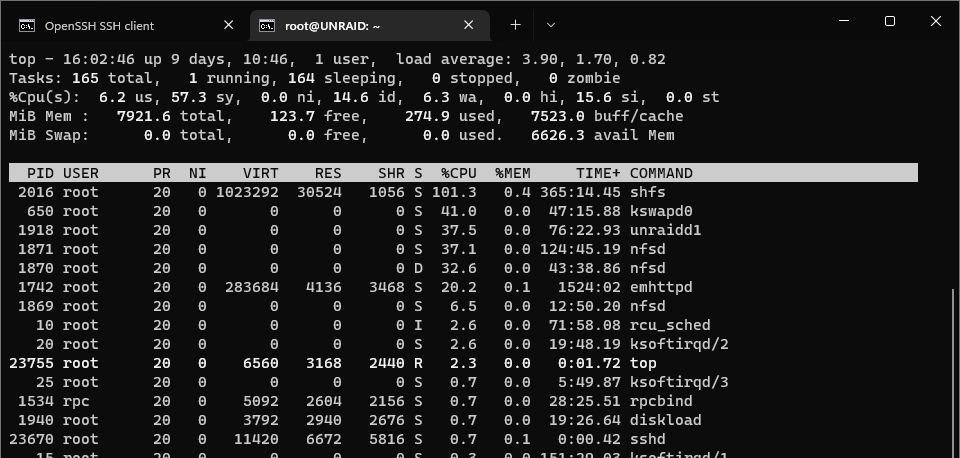
I know it's not exactly the best performer, indeed I don't expect to run Docker, VMs or anything else more than NFS and SMB on it. However I just need it to reach some decent read speeds, as it did with no problem before I started using Unraid on it. I thought the overhead would be only on write speed and wouldn't make such a big difference on read speeds as well. The slow down is on the server itself, copying a file from /mnt/user to /dev/null brings shfs usage to 100% and doesn't reach more than 30MB/s. Copying from the /mnt/cache to /dev/null doesn't seem make shfs go to 100% but the read speed is the same. CPU governor is currently set to On Demand and the frequency seem to be scaling correctly, and I haven't changed any network setting yet because the problem appears also locally: I first noticed it when copying data from a disk to another from Unraid, indeed importing the data from the old drives to the new ones took me a very long time, because the speed never reached more than 30MB/s despite the drives being able to reach 200MB/s and more. At first I assumed it was Unraid limiting write speeds to the array... Regarding NFS, I'm still getting stale file handle errors, but the frequency went from once every few minutes to once a day. Again, I'm attaching diagnostics.... Should I give up on Unraid and switch back to a less resource hungry OS? unraid-diagnostics-20220515-1925.zip
-
Just upgraded to 6.10rc8 and switched all my NFS share to v4.2, the logs look already cleaner at least on the clients side. Performances however did not improve, in fact I'm seeing around 22MB/s reading from cache or array, always with shfs at around 100 in top. New diagnostics attached. unraid-diagnostics-20220513-1815.zip
-
I've recently replaced some disks in my NAS and I took the chance to switch from OpenMediaVault to UNRAID 6.9.2. However I noticed as soon as I started copying files from the old disks to the new ones that performance are very bad. While on OMV I could saturate the ethernet link via SMB, now all copies (SMB, NFS and even local) are around 30 MB/s. Even when copying from SSD to SSD I'm not able to overcome that limit. What I noticed is that while copying data the shfs process uses a lot of CPU: While I expected a drop in write performance with respect to my previous setup because of the parity, I was not expecting such a drop in reads as well. Is it to be expected with my hardware? Moreover, I also noticed that I'm getting a lot of "Stale file handle" error, with one of the NFS shares. On the client's dmesg I see a lot of those errors: "NFS: server [IP] error: fileid changed". I already tried tuning the fuse_remember parameter but to no avail. Any suggestions for this? The machine is a Thecus N5550 with the following specifications: - Intel Atom D2550 - 8GB DDR3 RAM - 2 × Toshiba MG07ACA14TE (CMR) 14TB - 2 × WD RED (CMR) 6TB - Kingston A400 120GB - UNRAID 6.9.2, VMs and Docker disabled and no plugins I attach to this post the diagnostics. Thanks, Marco unraid-diagnostics-20220506-0106.zip