NathanR
Members
-
Joined
-
Last visited
Everything posted by NathanR
-
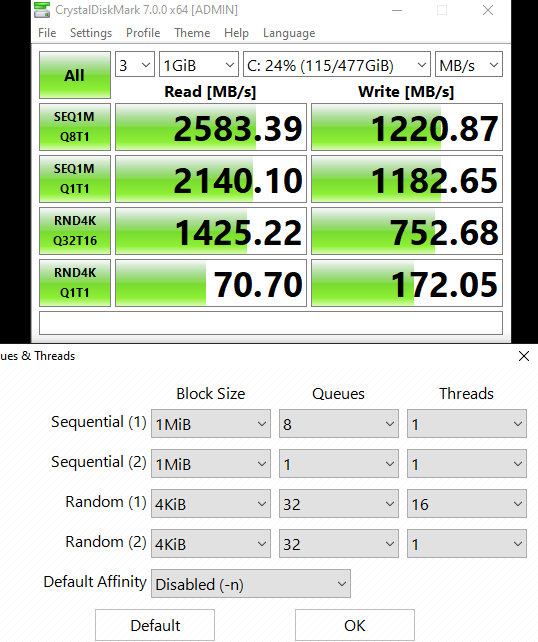
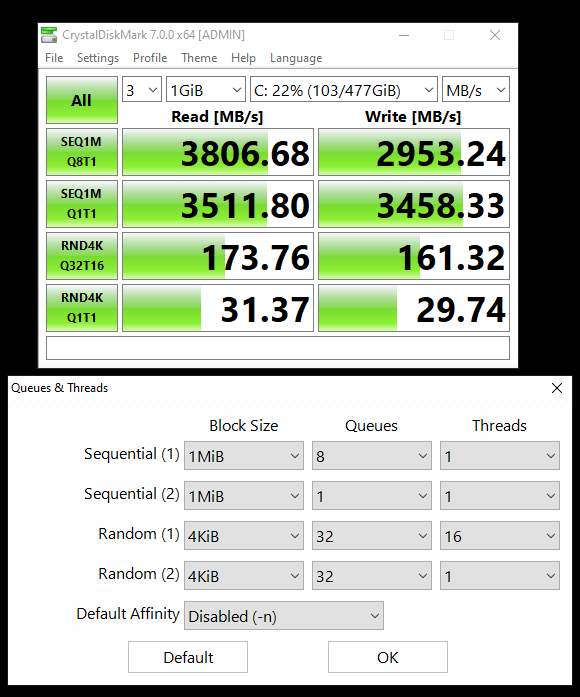
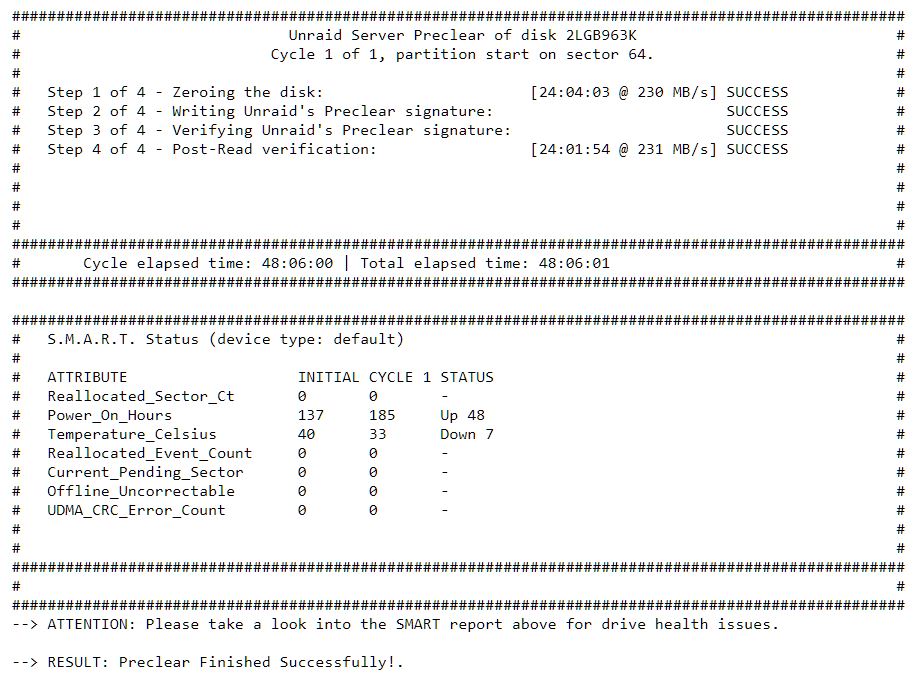
Preclear signature was lost on the 20T Now it will have to do it again I wonder if this has to do with Unassigned Devices or Dynamix File Manager being installed? --- Finished my VM vs HW testing. Interesting results... Overall, seems not a huge difference. Fairly impressive IMO Drive speed differences are rather strange. (Strange because image 1 is the passthru and image 2 is hw, lol) Who cares tho.

-
First things first. I love the GUI. It is fast, simple, and logical. Thank you for making an awesome product! --- My browser just started crashing today. I powered down my server to replace the BMC chip. Powered it up and it started doing this. It happens when I am clicking around my Unraid Server GUI (webpage IPaddr URL). It happens randomly. Pinned tab or not. Cleared cookies. 2022-07-20 - Brave - Version 1.41.99 Chromium: 103.0.5060.134 (Official Build) (64-bit) --- Where should I look in the logs to try to tell if this is a browser (Chromium update) issue or Unraid? --- Testing: It does not seem to crash on Chromium 103.0.5060.114 pfSense webpage - no crash MikroTik webpage - no crash ASRock Rack IPMI webpage - no crash
-
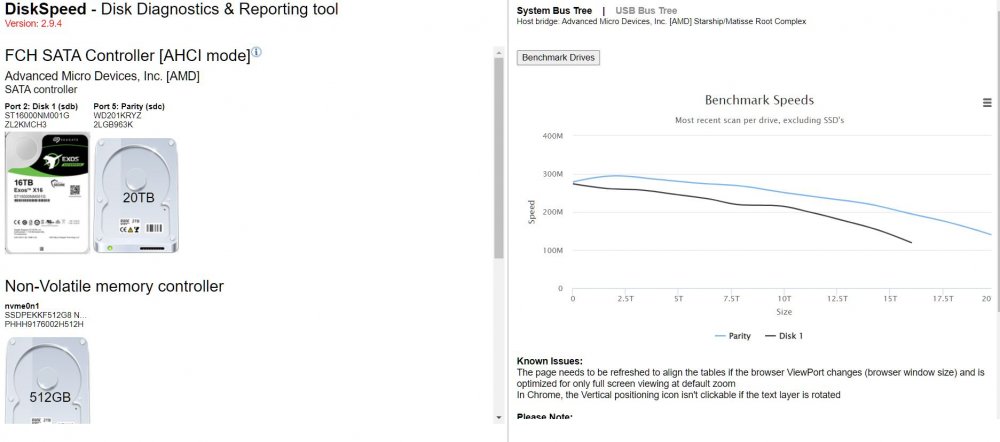
In other news... I debated on preclear and decided on it eventually. WD's new 20T Gold drives are amazing. 295-peak read
-
No matter what I did I could not get the qcow2 file to launch after EFI-Shell came up. I googled for hours finally finding that as the fix (after seeing stuff about CSM and Secure Boot all for older versions 4.xx/5.xx, ~2019)
-
Plugins: Community Applications - https://forums.unraid.net/topic/38582-plug-in-community-applications/ Unassigned Devices (And Plus) - https://forums.unraid.net/topic/92462-unassigned-devices-managing-disk-drives-and-remote-shares-outside-of-the-unraid-array/ Unassigned Devices Preclear - https://forums.unraid.net/topic/120567-unassigned-devices-preclear-a-utility-to-preclear-disks-before-adding-them-to-the-array/ Dynamix File Manager - https://forums.unraid.net/topic/120982-dynamix-file-manager/ Dockers: DiskSpeed - https://forums.unraid.net/topic/70636-diskspeed-hard-drive-benchmarking-unraid-6-version-292/ ESPHome (until I get VM running) - https://forums.unraid.net/topic/72033-support-digiblurs-docker-template-repository/ Home-Assistant-Core - https://registry.hub.docker.com/r/homeassistant/home-assistant/ netdata - https://forums.unraid.net/topic/47828-support-data-monkey-netdata/ --- Home-Assistant-Core doesn't have the add-ons module (dockers) because it is a docker. There's also the linuxsystems developed core (docker) version? Idk, too many limitations; decided VM was best route. Unfortunately HA is now setup as CORE and I need to move files to the VM... hOw? idk. But I know that Dynamix is amazingly helping me with all that. Unfortunately installing HA as a VM was rather troublesome... qemu-img convert -p -f qcow2 -O raw -o preallocation=off "/mnt/user/domains/Home Assistant/haos_ova-8.2.qcow2" "/mnt/user/domains/Home Assistant/vdisk1.img" Solved here though: --- I am slowly condensing my data on old HDD's [1x 16T, 2x 10T, 2x 2T] while running pre-checks on the new drive(s). Ordering 10G components (sw and svr already have 10G, but I need a card for my desktop (5950X/3070/64G,NVMe) 1T 980 NVMe Cache drives arrived [need to lookup the temp issue and apply the fix again] Todo: -5900X -Setup cache -Move HA-Core config -Condense -10G -Move Data -Preclear -DNS docker -test failure modes
-
@Arbadacarba was instrumental in solving my VM issues. Thank you \/ \/ \/ \/ See fixes here \/ \/ \/ \/ Having BMC issues with my X570D4U-2L2T Somehow it lost the 1.2 image --- On happier notes I ordered: -5900X -2x 980 1T On Prime Day I plan on using 5900X for H265 encoding and the 980's to store VM's and do write cache etc. Yes I plan on having 10G NIC's to utilize the throughput --- Here are all the app's I have installed so far: I have long wanted to run Home-Assistant!!! I CAN FINALLY DO IT YEASSSSSSS PLZZZZZZ THANK YOU Unraid! Plex is next I guess?

-
Figured I could chronicle my journey a bit and help anyone in the future or just be a place for reference and input as I have no idea what I'm doing Build: Model: Custom M/B: ASRockRack X570D4U-2L2T Version - BIOS: American Megatrends International, LLC. Version P1.40. Dated: 05/19/2021 BMS: 1.2 CPU: AMD Ryzen 9 3900X 12-Core @ 3800 MHz HVM: Enabled IOMMU: Enabled Cache: 768 KiB, 6 MB, 64 MB Memory: 64 GiB DDR4 Multi-bit ECC (max. installable capacity 128 GiB) Network: bond0: fault-tolerance (active-backup), mtu 1500 eth0: interface down eth1: 1000 Mbps, full duplex, mtu 1500 eth2: interface down eth3: interface down Kernel: Linux 5.15.46-Unraid x86_64 OpenSSL: 1.1.1o Uptime: ~3hrs Previous (noob getting started) thread: --- Me trying to figure out how to pass through a NVMe Drive in 6.10.3 I might just give up and run xcp-ng with Unraid nested? Or I guess I don't really need NVMe drives passthru I could just install a new Win10...but I have a working image with all my files, boo Idk, will revisit slowly...we'll see what Ghost82 says. Then I went down the why USB bootable drive and 64GB drive and which drive hole... Ugh, please just make this bootable from a standard HDD and the USB nightmare can go away. I read that 64GB drive Fat32 formatted with something like GUI Format.exe will work still. I read that Samsung BAR Plus is the best drive (as of 2022-07-12) for this. I get consternation given the reviews of the BAR Plus's longevity and lack of USB 2.0 drives. I'd rather have a list of tested compatible drives or better-yet a USB drive sold by Lime Technology...but it's all good. --- Current plan is to trade-for/buy a 5900X and run that. Using my old 3900X until then. I want some cache drives... but I am seeing now that there are issues with even that. Me complaining: Ugh... WHY is everything so complicated?!?! I read that Unraid was simple and 'just worked' FFFFFFF's in chat!!! Seems this is the fix: nvme_core.default_ps_max_latency_us=1500 --- Next is figuring out drive structure, folder structure, cache drives, etc. --- I'd like some input on the most common first things y'all do on an install... I've heard of zeroing or wiping or cleaning drives...whats that? What dockers, apps, VM's do you typically run? What's your folder/drive structure and why do you like it? Etc.
-
Hmm, I like that approach. I need to do some thinking about my data I thinks. I presume you're running PLEX and that works well? Each drive has separated content, but is it all one share or multiple different shares? I'll admit having the location agnostic to the share is new territory for me.
-
Not to be argumentative but isn't Unraid most similar to RAID4? I was mostly talking out the answer to myself. Thanks for listening. That is indeeeeed an incredibly low overhead loss amount once you get the number of disks higher!
-
Big thank you everyone. I realize this is a moment where you want to say "search the forum," "RTFM," etc. But I really appreciate the time/answers instead of 'figure it out yourself' sometimes feeling comfortable about being 'heard' is enough to satiate consternation. I tried to be diligent reading the manual/getting started guide, googling. But I still had some nagging questions and in hindsight they seem trivial. Again, thank you. I'm sure I'll be back for more!
-
Well, I understand the parity drive is 'lost' space. Raid 1 = 50% overhead Raid 5 = 66% (1 drive) [Something like this anyways] I meant that the last 4TB will never be written to and can't be used until a 20TB data drive is added to the array to compliment the 20TB parity drive(s). This is one of those 'duh' answers/moments. But my brain is just a bit fried from learning all this new stuff https://www.servethehome.com/raid-calculator/
-
Perfect, the best answer to my parity questions. Thanks! This just reminded me of Q5) since the parity drive(s) is completely separate of the filesystem/storage doesn't that mean I am losing 4TB of space (given my largest drive size in the array is 16TB) until I get another 20TB drive?
-
Thank you for reading 'between the lines' into my angst and refuting it thoroughly. I have a lot of consternation with syncing when I first got my Samsung 2T drives forever ago and did software raid in windows Disk Management... It would constantly re-sync. It bothered me so much I just started having two drives and copying the data manually every so often. Yeah - for now I'm just playing with importing/exporting empty drives to see how to do things without risk of data loss. I'ma get a few more empty drives and try the zero format thing from JorgeB's referenced thread. I might have the issue/workaround for my device passthrough error/issue. No idea what XML files are used for or anything. Time to do some reading/watching I guess. Might just say screw it and buy a Samsung. The intel SSDPEKKF512G8_NVMe_INTEL_512GB_PHHH9176002H512H - 512 GB (nvme0n1) was just something I had laying around.
-
Thank you! 1/3) That makes sense. Q: So there's a reserved set of space on each drive dedicated to XFS? Q: Is that also sync'd with the parity drive or do I need to be concerned with? I am super new to XFS. Took me an hour of googling just to figure out that's the file system Unraid uses by default. Went down the XFS/BTRFS convo rabbit hole... decided I don't know and don't care. Defaults it is! The drives are literally new out of box. I did tell Unraid to format the 16T drive, but the 20T parity wasn't an option. But I can see how Unraid would still want to make sure. Q: Will Unraid need to sync the entire 16T drive's worth of zeros/junk data? Or just the 134GB XFS portion? Is there a workaround, like pausing the array, adding drives until I'm ready for a parity sync? I hate to 'waste' drive writes on 'nothing' (just testing). I keep pausing it for now. Q: What am I missing (I see lots of filesystem rabbit holes even in that thread you pointed to)? [point me to relevant literature] 4) Copy thanks, I thought that was what it was. But I wanted to make sure given this was my first install of Unraid ever. 2) WOW that was easier than xcp-ng's commands lol. I love the GUI! Unfortunately the VM throws an error. Perhaps this is due to IOMMU only finding the controller? IOMMU group 21: [8086:f1a6] 23:00.0 Non-Volatile memory controller: Intel Corporation SSD Pro 7600p/760p/E 6100p Series (rev 03) This controller is bound to vfio, connected drives are not visible. VM creation error internal error: qemu unexpectedly closed the monitor: qxl_send_events: spice-server bug: guest stopped, ignoring 2022-07-11T15:23:36.764156Z qemu-system-x86_64: -device vfio-pci,host=0000:23:00.0,id=hostdev0,bus=pci.0,addr=0x5: vfio 0000:23:00.0: failed to add PCI capability 0x11[0x50]@0xb0: table & pba overlap, or they don't fit in BARs, or don't align
-
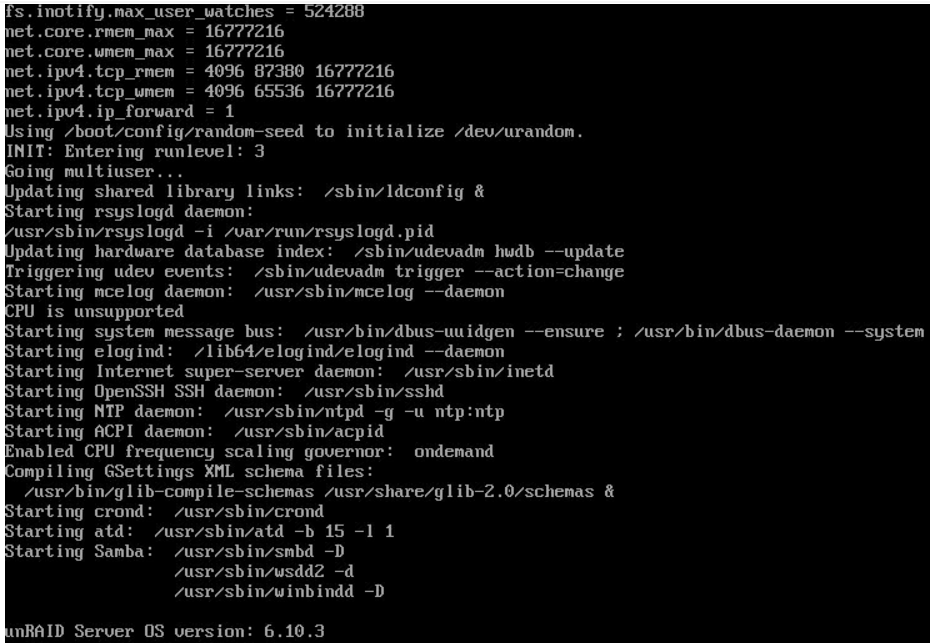
tl;dr New to unraid, a few questions. -Why used space on formatted drive? -Why parity sync even though drives are empty? -How do I passthru NVMe drive (with win10 already on it) to a Win10 VM? -CPU Unsupported? --- New to Unraid, testing out the trial to determine how I like it/if I want to run it long-term as my storage/VM server. Main draw is that I really...REALLY like the idea that I can mix drive sizes and still have parity. I buy storage as I see deals so I have a mixture of 2T, 10T, 16T, 20T drives thus zfs/TrueNAS or Scale are kinda out of the question. I wanted to get used to adding/removing drives, parity, syncing, setting up shares, etc. in a low pressure (dev) environment before moving to Production and purchasing a license. --- I have (in test) currently: -WD 20TB Parity -SD 16TB Drive -512 NVMe (intel) [not added to pool] Created the HDD array, formatted the 16TB drive (both are new from MFG) Q: 1) Why does it say I have 134GB of used space, 15.9TB free on the 16TB drive? 3) Both drives are empty, why is it doing a parity sync? XFS/XOR parity or something or another? I hate wasting a whole drive write without any data to write to it. Seems a huge waste. I'll only have to re-sync parity when I add more drives/copy files. 3) -How do I passthru NVMe drive (with win10 already on it) to a Win10 VM? My 512 Drive already has a bootable copy of Win10. Is it possible to create a VM and add it as a boot drive? It didn't seem possible from the GUI as that seemed more geared towards building a new VM from scratch. 4) I think this has to do with logging. But it says "CPU is unsupported" during boot logs. Should I be concerned? Model: Custom M/B: ASRockRack X570D4U-2L2T Version - BIOS: American Megatrends International, LLC. Version P1.40. Dated: 05/19/2021 BMS: 1.2 CPU: AMD Ryzen 9 3900X 12-Core @ 3800 MHz HVM: Enabled IOMMU: Enabled Cache: 768 KiB, 6 MB, 64 MB Memory: 64 GiB DDR4 Multi-bit ECC (max. installable capacity 128 GiB) Network: bond0: fault-tolerance (active-backup), mtu 1500 eth0: interface down eth1: 1000 Mbps, full duplex, mtu 1500 eth2: interface down eth3: interface down Kernel: Linux 5.15.46-Unraid x86_64 OpenSSL: 1.1.1o Uptime: ~3hrs