Beardiful42
Members
-
Joined
-
Last visited
Everything posted by Beardiful42
-
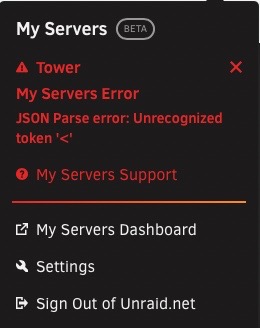
Ok third times a charm. Got this error. @Squid @ljm42. App tab is no longer working. domain.cfg c--------s.cfg d---------e.cfg v------e.cfg docker.cfg editor.cfg super.dat network-rules.cfg ident.cfg network.cfg go.txt disk.cfg vfio-pci.cfg SanDisk__Cruzer_Fit_03023313112921231516-0-0-20221009-2023 flash (sda).txt WD_Blue_SN570_1TB_22230Q801404-20221009-2023 docker_nvme2 (nvme2).txt CT1000BX500SSD1_2218E62CBC18-20221009-2023 cache_ssds3 (sde).txt WD_Blue_SN570_1TB_22230Q801434-20221009-2023 docker_nvme (nvme0).txt ST8000DM004-2CX188_ZR13D77Z-20221009-2023 disk1 (sdb).txt CT1000BX500SSD1_2218E62CBC1D-20221009-2023 cache_ssds2 (sdf).txt ST10000DM0004-1ZC101_ZA22WMAL-20221009-2023 parity (sdc).txt eui.e8238fa6bf530001001b448b4bee73af-20221009-2023 docker_nvme2 (nvme2).txt Samsung_SSD_970_EVO_500GB_S466NX0K949821Z-20221009-2023 vms_nvme (nvme1).txt Samsung_SSD_850_EVO_1TB_S2RENX0HC00055R-20221009-2023 cache_ssds (sdg).txt eui.0025385981b27361-20221009-2023 vms_nvme (nvme1).txt ST8000DM004-2CX188_ZR13DHX4-20221009-2023 disk2 (sdd).txt eui.e8238fa6bf530001001b448b4bee0412-20221009-2023 docker_nvme (nvme0).txt Windows 10.xml cmdline.txt btrfs-usage.txt unraid-api.txt plugins.txt motherboard.txt iommu_groups.txt ethtool.txt folders.txt lsmod.txt lsscsi.txt loads.txt memory.txt lspci.txt meminfo.txt lsusb.txt urls.txt top.txt ps.txt vars.txt lscpu.txt lsof.txt df.txt ifconfig.txt dhcplog.txt docker.txt syslog.txt appdata.cfg m---c.cfg domains.cfg isos.cfg l------e.cfg system.cfg m----------p.cfg shareDisks.txt unraid-6.11.1.txt
-
@Squid Ok I feel like I didn't get this right. Clicked on the above link but the servers plugin support in the drop down is greyed out. I can only select general and a few others.
-
@Squid Thank you I have done as you suggested.
-
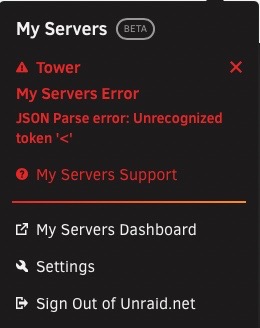
@Squid Thanks for some direction. Here is the diagnostic. @ljm42 6.11.1. Have this error and apps tab INOP. domain.cfg c--------s.cfg d---------e.cfg v------e.cfg docker.cfg editor.cfg super.dat network-rules.cfg ident.cfg network.cfg go.txt disk.cfg vfio-pci.cfg SanDisk__Cruzer_Fit_03023313112921231516-0-0-20221009-2023 flash (sda).txt WD_Blue_SN570_1TB_22230Q801404-20221009-2023 docker_nvme2 (nvme2).txt CT1000BX500SSD1_2218E62CBC18-20221009-2023 cache_ssds3 (sde).txt WD_Blue_SN570_1TB_22230Q801434-20221009-2023 docker_nvme (nvme0).txt ST8000DM004-2CX188_ZR13D77Z-20221009-2023 disk1 (sdb).txt CT1000BX500SSD1_2218E62CBC1D-20221009-2023 cache_ssds2 (sdf).txt ST10000DM0004-1ZC101_ZA22WMAL-20221009-2023 parity (sdc).txt eui.e8238fa6bf530001001b448b4bee73af-20221009-2023 docker_nvme2 (nvme2).txt Samsung_SSD_970_EVO_500GB_S466NX0K949821Z-20221009-2023 vms_nvme (nvme1).txt Samsung_SSD_850_EVO_1TB_S2RENX0HC00055R-20221009-2023 cache_ssds (sdg).txt eui.0025385981b27361-20221009-2023 vms_nvme (nvme1).txt ST8000DM004-2CX188_ZR13DHX4-20221009-2023 disk2 (sdd).txt eui.e8238fa6bf530001001b448b4bee0412-20221009-2023 docker_nvme (nvme0).txt Windows 10.xml cmdline.txt btrfs-usage.txt unraid-api.txt plugins.txt motherboard.txt iommu_groups.txt ethtool.txt folders.txt lsmod.txt lsscsi.txt loads.txt memory.txt lspci.txt meminfo.txt lsusb.txt urls.txt top.txt ps.txt vars.txt lscpu.txt lsof.txt df.txt ifconfig.txt dhcplog.txt docker.txt syslog.txt appdata.cfg m---c.cfg domains.cfg isos.cfg l------e.cfg system.cfg m----------p.cfg shareDisks.txt unraid-6.11.1.txt
-
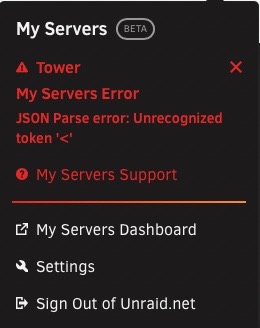
Hello, Super Unraid noob here. Been playing around trying to get things working good and I came across this error... Now the app tab doesn't work and I am stuck. Build is 6.11.1 I have the diagnostic downloaded but I wasn't sure if I needed to post the whole thing. Also hopefully this is in the correct place to post. My apologies if its not.