haabijaabi
Members
-
Joined
-
Last visited
-
Currently
Viewing Topic: SSH errors - Operation not permitted when attempting to ssh into another unraid server.
-
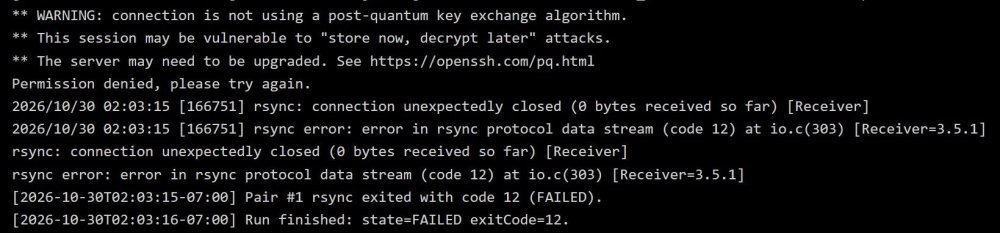
@fajkovic.sasa Thanks for looking into that. I was able to move past that. Next I ran into the error in the attached screenshot while trying to do a dry run. I suppose this is a OpenSSH version issue? Any way to work past this?
-
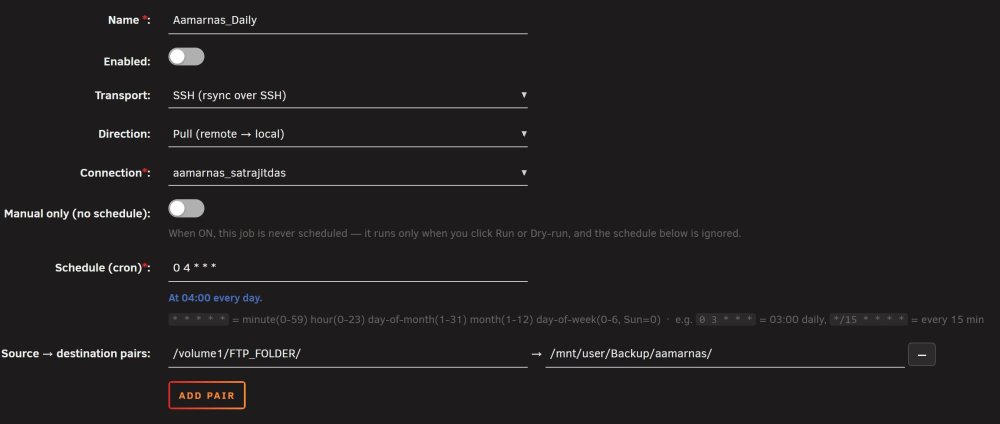
I am trying to set up a "pull" rsync job from a Synology NAS to Unraid. The source in Synology is of the form "/Volume<XXX>/<Share Name>/". In the job I am trying to set up the source/destination as shown in the screenshot. However, it looks like Unraid Rsync is expecting the source to be in the "/mnt/.../" form instead of the "/Volume<XXX>/<Share Name>/" form used by Synology. The error message I am getting is "Job "Aamarnas_Daily": Pair #1 destination (local) '/volume1/FTP_FOLDER/' must be a sub-directory of /mnt (for example /mnt/user/share/...) (HTTP 422)". Is there any way to work around this? Thanks.