





seanwalter
Members
-
Joined
-
Last visited
-
The easiest method is to set OPEN_REGISTRATIONS to True in the docker template and then register a new user via the KOReader app, which you can install on Linux or Android. Once a user is registered, you can log in from any other eReader app that can sync with a KOReader server. The KOReader UI isn't great in my opinion. I think you need to have a book open, which you can add via OPDS catalogs in the add books section. One a book is open, you can access the full app menu by tapping/clicking near the top of the window, and then you register users in the "tools" menu (icon is two tools crossed) under Progress Sync. There should also be a way to register via the API using a curl command directed to http://yourserver:8081/users/create and a password pre-hashed with md5, but I tried to add my wife this way to our server and somehow I ended up corrupting the entire database such that I couldn't log back in myself and had to delete the entire db.json file. So I won't try to advise on that method. Possibly my database was corrupted before I did any of that, but in any case if you can install KOReader somewhere and register users that way it's quick and painless once you've sorted your way through the KOReader app's UI.
-
I solved this. I had a note that console access is only available through container versions with “-debug” at the end of the docker hub tag. I think the latest such container repo is headscale/headscale:sha-171fd7a3-debug. I set that as my repository in the unraid template and console access is restored. Note you also need to be sure you specify Shell and not Bash as the Console shell command in the unraid template if you want console access from the unraid gui.
-
I am also having this issue. In addition docker exec at the unraid cli generates an error that the shell command is not in $path. This happens when I specify sh, /bin/sh and /bin/bash
-
I have also been having this problem since updating to 6.12. Was hoping 6.12.2 would finally resolve it. Diagnostics attached. For now I have this script in my /mnt/cache directory so that I can ssh into unraid and manually restart nginx (many thanks to someone who posted the main two command lines in another unraid forum, and some people at stackoverflow for the error-checking code...): #!/usr/bin/env bash pkill -9 nginx pkillexitstatus=$? if [ $pkillexitstatus -eq 0 ]; then echo "pkill exited normally with nginx killed" elif [ $pkillexitstatus -eq 1]; then echo "could not find nginx process to kill" elif [ $pkillexitstatus -eq 2]; then echo "syntax error in trying to kill nginx using \'pkill -9 nginx\'" elif [ $pkillexitstatus -eq 3]; then echo "fatal error using \'pkill -9 nginx\'" else echo UNEXPECTED fi /etc/rc.d/rc.nginx start nginxstatus=$? if [ $nginxstatus -eq 0 ]; then echo "nginx restarted normally with exit code " $nginxstatus else echo "nginx restart returned an abnormal exit code: " $nginxstatus fi home-raid-diagnostics-20230703-1316.zip
-
Just closing the loop on this for everyone... Sadly (?) this was user error. Some of my disks in fact have not been cooling to the restart temperature. I have changed the thresholds in the plugin settings and will report back if things are still not working. Many thanks to itimpi for reviewing my logs and letting me know this.
-
Thank you. I just sent you my diagnostics.
-
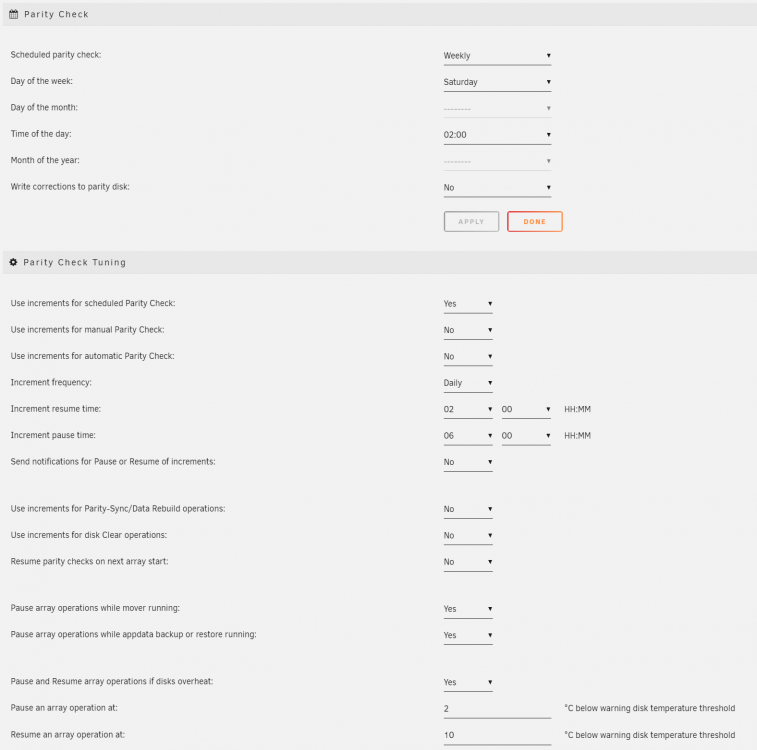
I am noticing unexpected behavior with this plugin recently. I am on version 2022.04.12. I use it to pause parity check when disks overheat (trust me, I've tried various cooling solutions...) Recently, I enabled "Use increments for scheduled parity check," with increments running between 2am and 6am daily and the scheduled check starting at 2am every Saturday. The behavior I get is that parity check starts at 2am on Saturday, runs until the disks overheat (15-20 min) and then permanently pauses. (I can manually resume, but it won't resume automatically) Attached are the current portion of the log file, the current .progress file, the current .progress.save file and a screen grab of my settings. I'll appreciate any help/advice on how I might get this to work as expected. Thanks! parity.check.tuning.log parity.check.tuning.progress parity.check.tuning.progress.save
-
Funny…After posting I went into docker hub to get the path to the prior version, and saw the latest update came through “4 minutes ago”. The update fixed it for me, too. Good times
-
I am having the same issue
-
@uberchuckie good news...updating my 2.0.2 container to 3.0_beta worked -- my data history is intact, I can connect via the web GUI using my user name and password, etc... It looks like others are having success as well, though to close the loop, I am using /mnt/cache/appdata for my observium config and other files. Thank you for sticking with us on this, and working through the issues!
-
I may have new news, but it's all a little weird... Because there was some discussion that these issues have to do with mariadb not updating within the docker container, on Friday I went ahead on a whim and ran an apt update and upgrade to all the packages from the observium:latest docker console. Several updates were pulled down -- not sure if that's normal for docker containers, as I generally don't get this far into it Following the updates, I started actually getting errors logged to my observium.err file per the reporting in the container log file. The error was: 2020-09-25 20:10:00 0 [ERROR] mysqld: File '/var/log/mysql/mariadb-bin.index' not found (Errcode: 13 "Permission denied") 2020-09-25 20:10:00 0 [ERROR] Aborting The file in question did exist. Permissions were 660. With permissions changed to 666 or 777 the error persisted, which seemed a little weird. The file in the log seems simply to reference another file in the same directory, mariadb-bin.000001, with the same 660 permissions. I also tried changing those permissions, but it didn't seem to help. I subsequently reverted back to 2.0.2. In writing this post now (~2 days later) I am seeing that in the 2.0.2 container, the files are owned by nobody:users, which is different from the owners that were showing up under the :latest container. In that container, the group was "adm" but I don't remember the user name. Next-level weirdness...I tried to repeat this entire process just now to get the user name again, but I could not reproduce the results -- after running the apt upgrades, things remained in the state where nothing was being logged to observium.err. Worse(?), the mariadb-bin files were not even being created in the container's /var/log/mysql directory. Finally, next-next-level weirdness, I decided I should create a second docker container to mess around with, using observium:latest. So basically I did a new install of the container, with a new container name, into a new appdata folder. When I had reverted back to 2.0.2 above, I had not deleted my apt upgraded :latest image file, so docker used that file to create the new container. And...this one works. Only problem is, all my data is in the 2.0.2 container. I can try to copy my 2.0.2 databases over, but I'd love any recommendations on whether this is a reasonable thing to do, and/or what exactly needs to be copied, and/or how to force a database conversion if one is necessary. With both containers now run-able, I am also happy to run other tests if helpful. Side note, my unRAID Docker page reports that the version is "not available" when I pull the container from uberchuckie/observium or uberchuckie/observium:latest. This is not an issue with uberchuckie/observium:2.0.2. I am slightly nervous there's an updated source on dockerhub and I missed the memo...
-
All, I encountered this problem for the first time today across most of my PCs, and the fixes in this thread did not work. What did work was adding a line to the [global] section of my unRAID smb extra configuration settings: client min protocol = SMB2 To be clear for those who are less versed in smb settings, this is in addition to a line I already had in there for the server, which is simply min protocol = SMB2. Note, I assume this change will break any SMB1 clients trying to connect, but hopefully those are increasingly few and far between. That said, I have not turned off the SMB1 client in my Windows features, though I assume it will no longer be necessary for accessing unRAID. I might test that later this week and report back with an update.
-
@uberchuckie, thanks for all your efforts to help troubleshoot this. Since it seems @Fiala06 and I are having similar issues, I went ahead and ran the mysqld_safe command in my console as well. I get the same result: root@observium:/# /usr/bin/mysqld_safe --skip-syslog --datadir='/config/databases' 200912 16:06:02 mysqld_safe Logging to '/config/databases/observium.err'. 200912 16:06:02 mysqld_safe Starting mariadbd daemon with databases from /config/databases However, if I run the same command using the 2.0.2 docker image (which still works for me), I get a different result: root@observium:/# /usr/bin/mysqld_safe --skip-syslog --datadir='/config/databases' 200912 16:09:58 mysqld_safe Logging to '/config/databases/observium.err'. 200912 16:09:58 mysqld_safe A mysqld process already exists Hopefully that helps a little.
-
So...not sure if this helps or not, but at present the latest docker in the main branch and the docker in the dev branch do not write to my observium.err file. The 2.0.2 version does. Here is the log from my last start/stop of 2.0.2, in case helpful: 2020-08-14 15:50:23 0 [Note] InnoDB: Using Linux native AIO 2020-08-14 15:50:23 0 [Note] InnoDB: Mutexes and rw_locks use GCC atomic builtins 2020-08-14 15:50:23 0 [Note] InnoDB: Uses event mutexes 2020-08-14 15:50:23 0 [Note] InnoDB: Compressed tables use zlib 1.2.11 2020-08-14 15:50:23 0 [Note] InnoDB: Number of pools: 1 2020-08-14 15:50:23 0 [Note] InnoDB: Using SSE2 crc32 instructions 2020-08-14 15:50:23 0 [Note] mysqld: O_TMPFILE is not supported on /tmp (disabling future attempts) 2020-08-14 15:50:23 0 [Note] InnoDB: Initializing buffer pool, total size = 256M, instances = 1, chunk size = 128M 2020-08-14 15:50:23 0 [Note] InnoDB: Completed initialization of buffer pool 2020-08-14 15:50:23 0 [Note] InnoDB: If the mysqld execution user is authorized, page cleaner thread priority can be changed. See th e man page of setpriority(). 2020-08-14 15:50:23 0 [Note] InnoDB: 128 out of 128 rollback segments are active. 2020-08-14 15:50:23 0 [Note] InnoDB: Creating shared tablespace for temporary tables 2020-08-14 15:50:23 0 [Note] InnoDB: Setting file './ibtmp1' size to 12 MB. Physically writing the file full; Please wait ... 2020-08-14 15:50:23 0 [Note] InnoDB: File './ibtmp1' size is now 12 MB. 2020-08-14 15:50:23 0 [Note] InnoDB: 10.4.12 started; log sequence number 25563225979; transaction id 55235761 2020-08-14 15:50:23 0 [Note] InnoDB: Loading buffer pool(s) from /config/databases/ib_buffer_pool 2020-08-14 15:50:23 0 [Note] Plugin 'FEEDBACK' is disabled. 2020-08-14 15:50:23 0 [Note] Server socket created on IP: '127.0.0.1'. 2020-08-14 15:50:23 0 [Note] Reading of all Master_info entries succeeded 2020-08-14 15:50:23 0 [Note] Added new Master_info '' to hash table 2020-08-14 15:50:23 0 [Note] /usr/sbin/mysqld: ready for connections. Version: '10.4.12-MariaDB-1:10.4.12+maria~bionic-log' socket: '/var/run/mysqld/mysqld.sock' port: 3306 mariadb.org binary distrib ution 2020-08-14 15:50:24 0 [Note] InnoDB: Buffer pool(s) load completed at 200814 15:50:24 2020-08-14 15:51:50 0 [Note] /usr/sbin/mysqld (initiated by: unknown): Normal shutdown 2020-08-14 15:51:50 0 [Note] Event Scheduler: Purging the queue. 0 events 2020-08-14 15:51:50 0 [Note] InnoDB: FTS optimize thread exiting. 2020-08-14 15:51:50 0 [Note] InnoDB: Starting shutdown... 2020-08-14 15:51:50 0 [Note] InnoDB: Dumping buffer pool(s) to /config/databases/ib_buffer_pool 2020-08-14 15:51:50 0 [Note] InnoDB: Buffer pool(s) dump completed at 200814 15:51:50 2020-08-14 15:51:51 0 [Note] InnoDB: Shutdown completed; log sequence number 25563233366; transaction id 55235778 2020-08-14 15:51:51 0 [Note] InnoDB: Removed temporary tablespace data file: "ibtmp1" 2020-08-14 15:51:51 0 [Note] /usr/sbin/mysqld: Shutdown complete
-
Thanks, @uberchuckie. My permissions on the files of interest looked good, as far as I could tell, though I went ahead and installed the dev branch to see if changing all permissions in the databases folder would help. With the dev branch installed, I get basically the same errors in the log, with an additional entry each time for Fixing file permissions. Again, reverting to 2.0.2 brings everything back to normal. I'm happy to try deleting the database itself, though I'm not exactly sure which files to delete and which to preserve. I had tried deleting a few things before my original post, but that led 2.0.2 to break as well. Thanks! Outputs of ls -l before running dev branch: drwxr-xr-x 1 nobody users 450 Aug 14 02:26 databases/ -rwxr-xr-x 1 nobody users 73728 Aug 14 02:00 aria_log.00000001* -rwxr-xr-x 1 nobody users 52 Aug 14 02:00 aria_log_control* -rw-rw---- 1 nobody users 30661 Apr 18 12:24 d5f1933a656f.err -rw-rw---- 1 nobody users 26061 Aug 14 02:00 ib_buffer_pool -rwxr-xr-x 1 nobody users 50331648 Aug 14 11:25 ib_logfile0* -rwxr-xr-x 1 nobody users 50331648 Aug 14 06:55 ib_logfile1* -rwxr-xr-x 1 nobody users 79691776 Aug 14 11:25 ibdata1* Docker log: *** Running /etc/my_init.d/10_syslog-ng.init... Aug 14 11:28:19 observium syslog-ng[12]: syslog-ng starting up; version='3.13.2' *** Running /etc/my_init.d/firstrun.sh... Using existing PHP database config file. warning: commands will be executed using /bin/sh job 1 at Fri Aug 14 11:29:00 2020 warning: commands will be executed using /bin/sh job 2 at Fri Aug 14 11:29:00 2020 *** Booting runit daemon... *** Runit started as PID 33 Database exists. Fixing file permissions. Aug 14 11:28:21 observium cron[38]: (CRON) INFO (pidfile fd = 3) Aug 14 11:28:21 observium cron[38]: (CRON) INFO (Running @reboot jobs) Starting MariaDB... 200814 11:28:24 mysqld_safe Logging to '/config/databases/observium.err'. 200814 11:28:24 mysqld_safe Starting mariadbd daemon with databases from /config/databases Database exists. Fixing file permissions. Database exists. Fixing file permissions. Starting MariaDB... ...


