




Skip to content
View in the app

A better way to browse. Learn more.

Unraid

A full-screen app on your home screen with push notifications, badges and more.

To install this app on iOS and iPadOS
  1. Tap the Share icon in Safari
  2. Scroll the menu and tap Add to Home Screen.
  3. Tap Add in the top-right corner.
To install this app on Android
  1. Tap the 3-dot menu (⋮) in the top-right corner of the browser.
  2. Tap Add to Home screen or Install app.
  3. Confirm by tapping Install.

[6.11.5] Docker "Network Type" selection in the GUI omits custom bridges beyond br0

  • Closed

To replicate the bug, if you have two bridges in your unRAID the Docker Network Type dropdown will only offer up the first one like so:
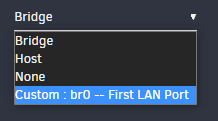
 

8dL4WV9uh.png


When instead it should offer all the bridges. In my system I have both br0 and br1. I'm able to select either for Virtual Machines but not with Docker. This is I believe how it should look:
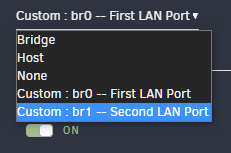
 

tWMCByt9d.png


Thank you.

Account

Navigation

Search

Search

Configure browser push notifications

Chrome (Android)
  1. Tap the lock icon next to the address bar.
  2. Tap Permissions → Notifications.
  3. Adjust your preference.
Chrome (Desktop)
  1. Click the padlock icon in the address bar.
  2. Select Site settings.
  3. Find Notifications and adjust your preference.