anongum
Members
-
Joined
-
Last visited
Everything posted by anongum
-
Same for me. Php error Inviato dal mio KB2003 utilizzando Tapatalk
-
I've been using let'se encrypt/swag for years now, so I know the bare steps to succesfully set up a reverse proxy to access the webgui of my docker images from remote (I have emby and nextcloud behind reverse proxy, they work as a charm). Recently I installed Komga, which is similar to plex but for books and comics. Set up the reverse proxy, worked perfectly. Ten days later, I get 502. Tried to update unraid OS, downgrade the container, uninstall it, clean the appdata folder and reinstall it, tried another url on duckdns - nothing works. But it worked a week ago, and I literally didn't touch the NAS in the meanwhile. Can anyone help me find out what's the issue? Docker command: komga.subdomain.conf file content, with redacted subdomain The error.log file of swag says this every time I try to access the webgui of the Komga container by remote These same exact steps made this container work not even 2 weeks ago, and now it doesn't. EDIT: It now works, I changed the port back to 8080. It's quite annoying that the container doesn't work unless it's on this port, but it's a problem from Komga side.
-
As many other, the expiration of the root certificate made my TVs swag reverse proxy of plex stop working. Is there something I can do to fix this without resorting to removing the reverseproxy altogether? On some emby threads https://emby.media/community/index.php?/topic/102144-several-lg-tvs-cannot-connect-to-server/page/2/ they suggested to switch to zerossl: I recreated my certs last week, but still no luck, and I don't know honestly if zerossl is built into letsencrypt or not, this is way beyond my tech competence. Can someone help me?
-
I have a page under a reverse proxy. Can I set credentials to access this page, if so how do I do it?
-
Thank you I'll look into this! Though, there's the problem of the license too.
-
I didn't create a backup of the flash drive. As I said, I can't create a backup of the flash drive as of now since it is unaccessible/unreadable. The unability ti create a backup led me to create this thread, since apparently I need to do stuff not covered by the documentation.
-
apps, vm and docker tabs are missing or not working. under the page it says Warning: parse_ini_file(/boot/config/docker.cfg): failed to open stream: No such file or directory in /usr/local/emhttp/plugins/dynamix.docker.manager/include/DockerClient.php on line 50 Warning: array_replace_recursive(): Expected parameter 2 to be an array, bool given in /usr/local/emhttp/plugins/dynamix.docker.manager/include/DockerClient.php on line 50 Warning: parse_ini_file(/boot/config/domain.cfg): failed to open stream: No such file or directory in /usr/local/emhttp/plugins/dynamix.vm.manager/include/libvirt_helpers.php on line 478 Nevertheless, my plex docker keeps working.
-
As the title suggests, my usb stick, whose I don't have a backup of, died while unraid was live and online (and still is). When clicking the registration (I have a plus license) all I see is: Error accessing your physical USB Flash boot device There is a physical problem accessing your USB Flash boot device. Please Contact Support. Flash GUID: Error code: ENOFLASH3 What can I do to ensure I don't incur in any data loss? I'm a noob, so a step to step, fool-proof guide will be very appreciated.
-
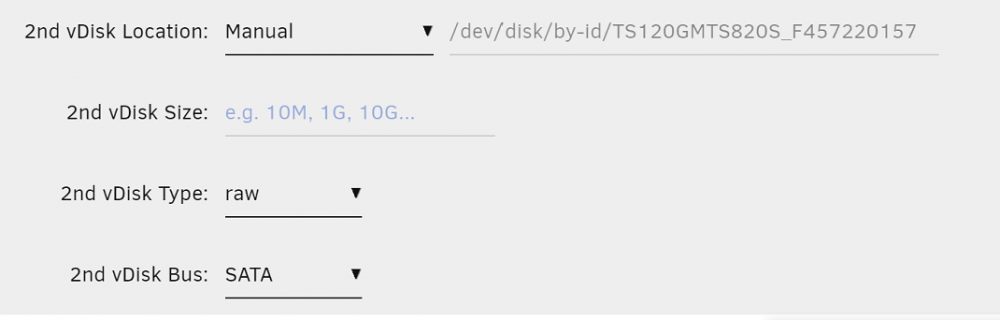
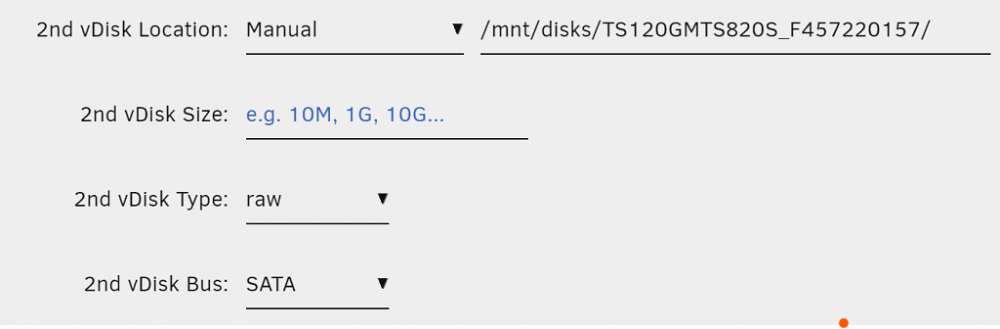
As the title suggests, I'm having a hard time figuring out how to make my 128GB SSD appear as a stand alone drive on the VM (whose vdisk is on the array). I've tried to add a second vdisk using these settings: The drive is mounted with unassigned devices and pass through enabled. When I click "update" on the VM page, it just gets stuck and I have no option but to refresh the page and undo the change. I've tried these settings too And I've tried the directory of the first screenshot without unassigned device too. In every case I can't update the vm page and it gets stuck. I'm sure I'm doing something wrong, I've tried following many of the threads already posted on this topic but all of them manage to do the trick doing what I tried to do. They also have previous versions of unraid which don't have the vdisk size and vdisk type options. My main objective is to passthrough the ssd completely into the vm, but I wouldn't mind finding a way (cache pool? In that case, how should I do that?) to just have the drive accessible without it being in the array.
-
Recently Filestash has been added to the community applications https://github.com/mickael-kerjean/filestash Since I'm not fiddly enough to figure out how to make it work, and there is no official docker thread, does anyone know if this is an appropriate tool to make unraid shares folders searchable and editable from remote?
-
Is there a way to make your unraid share appear in nextcloud as local storage and not external storage? Out of the box nextcloud is so buggy and slow with external storage that's honestly unusable. Deleting a folder or file, uploading a large file, result in several errors and the GUI stopping working, while it doesn't happen with files and folders in local storage. My nextcloud instance is clean, installed with no modification except some configs to make the reverse proxy work.
-
Ok, i reinstalled everything and looks like letsencrypt works fine now, I get the "website currently being setup under this address" that confirms me that the reverseproxy is working (I guess), and managed to make it work for nextcloud. Now I'm trying to install plex. The plex conf file says: # if plex is running in bridge mode and the container is named "plex", the below config should work as is # if not, replace the line "set $upstream_app plex;" with "set $upstream_app <containername>;" # or "set $upstream_app <HOSTIP>;" for host mode, HOSTIP being the IP address of plex # in plex server settings, under network, fill in "Custom server access URLs" with your domain (ie. "https://plex.yourdomain.url:443") server { listen 443 ssl; listen [::]:443 ssl; server_name plex.*; include /config/nginx/ssl.conf; client_max_body_size 0; proxy_redirect off; proxy_buffering off; # enable for ldap auth, fill in ldap details in ldap.conf #include /config/nginx/ldap.conf; location / { # enable the next two lines for http auth #auth_basic "Restricted"; #auth_basic_user_file /config/nginx/.htpasswd; # enable the next two lines for ldap auth #auth_request /auth; #error_page 401 =200 /login; include /config/nginx/proxy.conf; resolver 127.0.0.11 valid=30s; set $upstream_app plex; set $upstream_port 32400; set $upstream_proto http; proxy_pass $upstream_proto://$upstream_app:$upstream_port; proxy_set_header Upgrade $http_upgrade; proxy_set_header Connection "upgrade"; proxy_set_header X-Plex-Client-Identifier $http_x_plex_client_identifier; proxy_set_header X-Plex-Device $http_x_plex_device; proxy_set_header X-Plex-Device-Name $http_x_plex_device_name; proxy_set_header X-Plex-Platform $http_x_plex_platform; proxy_set_header X-Plex-Platform-Version $http_x_plex_platform_version; proxy_set_header X-Plex-Product $http_x_plex_product; proxy_set_header X-Plex-Token $http_x_plex_token; proxy_set_header X-Plex-Version $http_x_plex_version; proxy_set_header X-Plex-Nocache $http_x_plex_nocache; proxy_set_header X-Plex-Provides $http_x_plex_provides; proxy_set_header X-Plex-Device-Vendor $http_x_plex_device_vendor; proxy_set_header X-Plex-Model $http_x_plex_model; } } Now, considering that I'm installing PlexMediaServer form the plexinc/pms-docker repo, what should be my move? Do I simply name the container "plex" when adding it from the community apps plugin, and then just edit the server_name <plexsubdomain>.*? Or is better to try the second option, leaving the network to host? In that case the <HOSTIP> is the regular localurl:32400 of the webgui, or is some other ip?
-
Ok, didn't about the uppercase thing, thanks. Regarding url:port, I tried that before setting up letsencrypt, it worked before, it doesn't now. I'm going to read thoroughly the guide and try again from scratch - to completely delete any previous installation deleting appdata container folders and the docker image is sufficient, or is there more I need to delete to start clean? Obviously I delete everything in the shares dedicated to some containers, like nextcloud or Plex.
-
Today something weird happened to letsencrypt. I had a clean installation of unraid, on docker just Plex, Nextcloud, Mariadb, duckdns and letsencrypt. Everything perfectly worked until this afternoon, when things just stopped working. Nextcloud and plex would kept working when trying to access them locally, but would timeout whenever trying to use the reverse proxy. So, since I'm far from being an expert user, and one time I already broke my docker containers by messing too much, I deleted my docker image, all my folders in appdata relative to docker containers, and just installed plex and letsencrypt, to see if the problem went away. But it still doesn't work - tried to change domain, issue new certificates - no luck. Then I started thinking. For the sake of explaining I'll my plex domain plex.duckdns.org. I issued one certificate for this subdomain, but never actually used. Yet, for the sake of testing, I tried to access remotely my machine by typing plex.duckdns.org:32400, which is the port used by plex for its webgui, and it worked. I could access plex remotely just fine. Then I went, created a conf file in letsencrypt, which I'm posting: # make sure that your dns has a cname set for plex # if plex is running in bridge mode and the container is named "plex", the below config should work as is # if not, replace the line "set $upstream_app plex;" with "set $upstream_app <containername>;" # or "set $upstream_app <HOSTIP>;" for host mode, HOSTIP being the IP address of plex # in plex server settings, under network, fill in "Custom server access URLs" with your domain (ie. "https://plex.yourdomain.url:443") server { listen 443 ssl; listen [::]:443 ssl; server_name plex.*; include /config/nginx/ssl.conf; client_max_body_size 0; proxy_redirect off; proxy_buffering off; # enable for ldap auth, fill in ldap details in ldap.conf #include /config/nginx/ldap.conf; location / { # enable the next two lines for http auth #auth_basic "Restricted"; #auth_basic_user_file /config/nginx/.htpasswd; # enable the next two lines for ldap auth #auth_request /auth; #error_page 401 =200 /login; include /config/nginx/proxy.conf; resolver 127.0.0.11 valid=30s; set $upstream_app PlexMediaServer; set $upstream_port 32400; set $upstream_proto http; proxy_pass $upstream_proto://$upstream_app:$upstream_port; proxy_set_header Upgrade $http_upgrade; proxy_set_header Connection "upgrade"; proxy_set_header X-Plex-Client-Identifier $http_x_plex_client_identifier; proxy_set_header X-Plex-Device $http_x_plex_device; proxy_set_header X-Plex-Device-Name $http_x_plex_device_name; proxy_set_header X-Plex-Platform $http_x_plex_platform; proxy_set_header X-Plex-Platform-Version $http_x_plex_platform_version; proxy_set_header X-Plex-Product $http_x_plex_product; proxy_set_header X-Plex-Token $http_x_plex_token; proxy_set_header X-Plex-Version $http_x_plex_version; proxy_set_header X-Plex-Nocache $http_x_plex_nocache; proxy_set_header X-Plex-Provides $http_x_plex_provides; proxy_set_header X-Plex-Device-Vendor $http_x_plex_device_vendor; proxy_set_header X-Plex-Model $http_x_plex_model; } } Changed the name from plex to the docker container name, so PlexMediaServer, obviously changed plex.* to the actual subdomain. And it worked! I shared the link with my friend, so that he could access my plex webgui remotely. Everything was fine, but tonight everything is "time out" and I can't wrap my head around this. The port forwarding is working fine. The certs are issued without issues, and the letsencrypt log looks normal, the server is up (Server ready, as end message of the log). Before tonight, when trying to access one of the domains for which I issued a certificate I would get a white and simple html page saying "Welcome to our server. The website is currently being setup under this address. For help and support, please contact: [email protected]", but now, no matter the certs I issued, everything would just time out. Letsencrypt is in a custom "proxynet" network (yes, I too followed, or better bought unraid thanks to the spaceinvaderone tutorials) and the command is the same of when the reverse proxy worked. Since the port forwarding is fine, the plex container itself is fine, the problem is either duckdns or letsencrypt, tertium non datur. What can I do to see what is the problem? I tried a minimal troubleshooting, but I'm not an expert user, and already disheartened at how could this even happen without touching the nas or any settings. Please, help me.
-
Man, that's depressing. I hope someone here helps us out on this
-
So I setup nextcloud, let's encrypt and mariadb and I can access it remotely, but there are a few problems that seem to be common to many user: 1. The upload speed is capped in both local and remote upload, to 10mb/s. 2. When uploading large files (like a 16gb video file) the upload fails and the webgui becomes buggy or times out, and the docker.img becomes bloated (for this reason I set the docker image to be 200gb) 3. When downloading large files (test on a 4gb file) remotely from a stable connection it fails midway through. What are settings that I can modify to make nextcloud actually usable for large files?
-
I tried a reboot and it didn't fix the issue. I looked into a few logs (the one in the main nextcloud share) but couldn'tnotice anything wrong with it. The webgui of unraid isn't exposed to the web, just the nextcloud one Edit; I updated nextcloud in hope of a fix, but no luck. Webgui still not accessible.
-
I'm using nextcloud with a duckdns reverse proxy to access it remotely. I used the webdav to integrate the folder tree into explorer (raidrive) and it worked, somehow (couldn't move a 16gb file though). Except from that everything worked normally, but from today the webui is unreachable and I can't access the server from webdav too. What could have happened? I didn't edit or delete any conf file, and it just stopped working, even if let's encrypt, duckdns and mariadb are working fine. What can I try to troubleshoot from command line?
-
I recently installed different apps for the efull text search (all of those available actually) and basically immediately the webui stopped working (error 500 internal server) - so basically, is there a way to remove or disable the app without accessing the webui? I tried this cd /config/www/nextcloud/ sudo -u www-data php occ app:disable NAME_OF_APP from the shell in the docker tab from the unraid webui, but it gives me this error sudo: unknown user: www-data sudo: unable to initialize policy plugin what can I do?
-
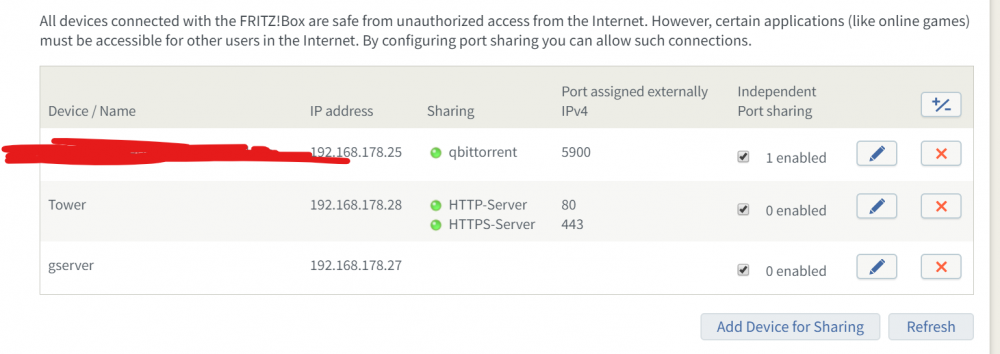
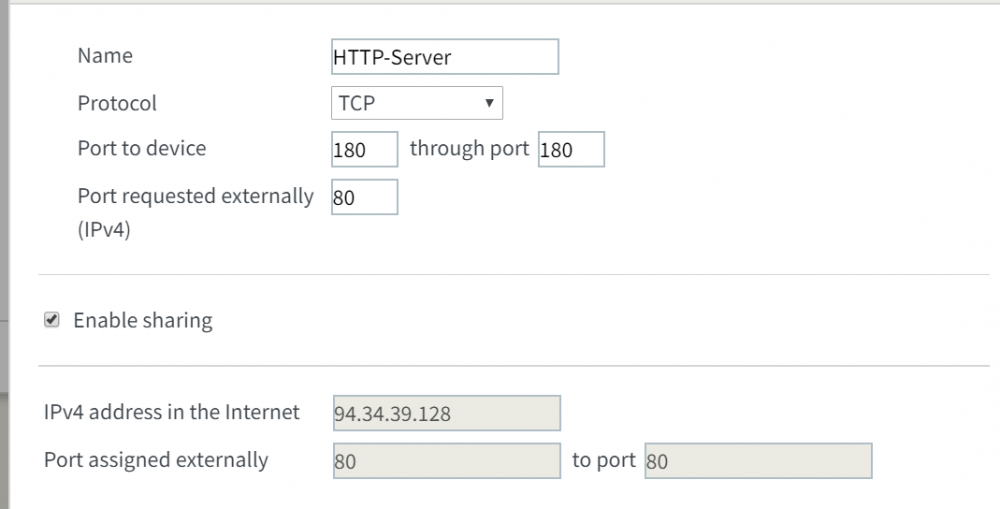
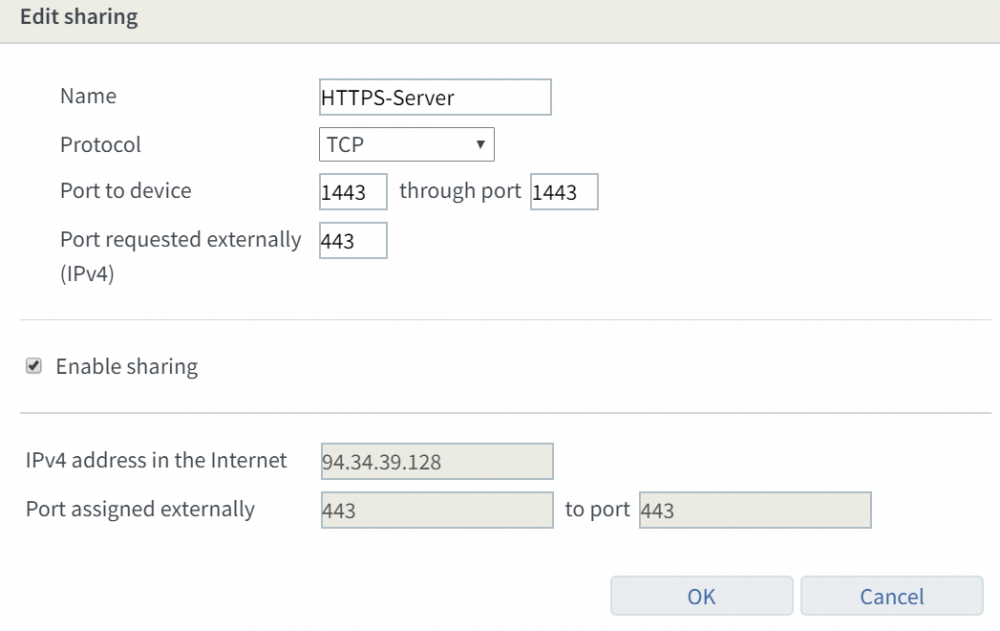
I changed router. I'm using a fritzbox 5790 now, the ports are open but I can't get past this error. ERROR: Cert does not exist! Please see the validation error above. The issue may be due to incorrect dns or port forwarding settings. Please fix your settings and recreate the container Considering the screen I already provided in the previous posts too, what could the problem be?
-
Yeah my bad, I omitted that part but the error comes literally just after the last line of the log. This is the docker run command: root@localhost:# /usr/local/emhttp/plugins/dynamix.docker.manager/scripts/docker run -d --name='letsencrypt' --net='proxynet' --log-opt max-size='50m' --log-opt max-file='1' --privileged=true -e TZ="Europe/Berlin" -e HOST_OS="Unraid" -e 'EMAIL'='***@gmail.com' -e 'URL'='duckdns.org ' -e 'SUBDOMAINS'='xxx,yyy,zzz' -e 'ONLY_SUBDOMAINS'='true' -e 'DHLEVEL'='2048' -e 'VALIDATION'='http' -e 'DNSPLUGIN'='' -e 'PUID'='99' -e 'PGID'='100' -p '180:80/tcp' -p '1443:443/tcp' -v '/mnt/user/appdata/letsencrypt':'/config':'rw' 'linuxserver/letsencrypt' 70ac0257d8a22cfa4321672616cf52ace9bd6809870b721300e1e9dfe5915893 The command finished successfully! I think the problem lies in my router. I'm gonna buy another one (fritzbox 5790) and test if the portforwarding works better.
-
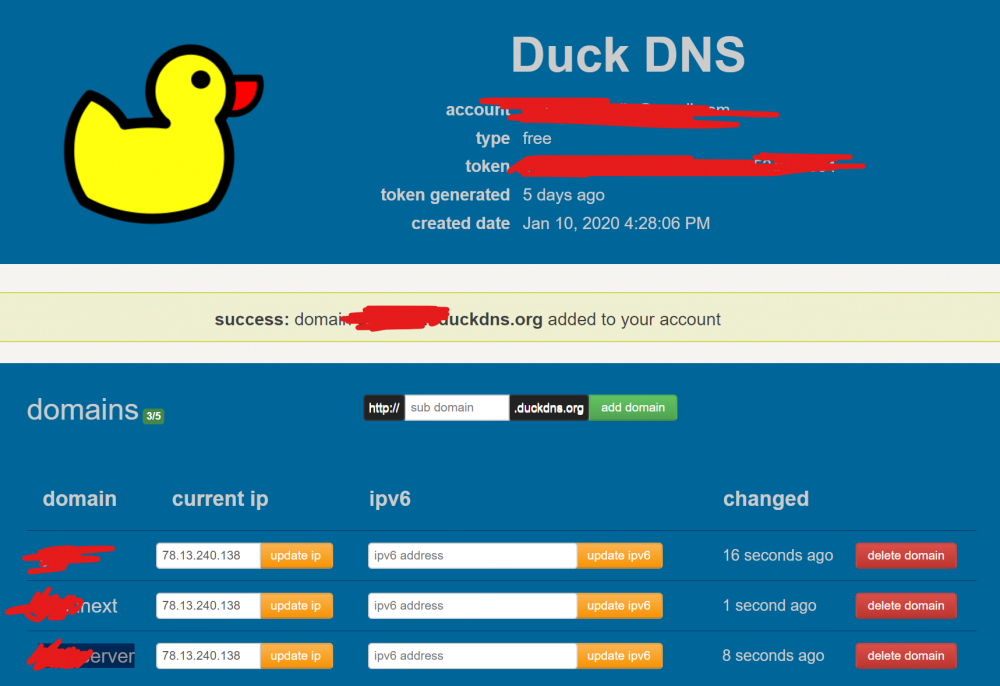
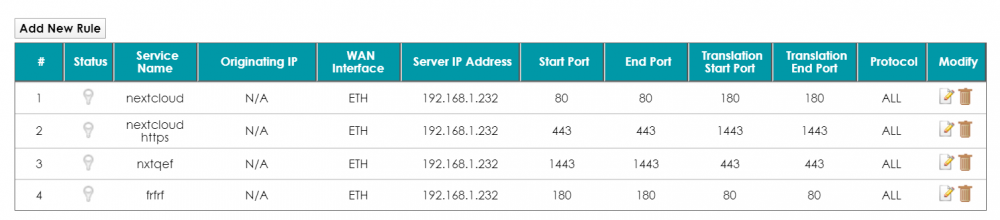
I'm having trouble setting up letsencrypt. Like many people here I've learned about this in the spaceinvaderone video about nextcloud. The error is ERROR: Cert does not exist! Please see the validation error above. The issue may be due to incorrect dns or port forwarding settings. Please fix your settings and recreate the container The whole log is User uid: 99 User gid: 100 ------------------------------------- [cont-init.d] 10-adduser: exited 0. [cont-init.d] 20-config: executing... [cont-init.d] 20-config: exited 0. [cont-init.d] 30-keygen: executing... using keys found in /config/keys [cont-init.d] 30-keygen: exited 0. [cont-init.d] 50-config: executing... Variables set: PUID=99 PGID=100 TZ=Europe/Berlin URL=duckdns.org SUBDOMAINS=xxx,yyy,zzz EXTRA_DOMAINS= ONLY_SUBDOMAINS=true DHLEVEL=2048 VALIDATION=http DNSPLUGIN= EMAIL=***@gmail.com STAGING= 2048 bit DH parameters present SUBDOMAINS entered, processing SUBDOMAINS entered, processing Only subdomains, no URL in cert Sub-domains processed are: -d xxx.duckdns.org -d zzz.duckdns.org -d yyy.duckdns.org E-mail address entered: ***@gmail.com http validation is selected Generating new certificate Saving debug log to /var/log/letsencrypt/letsencrypt.log Plugins selected: Authenticator standalone, Installer None Renewing an existing certificate IMPORTANT NOTES: - Congratulations! Your certificate and chain have been saved at: /etc/letsencrypt/live/zzz.duckdns.org/fullchain.pem Your key file has been saved at: /etc/letsencrypt/live/zzz.duckdns.org/privkey.pem Your cert will expire on 2020-04-14. To obtain a new or tweaked version of this certificate in the future, simply run certbot again. To non-interactively renew *all* of your certificates, run "certbot renew" - If you like Certbot, please consider supporting our work by: Donating to ISRG / Let's Encrypt: https://letsencrypt.org/donate Donating to EFF: https://eff.org/donate-le Now, the dns should be configured correctly yet when trying to access it from remote it doesn't load anything, it doesn't matter if the ports are open or closed. I also have a dyndns account, configured in the settings of the router (a crappy zyxel) - from there when portforwarding I can also access the webui from remote, but for obvious reasons I don't want that, so I'm using duckdns. I don't know if this is the problem. This is the portforwarding page on my router. As you can see, as the noob I am, I wasn't sure if I needed to open the internal (translation ports) or external port (start-end ports), so I alternatively tried both configuration. Obviously I got the same results for both attempts. I also created a duckdns container as specified in the video (which is this one, minute 10 starts to talk about the portforwarding) I honestly don't know how to deal with this, so I hope there's someone willing to suggest me some troubleshooting techniques.
-
Hi, I'm quite new to unraid so this might sound like a real noob question. I installed the docker image, and when trying to add my first library I found out that I can't navigate to the files and folder contained in my main share. How can I solve this? Do I need to give plex access to the share in some way which is unknown to me? Any help is really appreciated, thanks. I'm